ClassMind is an AI teaching assistant for Grade 7 Mathematics that plugs directly into Slack instead of requiring a full-stack web app -- teachers can pull exam summaries, analyze individual students, and generate variant practice questions without leaving their existing workflow, while students ask questions in plain language and get relevant learning materials back instantly, with any report or practice set exportable to Google Docs in a single prompt. Built on Elastic Agent Builder with custom ES|QL tools, semantic search, and MCP-connected Google Docs, all guided by custom agent instructions. See Agent Capabilities or jump to the Demo Use Cases.

The system spans three environments:
- Elastic Cloud Serverless -- Hosts the Kibana Agent Builder UI, the ClassMind Agent, and Elasticsearch indices.
- Self-Hosted -- A Python Slack bot (
slack_bot/) that bridges Slack messages to the agent via the Kibana REST API, and a Google Docs MCP server (a-bonus/google-docs-mcp) that the agent uses to create and edit documents. - Slack -- Users interact with the bot through @mentions in channels or direct messages, both delivered over Socket Mode.
Classmind/
├── agent_builder/
│   ├── agent_instruction.md   # Agent behavior rules and output formats
│   ├── agent_tools.md         # Tool definitions (ES|QL, MCP, builtins)
│   ├── schema.md              # Elasticsearch index schemas
│   └── data_generator/
│       ├── gen_1_students.py   # Generate student records
│       ├── gen_2_questions.py  # Generate exam questions
│       ├── gen_3_materials.py  # Generate learning materials
│       ├── gen_4_attempts.py   # Generate student attempt records
│       ├── gen_5_curriculum.py # Generate curriculum entries
│       ├── upload_bulk.py      # Create indices and bulk upload NDJSON
│       ├── students.ndjson
│       ├── questions.ndjson
│       ├── materials.ndjson
│       ├── attempts.ndjson
│       └── curriculum.ndjson
├── slack_bot/
│   ├── bot.py                 # Slack event handlers (mentions + DMs)
│   ├── elastic_client.py      # HTTP client for Agent Builder API
│   ├── slack_setup.md         # Slack app setup guide
│   └── elastic_setup.md       # Elastic credential setup guide
├── requirements.txt
└── .env                       # Credentials (not committed)
All data lives in five Elasticsearch indices. The skill field is the common key that connects them.
| Index | Purpose |
|---|---|
students |
Student roster and class assignment |
questions |
Exam questions with correct answers, skill tags, and difficulty |
attempts |
Per-student responses to each question, with correctness and time spent |
materials |
Learning resources (videos, articles) linked to a skill, used for recommendations |
curriculum |
Skill scope, semester/chapter placement, and full topic descriptions |
See agent_builder/schema.md for full field-level definitions.
Elastic Agent Builder provides a built-in agentic reasoning architecture that orchestrates tool calls to handle complex, multi-step queries. Users can fully customize the agent's behavior through custom instructions (defined in agent_builder/agent_instruction.md) -- controlling response format, task workflows, output structure, and when each tool should be invoked. The ClassMind agent has access to three categories of tools (full reference: agent_builder/agent_tools.md):
- Built-in platform tools -- General-purpose Elasticsearch tools managed by Elastic, including full-text search, index exploration, ES|QL generation and execution, and product documentation lookup.
- Custom ES|QL tools -- Purpose-built analytical queries tailored to the ClassMind data model: exam score averages, score distributions, high error-rate questions, student rankings, per-skill accuracy breakdowns, and performance trends across exams.
- MCP tools (Google Docs) -- Connected via the a-bonus/google-docs-mcp server, enabling the agent to create, read, and write Google Docs directly from a conversation.
Teachers and students interact with the agent directly inside Slack -- via @mentions in a channel or direct messages -- without opening a separate interface. Key benefits:
- Single UI -- No need to open Kibana, run a query, and copy-paste results. The full analysis happens inside the conversation.
- Shared channel context -- Exam summaries or skill analyses posted in a channel are visible to the whole class, so repeated questions get answered once and remain accessible.
- Permission gating -- Different Slack bots can be configured with different API keys and agent IDs. Teachers get full access to individual student data; students can query high-level class statistics but are restricted from accessing other students' private records.
After any analysis -- Teachers can use this directly as an assignment or exam paper without any additional formatting work. Students can also request variant or similar questions based on their weak skills and receive a personal practice sheet exported to Google Docs.
The questions, materials, and curriculum indices use Elasticsearch's semantic_text field type. This allows the agent to combine retrieval-augmented generation (RAG) with the agentic reasoning flow: a student can describe a concept they are struggling with in natural language, and the agent will semantically match it to relevant learning materials and curriculum context -- going beyond keyword matching to understand intent.
A teacher notices that James Martinez has been struggling and wants to understand exactly where things went wrong. Instead of digging through spreadsheets, she opens the Kibana Agent Builder UI and asks the agent to analyze James's performance from January to June 2025. The agent reasons through his attempt history, surfaces weak areas in Geometry and Integers, and then generates three variant practice questions for each skill on the spot. With one more prompt, the entire report and question set is saved to a brand-new Google Doc -- ready to share with James before the next class.
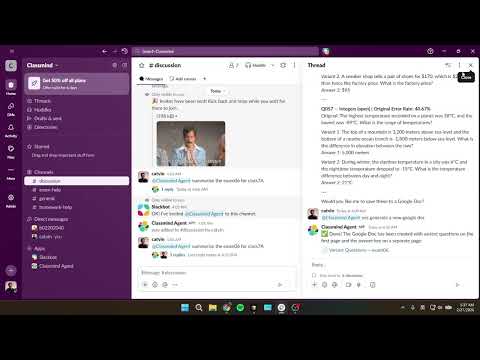
Right after exam06 results come in, the teacher @mentions the bot in the class 7A Slack channel. Without leaving Slack, she gets a full breakdown: class average, score distribution, and a ranked list of questions that tripped students up the most. She follows up asking the agent to generate variant questions for those high-error questions, and the bot produces a ready-to-use practice set and saves it to Google Docs -- all within the same thread, visible to any co-teacher or department head in the channel.
A student has been stuck on a type of division problem but doesn't know what it's called or how to search for help. He opens a DM with the bot and describes the problem in his own words: "I keep getting confused when a problem asks me to find how much of something is left after sharing it into equal parts." The agent uses semantic search to match his description against the materials index, understands he is describing division with remainders, and responds with the most relevant learning resources -- no keyword required.
- Python 3.10+
- Elastic Cloud account with Agent Builder enabled
- Slack workspace (for the Slack bot)
pip install -r requirements.txtCopy the template and fill in your credentials:
cp .env.template .env| Variable | Description |
|---|---|
ELASTIC_URL |
Elasticsearch endpoint URL |
KIBANA_URL |
Kibana endpoint URL (replace .es. with .kb. in the Elasticsearch URL) |
ELASTIC_API_KEY |
Base64-encoded API key with Agent Builder access |
KIBANA_SPACE |
Kibana space ID where the agent lives (omit for default space) |
ELASTIC_AGENT_ID |
Agent ID from the Agent Builder UI |
SLACK_BOT_TOKEN |
Bot User OAuth Token (xoxb-...) |
SLACK_APP_TOKEN |
App-level token with connections:write scope (xapp-...) |
For step-by-step credential setup, see:
- slack_bot/elastic_setup.md -- Elastic API key, Kibana URL, space configuration
- slack_bot/slack_setup.md -- Slack app creation, bot scopes, socket mode, event subscriptions
- a-bonus/google-docs-mcp -- Google Docs MCP server setup, including enabling the Google Docs API and configuring OAuth credentials via Google Cloud Console
The data schema and structure are inspired by ASSISTments, an open educational dataset covering student performance on math problems. All records (students, questions, attempts, materials, and curriculum) are fully synthetic and generated using an LLM. Synthetic data is generated by the scripts in agent_builder/data_generator/. Run them in order:
python agent_builder/data_generator/gen_1_students.py
python agent_builder/data_generator/gen_2_questions.py
python agent_builder/data_generator/gen_3_materials.py
python agent_builder/data_generator/gen_4_attempts.py
python agent_builder/data_generator/gen_5_curriculum.py
Then upload everything to Elasticsearch (creates indices with mappings and bulk-inserts the NDJSON files):
python agent_builder/data_generator/upload_bulk.pypython slack_bot/bot.py- Channel: @mention the bot to start a conversation. Replies in the same thread continue the same agent conversation.
- DM: Message the bot directly for a private conversation.