When using @frame in an annotation, the time is not on the drawing / frame that is shown in the player ( this is further off on longer shots and also depends on the framerate of the video / project )
On shorter shots, this is often off by one frame ( sometimes the frame that @frame generates is correct but the timestamp is not, sometimes it is the other way round ). This means clicking the annotation jumps to the wrong frame and does not display the drawing. Correcting the annotation into something that matches the player will fix that.
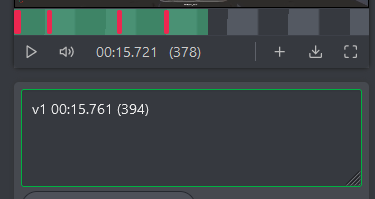
Image below is after typing @frame and pressing enter. You can see the missmatch between the current playhead position and the text that was generated.


When using @frame in an annotation, the time is not on the drawing / frame that is shown in the player ( this is further off on longer shots and also depends on the framerate of the video / project )
On shorter shots, this is often off by one frame ( sometimes the frame that @frame generates is correct but the timestamp is not, sometimes it is the other way round ). This means clicking the annotation jumps to the wrong frame and does not display the drawing. Correcting the annotation into something that matches the player will fix that.
Image below is after typing @frame and pressing enter. You can see the missmatch between the current playhead position and the text that was generated.