官网:http://cloud.spring.io/spring-cloud-static/spring-cloud-netflix/1.3.1.RELEASE/
参考博客:https://blog.csdn.net/wqh8522/article/details/79075907
Eureka Server源码分析:https://www.jianshu.com/p/2fc7cf7264ca
Eureka Clients源码分许:https://www.jianshu.com/p/b768736f9c10
Eureka是Netflix开源的服务注册发现组件,分为Client和Server两部分,简化架构如下图:
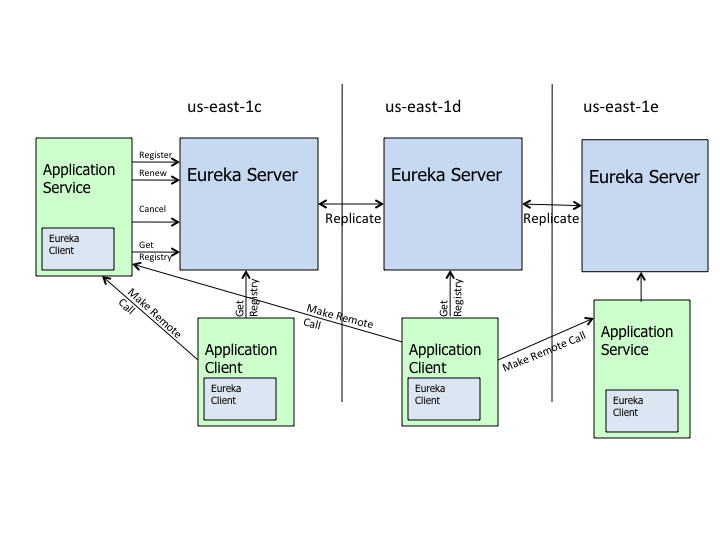
- Eureka-Server:通过REST协议暴露服务,提供应用服务的注册和发现的功能
- Application Service: 应用服务提供者,内嵌Eureka-Client,通过它向Eureka-Server注册自身服务.
- Application Client: 应用服务消费者,内嵌Eureka-Client,通过它向Eureka-Server获取服务列表.
- 请注意,Application Service和Application Client强调扮演的角色,实际可以在同JVM进程,即使服务的提供者,又是服务的消费者.
**服务注册中心:**即Eureka Client向Eureka Server提交自己的服务信息,包括IP地址,端口,service ID等信息.如果Eureka Client没有service ID ,则默认为${spring.application.name},使用关键依赖:
<dependency>
    <groupId>org.springframework.cloud</groupId>
    <artifactId>spring-cloud-starter-eureka-server</artifactId>
</dependency>
启动服务注册中心,只需要一个注解@EnableEurekaServer,这个注解需要在springBoot工程的启动类上加:
@EnableEurekaServer
@SpringBootApplication
public class EurekaserverApplication {

    public static void main(String[] args) {
        SpringApplication.run(EurekaserverApplication.class, args);
    }
}
Eureka是一个高可用的组件,它没有后端缓存,每一个实例注册之后需要向注册中心发送心跳(因此可以在内存中完成),在默认情况下Eureka Server也是一个Eureka Client,必须要指定一个server.Eureka Server的配置文件application.yml:
server:
  port: 8761

eureka:
  instance:
    hostname: localhost
  client:
    registerWithEureka: false
    fetchRegistry: false
    serviceUrl:
      defaultZone: http://${eureka.instance.hostname}:${server.port}/eureka/
- 通过eureka.client.registerWithEureka : false 和 eureka.client.fetchRegistry : false 来表明自己是一个eureka server
**服务提供者:**当client向server注册时,它会提供一些元数据,例如主机和端口,URL,主页等,Eureka Server从每个Client实力接收心跳消息.如果心跳超时,则通过将该实例从注册server中删除,创建过程同server类似,主要依赖
<dependency>
    <groupId>org.springframework.cloud</groupId>
    <artifactId>spring-cloud-starter-eureka</artifactId>
</dependency>
通过注解@EnableEurekaClient表明自己是一个Eureka Client.
@SpringBootApplication
@EnableEurekaClient
@RestController
public class ServiceHiApplication {

    public static void main(String[] args) {
        SpringApplication.run(ServiceHiApplication.class, args);
    }

    @Value("${server.port}")
    String port;
    @RequestMapping("/hi")
    public String home(@RequestParam String name) {
        return "hi "+name+",i am from port:" +port;
    }
}
配置application.yml文件,注明自己的服务注册中心地址.
eureka:
  client:
    serviceUrl:
      defaultZone: http://localhost:8761/eureka/
server:
  port: 8762
spring:
  application:
    name: service-hi
spring.application.name,这个是以后服务与服务之间相互调用的name
- Server给Client提供注册功能,所有的实例保存在一个双重map中,注册后,Server会将数据复制到配置的同伴节点
- Client从Server获取的服务列表的是通过http请求server的ApplicationsResource#getContainers()方法获取所有的服务列表,而这个服务列表更新时间是30秒
- 服务的续约其实就是心跳,每个RPC服务都是需要心跳的.Client的心跳实现是HeartbeatThread,会定时的调用renew方法,这个方法会调用Server的InstanceResource#renewLease方法,同时,这个行为也会复制到配置文件中的其他Server节点.
- 启动时候,会调用DiscoveryClient的register方法进行注册,同时,还有一个30秒间隔的定时任务也可能(当心跳返回404)会调用这个方法,用于服务心跳
- Client通过DiscoveryClient的getAndStoreFullRegistry方法对服务列表进行获取或者更新
- Client如何负载均衡调用服务,Client通过使用JDK的动态代理,使用HystrixInvocationHandler进行拦截.而其中的负载均衡策略实现不同,默认是通过一个原子变量递增取余机器数,也就是轮询策略,而这个类就是ZoneAwareLoadBalancer.
一个分布式系统不可能同时满足C(一致性),A(可用性),P(分区容错性).由于分区容错性在分布式系统中必须要保证的,因此我们执行在A和C之间进行权衡.因此Zookeeper保证的是CP,而Eureka则是AP.
-
Zookeeper保证CP
在注册中心查询服务列表时,我们可以容忍注册中心返回的是几分钟以前的注册信息,但不能接受服务直接down掉不可用.也就是说,服务注册功能对可用性的要求要高于一致性.但是Zookeeper会出现这样一种情况,当master节点因为网络故障与气压节点失去联系时,剩余节点会重新进行leader选举.问题在于,选举leader的时间太长,30~120s,且选举期间整个Zookeeper集群都是不可用的,这就单只在选举期间注册服务瘫痪.在云部署的环境下,因网络问题使得Zookeeper集群失去master节点是交大概率会发生的事,虽然服务能够最终恢复,但是漫长的选举时间导致的注册长期不可用是不能容忍的. -
Eureka保证AP
Eureka在设计师优先保证可用性,Eureke各个节点都是平等的,几个节点挂掉不会影响正常节点的工作,剩余节点依然可以提供注册和查询服务.而Eureka的客户端在向某个Eureka注册是如果发现连接失败,则会自动切换至其它节点,只要有一台Eureka还在,就能保证注册服务可用(保证可用性),只不过查到的信息可能不是最新的(不保证强一致性),除此之外,Eureka还有一个自我保护机制,如果在15分钟内超过85%的节点都没有正常的心跳,那么Eureka就认为客户端与注册中心出现了网络故障,此时会出现以下几种情况:
- Eureka不在从注册列表中移除因为长时间没收到心跳而应该过期的服务
- Eureka仍然能够接受新服务的注册和查询请求,但是不会被同步到其它节点上(即保证当前节点依然可用)
- 当网络稳定时,当前实例新的注册信息会被同步到其它节点中
总结
Eureka作为单纯的服务注册中心来说要比Zookeeper更加"专业",因为注册服务更重要的是可用性,我们可能接受短期内达不到一致性的情况.
- Eureka Server(注册中心) 和 Eureka Producer(服务提供者配置)
参考文档之前部分 - Eureka Consumer(服务消费者配置)
-
使用Feign需要引入jar依赖
<dependency> <groupId>org.springframework.cloud</groupId> <artifactId>spring-cloud-starter-openfeign</artifactId> </dependency> -
在服务消费者启动类上加@EnableFeignClients注解,如果你的Feign接口定义跟你的启动类不在一个包名下,需要制定扫描的包名@EnableFeignClients(basePackages="com.xxx.xxx.xxx")
@SpringBootApplication @EnableDiscoveryClient @EnableFeignClients public class FeignApplication { public static void main(String[] args) { SpringApplication.run(FeignApplication.class, args); } } -
application.yml文件配置(参考Service Discovery: Eureka Clients(服务提供者)application.yml文件配置)
eureka: client: serviceUrl: defaultZone: http://localhost:8761/eureka/ server: port: 8762 spring: application: name: service-h #feign远程调用配置 feign: hystrix: #开启熔断 enabled: true -
Controller层服务配置:
@RestController public class ConsumerController { @Autowired HelloRemote helloRemote; @RequestMapping("/hello/{name}") public String hello(@PathVariable("name") String name) { return helloRemote.hello(name); } } -
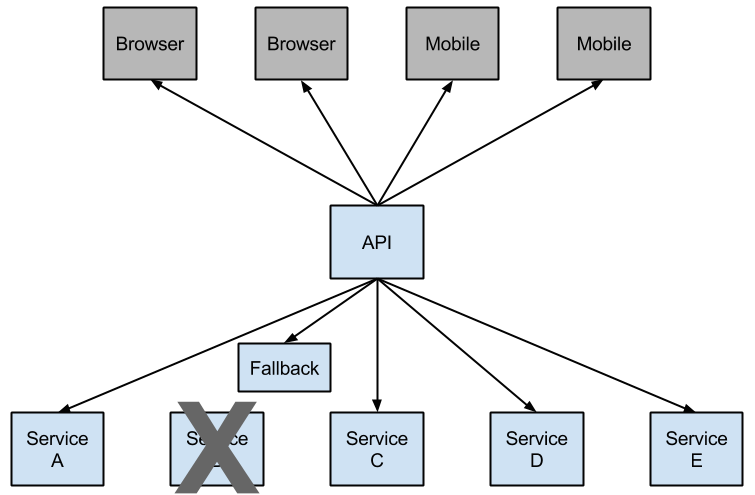
Service层配置,使用@FeignClient(value = "service-hi",fallback= UserServiceFallback.class)注解来绑定该接口对应service-hi服务,value值是需要配置服务提供者的服务名,fallback值是服务降级的回调类.服务降级就是在执行主流程时,主流程突然出现意外执行不下去了,那就执行另外一个方法让主流程看起来是正常的(这个方法通常就是降级方法,似乎有些牵强.)
@FeignClient(value = "service-hi",fallback= UserServiceFallback.class) public interface UserService { @GetMapping("/feign/userById") User finUserById(@RequestParam("id") Long id); } -
Service实现类配置,用于远程降级服务的回调,防止服务出现雪崩效应
 	@Service
 	public class UserServiceFallback implements UserService {

 	    @Override
 	    public User finUserById(@RequestParam("id") Long id) {
 	        System.out.println("远程服务调用失败");
 	        return new User(-1L,"finbyid error",0);
 	    }
 	}
参考网站https://www.jianshu.com/p/e8a477a051d8
小红常用A号码拨打电话,发现A号码无法正常拨通,采用备用号码B拨打电话.这个过程就叫做降级(主逻辑失败采用备用逻辑的过程).
打完电话后,小红又碰到了一些问题,于是他又尝试用A号码拨打,这一次又没有能够拨通,所以她又用号码B拨号,就这样连续的经过了几次在拨号设备选择上的“降级”,小红觉得短期内A号码可能因为运营商问题无法正常拨通了,所以决定近期直接用B号码进行拨号,这样的策略就是熔断(A号码因短期内多次失败,而被暂时性的忽略,不再尝试使用)。
导入pom依赖(前提是在使用到了声明式服务调用)
<dependency>
    <groupId>org.springframework.cloud</groupId>
    <artifactId>spring-cloud-starter-hystrix</artifactId>
</dependency>
在application.yml文件增加配置服务熔断
#feign远程调用配置
feign:
  hystrix:
    #开启熔断
    enabled: true
# 熔断策略
hystrix:
  command:
    default:
      execution:
        isolation:
          strategy: SEMAPHORE
导入pom依赖
<dependency>
    <groupId>org.springframework.cloud</groupId>
    <artifactId>spring-cloud-starter-hystrix-dashboard</artifactId>
</dependency>
<dependency>
    <groupId>org.springframework.boot</groupId>
    <artifactId>spring-boot-starter-actuator</artifactId>
</dependency>
<!--The @HystrixCommand is provided by a Netflix contrib library called "javanica".-->
<dependency>
    <groupId>com.netflix.hystrix</groupId>
    <artifactId>hystrix-javanica</artifactId>
    <version>1.5.12</version>
</dependency>
<dependency>
    <groupId>org.springframework.boot</groupId>
    <artifactId>spring-boot-starter-actuator</artifactId>
</dependency>
在启动类加上@EnableHystrixDashboard注解,用于开启熔断监控仪表盘,加上注解@EnableCircuitBreaker,用于开启断路器
@EnableFeignClients   开启Feign远程调用
@EnableEurekaClient   开启客户端发现
@EnableHystrixDashboard  开启熔断监控仪表盘
@EnableCircuitBreaker  开启断路器
@SpringBootApplication
public class FeignApplication {

	public static void main(String[] args) {
		SpringApplication.run(FeignApplication.class, args);
	}
}
在application.yml配置文件增加配置(version 2.0.0.)
#熔断监控仪表板查看地址  http://host:port/actuator/hystrix.stream
management:
  endpoints:
    web:
      exposure:
        include: hystrix.stream
通过地址http://host:port/hystrix访问熔断监控页面,
在地址栏输入地址http://host:port/actuator/hystrix.stream,点击Monitor Stream即可访问监控页面.

