This is a streaming voice input plugin for the OpenCode TUI with a provider-based speech recognition architecture. The current built-in provider is Volcengine ASR.
Press the shortcut once to start recognition. While you speak naturally, audio is streamed continuously to Volcengine. Press the shortcut again to stop recognition. Stable recognized text is appended continuously into the current OpenCode input while you are still speaking.
- Start and stop streaming recognition with a single shortcut
- Stable recognition results are appended to the input before the session ends
- Warning/error toast feedback for misconfiguration or failures
- Works on macOS and Linux
- Keeps credentials out of the plugin repo
- First
Ctrl+S: start microphone capture and streaming recognition - While speaking: stable recognized text is appended continuously to the current prompt
- Second
Ctrl+S: stop capture, wait for the final ASR result, then append the remaining tail text - A persistent recording toast stays visible while recording and disappears automatically when recognition stops
OpenCode's current TUI plugin API supports keybind matching, but it does not expose key release events yet. That means truly reliable "hold to record / release to stop" behavior is not possible in a plugin right now.
- OpenCode with TUI plugin support
- Provider credentials for your selected ASR backend
- Sox installed locally (
recon macOS/Linux,sox.exeon Windows)
macOS:
brew install soxUbuntu/Debian:
sudo apt install soxWindows:
- Download and install SoX from https://sourceforge.net/projects/sox/
- Make sure
sox.exeis available inPATH - Verify the install:
sox --versionPreferred install command:
opencode plugin opencode-voice2text@latest --globalThis is the same style used by opencode-dynamic-context-pruning. The OpenCode CLI installs the npm package and updates your OpenCode plugin config for you.
If you only want it in the current project instead of globally, omit --global:
opencode plugin opencode-voice2text@latestThe installer writes a default TUI plugin entry for you with:
commandKeybind: "ctrl+s"
You still need to make sure terminal_suspend does not conflict with your chosen shortcut.
Recommended ~/.config/opencode/tui.json:
{
  "$schema": "https://opencode.ai/tui.json",
  "keybinds": {
    "terminal_suspend": "none"
  }
}
If you want a different shortcut, edit the generated plugin entry in tui.json after installation.
Ctrl+S is the default shortcut. If pressing it does nothing, your terminal is likely intercepting it for XON/XOFF flow control before OpenCode sees the key.
Current shell session fix:
stty -ixonPersistent fix for zsh:
Add stty -ixon to ~/.zshrc, then restart the terminal.
Persistent fix for bash:
Add stty -ixon to ~/.bashrc or ~/.bash_profile, then restart the terminal.
If you still prefer not to change terminal flow control, override commandKeybind manually in tui.json.
Windows terminals do not use the same Ctrl+S XON/XOFF flow control behavior, so the stty -ixon fix is only relevant on macOS/Linux shells.
If OpenCode is already running, restart it so the plugin and dependency tree are loaded again.
Create a local config file on the target machine:
macOS/Linux:
~/.config/opencode/voice2text.local.json
Windows:
%APPDATA%\opencode\voice2text.local.json
{
  "provider": "volcengine",
  "providerConfig": {
    "appId": "your-volcengine-app-id",
    "accessToken": "your-volcengine-access-token",
    "resourceId": "volc.seedasr.sauc.duration",
    "endpoint": "wss://openspeech.bytedance.com/api/v3/sauc/bigmodel_async"
  },
  "language": "zh-CN",
  "chunkMs": 200,
  "endWindowSize": 800,
  "maxDurationSeconds": 180,
  "appendTrailingSpace": true,
  "rate": 16000,
  "bits": 16,
  "channels": 1
}
An example template also lives in examples/voice2text.local.example.json.
For the built-in volcengine provider, you need to prepare the following values from Volcengine before the plugin can work:
-
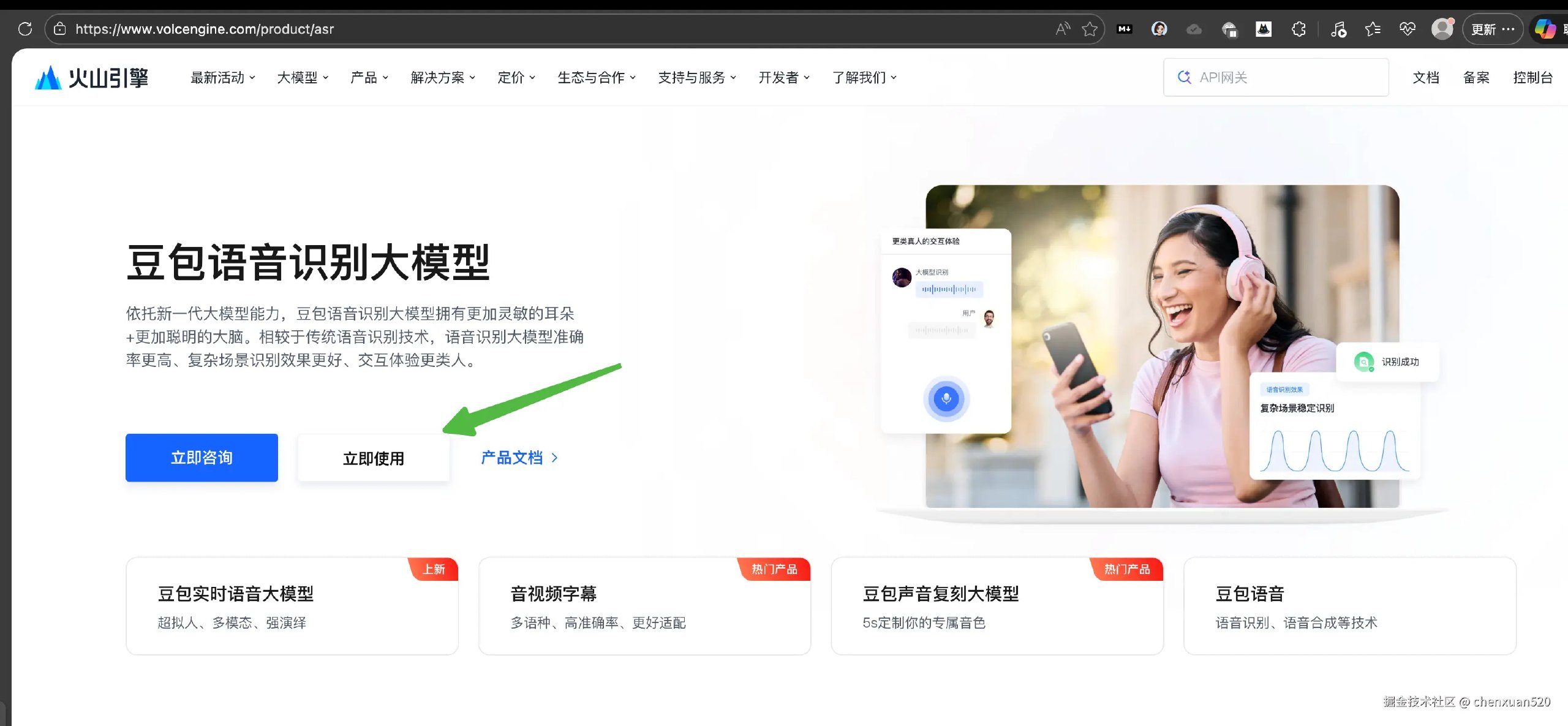
Volcengine ASR product page: https://www.volcengine.com/product/asr
-
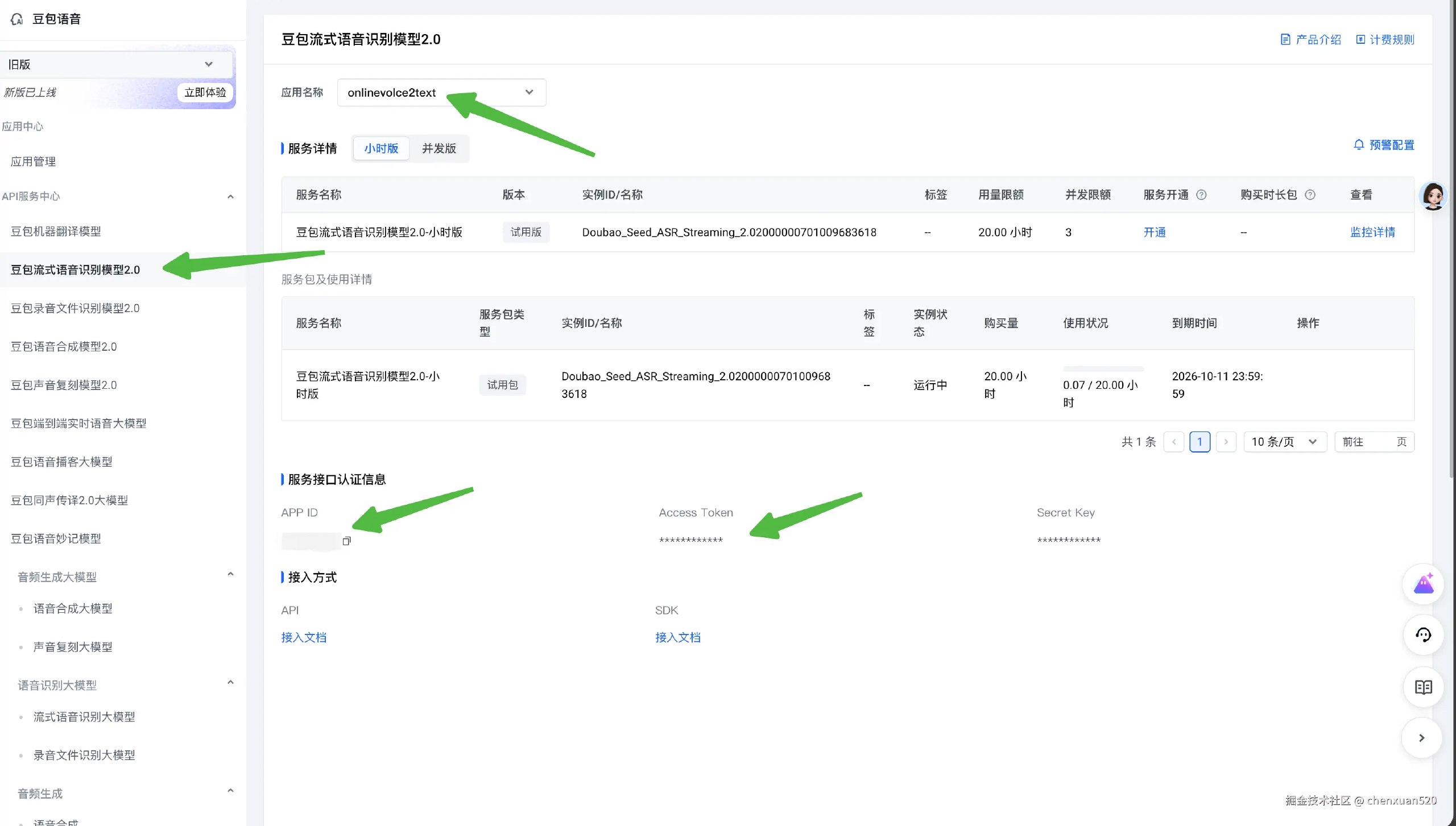
providerConfig.appId -
providerConfig.accessToken -
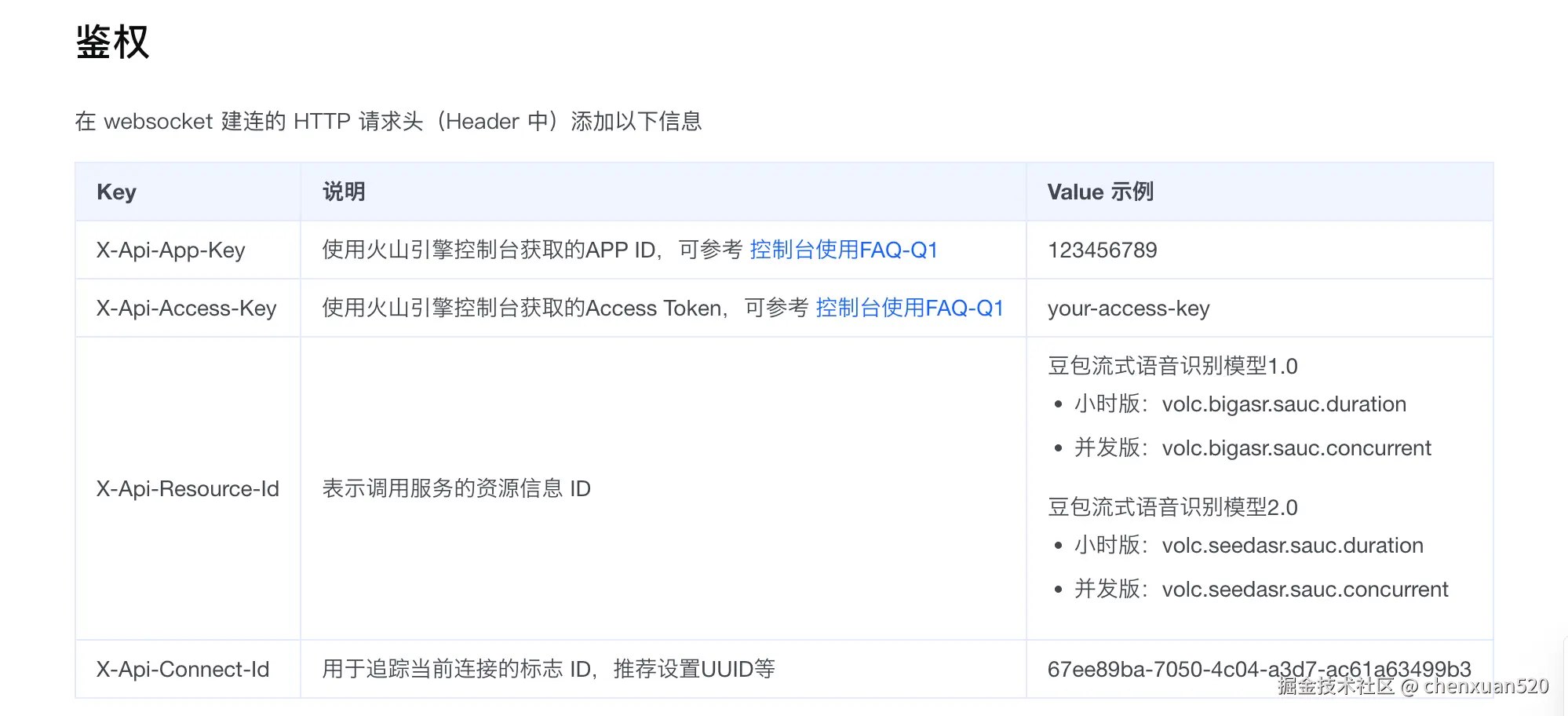
providerConfig.resourceId -
providerConfig.endpoint
Typical setup flow:
-
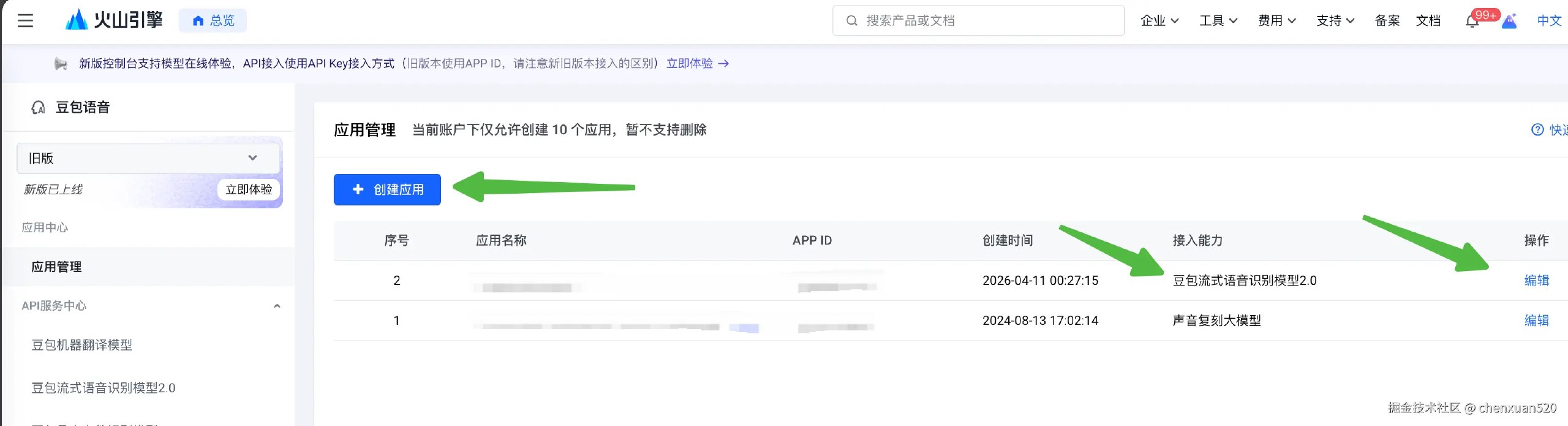
Open the Volcengine ASR page, sign in to the Volcengine console, or register first if you do not already have an account. Then open the speech recognition / ASR service page.
-
Create or select an application.
-
Get the credentials and resource settings for that application.
-
Fill the values into your local
voice2text.local.json. On macOS/Linux the default path is~/.config/opencode/voice2text.local.json. On Windows the default path is%APPDATA%\opencode\voice2text.local.json. ForresourceId, check the Big Model Streaming Speech Recognition API docs. The recommended value isvolc.seedasr.sauc.duration. Forendpoint, usewss://openspeech.bytedance.com/api/v3/sauc/bigmodel_async.
For this plugin's current Volcengine implementation:
providerConfig.endpointis typically a websocket endpoint underwss://openspeech.bytedance.com/api/v3/sauc/...providerConfig.resourceIdshould match the model/resource you enabled in VolcengineproviderConfig.appIdandproviderConfig.accessTokenmust belong to the same Volcengine application
Example:
{
  "provider": "volcengine",
  "providerConfig": {
    "appId": "your-app-id",
    "accessToken": "your-access-token",
    "resourceId": "volc.seedasr.sauc.duration",
    "endpoint": "wss://openspeech.bytedance.com/api/v3/sauc/bigmodel_async"
  }
}
If the plugin is triggered without valid Volcengine credentials, it will show a warning toast instead of failing silently.
You can override the config path with:
export OPENCODE_VOICE2TEXT_LOCAL_CONFIG=/path/to/voice2text.local.jsonThese can override or replace values from the local config file:
export OPENCODE_VOICE2TEXT_PROVIDER=volcengine
export OPENCODE_VOICE2TEXT_LANGUAGE=zh-CN
export OPENCODE_VOICE2TEXT_CHUNK_MS=200
export OPENCODE_VOICE2TEXT_END_WINDOW_SIZE=800
export OPENCODE_VOICE2TEXT_MAX_DURATION_SECONDS=180
export OPENCODE_VOICE2TEXT_APPEND_TRAILING_SPACE=true
export OPENCODE_VOICE2TEXT_SAMPLE_RATE=16000
export OPENCODE_VOICE2TEXT_BITS=16
export OPENCODE_VOICE2TEXT_CHANNELS=1
Legacy flat environment variables are still supported for the built-in Volcengine provider:
export OPENCODE_VOICE2TEXT_APP_ID=...
export OPENCODE_VOICE2TEXT_ACCESS_TOKEN=...
export OPENCODE_VOICE2TEXT_RESOURCE_ID=volc.seedasr.sauc.duration
export OPENCODE_VOICE2TEXT_ENDPOINT=wss://openspeech.bytedance.com/api/v3/sauc/bigmodel_asyncYou can pass the same runtime options through tui.json:
commandKeybindproviderproviderConfiglanguagechunkMsendWindowSizemaxDurationSecondsappendTrailingSpaceratebitschannels
In practice, credentials are best kept in the local config file or environment variables rather than in tui.json.
The config is now provider-oriented so more ASR backends can be added later without changing the install shape.
- current provider:
volcengine - future providers can reuse the same plugin entry and TUI behavior
- provider-specific secrets now live under
providerConfig
To add a new provider in code:
- add a new file under
src/providers/ - implement the
VoiceProviderinterface fromsrc/providers/types.ts - register it in
src/providers/index.ts - use
provider+providerConfigin local config
If provider config is missing, pressing the shortcut shows a toast explaining which local config file to fill instead of failing silently.
Install dependencies and build:
npm install
npm run build
Type-check only:
npm run typecheckThis repository now includes .github/workflows/publish.yml.
It is configured for npm trusted publishing with GitHub Actions OIDC, so you do not need to store a long-lived NPM_TOKEN in GitHub.
Behavior:
- every push to
masterruns typecheck and build - the workflow checks whether
package.json's currentname@versionalready exists on npm - if that version is not published yet, it runs
npm publish - if that version already exists, the workflow exits cleanly without failing
Required npm setup:
- add this repository as a trusted publisher for the npm package
On npmjs.com, open the package settings for opencode-voice2text, then configure:
- Trusted Publisher
- provider: GitHub Actions
- owner:
chenxuan520 - repository:
opencode-voice2text - workflow filename:
publish.yml
Important release rule:
- before pushing to
master, bumppackage.jsonversion if you want a new npm release - if you push code without changing the version, CI will skip publishing because npm versions are immutable
Version bump examples:
npm version patchor:
npm version minornpm publishprepublishOnly runs the build automatically.
For emergency manual publishing, use your local npm login or a short-lived bypass-2FA token locally. Do not store long-lived publish tokens in GitHub Actions when trusted publishing is enabled.
- The built-in Volcengine provider uses Volcengine's websocket ASR protocol directly.
- Success toasts are intentionally not shown; recording state uses a long-lived toast that disappears after stop.
- Errors still surface as OpenCode toasts.
opencode plugin ...updates the plugin entry intui.json, but does not replace unrelated TUI settings such asthemeorkeybinds.