The Standard UI Kit for AI Voice Agents



A collection of production-ready React components for building AI voice interfaces with real-time audio visualization. Featuring Siri-like animations, Web Audio API integration, and canvas-based rendering optimized for 60fps performance.
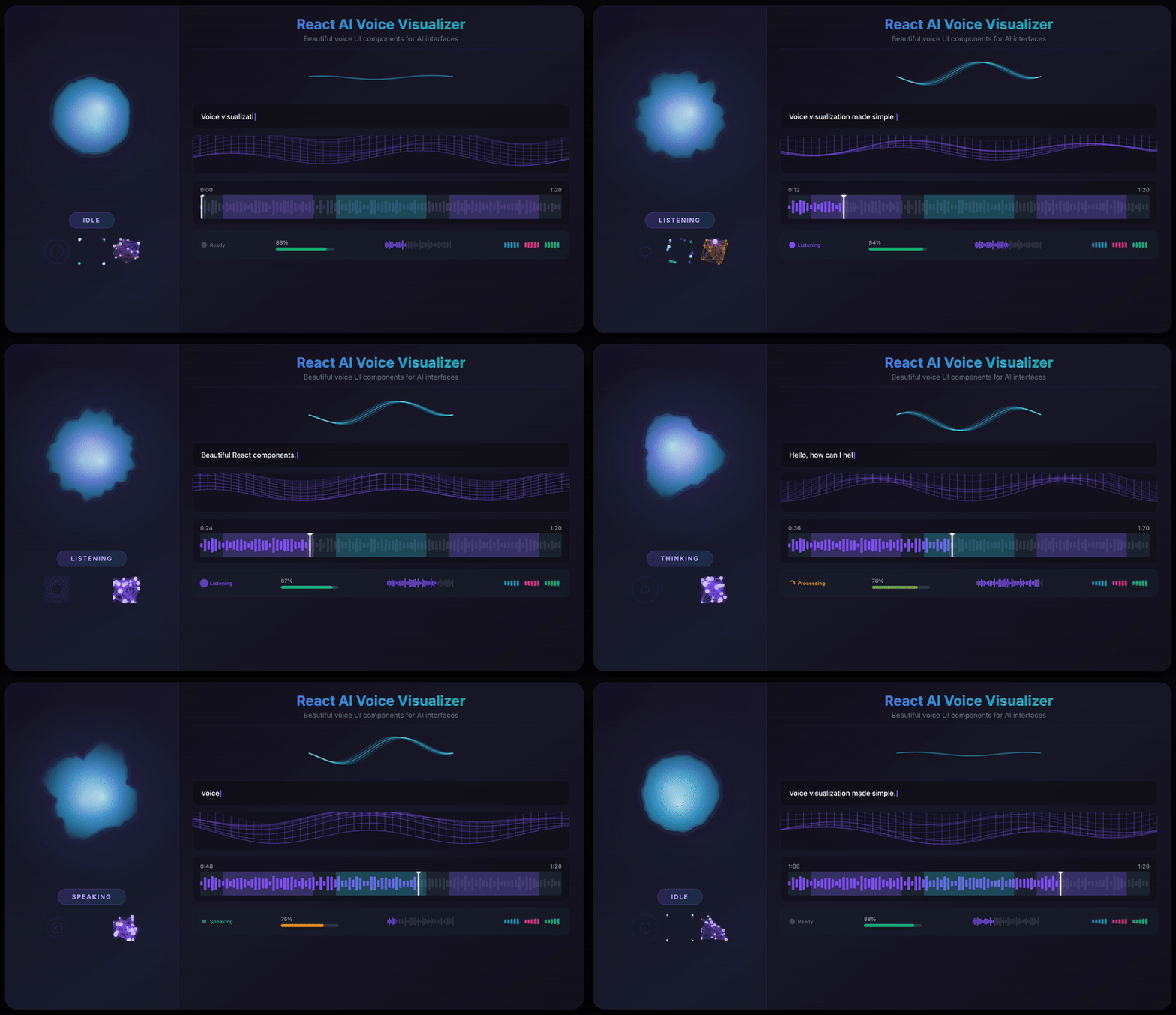
- 12 Visualization Components - From fluid orbs to neural networks, particle swarms to waveforms
- 3 Powerful Hooks - Microphone capture, real-time audio analysis, and voice activity detection
- State-Aware Animations - Built-in support for
idle,listening,thinking, andspeakingstates - Web Audio API Integration - FFT-based frequency analysis with bass/mid/treble extraction
- Retina Display Support - Automatic
devicePixelRatioscaling for crisp visuals on all screens - Full TypeScript Support - Comprehensive type definitions for all components and hooks
- Zero External Dependencies - Only
simplex-noisefor organic deformation effects - 60fps Canvas Rendering - Optimized
requestAnimationFrameloops with delta-time smoothing
npm install react-ai-voice-visualizeryarn add react-ai-voice-visualizerpnpm add react-ai-voice-visualizerimport {
VoiceOrb,
useMicrophoneStream,
useAudioAnalyser,
} from 'react-ai-voice-visualizer';
function VoiceInterface() {
const { stream, isActive, start, stop } = useMicrophoneStream();
const { frequencyData, volume } = useAudioAnalyser(stream);
return (
<div>
<VoiceOrb
audioData={frequencyData}
volume={volume}
state={isActive ? 'listening' : 'idle'}
size={200}
primaryColor="#06B6D4"
secondaryColor="#8B5CF6"
onClick={isActive ? stop : start}
/>
</div>
);
}A beautiful, fluid 3D-like sphere that reacts to voice in real-time. The hero component featuring organic simplex noise deformation and smooth state transitions.
<VoiceOrb
  audioData={frequencyData}
  volume={volume}
  state="listening"
  size={200}
  primaryColor="#06B6D4"
  secondaryColor="#8B5CF6"
  glowIntensity={0.6}
  noiseScale={0.2}
  noiseSpeed={0.5}
/>| Prop | Type | Default | Description |
|---|---|---|---|
audioData |
Uint8Array |
- | Frequency data from useAudioAnalyser |
volume |
number |
0 |
Volume level (0-1), can drive animation without full audioData |
state |
'idle' | 'listening' | 'thinking' | 'speaking' |
'idle' |
Current state of the voice interface |
size |
number |
200 |
Diameter in pixels |
primaryColor |
string |
'#06B6D4' |
Primary color for the orb |
secondaryColor |
string |
'#8B5CF6' |
Secondary color for gradient |
glowColor |
string |
- | Glow color (defaults to primaryColor) |
glowIntensity |
number |
0.6 |
Glow intensity (0-1) |
noiseScale |
number |
0.2 |
Deformation intensity |
noiseSpeed |
number |
0.5 |
Animation speed multiplier |
onClick |
() => void |
- | Click handler |
className |
string |
- | Additional CSS class |
style |
CSSProperties |
- | Inline styles |
Siri/Gemini-inspired multiple sine waves with phase-shifted dancing animation.
<VoiceWave
  audioData={frequencyData}
  volume={volume}
  state="speaking"
  size={300}
  lineColor="#FFFFFF"
  numberOfLines={5}
/>| Prop | Type | Default | Description |
|---|---|---|---|
audioData |
Uint8Array |
- | Frequency data from useAudioAnalyser |
volume |
number |
0 |
Volume level (0-1) |
state |
VoiceState |
'idle' |
Current state |
size |
number |
200 |
Component size in pixels |
lineColor |
string |
'#FFFFFF' |
Color of the wave lines |
lineWidth |
number |
2 |
Width of each line |
numberOfLines |
number |
5 |
Number of wave lines |
phaseShift |
number |
0.15 |
Phase shift between lines |
amplitude |
number |
1 |
Amplitude multiplier |
speed |
number |
1 |
Animation speed multiplier |
onClick |
() => void |
- | Click handler |
className |
string |
- | Additional CSS class |
style |
CSSProperties |
- | Inline styles |
Particle swarm visualization with state-based behaviors (brownian, swirl, pulse, jitter).
<VoiceParticles
  audioData={frequencyData}
  volume={volume}
  state="thinking"
  particleCount={100}
  particleSize={3}
/>| Prop | Type | Default | Description |
|---|---|---|---|
audioData |
Uint8Array |
- | Frequency data from useAudioAnalyser |
volume |
number |
0 |
Volume level (0-1) |
state |
VoiceState |
'idle' |
Current state |
size |
number |
200 |
Component size in pixels |
primaryColor |
string |
'#8B5CF6' |
Primary particle color |
secondaryColor |
string |
'#EC4899' |
Secondary particle color |
particleCount |
number |
100 |
Number of particles |
particleSize |
number |
3 |
Base particle size |
speed |
number |
1 |
Animation speed multiplier |
onClick |
() => void |
- | Click handler |
className |
string |
- | Additional CSS class |
style |
CSSProperties |
- | Inline styles |
Minimal ring with ripple effects and breathing animation when idle.
<VoiceRing
  audioData={frequencyData}
  volume={volume}
  state="listening"
  rotationSpeed={1}
/>| Prop | Type | Default | Description |
|---|---|---|---|
audioData |
Uint8Array |
- | Frequency data from useAudioAnalyser |
volume |
number |
0 |
Volume level (0-1) |
state |
VoiceState |
'idle' |
Current state |
size |
number |
200 |
Component size in pixels |
primaryColor |
string |
'#8B5CF6' |
Primary ring color |
secondaryColor |
string |
'#EC4899' |
Secondary color for gradient |
glowColor |
string |
- | Glow color |
glowIntensity |
number |
0.5 |
Glow intensity (0-1) |
rotationSpeed |
number |
1 |
Ring rotation speed |
onClick |
() => void |
- | Click handler |
className |
string |
- | Additional CSS class |
style |
CSSProperties |
- | Inline styles |
Neural network node visualization with connecting lines and pulse propagation.
<VoiceNeural
  audioData={frequencyData}
  volume={volume}
  state="thinking"
  nodeCount={40}
  connectionDistance={100}
/>| Prop | Type | Default | Description |
|---|---|---|---|
audioData |
Uint8Array |
- | Frequency data from useAudioAnalyser |
volume |
number |
0 |
Volume level (0-1) |
state |
VoiceState |
'idle' |
Current state |
size |
number |
200 |
Component size in pixels |
primaryColor |
string |
'#8B5CF6' |
Primary node color |
secondaryColor |
string |
'#EC4899' |
Secondary color for connections |
nodeCount |
number |
40 |
Number of neural nodes |
connectionDistance |
number |
100 |
Max distance for node connections |
onClick |
() => void |
- | Click handler |
className |
string |
- | Additional CSS class |
style |
CSSProperties |
- | Inline styles |
Bar-based waveform visualization for real-time or static audio data with playback progress.
<Waveform
  timeDomainData={timeDomainData}
  progress={0.5}
  height={48}
  barWidth={3}
  barGap={2}
  color="#8B5CF6"
  progressColor="#06B6D4"
/>| Prop | Type | Default | Description |
|---|---|---|---|
timeDomainData |
Uint8Array |
- | Time domain data for real-time visualization |
staticData |
number[] |
- | Pre-computed waveform data for static visualization |
progress |
number |
- | Playback progress (0-1) |
width |
number | string |
- | Component width |
height |
number |
48 |
Component height |
barWidth |
number |
3 |
Width of each bar |
barGap |
number |
2 |
Gap between bars |
barRadius |
number |
2 |
Border radius of bars |
color |
string |
'#8B5CF6' |
Waveform color |
progressColor |
string |
- | Color for played portion |
backgroundColor |
string |
'transparent' |
Background color |
animated |
boolean |
true |
Enable smooth transitions |
className |
string |
- | Additional CSS class |
style |
CSSProperties |
- | Inline styles |
Compact equalizer bars with glow effect, perfect for inline status indicators.
<WaveformMini
  audioData={frequencyData}
  volume={volume}
  barCount={8}
  width={80}
  height={24}
  color="#00EAFF"
/>| Prop | Type | Default | Description |
|---|---|---|---|
audioData |
Uint8Array |
- | Frequency data from useAudioAnalyser |
volume |
number |
- | Volume level for simulated animation |
barCount |
number |
8 |
Number of equalizer bars |
width |
number |
80 |
Component width |
height |
number |
24 |
Component height |
color |
string |
'#00EAFF' |
Bar color |
className |
string |
- | Additional CSS class |
style |
CSSProperties |
- | Inline styles |
Cyberpunk wireframe grid/terrain with perspective 3D transformation and audio-reactive wave animation.
<AudioReactiveMesh
  audioData={frequencyData}
  volume={volume}
  rows={20}
  cols={30}
  height={200}
  perspective={60}
  waveSpeed={1}
  waveHeight={1}
/>| Prop | Type | Default | Description |
|---|---|---|---|
audioData |
Uint8Array |
- | Frequency data from useAudioAnalyser |
volume |
number |
- | Volume level (0-1) |
rows |
number |
20 |
Number of grid rows |
cols |
number |
30 |
Number of grid columns |
width |
number | string |
- | Component width |
height |
number |
200 |
Component height |
color |
string |
'#8B5CF6' |
Line color |
lineWidth |
number |
1 |
Line width |
perspective |
number |
60 |
Perspective angle in degrees |
waveSpeed |
number |
1 |
Wave animation speed |
waveHeight |
number |
1 |
Wave height multiplier |
className |
string |
- | Additional CSS class |
style |
CSSProperties |
- | Inline styles |
Voice Activity Detection status indicator with state-specific animations.
<VADIndicator
  state="listening"
  size="md"
  showLabel={true}
  labels={{
    idle: 'Ready',
    listening: 'Listening...',
    processing: 'Processing...',
    speaking: 'Speaking',
  }}
/>| Prop | Type | Default | Description |
|---|---|---|---|
state |
'idle' | 'listening' | 'processing' | 'speaking' |
required | Current VAD state |
size |
'sm' | 'md' | 'lg' |
'md' |
Indicator size |
showLabel |
boolean |
false |
Show state label |
labels |
object |
- | Custom labels for each state |
colors |
object |
- | Custom colors for each state |
className |
string |
- | Additional CSS class |
style |
CSSProperties |
- | Inline styles |
Progress bar that changes color based on speech recognition confidence level.
<SpeechConfidenceBar
  confidence={0.85}
  showLabel={true}
  showLevelText={true}
  width={200}
  height={8}
  showGlow={true}
/>| Prop | Type | Default | Description |
|---|---|---|---|
confidence |
number |
required | Confidence value (0-1) |
showLabel |
boolean |
true |
Show percentage label |
showLevelText |
boolean |
false |
Show confidence level text |
levelLabels |
object |
- | Custom labels for low/medium/high |
width |
number |
200 |
Bar width |
height |
number |
8 |
Bar height |
animated |
boolean |
true |
Enable animated transitions |
showGlow |
boolean |
true |
Show glow effect at high confidence |
lowColor |
string |
'#EF4444' |
Color for low confidence |
mediumColor |
string |
'#F59E0B' |
Color for medium confidence |
highColor |
string |
'#10B981' |
Color for high confidence |
backgroundColor |
string |
'#374151' |
Background color |
labelColor |
string |
'#9CA3AF' |
Text color for labels |
fontSize |
number |
12 |
Font size for labels |
mediumThreshold |
number |
0.5 |
Threshold for medium confidence |
highThreshold |
number |
0.8 |
Threshold for high confidence |
className |
string |
- | Additional CSS class |
style |
CSSProperties |
- | Inline styles |
Live transcription display with typing animation, blinking cursor, and confidence-based word highlighting.
<TranscriptionText
  text="Hello, how can I help you today?"
  interimText=" I'm listening..."
  animationMode="word"
  typingSpeed={50}
  showCursor={true}
  showConfidence={true}
  wordConfidences={[0.9, 0.95, 0.85, 0.7, 0.92, 0.88, 0.91]}
/>| Prop | Type | Default | Description |
|---|---|---|---|
text |
string |
required | Main finalized transcription text |
interimText |
string |
- | Interim text shown in muted color |
animationMode |
'character' | 'word' | 'instant' |
'word' |
Animation mode |
typingSpeed |
number |
50 |
Typing speed in ms per unit |
showCursor |
boolean |
true |
Show blinking cursor |
wordConfidences |
number[] |
- | Confidence values for each word (0-1) |
showConfidence |
boolean |
false |
Enable confidence-based highlighting |
textColor |
string |
'#FFFFFF' |
Main text color |
interimColor |
string |
'#6B7280' |
Interim text color |
cursorColor |
string |
'#8B5CF6' |
Cursor color |
lowConfidenceColor |
string |
'#F59E0B' |
Color for low confidence words |
fontSize |
number |
16 |
Font size in pixels |
fontFamily |
string |
'system-ui, sans-serif' |
Font family |
lineHeight |
number |
1.5 |
Line height multiplier |
className |
string |
- | Additional CSS class |
style |
CSSProperties |
- | Inline styles |
Interactive audio timeline with waveform, speech segments, markers, and seek support.
<VoiceTimeline
  duration={120}
  currentTime={45}
  isPlaying={true}
  segments={[
    { start: 0, end: 15, label: 'User', speakerId: 'user' },
    { start: 18, end: 45, label: 'AI', speakerId: 'ai' },
  ]}
  markers={[
    { time: 30, label: 'Important', color: '#EF4444' },
  ]}
  waveformData={waveformArray}
  onSeek={(time) => console.log('Seek to', time)}
  onPlayPause={() => console.log('Toggle playback')}
/>| Prop | Type | Default | Description |
|---|---|---|---|
duration |
number |
required | Total duration in seconds |
currentTime |
number |
- | Current playback position in seconds |
segments |
TimelineSegment[] |
- | Speech segments to display |
markers |
TimelineMarker[] |
- | Markers for important points |
waveformData |
number[] |
- | Waveform data (0-1 normalized) |
isPlaying |
boolean |
- | Whether timeline is playing |
onSeek |
(time: number) => void |
- | Called when user seeks |
onPlayPause |
() => void |
- | Called when play/pause clicked |
width |
number | string |
- | Component width |
height |
number |
64 |
Component height |
showTimeLabels |
boolean |
true |
Show time labels |
showPlayhead |
boolean |
true |
Show playhead |
seekable |
boolean |
true |
Enable seeking by click |
segmentColor |
string |
'#8B5CF6' |
Primary color for segments |
playheadColor |
string |
'#FFFFFF' |
Color for playhead |
backgroundColor |
string |
'#1F2937' |
Background color |
waveformColor |
string |
'#374151' |
Waveform color |
progressColor |
string |
'#8B5CF6' |
Progress color for played portion |
labelColor |
string |
'#9CA3AF' |
Text color for labels |
className |
string |
- | Additional CSS class |
style |
CSSProperties |
- | Inline styles |
Captures audio from the user's microphone with automatic permission handling and cleanup.
const { stream, isActive, error, start, stop } = useMicrophoneStream();Returns:
| Property | Type | Description |
|---|---|---|
stream |
MediaStream | null |
The active MediaStream, or null if not started |
isActive |
boolean |
Whether the microphone is currently active |
error |
Error | null |
Any error that occurred during initialization |
start |
() => Promise<void> |
Start capturing audio from the microphone |
stop |
() => void |
Stop capturing audio and release the stream |
Real-time audio analysis using Web Audio API with FFT-based frequency analysis.
const {
  frequencyData,
  timeDomainData,
  volume,
  bassLevel,
  midLevel,
  trebleLevel,
} = useAudioAnalyser(stream, {
  fftSize: 256,
  smoothingTimeConstant: 0.8,
});
Options:
| Option | Type | Default | Description |
|---|---|---|---|
fftSize |
number |
256 |
FFT size for frequency analysis (power of 2) |
smoothingTimeConstant |
number |
0.8 |
Smoothing time constant (0-1) |
Returns:
| Property | Type | Description |
|---|---|---|
frequencyData |
Uint8Array |
Raw frequency data array |
timeDomainData |
Uint8Array |
Time domain waveform data |
volume |
number |
Normalized RMS volume level (0-1) |
bassLevel |
number |
Bass frequency level (0-1) |
midLevel |
number |
Mid frequency level (0-1) |
trebleLevel |
number |
Treble frequency level (0-1) |
Voice Activity Detection based on volume thresholds with speech segment tracking.
const {
  isSpeaking,
  silenceDuration,
  lastSpeakTime,
  speechSegments,
} = useVoiceActivity(volume, {
  volumeThreshold: 0.1,
  silenceThreshold: 1500,
});
Options:
| Option | Type | Default | Description |
|---|---|---|---|
volumeThreshold |
number |
0.1 |
Volume threshold to detect speech (0-1) |
silenceThreshold |
number |
1500 |
Duration of silence before speech ends (ms) |
Returns:
| Property | Type | Description |
|---|---|---|
isSpeaking |
boolean |
Whether the user is currently speaking |
silenceDuration |
number |
Duration of current silence (ms) |
lastSpeakTime |
number | null |
Timestamp of last detected speech |
speechSegments |
SpeechSegment[] |
Array of recorded speech segments |
import {
  normalizeFrequencyData,
  getAverageVolume,
  getFrequencyBands,
  smoothArray,
  downsample,
  envelopeFollower,
  softClip,
} from 'react-ai-voice-visualizer';| Function | Description |
|---|---|
normalizeFrequencyData(data) |
Converts Uint8Array (0-255) to number array (0-1) |
getAverageVolume(data) |
Calculates RMS volume level from audio data |
getFrequencyBands(data) |
Extracts bass, mid, and treble levels |
smoothArray(current, previous, factor) |
Smooth interpolation between arrays |
downsample(data, targetLength) |
Downsamples audio data to target sample count |
envelopeFollower(current, target, attack, release) |
Decay effect with attack/release |
softClip(value, gain) |
Soft clipping to prevent distortion |
import {
  lerp,
  mapRange,
  clamp,
  easeOutCubic,
  easeInOutSine,
  easeOutQuad,
  easeOutElastic,
  degToRad,
  smoothDamp,
  seededRandom,
} from 'react-ai-voice-visualizer';| Function | Description |
|---|---|
lerp(a, b, t) |
Linear interpolation between two values |
mapRange(value, inMin, inMax, outMin, outMax) |
Maps value from one range to another |
clamp(value, min, max) |
Clamps value between min and max |
easeOutCubic(t) |
Cubic ease-out animation function |
easeInOutSine(t) |
Sine ease-in-out function |
easeOutQuad(t) |
Quadratic ease-out function |
easeOutElastic(t) |
Elastic bouncy ease-out |
degToRad(degrees) |
Degrees to radians conversion |
smoothDamp(current, target, smoothing, deltaTime) |
Delta-time based smoothing |
seededRandom(seed) |
Pseudo-random number from seed |
The VoiceOrb component uses simplex noise to create organic, fluid deformations. Unlike Perlin noise, simplex noise produces smoother gradients with fewer directional artifacts, perfect for natural-looking animations.
Multi-layered noise formula:
noiseValue = (noise1 + noise2 * 0.5) * 0.66

Where:
- noise1 = simplex2D(cos(angle) * 1.5 + time, sin(angle) * 1.5 + time)
- noise2 = simplex2D(cos(angle) * 3 - time * 1.5, sin(angle) * 3 + time * 0.5)
The combination of two noise layers at different frequencies and opposing time directions creates complex, non-repeating motion that feels alive and organic.
For ultra-smooth sphere rendering, we convert Catmull-Rom splines to cubic Bezier curves. This allows the canvas to draw perfectly smooth curves through all 128 sample points:
Control point calculation:
cp1x = currentX + (nextX - previousX) / 6
cp1y = currentY + (nextY - previousY) / 6
cp2x = nextX - (nextNextX - currentX) / 6
cp2y = nextY - (nextNextY - currentY) / 6
This mathematical transformation ensures C1 continuity (smooth tangents) at every point, eliminating the jagged appearance that would result from linear interpolation.
The audio analysis system uses a direct Web Audio API pipeline:
MediaStream → AudioContext → MediaStreamSourceNode → AnalyserNode
                                                          ↓
                                            getByteFrequencyData()
                                            getByteTimeDomainData()
The AnalyserNode performs real-time FFT (Fast Fourier Transform) analysis, transforming the time-domain audio signal into frequency-domain data. With the default FFT size of 256, you get 128 frequency bins ranging from 0 Hz to the Nyquist frequency (half the sample rate, typically ~22,050 Hz).
Audio frequencies are divided into perceptually meaningful bands:
| Band | Frequency Range | FFT Bins | Character |
|---|---|---|---|
| Bass | 0-300 Hz | 0-10% | Rhythm, punch, warmth |
| Mid | 300-2000 Hz | 10-50% | Vocals, melody, presence |
| Treble | 2000+ Hz | 50-100% | Clarity, air, sibilance |
Volume is calculated using RMS (Root Mean Square), which provides a more accurate representation of perceived loudness than simple averaging:
volume = √(Σ(sample²) / sampleCount)
All animations use frame-rate independent smoothing to ensure consistent behavior across 60Hz, 120Hz, and variable refresh rate displays:
smoothFactor = 1 - pow(0.05, deltaTime / 16.67)
newValue = lerp(currentValue, targetValue, smoothFactor)
This exponential smoothing approach ensures that animations feel identical regardless of the user's display refresh rate.
All components and hooks are fully typed. Import types directly:
import type {
  VoiceState,
  VADState,
  ComponentSize,
  FrequencyBands,
  SpeechSegment,
  VoiceOrbProps,
  WaveformProps,
  UseAudioAnalyserOptions,
  UseAudioAnalyserReturn,
  TimelineSegment,
  TimelineMarker,
} from 'react-ai-voice-visualizer';- Chrome 66+ (Web Audio API, MediaDevices)
- Firefox 76+ (Web Audio API, MediaDevices)
- Safari 14.1+ (Web Audio API, MediaDevices)
- Edge 79+ (Chromium-based)
Note: Microphone access requires HTTPS in production environments.
MIT
React Voice Visualizer, AI Agent UI, Canvas Audio Visualization, Siri Animation, Web Audio API, Voice Activity Detection, Real-time Audio, Speech Recognition UI, React Audio Components, TypeScript Audio, VAD Indicator, Waveform Component, Audio Reactive, Microphone Stream, Frequency Analysis