
This is one of the biggest QuickAdd updates yet. Prompts can now be optional, the choice picker searches your whole choice tree, you can apply a template to a note that already exists, package imports get a full security review screen, and creating & organizing choices has been completely reworked — plus a long list of quality-of-life fixes.
Important
QuickAdd now requires Obsidian 1.13.0 or newer. If you're on an older Obsidian, you'll simply stay on QuickAdd 2.12.3 (nothing breaks) until you update Obsidian. No settings are lost or changed by this update.
🎬 Watch the 60-second release video for a quick tour of the highlights.
⏭️ Make any prompt optional with |optional
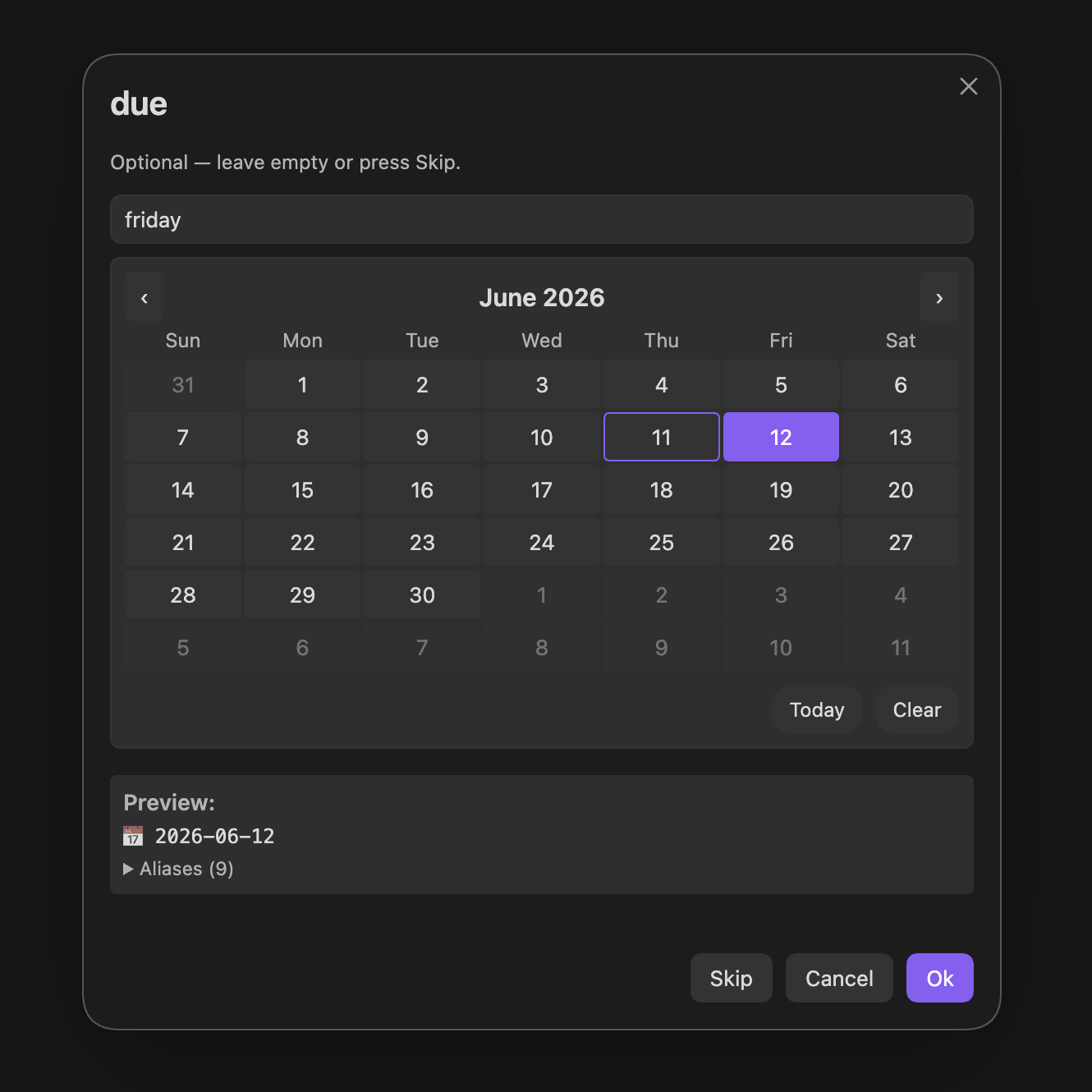
Until now, every {{VALUE}} and {{VDATE}} placeholder forced an answer — annoying when a field just doesn't apply this time (a task with no due date, a sometimes-empty metadata field). Add |optional to any placeholder and the prompt becomes skippable:
- [ ] {{VALUE:task}} {{VDATE:due,[📅 ]YYYY-MM-DD|optional}}Answer the date prompt and you get - [ ] Buy milk 📅 2026-06-14. Press Skip (or just submit empty) and you get - [ ] Buy milk — the 📅 emoji disappears too, because literal text in square brackets inside the date format only renders when the date does.
- Works on
{{VALUE}},{{NAME}}, named variables, option lists ({{VALUE:low,medium,high|optional}}), and{{VDATE}}. - Text, multiline, and date prompts get a Skip button; suggesters skip with
Ctrl/Cmd+Shift+Enter. - In the One-Page Input modal, optional fields show an (optional) badge and optional dropdowns get a "Skip (leave empty)" entry.
- Combine with defaults in any order:
{{VALUE:reminder|call mom|optional}}pre-fills "call mom", and clearing it submits empty. - Skipping never re-prompts later in the run — and
Escstill cancels the whole choice, so "skip this answer" and "abort everything" stay distinct.
Heads-up for one existing pattern:
optionalis now a reserved flag word. If you genuinely want the literal default text "optional", write{{VALUE:x|default:optional}}.
🔍 The choice picker now searches inside your folders
If you organize choices in folders (Multi choices), you no longer have to drill into them. Typing in the picker now fuzzy-matches every nested choice under the current level, with a subtle breadcrumb showing where each result lives — and your query can match path names too, so work meeting finds "New meeting" inside Work / Meetings straight from the root.
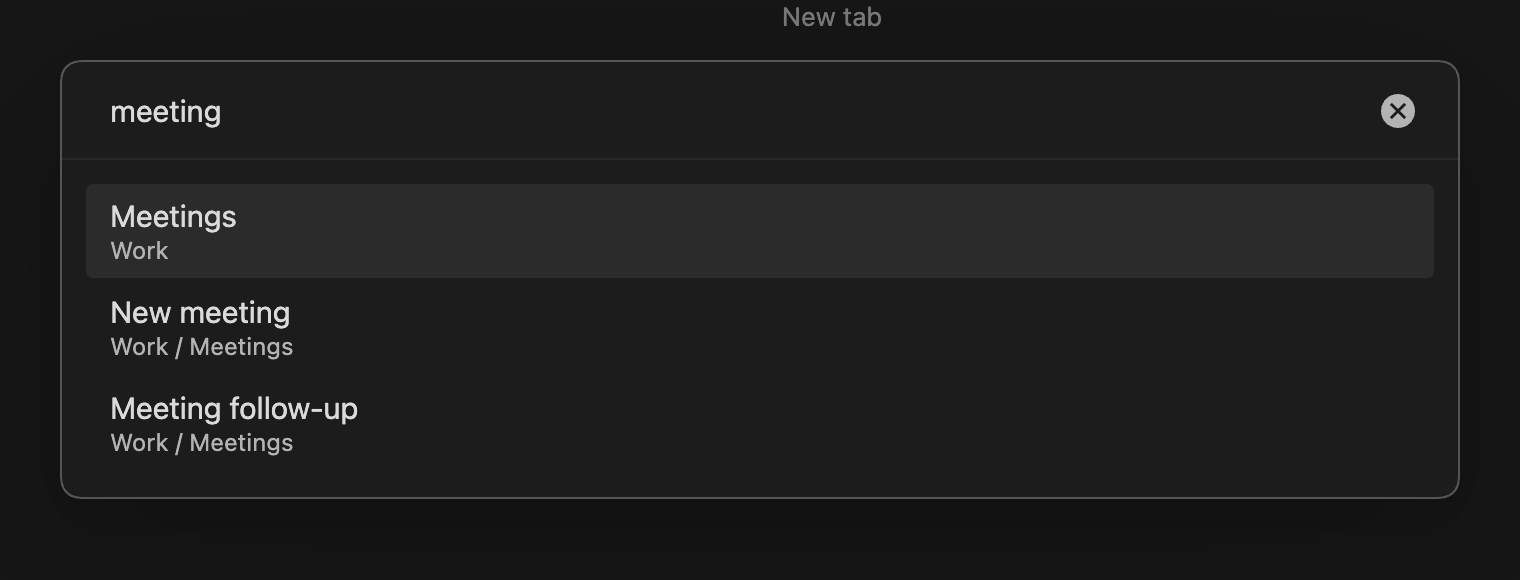
Browsing without typing is unchanged — you still see one level at a time. Prefer the old behavior? Turn off Search nested choices in the settings.
📄 Apply a template to a note that already exists
No more deleting a note and recreating it because you forgot the template. Run the new command "QuickAdd: Apply template to active note" (or right-click a file → Apply QuickAdd template), pick any Template choice or a file from your templates folder…
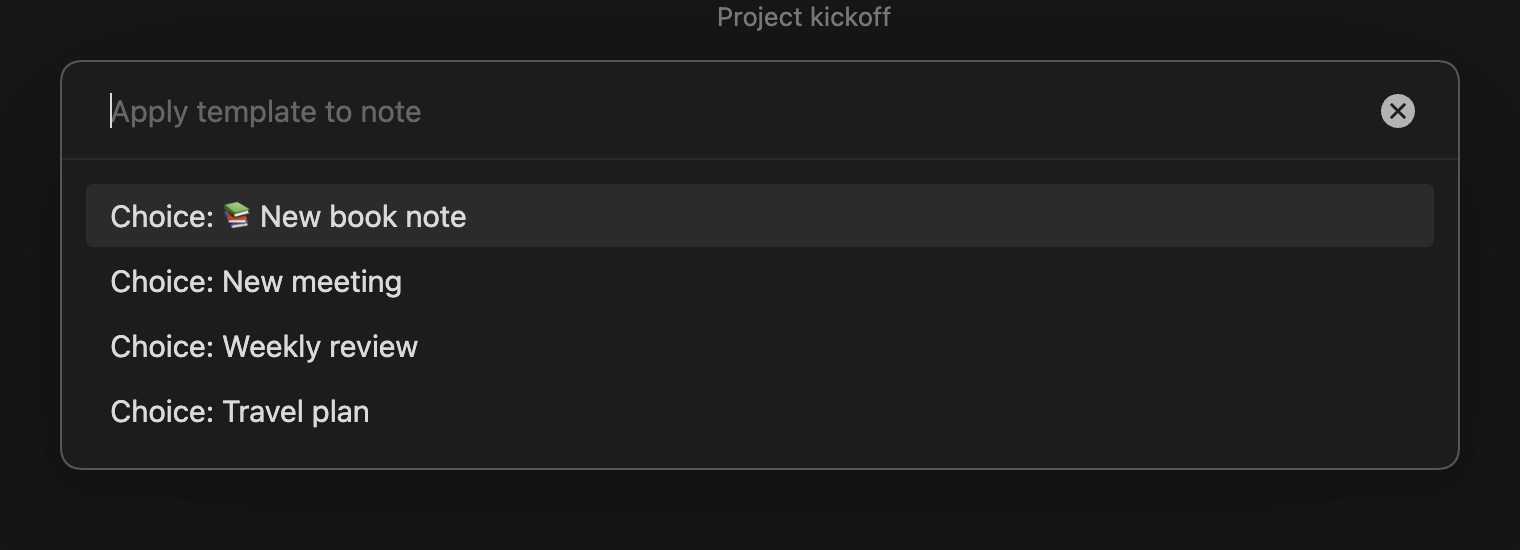
…then choose how to apply it:
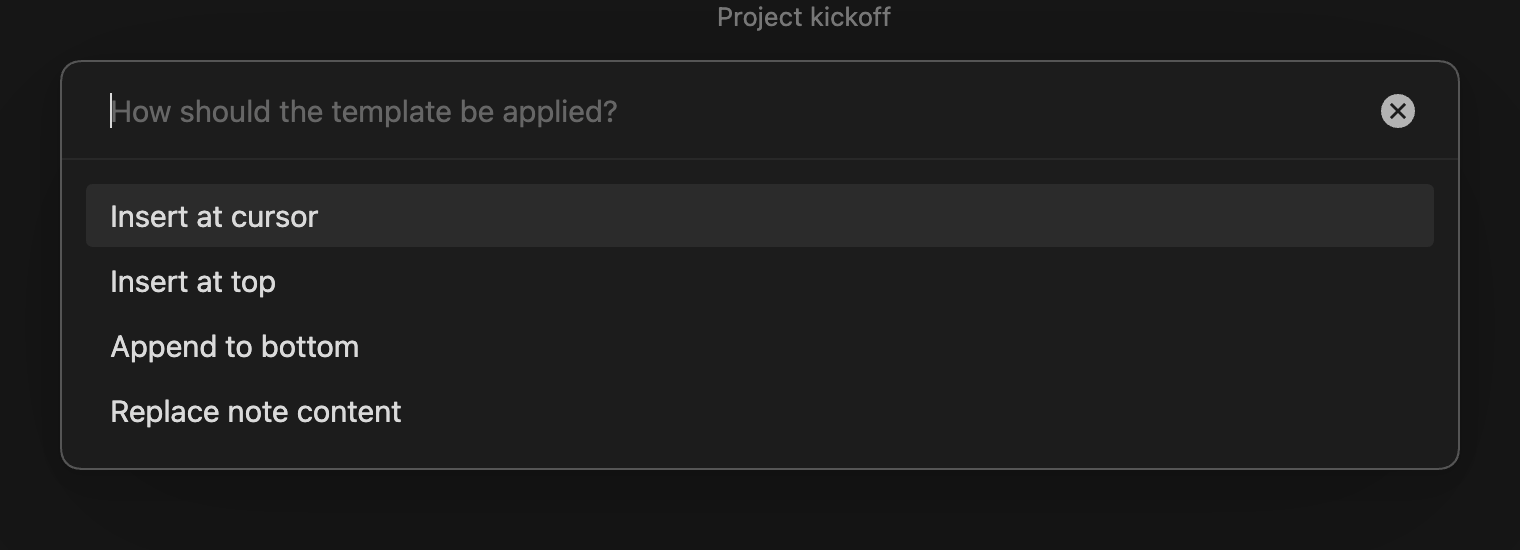
It's smart about the common cases:
- Empty notes skip the "how" question — the template just becomes the content.
{{title}}and the unnamed{{VALUE}}fill in from the note's name instead of prompting.- The template's frontmatter merges into the note's existing properties — your values win, and you never get a duplicate
---block. - If the Template choice normally files notes into a specific folder or name format, QuickAdd offers to move/rename the note to match, updating links automatically.
Script authors get the same power without prompts: await quickAddApi.applyTemplateToActiveFile("templates/meeting.md", { mode: "top" }). (Markdown notes only — canvas and base files are excluded.)
✨ Creating & organizing choices, reworked
The old "type a name next to an unexplained dropdown" flow is gone. New choice opens a menu that tells you what each type actually does, and New folder creates a group directly — "Multi" is now simply called a folder everywhere in the UI (your existing setup is untouched).
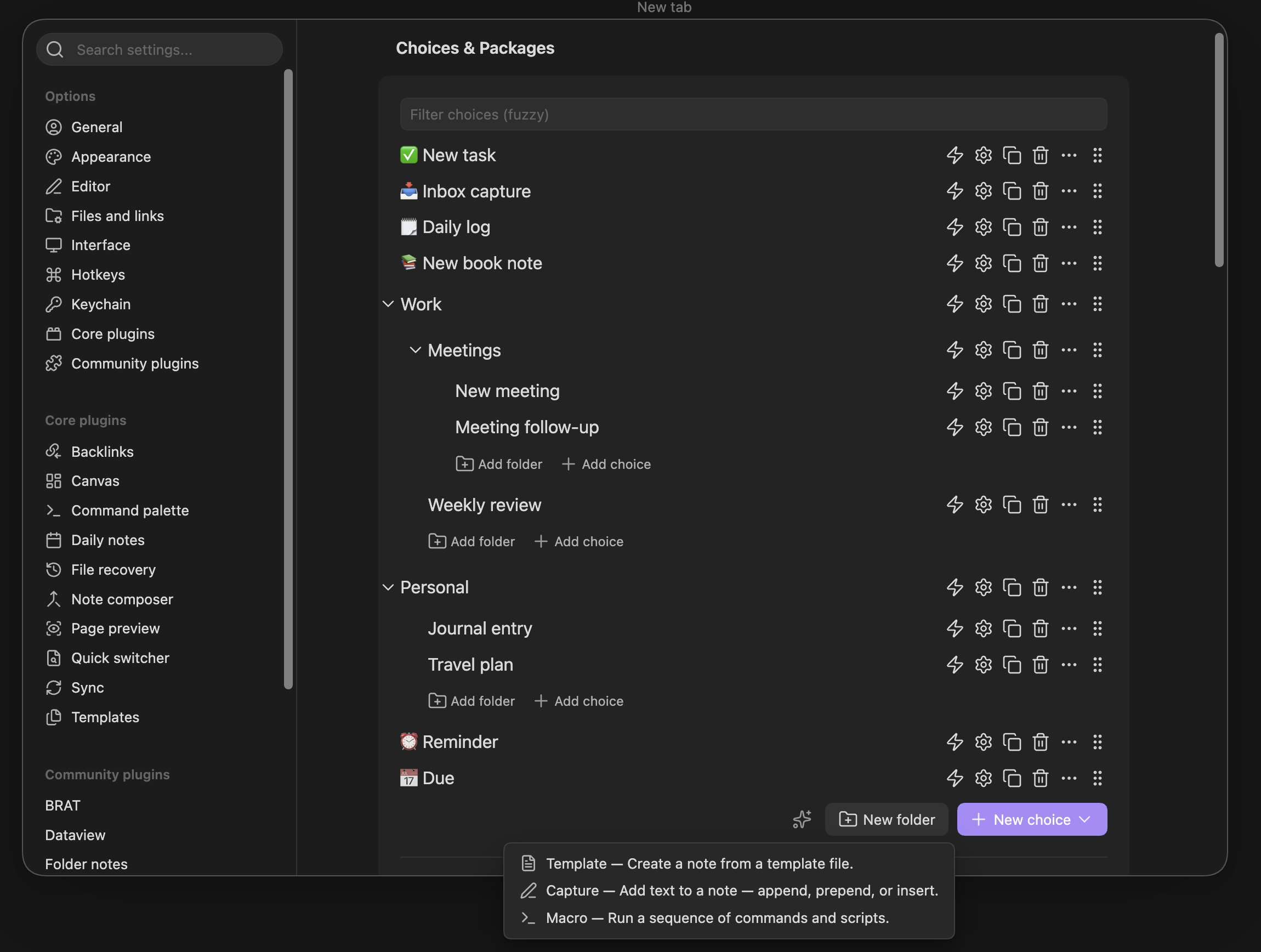
- New choices are auto-named and open their builder immediately — no naming ceremony before you can configure. (Hold
Alt/⌥while picking a type to scaffold several choices quickly without opening the builder.) - Every expanded folder has its own Add choice / Add folder links, so you can create things inside a folder at any depth instead of dragging them in afterwards.
- While dragging, folders light up as drop targets, and empty folders show a hint and a comfortable landing zone.
- Fixed along the way: dragging a choice between the root list and a folder could leave a duplicate behind — choices now land exactly once. Reordering follows your cursor smoothly, folder collapse toggles respond on the first click, and settings writes are batched into one save per change-burst (less churn for synced vaults).
- A fresh install now shows a proper welcome screen instead of an empty list.
🛡️ See exactly what a package will do before you import it
Shared QuickAdd packages can bundle scripts and macros that run with full access to your vault and network. The import screen is now a real security review: a "What this package can do" panel ranks the package's capabilities and names the choice each one comes from.
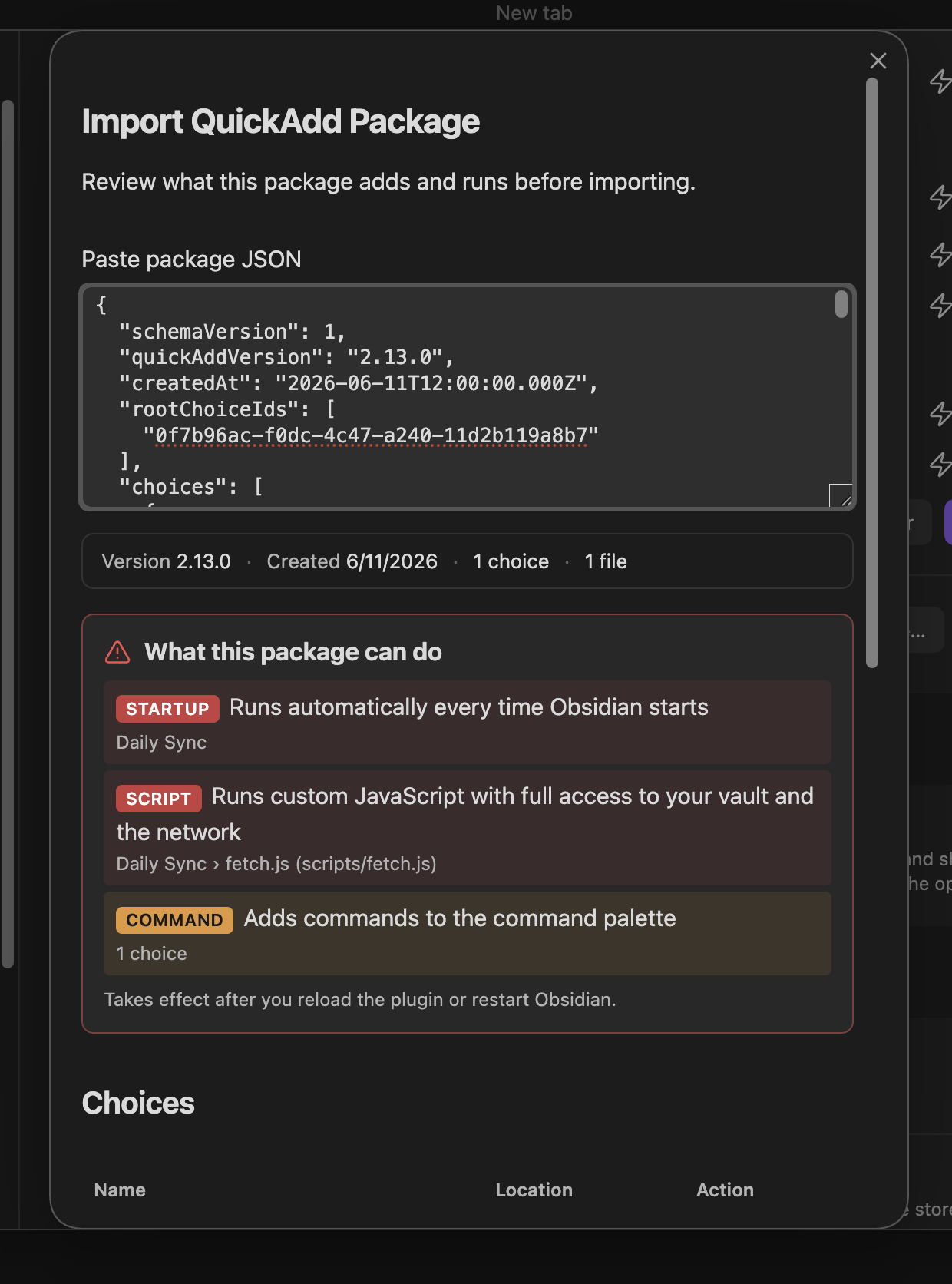
Every bundled file is listed as Added or Will overwrite with a View contents button so you can read it before anything is written. If a package runs code, the Import button stays locked until you've actually opened each executable script and ticked the acknowledgement:
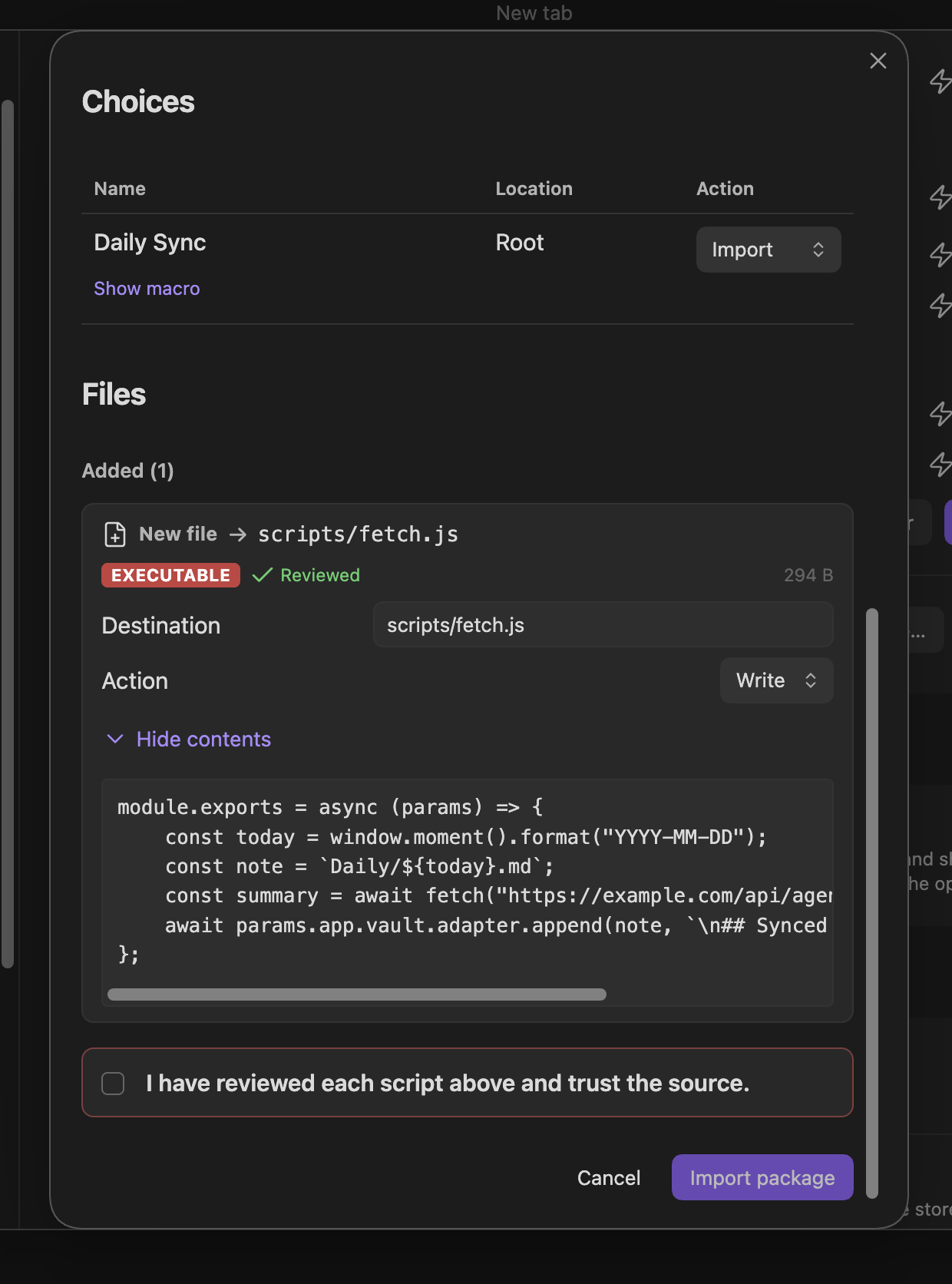
Overwrite detection now also catches files in hidden folders like .obsidian/, which were previously overwritten silently.
📌 Capture: insert before a line
Capture choices have a new "Before line…" write position — the counterpart to "After line…". Perfect for keeping a log section that always grows at the end, just above a closing heading:
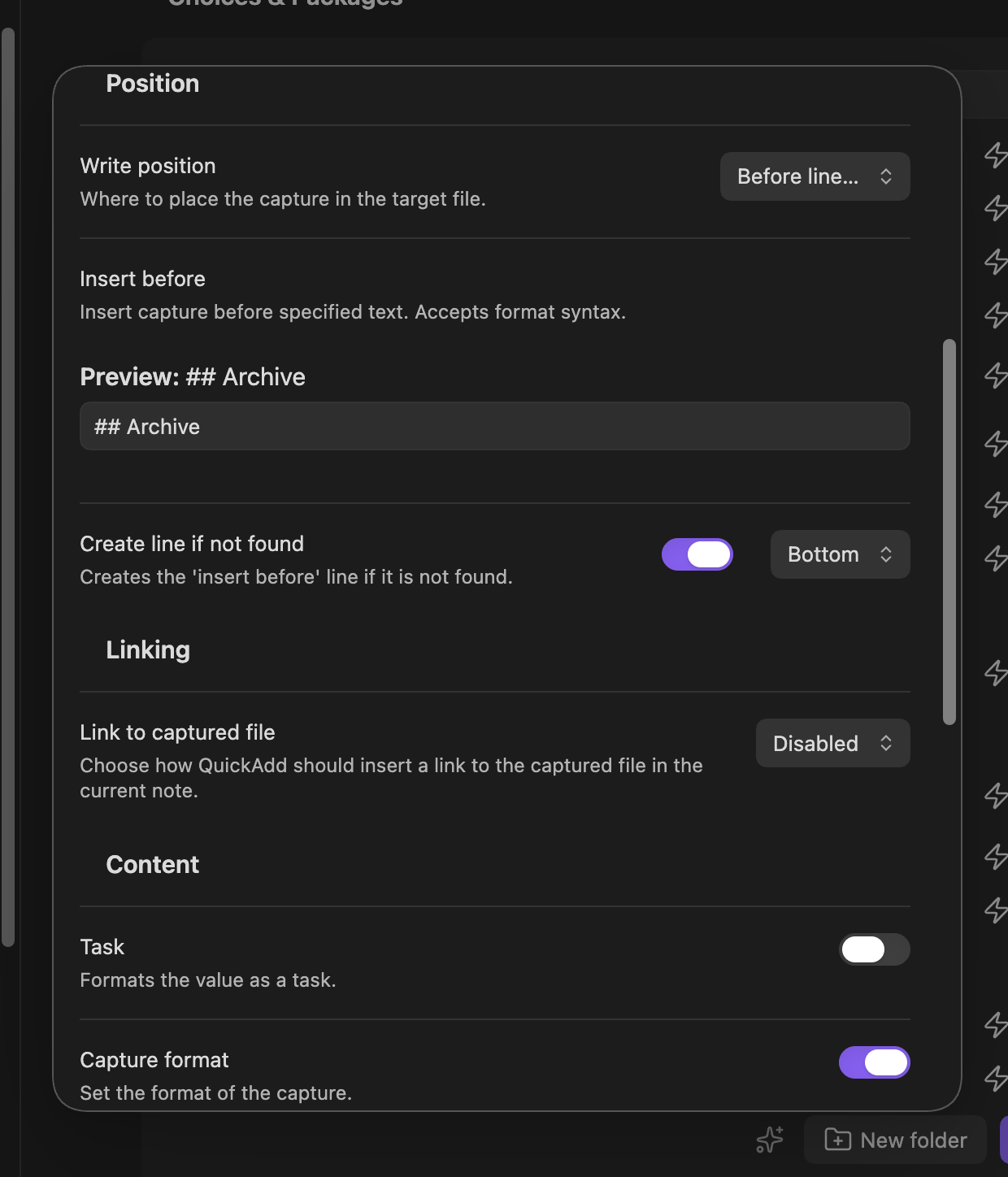
The target accepts format syntax (e.g. {{DATE:YYYY-MM-DD}}) with a live preview, supports Create line if not found, and works in Canvas captures too.
🔎 Settings, keyboard & accessibility
- Settings are now searchable from Obsidian's settings search (the reason for the 1.13 requirement). Type "multi-line" or "capture notification" in the Settings search bar and jump straight to the QuickAdd option. The tab itself is organized under clear group headings.
- Everything works from the keyboard: Tab through a choice row's buttons, press the grip handle and use
ArrowUp/ArrowDownto reorder (same in the macro editor), and open the new ⋮ "More options" menu (Rename, Move to folder) with Enter — previously right-click-only. Buttons carry proper screen-reader labels throughout. - On mobile: long-press to reorder, full-width action buttons, and row actions tucked into the ⋮ menu.
- Also fixed here: dragging a folder nested inside another folder could silently overwrite the parent folder's contents — gone.
🧱 A modern foundation
QuickAdd's entire UI was rewritten on Svelte 5 — deliberately behavior-preserving, so everything looks and works the same, but on a maintained framework that makes future improvements faster and safer. Alongside it, the automated test suite grew substantially (core-logic tests, UI component tests, and a real-Obsidian end-to-end test), so updates are far less likely to break things. If anything behaves differently than in 2.12, please report it.
🐛 Fixes
- Your typed input is no longer lost when a capture or template fails. If a choice errors after you submit a prompt (invalid filename, disk error…), re-running it reopens the prompt with your text already filled in. Drafts clear automatically once the choice succeeds.
- Field suggestions no longer show raw
{{FIELD:...}}tokens — or crash Obsidian. Templates that quote field tokens in frontmatter (needed for links in properties) used to leak the literal token into suggestions; picking it could hang the app. Fixed, resolving long-standing #644. - One-page input no longer asks twice for
{{FIELD:...}}values. Your answer from the form is used directly; the duplicate follow-up prompt is gone. - Macro commands no longer vanish when you drag to reorder them in the macro editor.
- Clicking Yes/No in confirmation dialogs no longer moves your cursor in the editor underneath (affected
yesNoPromptusers and built-in confirmations). - Captures consisting of a single non-breaking space are no longer dropped as empty.
- Duplicating a folder (Multi) keeps all its settings, importing a package from a newer QuickAdd gives a clear "update the plugin" message instead of a generic error, and
utility.getSelectedText()now returns""instead ofundefinedwhen nothing is selected. - AI provider endpoints are matched by hostname instead of URL substring (more accurate, can't be fooled by look-alike URLs), and model browsing now works for the TogetherAI preset.
🧰 For script & template authors
-
inputPrompt/wideInputPromptaccept a new options argument:{ cursorAtEnd: true }places the caret after prefilled text instead of selecting it — great for prefix workflows like starting a tag prompt with#:const tag = await params.quickAddApi.inputPrompt("Add tag", "", "#", { cursorAtEnd: true });
-
Setting a variable to
""from a script now means "answered, empty" for{{VDATE}}(no re-prompt; the old" "workaround still works). -
utility.getSelectedText()always returns a string now — check for""rather thanundefined. -
New API:
applyTemplateToActiveFile(templatePath, { mode })with modescursor,top,bottom,replace.
📚 Full documentation at quickadd.obsidian.guide. Found a bug or have an idea? Open an issue — and if QuickAdd saves you time, consider supporting development ❤️
Full commit-level changelog
2.13.0 (2026-06-11)
Bug Fixes
- ai: match provider endpoints by hostname, not URL substring (#1242) (c48ce52)
- capture: preserve content when file creation fails (#1270) (8e58562)
- choices: bug fixes + polish for the choices view (#1262) (be083db), closes #1257 #1261
- ignore unresolved field tokens in suggestions (#1271) (c374be9)
- keep non-breaking-space-only captures instead of dropping them as empty (#1296) (37a9398), closes #760
- macros: keep commands from vanishing when reordering in the macro editor (#1244) (539605d)
- preserve prompt drafts until choice execution commits (0b08863), closes #1275
- resolve three verified bugs surfaced by the core-logic tests (#1246) (#1247) (d2333fe)
- store one-page FIELD inputs under the runtime FIELD: variable key (#1295) (9ccc86a), closes #1184
- suppress yes/no prompt pointer press (#1273) (d31b8f4)
Features
- a11y: keyboard & ARIA pass on the choice & macro GUIs (#1251) (9247e00)
- api: add cursor option for input prompts (#1272) (f05284e)
- apply template to existing note (#1293) (7f4d35d), closes #526
- capture: add insert-before write position (#1274) (7a6e95f)
- choices: highlight folders as drop targets while dragging + empty-folder hint (#1264) (ff69ce8)
- migrate settings to the Obsidian 1.13 declarative API; raise minAppVersion to 1.13.0 (#1255) (fcb22f6)
- optional / skippable {{VALUE}} / {{VDATE}} prompts (#1297) (e629deb), closes #1259
- packages: capability-review preview for package import (#1287) (ba9cf00)
- rework the add-choice UX — explained types, Multi-as-folder, add-into-folder (#1257) (c02b1ab)
- search nested choices in the choice picker (#1294) (1b84cc3), closes #1185