UI Guide
🏠 Home › UI Guide
A page-by-page tour of CHUB's web interface. Open http://localhost:8000 and follow along.
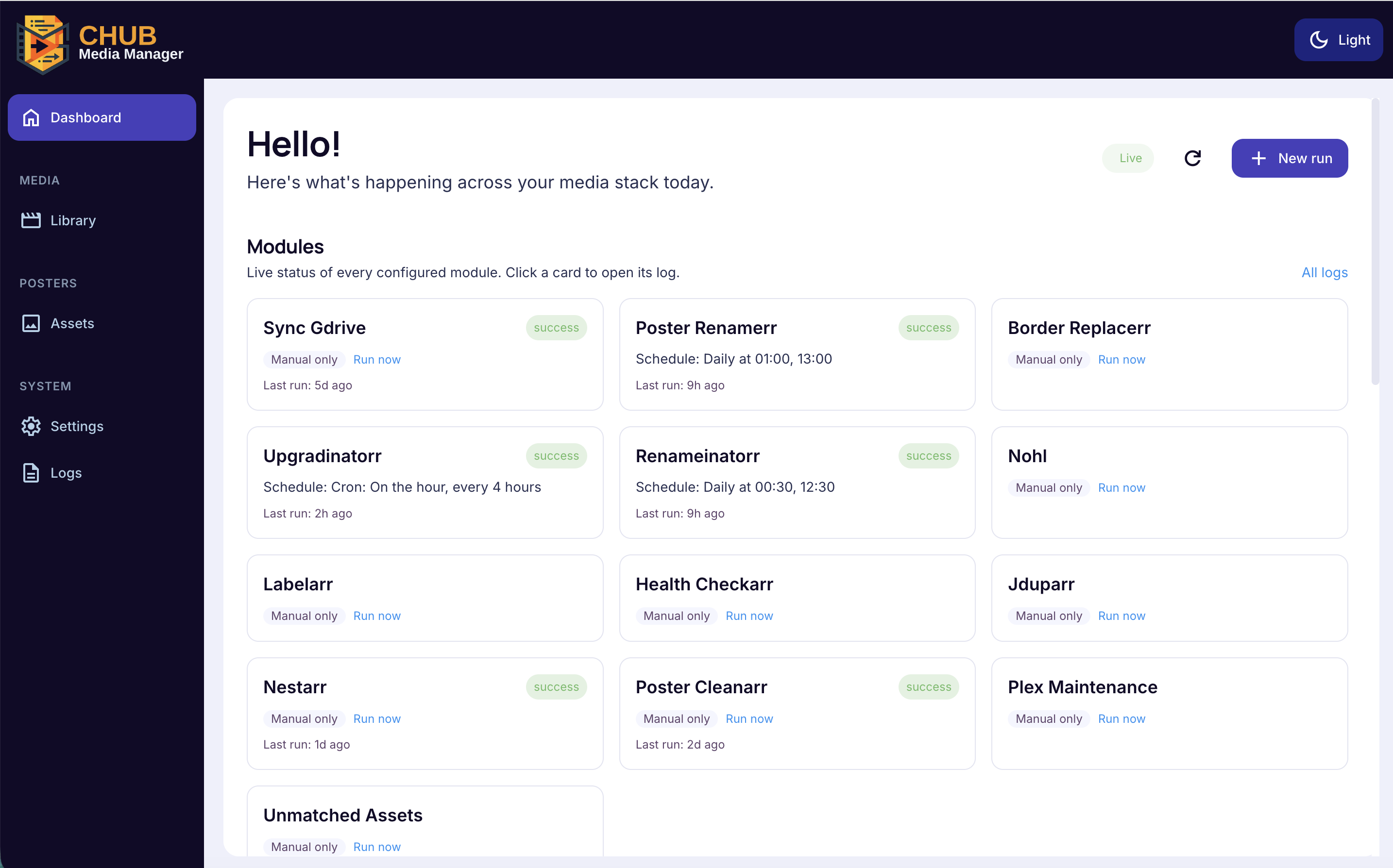
The landing page at /dashboard — answers "is anything running, what ran recently, what's next?"
- Header — greeting, live status dot (green = live updates, amber = polling), and a New run button (module picker).
- Quick-start cards — Run module, Browse media, Browse posters, Find duplicates, Inspect logs. Each deep-links to its page.
- Recent jobs — the four most recent runs with pass/fail; click to open the full log.
- Scheduler callout — which module fires next and when.
- Module status grid — one tile per module (idle, running, queued, error).
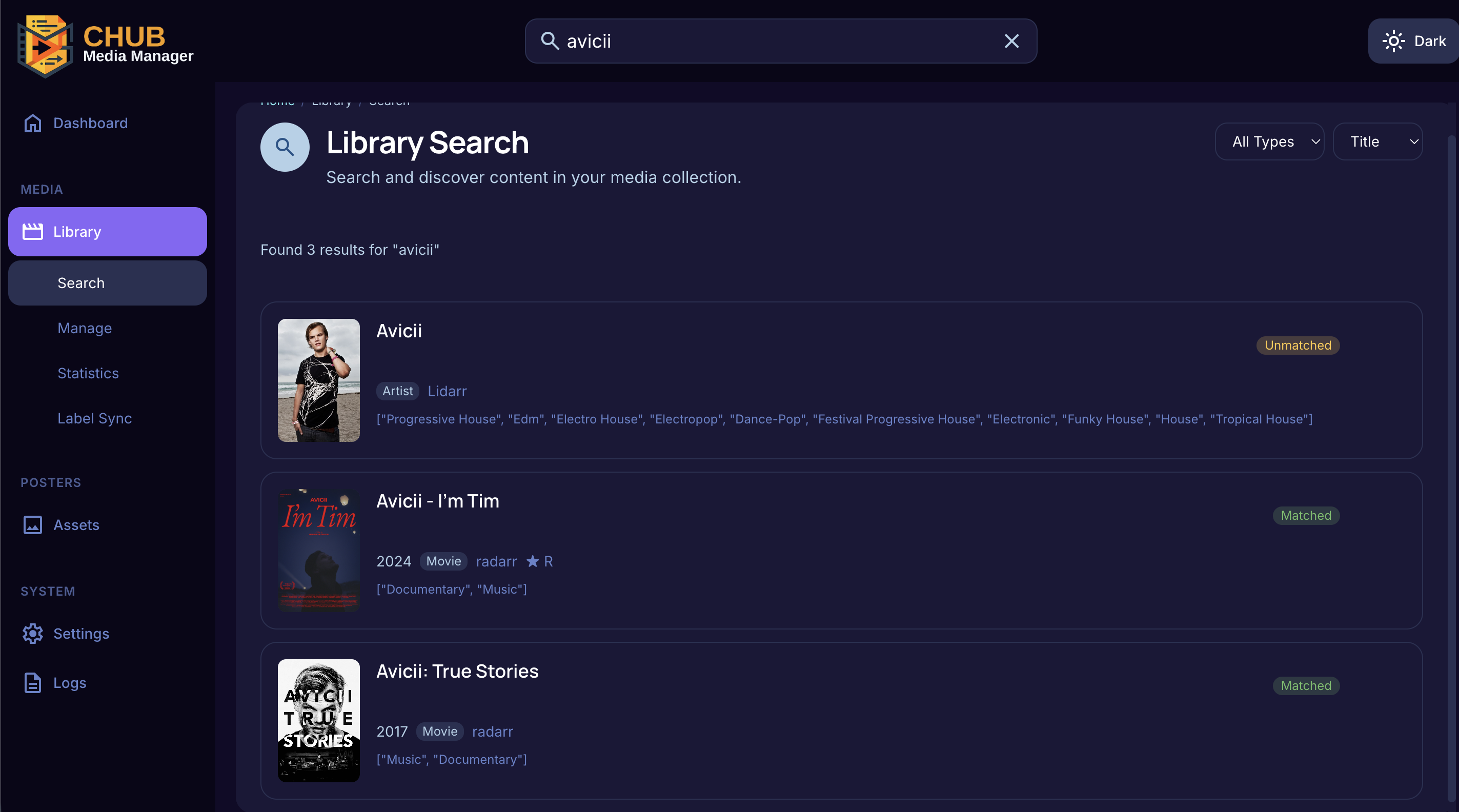
- One search box across every Radarr, Sonarr, and Lidarr instance.
- Right-side filters: type (movie/series/album), sort, order — remembered per browser.
- Recent-search dropdown pulls the last ten queries on this device.
- Click a result to open its detail drawer.
- Inline-edit title, year, status, rating, studio, language, edition, genre; every save logs to edit history.
- Delete button → confirm dialog with optional "also delete files from disk".
- Duplicate-group items show a side-by-side resolution panel: pick the copy to keep, optionally delete the others' files, optionally add an import-list exclusion.
- History tab lists every edit.
- Time-windowed counters: additions, edits, duplicates resolved, low-rating, incomplete-metadata.
- Pick a period via the on-page selector or
?period=7d|30d|90d|all.
- Shows ARR-tag ↔ Plex-label sync state for every mapping in
labelarr.mappings. - Sync now queues a labelarr job immediately.
- Browse everything indexed from your
sync_gdrivesources; filter by title, type, or path.
- Browse what's landed in
destination_dir; filter by low-resolution, recently-added, or type.
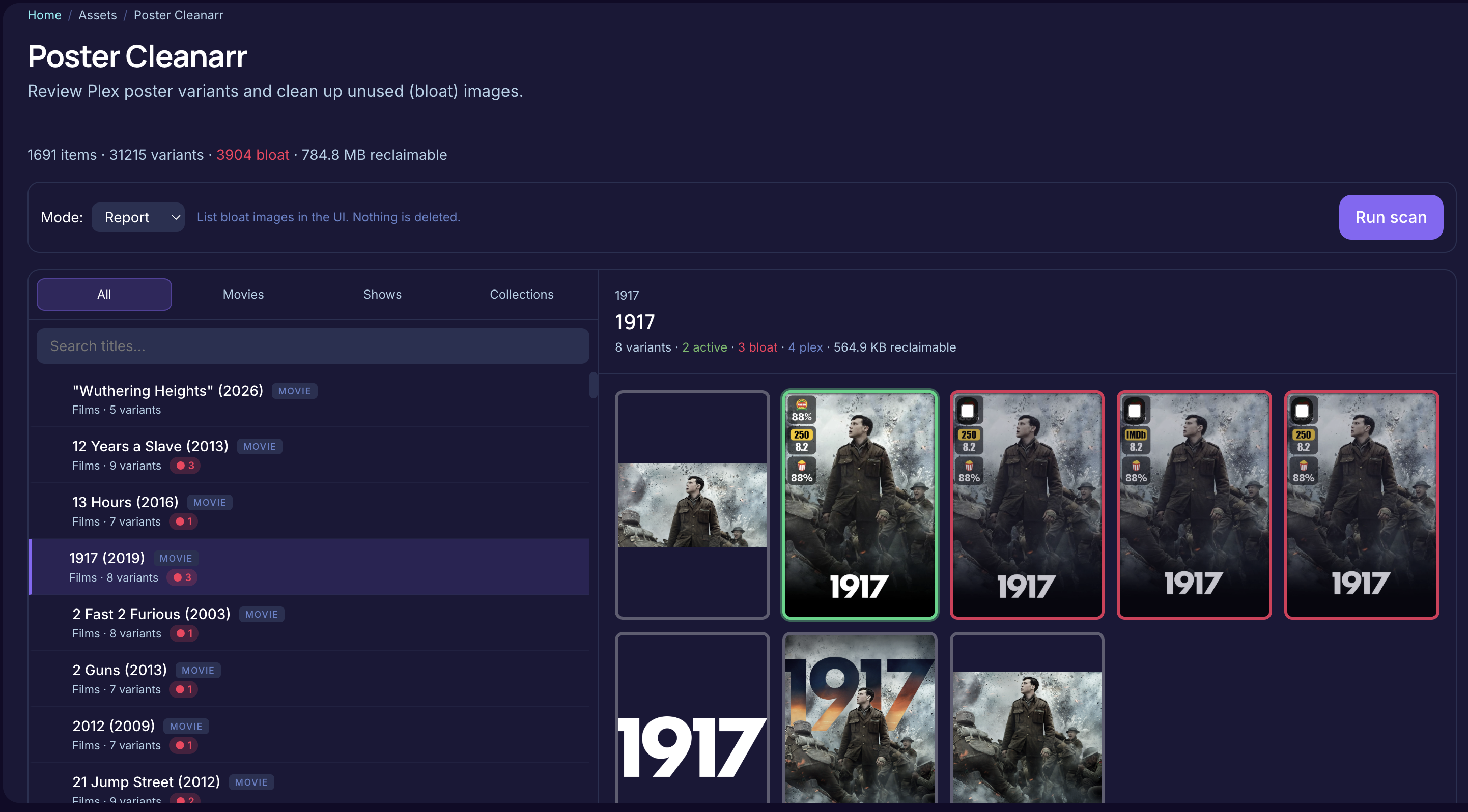
- Master-detail view over Plex's Metadata folder: find poster variants Plex no longer references ("bloat") and reclaim disk.
- Modes: Report (scan only), Move (to a restore folder), Remove (delete).
- Filter by title, type (movies/shows/collections), or search. Click a title to open its variant grid (active / bloat / Plex-referenced color-coded). Run with Run scan.
Pills and legend. Each media card can carry two numbered pills:
- Red ● N bloat — N unused Plex poster variants for that item. Hidden when N = 0.
- Amber ⧉ N stale — N Kometa asset folders whose id matches the item but whose folder name is outdated (stale duplicate). Hidden when N = 0.
A legend below the header explains both symbols. Orphaned asset count (assets with no matching media at all) is shown as a plain text note in the header when non-zero.
Orphaned assets section. When orphaned Kometa assets are detected, a separate collapsible section below the media grid lists each orphaned path, its parsed title, and its size. Orphans are detected via the same GET /api/posters/plex-metadata/kometa-assets-scan read-only scan that populates the stale pills.
Clean-mode checkboxes. Three checkboxes at the top of the run panel let you choose which cleaners fire when you click Run:
-
Bloat (default checked) — Plex metadata bloat pass. When unchecked, bloat mode is sent as
nothingso the job can still run stale/orphan without touching Plex metadata. -
Stale — stale-duplicate asset folder pass. Uses
stale_duplicates_modefrom saved config (or the per-run mode selector). -
Orphan — orphan-asset pass. Uses
orphan_assets_modefrom saved config (or the per-run mode selector).
All three cleaners (in any active combination) run at the chosen report/move/remove mode on every scheduled Poster Cleanarr job as well, controlled by the saved config toggles (stale_duplicates_enabled, orphan_assets_enabled).
/poster/manageis an old bookmark path that redirects here.
- Live preview of
border_replacerron a sample of real posters (2 movies + 2 series + 2 collections by default), original vs. result. -
Holiday dropdown: Default border colors (just
border_colors), Current state (mirrors a real run today), or any configured holiday by name. Selecting re-renders all six. - Refresh picks a fresh sample from the matched-media cache.
- Surfaces the active holiday name and effective
border_width. If the matched-media cache is empty (noposter_renamerrrun yet), the page says so.
- Summary cards: total count, storage used, orphans, duplicates, posters below the resolution threshold.
- Backfill dimensions populates width/height for older posters so the low-res filter works on them.
- Three collapsible tables list unmatched movies, series, and collections, filtered through
unmatched_assets's gates (see Modules → unmatched_assets). Movie/series rows have a Request copy-to-clipboard button (Discord-ready block with title, year, TMDb/TVDb link). Run Unmatched Assets triggers a fresh pass.
Four tabs over each item's match state:
- Unmatched — nothing linked. Each row can be Ignored.
- Needs Review — matched but with a genuine identity conflict. Per row: Choose a poster (picker; applies immediately — copies to destination and pushes to Plex, then locks the row), Approve (accept current match and lock), Ignore.
-
Locked — items you applied or approved; the
user_confirmedlock holds the matcher off. Unlock clears it so the next run can recompute. - Ignored — dismissed items, hidden from the other tabs and persistent across re-scans/ARR re-syncs. Restore un-ignores.
A manual pick or approval sets a
user_confirmedlock the matcher respects. It clears when you apply a different poster, ignore the item, or hit Unlock.
Two cards on one page:
- Interface — theme picker (auto/dark/light); sets the server-wide default, browser remembers its own choice.
-
General — the
generalconfig block: log level, max log files, webhook delay/retries, webhook secret, duplicate exclude groups. Saves immediately.
/settings/interface redirects here (the Interface page was merged in).
- One page per module (including Asset Renamerr), generated from each module's config schema (validated, documented).
- Per page: Run now, a Test button for modules talking to external services (Plex/ARR/GDrive), and a live run-state indicator.
- Each scheduled module shows its cron/interval rule plus next-run time.
- Saving writes
config.yml.scheduleand updates the live scheduler — no restart.
- Manage Radarr, Sonarr, Lidarr, and Plex connections.
- Per instance: Test connectivity, view status, enable/disable without deleting, latest health-probe result. Plex libraries are fetched live. See First Run for connecting instances.
- Discord and Notifiarr config per module, plus an optional
mainentry catchingERROR-level lines from any module. - Template preview shows the notification before saving. See Configuration → notifications.
- Queue view with filters for status, module, and type.
- Per row: retry, view log tail, open full log. Bulk action purges completed jobs older than N days.
- Generated webhook URLs for Sonarr / Radarr / Tautulli, with the secret pre-applied if set.
- Recent origins panel shows which hosts/endpoints fired webhooks in the last 7 days. See Webhooks.
Database statistics and maintenance.
- Four tiles: Total Rows, Database File size, Reclaimable bytes (freed by VACUUM), and applied Schema Migrations count.
-
Database Statistics table — row count per table (
media_cache,poster_cache,plex_media_cache,jobs, …). - Schema Migrations table — every applied one-shot data migration, with timestamps.
-
Maintenance Actions:
- Compact Database (VACUUM) — reclaims space; safe any time, brief write lock.
-
Rebuild Poster Cache — wipes
poster_cache; the nextposter_renamerrrun rescans and repopulates. Use after a code change affecting poster parsing/matching. Confirm modal shows the row count.
Combined log viewer — left rail lists modules, right panel tails the selected module's latest file.
- Level filter (critical/error/warning/info/debug) — pills toggle independently.
-
Hide heartbeat — hides repetitive progress lines marked
[hb](on by default). - Search within buffer — case-insensitive substring, per-line, matches highlighted.
- Auto-scroll toggle and Download full file.
Secrets (API keys, tokens, webhook URLs) are replaced with placeholders before anything is written to disk — log excerpts are safe to paste into issue reports.
- Deep links — every page is URL-addressable; media/poster filters persist per browser.
- Theme — toggle in the header; applies instantly, remembered per device.
- Responsive — below 768px the sidebar collapses to a drawer; grids reduce to one or two columns.
-
Shortcuts —
/→/dashboard,/media→/media/search,/poster→/poster/search/gdrive. Unknown URLs bounce to the dashboard.
Next: Webhooks · Related: Modules, Troubleshooting