Skip to content

Rework Route I/O and Route Window for Randomizer#1154

Merged
chreden merged 38 commits intomasterfrom
issue/1149
Jul 30, 2023
Merged

Rework Route I/O and Route Window for Randomizer#1154
chreden merged 38 commits intomasterfrom
issue/1149

Conversation

@chreden
Copy link
Copy Markdown
Owner

@chreden chreden commented Jun 30, 2023

This started off as adding the route I/O for the Lua bindings but grew to a larger rewrite of the Randomizer integration and the Route window in general. The import and export buttons are now gone, replaced with a menu bar. Routes now keep track of where they were saved and know what type they are so the user doesn't have to repeatedly specify the file to export to.

  • Added RandomizerRoute type which is a collection of waypoints. It swaps the waypoints out when the user changes the opened level. This lets the user use one set of Randomizer locations without having to open it manually for each level.
  • Added menu bar to Route Window
  • Replaced Import with Open
  • Replace Export with Save and Save As
  • Added Reload command
  • Added option to create a new Route or RandomizerRoute in the Route Window
  • Randomizer settings are now only shown for RandomizerRoute
  • Route Window now shows level selection for RandomizerRoute
  • Default route type now depends on whether Randomizer tools are enabled
  • Added Lua bindings for open, save, save_as

Closes #1149
Closes #1155

chreden added 25 commits June 26, 2023 23:08
Next is to allow user to stop popups
#1149
Randomizer import reworked to remove IsInRoomSpace property handling
Create route or rando route with button
Automatically update waypoints when adding waypoints in rando mode
#1155
Save route if filename not set
#1155
Make a save as function for IRoute, call it, delete free standing functions.
#1155
Some code moved to rando route, remove from route
#1155
If randomizer tools are on make the default route a rando route
#1155
@chreden chreden changed the title Issue/1149 Rework Route I/O and Route Window for Randomizer Jul 19, 2023
@chreden chreden added this to the Next milestone Jul 19, 2023
@chreden chreden added the scripting Lua integration label Jul 19, 2023
@chreden chreden marked this pull request as ready for review July 28, 2023 01:12
@chreden chreden requested review from lahm86 and makotocchi July 28, 2023 01:12
@chreden chreden self-assigned this Jul 28, 2023
@makotocchi
Copy link
Copy Markdown
Collaborator

There's a nasty crash that happens when you open a valid route, modify the file to make it invalid and press the reload button. Opening it normally shows an error message, but reloading doesn't, it just crashes. Both buttons should have the error treatment imo.

@lahm86
Copy link
Copy Markdown
Collaborator

lahm86 commented Jul 28, 2023

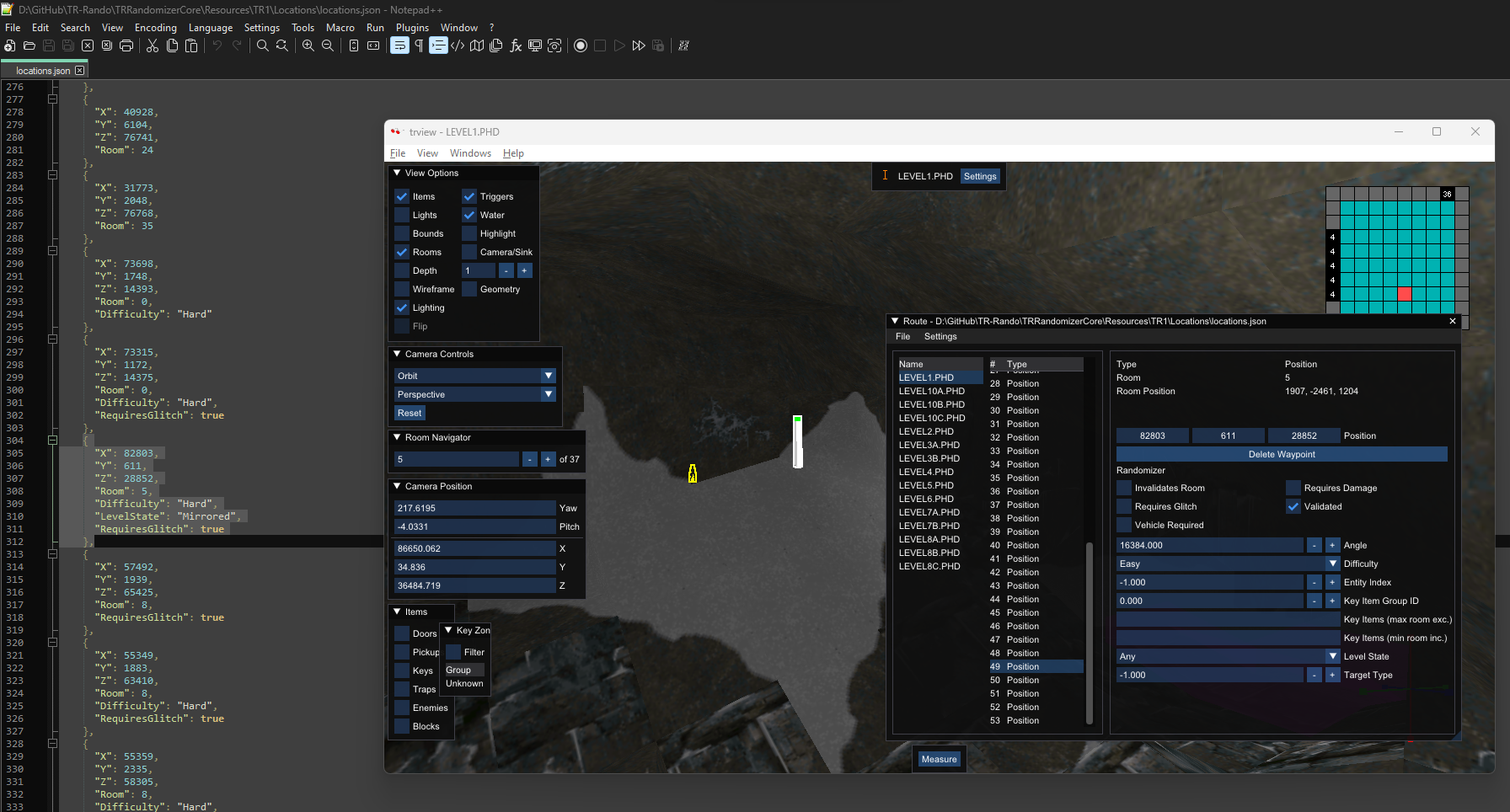
I've noticed that Rando properties don't seem to be retained - here you can see a secret location that should be glitched, mirrored and hard, but the properties aren't set in the UI on load, and if you save the file, the properties are lost.

image

Related files:
https://github.com/LostArtefacts/TR-Rando/blob/master/TRRandomizerCore/Resources/Shared/randomizer.json
https://github.com/LostArtefacts/TR-Rando/blob/master/TRRandomizerCore/Resources/TR1/Locations/locations.json

It's the same if you make a new waypoint, set some properties, save, then reload.

@chreden
Copy link
Copy Markdown
Owner Author

chreden commented Jul 28, 2023

There's a nasty crash that happens when you open a valid route, modify the file to make it invalid and press the reload button. Opening it normally shows an error message, but reloading doesn't, it just crashes. Both buttons should have the error treatment imo.

Missed this when moving from free function to members, will add catches around them, thanks. Will also make it so failed reloads aren't destructive - with the error caught it still clears the route.

I've noticed that Rando properties don't seem to be retained - here you can see a secret location that should be glitched, mirrored and hard, but the properties aren't set in the UI on load, and if you save the file, the properties are lost.

image

Related files: https://github.com/LostArtefacts/TR-Rando/blob/master/TRRandomizerCore/Resources/Shared/randomizer.json https://github.com/LostArtefacts/TR-Rando/blob/master/TRRandomizerCore/Resources/TR1/Locations/locations.json

It's the same if you make a new waypoint, set some properties, save, then reload.

I missed a place where I should just use the returned new waypoint instead of going and getting it, will be fixed when I push again.

Reload route without destroying route before it succeeds
Catch errors when loading
#1155
@lahm86
Copy link
Copy Markdown
Collaborator

lahm86 commented Jul 29, 2023

Properties are looking great now, thank you. The new functionality is fantastic overall, there is just one thing I was wondering about. Currently, the location files are generally ordered level1, level2, level3a etc but on import they get sorted into alphabetical order in the route window. This means if you save again without making any changes, you get a large diff as it outputs in alphabetical order. This isn't a big deal, we could just do a commit in the rando to rebase to alphabetical order for all the files to avoid complicated diffs in the future when we do make actual changes. If it's possible not to sort alphabetically that would be nice, but again, it's not a big issue otherwise.

@chreden
Copy link
Copy Markdown
Owner Author

chreden commented Jul 29, 2023

Properties are looking great now, thank you. The new functionality is fantastic overall, there is just one thing I was wondering about. Currently, the location files are generally ordered level1, level2, level3a etc but on import they get sorted into alphabetical order in the route window. This means if you save again without making any changes, you get a large diff as it outputs in alphabetical order. This isn't a big deal, we could just do a commit in the rando to rebase to alphabetical order for all the files to avoid complicated diffs in the future when we do make actual changes. If it's possible not to sort alphabetically that would be nice, but again, it's not a big issue otherwise.

Yes, I can do that. Will switch json to not be ordered and also keep the waypoints in a vector of vectors instead of a map of vectors. I think I can make the levels orderable too like waypoints are, as I can imagine that would be a problem when adding new ones.

Preserve ordering of JSON elements loaded from file.
Allow levels to be reordered in the route window
#1155
Comment thread doc/lua/route.md Outdated
Comment thread doc/lua/route.md
@chreden chreden merged commit d046b50 into master Jul 30, 2023
@chreden chreden deleted the issue/1149 branch July 30, 2023 18:45
Sign up for free to join this conversation on GitHub. Already have an account? Sign in to comment

Projects

None yet

Development

Successfully merging this pull request may close these issues.

Rework Route window Lua: File IO review

3 participants