GitHub-style orange grass for your Claude Code usage. Reads
~/.claude/projects/**/*.jsonland renders an SVG you can paste into your profile README.
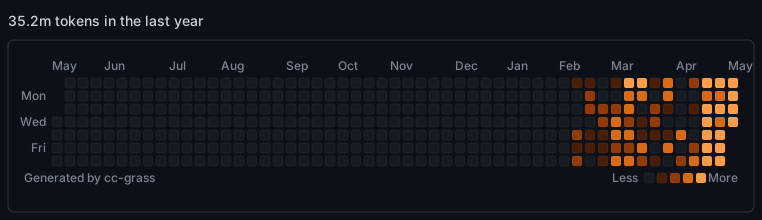
▶ Interactive version (with hover tooltips)
Privacy note: The sample SVG and the interactive page above show real activity from the author's
~/.claude. When you run cc-grass on your own machine, the output reflects your activity (per-day token volume, active hours, what days you took off). Be intentional about where you publish it.
Claude Code already shows you a contribution graph in /usage > Stats — but it stays in your terminal. cc-grass turns that same data into a stand-alone SVG with the exact GitHub contribution graph layout, just with the grass dyed orange. Drop it into your GitHub profile README, your portfolio, anywhere.
- Zero dependencies. Pure
fs/path/os. Noccusage, no API calls. - Cross-platform. Works on macOS, Linux, Windows. Node ≥ 18.
- Just an SVG. No daemons, no schedulers, no GitHub Actions bundled in. You decide how often to run it.
- Pixel-perfect GitHub clone. 10×10 cells, 3px gap, rounded corners, Mon/Wed/Fri labels, monthly headers, Less / More legend.
- Matches
/usage. Token counting follows the same rule (input + output, no cache, no subagents) so the headline number lines up with what Claude Code shows you.
# write to a file
npx cc-grass --output grass.svg

# pipe to stdout
npx cc-grass > grass.svg

# interactive HTML (hover tooltips work in real browsers)
npx cc-grass --html --output grass.html
Then paste into your README:
| Option | Default | Description |
|---|---|---|
--metric <prompts|sessions|tokens> |
tokens |
What to count per day |
--output <path>, -o |
stdout | Write to a file instead of stdout |
--since <YYYY-MM-DD> |
Sunday 52 weeks before --until |
Range start (local time, mirrors GitHub's grid) |
--until <YYYY-MM-DD> |
today | Range end, inclusive |
--theme <dark|light> |
dark |
Color theme |
--header <string> |
auto | Override the headline (34.8m tokens in the last year) |
--claude-dir <path> |
~/.claude |
Override the Claude Code data directory |
--include-subagents |
off | Also count subagent jsonl files (changes the total) |
--html |
off | Wrap the SVG in a minimal HTML page so hover tooltips work |
--version, -v |
— | Print version |
--help, -h |
— | Show help |
# last 30 days only
npx cc-grass --since 2026-04-06 --until 2026-05-06 -o month.svg

# count prompts instead of tokens
npx cc-grass --metric prompts -o prompts.svg

# light theme
npx cc-grass --theme light -o grass-light.svg

# include subagents (will inflate the number)
npx cc-grass --include-subagents -o grass-with-subs.svgEach cell in the SVG has a <title> element with 1,234 tokens on May 6th.. This works in any standalone SVG viewer (open the file directly in a browser) and inside the HTML output (--html). It does not work when the SVG is embedded in a GitHub README — GitHub renders it as <img>, and browsers ignore <title> inside <img>-loaded SVG. This is a fundamental limitation, not a cc-grass bug. The <title> elements are still useful for screen readers and direct viewing.
If hover matters, host the --html output on GitHub Pages and link to it from your README.
cc-grass intentionally does not ship with a scheduler. Pick whatever fits your setup:
# crontab: regenerate every hour and commit if changed
0 * * * * cd ~/profile-repo && npx -y cc-grass -o grass.svg && git add grass.svg && (git diff --cached --quiet || (git commit -m "update grass" && git push))
The (... || (... && ...)) form is intentional. With a flat A && B && C || D chain, bash treats it as ((A && B) && C) || D — meaning a failure anywhere in A, B, or C would still trigger the commit + push. The grouped form ensures git commit && git push only runs when there are real changes, never as a fallback for upstream errors.
Or wire it to a gh workflow_dispatch you trigger from your laptop, or just run it before you commit other things to your profile repo.
tokens per day = sum of message.usage.input_tokens + message.usage.output_tokens for entries with timestamp falling on that day (local time). This matches the headline number Claude Code shows in /usage > Stats > Overview. Cache reads and cache creation are excluded by default; passing --include-subagents adds the subagent jsonl files but that's the only way to deviate from the /usage definition.
For the curious, --metric prompts counts only type:"user" entries whose message.content is a real human prompt (not a tool result), and --metric sessions counts each jsonl file once per day it touched.
import { parseClaudeProjects, renderSvg } from "cc-grass";

// mirrors the CLI default: Sunday 52 weeks before `until`
const until = new Date();
const since = new Date(until);
since.setHours(0, 0, 0, 0);
since.setDate(since.getDate() - since.getDay() - 364);

const data = await parseClaudeProjects({ includeSubagents: false });
const svg = renderSvg({
  buckets: data.buckets,
  metric: "tokens",
  since,
  until,
  total: data.total,
});
console.log(svg);MIT © chuqk