Home
There is no good, free Google Drive sync client for Linux. The KDE Accounts integration barely works, GNOME Online Accounts only mounts files on demand (no offline access), and every other option is either paid (Insync), abandoned, or command-line only. We built Cloud Drive Sync to fix that — a native, open-source desktop app that just works, like what Dropbox and Google Drive offer on Windows and macOS but never bothered to ship for Linux.
It grew into a full multi-cloud sync platform supporting Google Drive, Dropbox, OneDrive, Nextcloud, and Box, running on Linux, macOS, and Windows — with Proton Drive planned for Q2 2026+.
If this project is useful to you, consider supporting it:

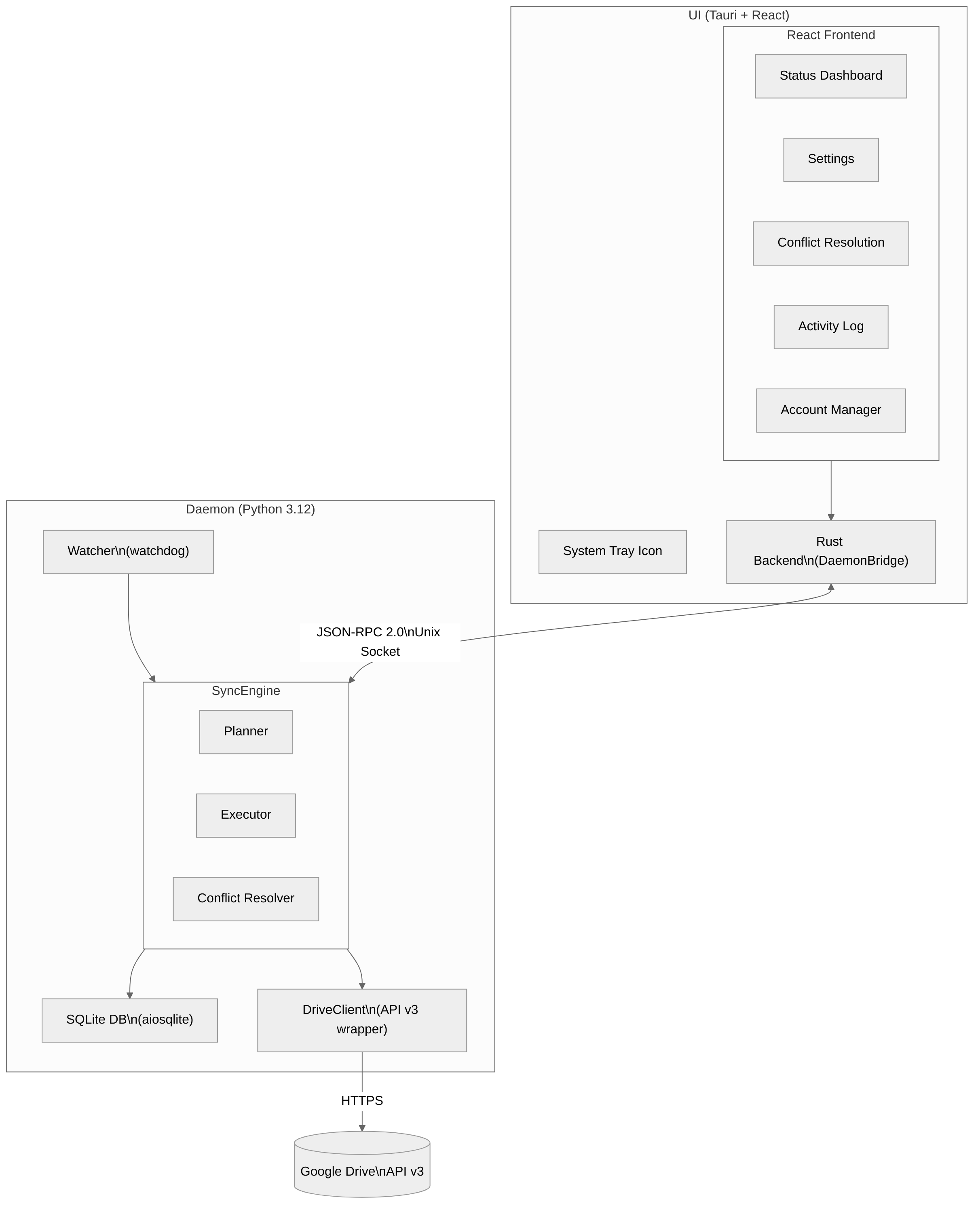
View as Mermaid
graph TB
    subgraph UI["UI (Tauri + React)"]
        direction TB
        subgraph Frontend["React Frontend"]
            StatusDashboard["Status Dashboard"]
            Settings
            ConflictDialog["Conflict Resolution"]
            ActivityLog["Activity Log"]
            AccountManager["Account Manager"]
        end
        Tray["System Tray Icon"]
        RustBackend["Rust Backend\n(DaemonBridge)"]
        Frontend --> RustBackend
    end

    subgraph Daemon["Daemon (Python 3.12)"]
        direction TB
        subgraph SyncEngine
            Planner
            Executor
            ConflictResolver["Conflict Resolver"]
        end
        subgraph Providers["Provider Abstraction"]
            GDrive["Google Drive"]
            Dropbox["Dropbox"]
            OneDrive["OneDrive"]
            Nextcloud["Nextcloud"]
            Box["Box"]
        end
        Watcher["Watcher\n(watchdog)"]
        DB["SQLite DB\n(aiosqlite)"]
        Watcher --> SyncEngine
        SyncEngine --> DB
        SyncEngine --> Providers
    end

    RustBackend <-->|"JSON-RPC 2.0\nUnix Socket"| SyncEngine
    GDrive -->|"HTTPS"| GoogleAPI[("Google Drive\nAPI v3")]
    Dropbox -->|"HTTPS"| DropboxAPI[("Dropbox\nAPI v2")]
    OneDrive -->|"HTTPS"| GraphAPI[("Microsoft\nGraph API")]
    Nextcloud -->|"WebDAV"| NextcloudAPI[("Nextcloud\nServer")]
    Box -->|"HTTPS"| BoxAPI[("Box\nAPI v2")]
Cloud Drive Sync runs in two modes:
| Mode | Description |
|---|---|
| Desktop Mode | Native desktop app (Tauri + React) with system tray, desktop notifications, and visual management of accounts, sync folders, and conflicts. Works on Linux, macOS, and Windows. |
| Headless Mode | Daemon runs standalone — ideal for servers, NAS devices, and Docker containers. Manage via CLI (cloud-drive-sync status), Web UI (http://localhost:8080/), REST API (curl http://localhost:8080/api/status), or an AI assistant over MCP. |
The HTTP server (web UI + REST API) starts with --http-port 8080. Docker containers enable it by default. Headless does not mean CLI-only — the daemon serves the same web UI as the desktop app from its own process, with no separate web server to run.
An MCP server for AI assistants (Claude Desktop, Claude Code, any MCP client) starts with --mcp-port 8081, or CDS_MCP_PORT=8081 in a container. It is off by default and read-only unless you add --mcp-allow-writes, so an assistant can answer "is sync healthy?" or "why hasn't this file uploaded?" without being able to change anything. See MCP Server.
⚠️ Neither the web UI nor the MCP endpoint has authentication, and both bind all interfaces. If you publish either port, read Security first.
What's next: the ordered Feature Queue lists what is being built and in what order — currently a delete fail-safe, an emergency stop control, and a spike on replacing the Nextcloud WebDAV bridge.
Authentication in headless mode works without a local browser — the daemon prints an authorization URL to the console, and you complete sign-in on any device.
- Multi-cloud support — Google Drive, Dropbox, OneDrive, Nextcloud, Box (Proton Drive coming soon)
- Bidirectional sync — uploads local changes and downloads remote changes automatically
- Cross-cloud sync — download from one provider and upload to another (see Cross-Cloud Sync)
- Google Docs conversion — exports Google Docs/Sheets/Slides to .docx/.xlsx/.pptx locally, re-uploads on edit
- Conflict resolution — three strategies: keep both copies, newest wins, or ask the user
- Real-time monitoring — local filesystem watcher (watchdog) + remote change polling
- Desktop notifications — native OS notifications for sync events, conflicts, and errors
- System tray — always-on tray icon with dynamic status indicators (idle, syncing, error, conflict)
- Headless CLI — full management via command line without the GUI
-
Selective sync — per-pair ignore patterns and
.cloud-drive-sync-ignorefiles (gitignore-style) - Shared Drives — full support for Google Workspace Shared Drives (Team Drives)
- Multiple accounts — connect accounts from different providers, bind each sync pair to a specific account
- Hidden file filtering — exclude dotfiles and dot-directories from sync (configurable per pair)
- Multi-pair support — sync multiple local folders to different cloud locations
- Cross-platform — runs natively on Linux, macOS, and Windows
- Native desktop UI — Tauri + React app for configuration and monitoring
- Daemon architecture — runs as a background service (systemd on Linux, sidecar on macOS/Windows)
- XDG compliance — config, data, and runtime files follow the XDG Base Directory spec
- Encrypted credentials — OAuth2 tokens stored encrypted on disk (per-account)
- Demo mode — test the full UI and sync flow without any cloud account
| Provider | Status | Auth Method | Hash Algorithm | Notes |
|---|---|---|---|---|
| Google Drive | ✅ Tested | OAuth 2.0 (browser) | MD5 | Shared Drives, Google Docs conversion |
| Nextcloud | ✅ Tested | App password | MD5 | Self-hosted, WebDAV, ETag polling |
| Dropbox | 🧪 Needs testing | OAuth 2.0 PKCE | Content hash (SHA-256 blocks) | Code complete — community testing welcome |
| OneDrive | 🧪 Needs testing | Azure AD (device code / browser) | QuickXorHash | Code complete — community testing welcome |
| Box | 🧪 Needs testing | OAuth 2.0 | SHA-1 | Code complete — community testing welcome |
| Proton Drive | 🔜 Planned Q2 2026+ | N/A | N/A | No public API yet |
Tested means we actively run it in production and bugs are caught quickly. Needs testing means the provider implementation is complete but has not been validated end-to-end by the maintainers. If you use Dropbox, OneDrive, or Box — please try it and open an issue if anything breaks. Your reports directly improve coverage for everyone.
Pre-built packages (DEB, RPM, AppImage, Flatpak, DMG, MSI) and the Docker image include all providers out of the box — no extra steps needed. If you install from PyPI, providers other than Google Drive require optional dependencies:
pip install cloud-drive-sync[nextcloud]      # includes nc-py-api
pip install cloud-drive-sync[dropbox]        # includes dropbox SDK
pip install cloud-drive-sync[onedrive]       # includes msgraph-sdk + azure-identity
pip install cloud-drive-sync[box]            # includes box-sdk-gen
pip install cloud-drive-sync[all-providers]  # everything at once
Screenshots show the Tauri desktop application.
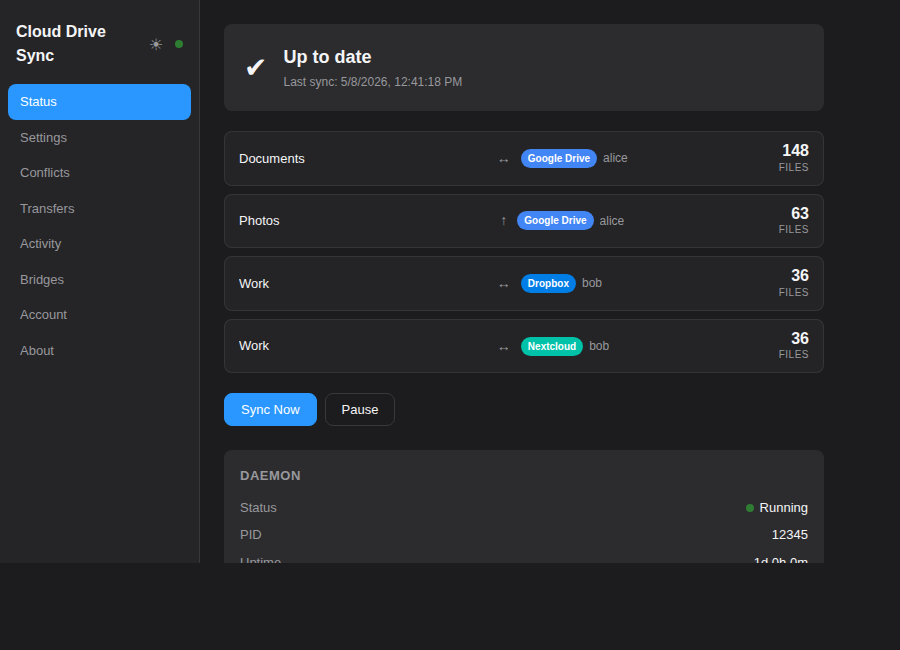
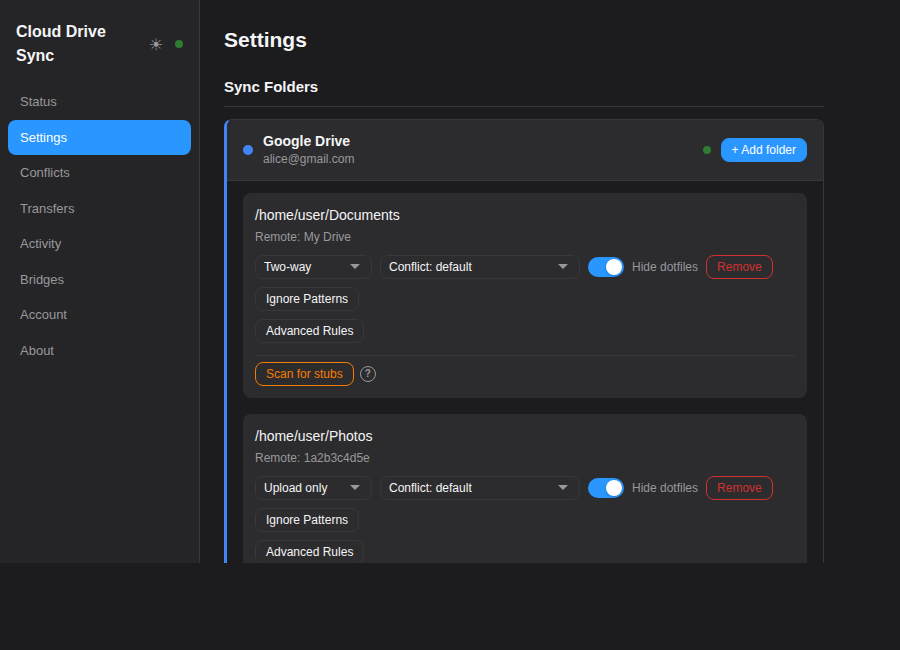
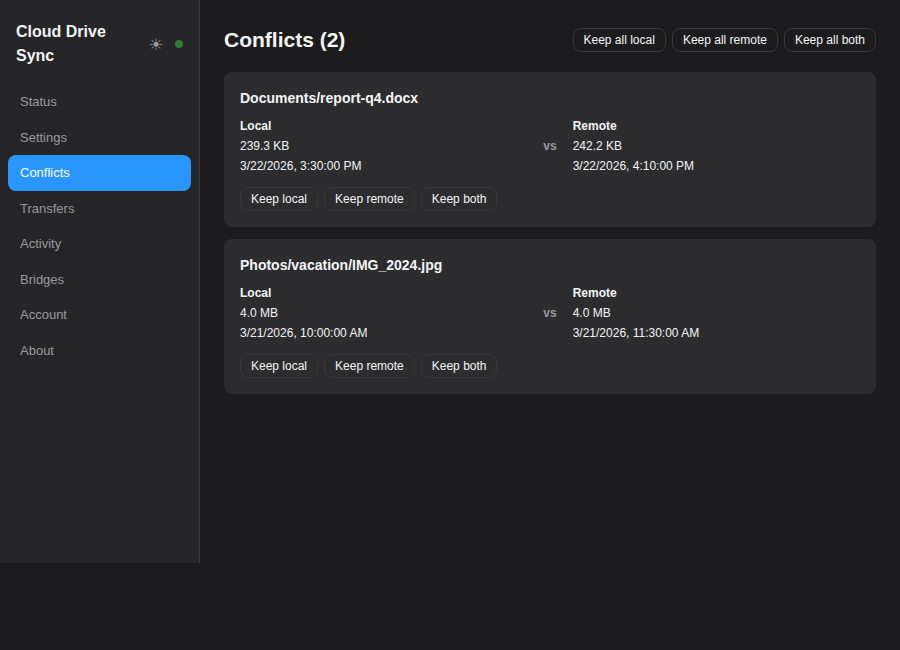
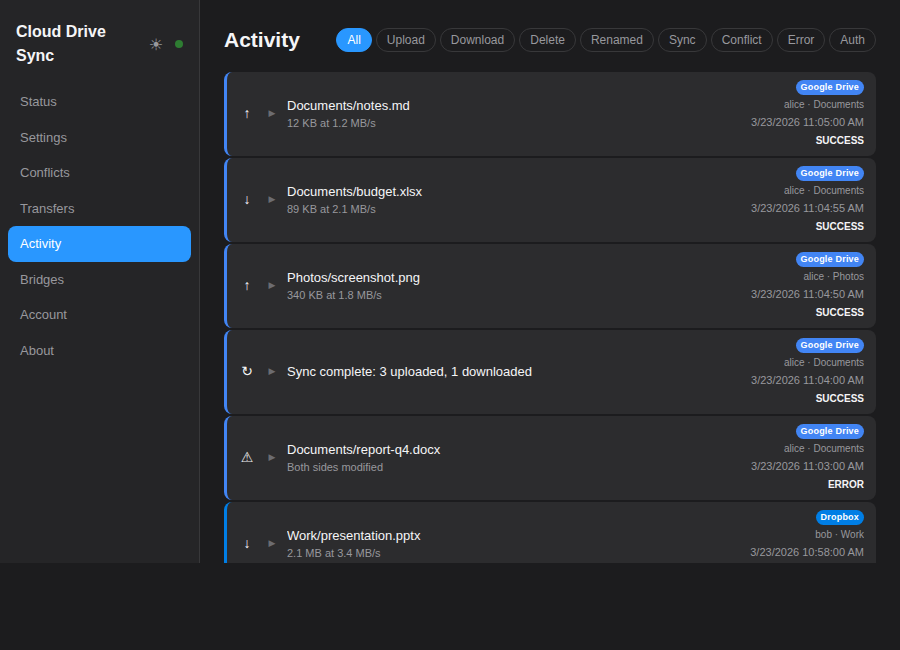
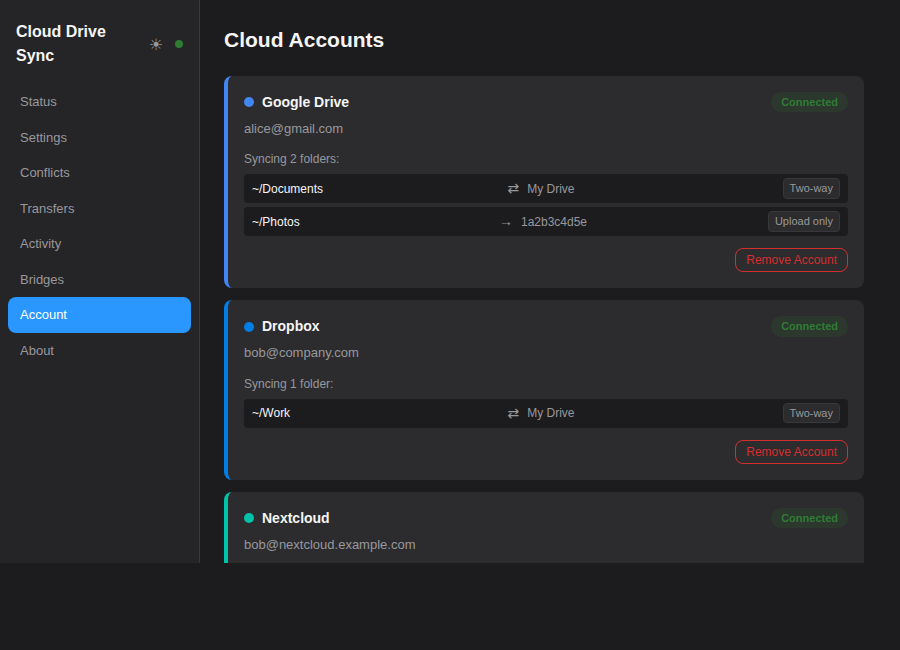
To add screenshots, place PNG files in
https://raw.githubusercontent.com/ciberkids/cloud-drive-sync/main/docs/screenshots/matching the filenames above.
| Guide | Link |
|---|---|
| Install on Linux / macOS / Windows | Installation |
| Run with Docker | Docker |
| Run with Podman Quadlet (servers / NAS) | Quadlet |
| Provider Setup (OAuth, credentials) | Provider Setup |
| Configuration Reference | Configuration |
| Cross-Cloud Sync | Cross-Cloud Sync |
| CLI Reference | CLI |
- CLI Reference — complete command-line interface guide with examples
- Architecture — system design, sync algorithm, database schema
- API Reference — full IPC method documentation with examples
- Daemon — daemon CLI, config reference, demo mode
- UI — Tauri development and build instructions
- Contributing — dev setup, code style, PR process
MIT