Repository navigation
Doors and Code Locks
| Piece | Goes in | Notes |
|---|---|---|
| Door, Door (right-hinged) | Doorway wall, Narrow doorway wall, Door Frame | Has a peephole that you open from inside. It closes by itself after 30 seconds. |
| Double gate | Gateway wall, Double Door Frame | |
| Roll-up garage door | Gateway wall | The slats roll up. Aim anywhere in the opening to open it. |
| Hatch with ladder, Compact hatch with ladder | Floor with hatch, Triangle floor with hatch | The ladder folds down and you can climb it. It doesn't close while someone is on it. |
| Roof hatch, Hatch cover | The same openings | Other lids. The cover has no ladder. |
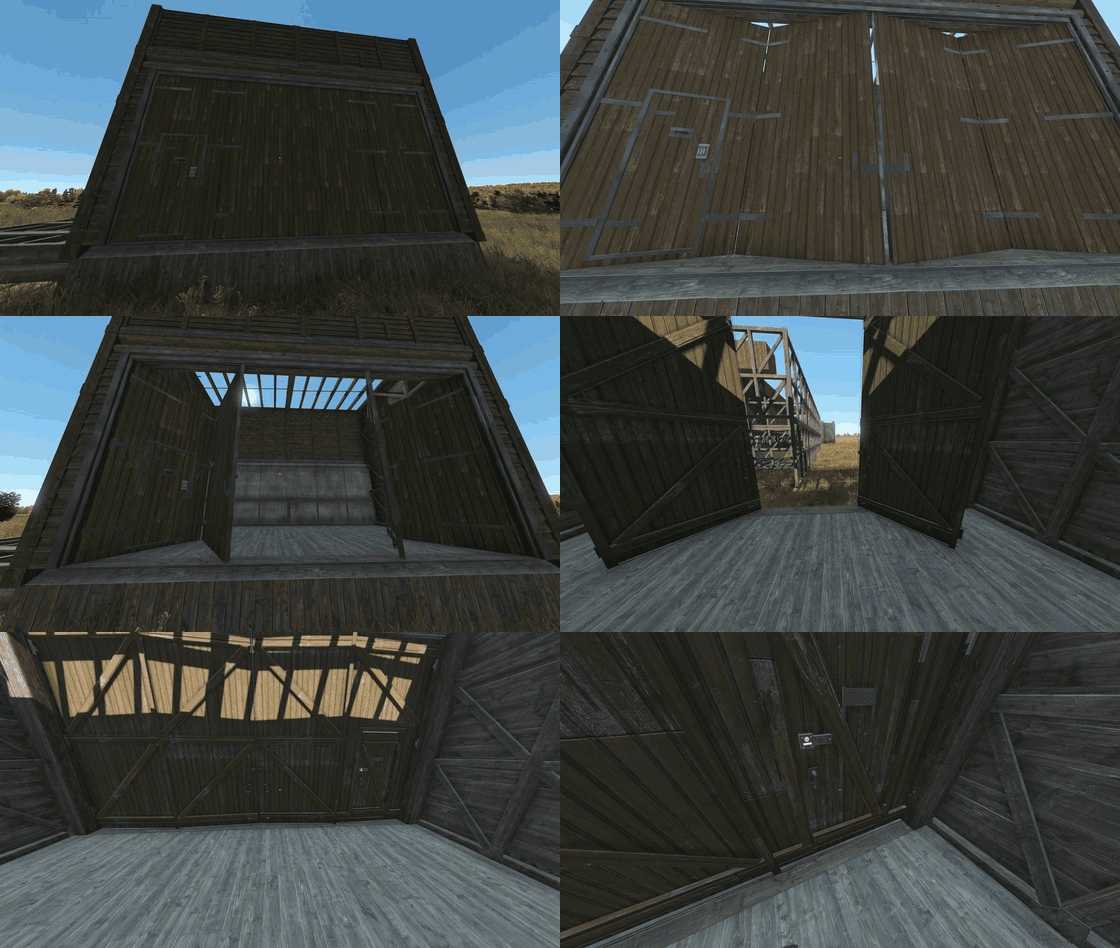
| Hangar door | Hangar wall | Folds inwards and has a wicket door with a peephole. It doesn't close on a vehicle that stands where the leaves fold. |
| Compound gate | Palisade | Two leaves and a wicket door with a peephole. One lock for all of it. |
| Lifting gate | Palisade | Goes up 3.5 m. Aim anywhere in the gateway to open it. |
| Fence gate | Mesh fence | |
| Fake wall, Fake floor | A hidden panel. Only the owner and their territory members can open it. It can't take a lock. |
- When you place a door, R chooses the side it opens to. Later you can change it with a hammer (Reverse door swing). The door must be closed and you must be the owner.
- Doors must be closed to upgrade, rotate or paint them.
- Window covers that open, like shutters, sliding steel shutters and louvred shutters, work like doors.
- Door Frames stand on their own. Put one in the doorway of a map building, or anywhere, and add a door.


In the game: the hangar door, with its wicket door and code lock.
| Piece | How it works |
|---|---|
| Helicopter hangar | The roof opens over the whole hall. Open and close it with the lever inside. When it is open it is 29 m wide, so leave 3 m free on each side. |
| Roof hatch 3 × 3, Roof hatch 4 × 4 | The same opening roof, on the walls of a room of 3 × 3 or 4 × 4 cells. All four sides need walls. Aim at it to open or close it. |
| Folding railing | Raise railing and Lower railing. |
Each door takes one lock. These pieces take a code lock: doors, gates, the garage door, hatches, the compound and lifting gates, the hangar door (on its wicket), the fence gate, and the window covers that open (shutters and sliding steel shutters).
These pieces don't take one: louvred shutters, glass, grilles, embrasure plates, nailed boards, the hangar roof, the roof hatches 3 × 3 and 4 × 4, and the fake wall and floor.

In the game: a concrete door with a code lock.
The controls below use BS Base Building's vanilla code lock integration. It is enabled by default with Pieces.EnableVanillaCodelock set to 1 in <profile>/BS_BaseBuilding/bs_config.json.
| To | Do this |
|---|---|
| Put it on | Hold the code lock and look at the closed door. Choose Place. You need permission to build there. |
| Set the code | Set PIN, with the door closed. |
| Open | Open. If you already entered the right code on this door, it opens. If not, the keypad appears. With the right code the door opens and remembers you. |
| Lock | Closing the door locks it. With a code set, it is always locked. |
| Change it or take it off | With the door open, Reset PIN (only players it remembers). Then Take into hands with empty hands. |
- The code is asked on both sides of the door. Only players it remembers open without the code.
- Upgrading the door keeps the lock, its code and the players it remembers.
- A locked door can't be dismantled. When its hinges break, the door falls open and the lock drops. Its code is erased.
If you use a mod that modifies the vanilla digital code lock, such as LBmaster's code lock mod, set EnableVanillaCodelock to 0 inside the existing Pieces section of bs_config.json:
{
    "Pieces": {
        "EnableVanillaCodelock": 0
    }
}
This is an excerpt: keep the rest of your file and the other settings in Pieces. Restart the server and reconnect clients so they receive the setting.
With 0, BS Base Building stops applying its own vanilla code lock actions, remembered PIN access, automatic locking and other vanilla lock overrides. The other mod handles the lock and needs to support BS doors. Compatibility with LBmaster still needs to be tested with both mods loaded.
Generated configuration files include the setting with a default of 1. Existing files keep their contents; if the key is missing, the integration stays enabled. Add the key manually to disable it. The optional Wardog and Expansion bridges have their own integration and are unaffected by this setting.
You need DayZ Expansion and @BS_BaseBuilding_Expansion on the server and on the clients. See Installation.
| To | Do this |
|---|---|
| Put it on | Hold the Expansion code lock, open the door and use Expansion's attach action. You need permission to build there. |
| Set the code | Set code. |
| Open | Open. Players it knows open it directly. Other players get Expansion's keypad. A closed door is locked, an open door is unlocked. |
| Change the code | Change code, with the door open. Only players it knows. |
| Take it off | With the door open and empty hands, a player it knows holds F for 3 seconds (Remove code lock). |
- Expansion's Unlock, Enter code and Close & lock don't show on BS doors. Open does all of it.
- Upgrading the door keeps the code and the players it knows.
- The code is asked on both sides of the door.
You need the CodeLock mod by RoomService & Wardog and @BS_BaseBuilding_Wardog on the server and on the clients. See Installation. It works like on Wardog's fences, with its own menus.
| To | Do this |
|---|---|
| Put it on | Hold the code lock, look at the door and choose Attach. Then choose the passcode in its menu. The door can be open or closed. You need permission to build there. |
| Set the passcode | Set passcode, if the lock doesn't have one yet. |
| Open | The owner and the guests choose Open locked door, without the passcode. Other players choose Enter passcode. With the right passcode the door opens, and the player becomes a guest, or the owner if the lock had none. |
| Manage it | With the door closed, hold F. The owner gets Manage lock: enter, change the passcode or remove the lock. On a locked lock without an owner, Claim ownership with the passcode. |
- Changing the passcode removes the guests, like in Wardog's mod.
- Upgrading the door keeps the passcode, the owner and the guests.
- When the piece is destroyed or dismantled, the lock drops and its passcode, owner and guests are erased.
- Wardog's admin menu and saw don't work on BS doors. Raid the door as usual.
Tip
Next: Paint Roller and Signs.