Repository navigation
Territory
The mod uses a territory system to decide who can build where, which pieces decay and who gets raid alerts. It can use the territory mod you already have, or its own command cabinet.
- You choose the system with
Territory.Systeminbs_territory.json. It is a number. - The default is
1: the mod's own territory, with the command cabinet. - If you already use Expansion territories or LBmaster plotpoles, set
0(auto) and the mod uses them instead. With0and neither of them, it uses the vanilla flag, only for upkeep. - Players don't need to change anything. The game follows the server.
- Server owners can also limit how many pieces a territory or a player can build, and set raid hours. See Limits and Raid Rules.
Permissions. These actions are checked where the piece is:
- Build, which also covers building in series and blueprint marks.
- Upgrade, which also covers switching the style of a concrete door.
- Repair.
- Dismantle, which also covers Undo.
- Rotate: turning walls and changing the side a door opens to.
- Codelock: putting a lock on a door.
The command cabinet adds Deposit (paying upkeep), Invite and Kick. When an action isn't allowed, the ghost or the action shows the reason.
Upkeep and decay. Pieces inside a maintained territory don't decay, and damaged pieces heal slowly (see Upgrade Repair and Dismantle). Outside, a piece that nobody touches for 72 hours starts to decay. What "maintained" means depends on the system.
Members. The Build view shows your base by territory. Members share blueprint marks, see each other's ghosts and get a Base under attack message when they are online.
Raid history. One line per territory per minute while its pieces are hit or destroyed.
Range. With the Building blueprint or a hammer in your hands, a 3D cage shows the range of your territory.
Two checks come first, whatever system you use:
-
Admin bypass, off by default. With
AdminHammer.IgnoreTerritoryset to1(inbs_admin.json), the admins inAdminHammer.SteamIdsignore territories and no-build zones. -
LBmaster no-build zones. If
<profile>/LBmaster/Config/LBGroup/NoBuildZones.jsonexists and is enabled, Build, Upgrade, Repair and Codelock aren't allowed inside its zones, with any system, even7(no territory). Dismantle and Rotate are still allowed. The file is read again every 60 seconds.
Set it in the Territory section of bs_territory.json and restart:
"Territory": {
    "System": 1
}| Number | System | Needs |
|---|---|---|
0 |
Auto: the loaded system with the highest priority. | Nothing. |
1 (default) |
The mod's own command cabinet. | Nothing. |
2 |
The vanilla territory flag, only for upkeep. | Nothing. |
3 |
Expansion territories. | DayZ Expansion BaseBuilding. |
4 |
LBmaster plotpole flags. | LBmaster Advanced Groups and the Plotpole DLC. |
7 |
No territory. | Nothing. |
-
0tries Expansion first, then LBmaster, then the vanilla flag. It never picks the command cabinet, which is1. -
5and6are for other territory mods that this version doesn't support. A number that isn't in the table works as0and writes a warning in the log. - If you choose a system that isn't loaded, the log shows a warning and there is no territory, so everything is allowed.
- When the server starts,
script_*.logshows a[BS] territory:line with the system in use.
Which one to use:
- You already have Expansion territories or LBmaster plotpoles: set
0. - You have neither and want protection: leave
1. - You have neither and the vanilla flag is enough to stop decay: set
0.
-
Area: a sphere around the flag. Its size is
TerritorySizeinTerritorySettings.json, 150 m by default. Members, ranks and invitations are managed in Expansion. -
Inside a territory: the owner, admins, moderators and members can do every BS action. Other players can't do anything, except Dismantle and Rotate if
DismantleInsideTerritoryis on. Players with Expansion'sExpansion.Territories.Editpermission can do everything. -
Outside all territories:
-
Build and Upgrade need
AllowBuildingWithoutATerritory, orBSBB_BaseinDeployableOutsideATerritory. -
Dismantle needs
DismantleOutsideTerritory, which is off in Expansion by default. - Repair, Codelock and Rotate are allowed.
-
Build and Upgrade need
-
Placing isn't allowed in Expansion safe zones or in
BaseBuilding.Zones, which include the 1000 m trader zones of Market. This works the same as for Expansion's own pieces. - Maintained: inside a territory whose flag is raised.
-
Raid: the mod's history and alert. With
BaseBuildingRaidingon inLogsSettings.json, Expansion's log also gets a line. Expansion's raid schedule doesn't apply to BS pieces. - The
@BS_BaseBuilding_Expansionbridge isn't needed for territory. It is only for Expansion's code lock.
- You need both, and
enablePlotpoleExtensionset to 1 inPlotpoleConfig.json, which is off by default. If it is off, the server logs a warning and runs with no territory. -
Area: a cylinder around the flag. By default
plotpoleRadiusis 30 m, andplotpoleHeightUpandplotpoleHeightDownare 30 m. -
Members: the group that owns the flag. Their rank needs
canDoBasebuilding. LBmaster admins withgroups.build.enemycan build anywhere. -
Rules: LBmaster's own.
-
Build and Upgrade follow its deploy and build rules:
forceDeployingInTerritory,allowDeployInUnclaimedTeritorry,allowBuildInUnclaimedTeritorry,preventUnauthorizedDeployingandpreventUnauthorizedBuilding. With LBmaster's defaults, nobody can place BS pieces outside a flag. - Repair and Codelock follow its build rule.
-
Dismantle and Rotate need the build right and the dismantle rule. The build right is checked even when
preventUnauthorizedDismantlingis 0, so a stranger with a hammer can't dismantle your base.
-
Build and Upgrade follow its deploy and build rules:
-
Maintained: inside a raised flag with
doObjectLifetimeReseton. - Raid: the mod's history and alert, sent to the online members of the group that owns the flag.
- If you have Groups but not the Plotpole DLC,
0(auto) uses the vanilla flag.
- Only for upkeep. BS pieces within 60 m of a raised flag don't decay.
- You can build anywhere. There are no owners, members, raid history or territory marks.
- With a build tool in your hands and a raised flag within 100 m, the cage shows its 60 m radius.
- It doesn't protect anything. See Known limits below.
No territory, no cage and no history. Decay works everywhere and nothing protects a piece.
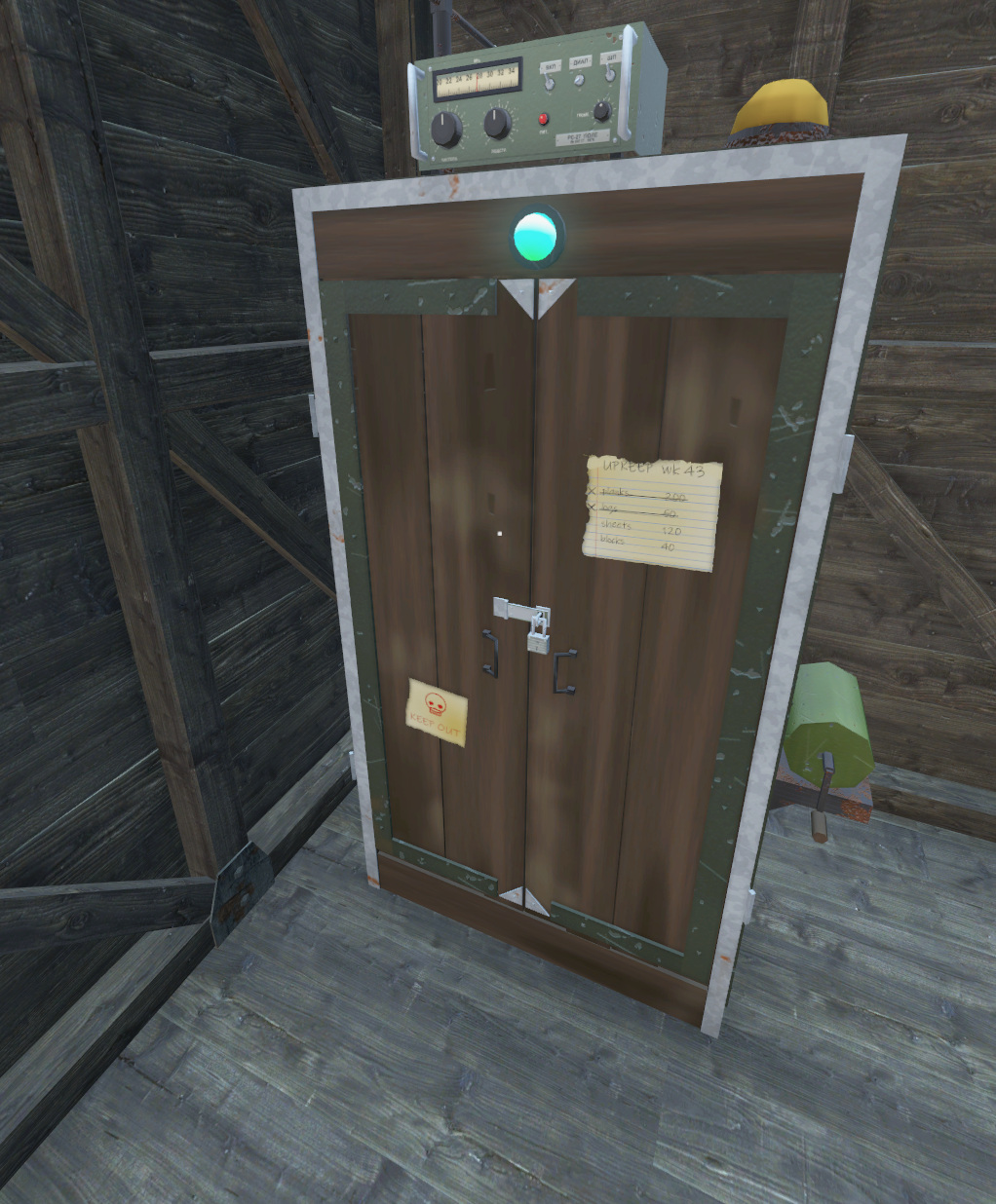
It only works with "System": 1. With another system you can't place it, and cabinets that already exist do nothing (nothing is deleted). A cabinet without an owner, for example one spawned with an admin tool, doesn't make a territory either.
- To place it, hold the Building blueprint, open the wheel with right click, choose Command cabinet in the Foundations ring and left click.
- It stands on the ground or on a floor. Put it inside your base.
- It starts as a hologram, with no area and no permissions. Upgrade it with a hammer to level 1, 2 and 3. The territory starts at level 1.
- You can't place it in a no-build zone, within 100 m of another cabinet (holograms count), if the player already has the maximum number of cabinets, or inside another territory or the ring around it.
- If the cabinet is destroyed or dismantled, the territory ends. It can be raided like any other piece.
| Level | Class | Radius | Upgrade cost | Health | Base upkeep per day |
|---|---|---|---|---|---|
| 1 | BSBB_HQ_T1 |
20 m | 10 planks, 4 metal sheets | 3 000 | 10 points |
| 2 | BSBB_HQ_T2 |
30 m | 6 metal sheets | 6 000 | 20 points |
| 3 | BSBB_HQ_T3 |
40 m | 10 concrete blocks | 9 000 | 30 points |
- Nails and wire are added if your server charges them. With
Pieces.ConcreteRecipeTypeset to2, level 3 costs 4 concrete blocks, 3 cement bags and 2 wire; with1(classic), 3 cement bags, 8 metal sheets and 2 wire. - The territory is a cylinder: the radius above, 40 m up and 15 m down from the cabinet.
| Who | Inside the radius |
|---|---|
| Owner (the player who placed the cabinet) | Everything. |
| Admin of the territory | What AdminCan allows, 1 or 0 for each action. By default, everything. |
| Member | What MemberCan allows, 1 or 0 for each action. By default, everything except Invite and Kick. |
| Other players | Nothing. |
Undo counts as dismantling. If you set Dismantle to 0 for members, they can't undo their own mistakes either.
Outside the radius:
- Dismantle and Rotate aren't checked. By default, only the owner can rotate anyway.
- Build, Upgrade, Repair and Codelock aren't allowed in the 25 m ring around another territory. Farther away they are allowed.
-
Build and Upgrade also need
BSTerritory.AllowBuildOutsideTerritoryset to1.
- The cabinet has a fund of points. Deposit items to add points: 1 per nail, 4 per plank and 8 per metal sheet (
BSTerritory.UpkeepItems). - The daily cost is the level's base cost (10, 20 or 30) plus the upkeep of every BS piece inside. A 4 m wall or foundation costs 0.5, a door 0.2 and the biggest pieces 1.5, at any tier. Holograms, corner posts, wall walk caps, ramps and ladders are free.
- Example: 40 pieces of 4 m (20 points) and a level 1 cabinet (10 points) cost 30 points a day. That is 30 nails, 8 planks or 4 metal sheets.
- The fund goes down in real time while the server runs, not while it is off. It holds up to 14 days of cost.
- To pay, hold the item, look at the cabinet and choose Pay upkeep. Only what fits is taken, and the rest stays in your hand.
-
Storage. Levels 1 to 3 have a 10 × 20 inventory. Look at the cabinet and open your inventory.
- It only takes upkeep items, and only players who can Deposit can see and use it.
- When the fund has less than 1 day left, the server takes what it needs from the storage to get back to 1 day. It checks every minute and right after the inventory changes.
- The Territory tab counts what is stored: Days left: 12.6 (10.5 in the cabinet), and a lighter part of the bar after the fund.
- A broken cabinet drops half of each item, and the rest is lost. A dismantled one drops everything. An upgrade keeps it.
-
Maintained means level 1 or higher, not destroyed, and a fund above 0. While it is maintained, BS pieces inside don't decay, and vanilla tents, barrels and other items in the radius don't despawn (
ResetLifetimeInRadius). - Without upkeep the territory still gives permissions, but its pieces decay like anywhere else.
- The lamp on the cabinet is green when it is maintained and red when it isn't. At level 3, an amber beacon turns on for 5 minutes after a raid.
Open the Build view (Numpad 7) and go to the Territory tab. With 1 (the command cabinet) it has the Summary, Members and Rules tabs, plus an Admin tab for server admins. With other systems it only has Rules (see Limits and Raid Rules).
- Summary: owner, your role, level and radius, whether it is maintained, days left, the fund, the daily cost, which items pay, and the raid history, newest first. If you have an invitation, it shows at the top with Accept and Decline. Players who aren't members only see the level, the radius and the owner.
- Members: the list of members, with a dot for the ones online, and the buttons your role allows: Kick, Make admin or Make member, Hand over and Leave territory. With Hand over, the new owner gets the territory and the old owner stays as admin. Kick, Hand over and Leave ask you to click twice.
- Inviting: the players within 10 m, with Invite. The invited player gets a message with Accept and Decline. It expires after 60 seconds.
-
MaxMemberscounts the owner. The owner can't be kicked and can't leave without handing over first. Only the owner can kick an admin or change roles. - Messages like "X joined the territory" or "Your territory ended" arrive as notifications.
- Server admins are the Steam64 ids in
AdminHammer.SteamIds. - In the Territory tab they have an Admin tab with every territory, 25 per page, and a View button.
- On any territory they can kick and change roles, set another owner, fill or empty the fund, clear the raid history and delete the territory. Deleting the territory also deletes the cabinet.
- Every admin change writes a line in the server log.
- If the cabinet is destroyed, the territory ends right away. If it is dismantled or removed, it ends after 3 to 8 seconds, unless another cabinet takes its place.
- Online members get a message, the territory file is archived and the pieces stay, without protection and with decay.
- Shutting down or restarting the server doesn't end territories.
-
<profile>/BS_BaseBuilding/territories/bs_<n>.json: one file per cabinet, with the owner, level, position, fund, members and raid history. It is saved a few seconds after a change, and the fund every 5 minutes. Ids are never used twice (counter.json). -
territories/deleted/: copies of territories that ended. - Two minutes after the server starts, a file whose cabinet can't be found is moved to
deleted/. If you wipe the persistence, the territory files are archived. - Stop the server before you edit a file by hand.
All territory keys are in Configuration Reference, in the Territory, BSTerritory and AdminHammer sections. types_bs.xml already has the three BSBB_HQ_* entries.
With any system
- Outside territories nobody owns pieces. With
7(no territory), with the vanilla flag, or outside all territories and their rings, any player can upgrade, repair and dismantle a piece. Code locks still keep doors shut, and only the owner can rotate (Pieces.RotateOwnerOnly). A territory is what protects a base. - The ghost is only a hint. Each player gets up to 32 territories and 16 no-build zones within 150 m, or the 6 closest raised flags with the vanilla flag. The server always decides, so a green ghost can still be refused.
- The 3D cage only shows your own territory. Its height is fixed, from about 3 m below to 34 m above the cabinet, and it shows up to 40 m outside the radius.
Command cabinet
- A new cabinet doesn't check the pieces of other players that are already there. Those pieces end up inside someone else's territory, and the player who built them can't upgrade, repair or dismantle them anymore.
- If the cabinet is raided, the territory ends.
DayZ Expansion
-
DismantleOutsideTerritoryis off in Expansion by default. Outside all territories nobody can dismantle BS pieces, and Undo doesn't work either. The game still offers the action, and the server refuses it ("you cannot dismantle outside a territory"). Turn it on inBaseBuildingSettings.jsonif you want it. - Only the server knows the safe zones and
BaseBuilding.Zones. The ghost can be green and the server can still refuse. - Expansion's lists are checked with the class
BSBB_Base. An entry with a specific BS class is ignored. - Only Expansion territories count as maintained. A raised flag without a territory doesn't stop decay.
LBmaster
- In a few cases the ghost can differ from the server. LBmaster decides by the closest flag, while the ghost uses the flag that contains the point. Values in
PlotpoleConfig.jsonthat aren't the default are not predicted.
Memory
- With a very long mod list, the game can run out of script memory. If the log shows
Out of static buffer memory, report it. See Support and License.
| Message | Meaning |
|---|---|
| no-build zone | Inside an LBmaster no-build zone. |
| someone else's territory | Inside another group's territory. |
| too close to someone else's territory | In the ring around it: 25 m for the command cabinet, 5 m for LBmaster. |
| you can only build inside your territory | Building outside territories is turned off (AllowBuildOutsideTerritory, LBmaster forceDeployingInTerritory or Expansion AllowBuildingWithoutATerritory). |
| your territory rank does not allow it | That member or admin doesn't have the action (MemberCan, AdminCan or LBmaster canDoBasebuilding). |
| you cannot dismantle outside a territory | Expansion's DismantleOutsideTerritory is off. |
| safe zone, outside the build zones | Expansion rules. |
| this server does not use the BS territory | A command cabinet, while Territory.System isn't 1. |
| another command cabinet N m away (minimum M m) | Two cabinets are too close. |
| you already own N command cabinets (maximum M) | The player has the maximum number of cabinets. |
Tip
Next: Raiding.