In the context of Cleo Harmony, containerization refers to packaging Harmony services into lightweight, portable containers using Docker and orchestrated via Kubernetes or another platform, resulting in faster deployments and scalable infrastructure.
This document outlines requirements, and containerization-specific platform instructions.
Note
Currently, the only supported containerization platform is Kubernetes. See the kubernetes directory for detailed deployment documentation.
Before you deploy Harmony in a containerized environment, certain requirements must be met to ensure that the system is properly licensed, has access to necessary configuration and runtime resources, and can operate properly in your environment.
A Harmony Enterprise license is required when running the product within containers. Please contact your Cleo sales representative for more information.
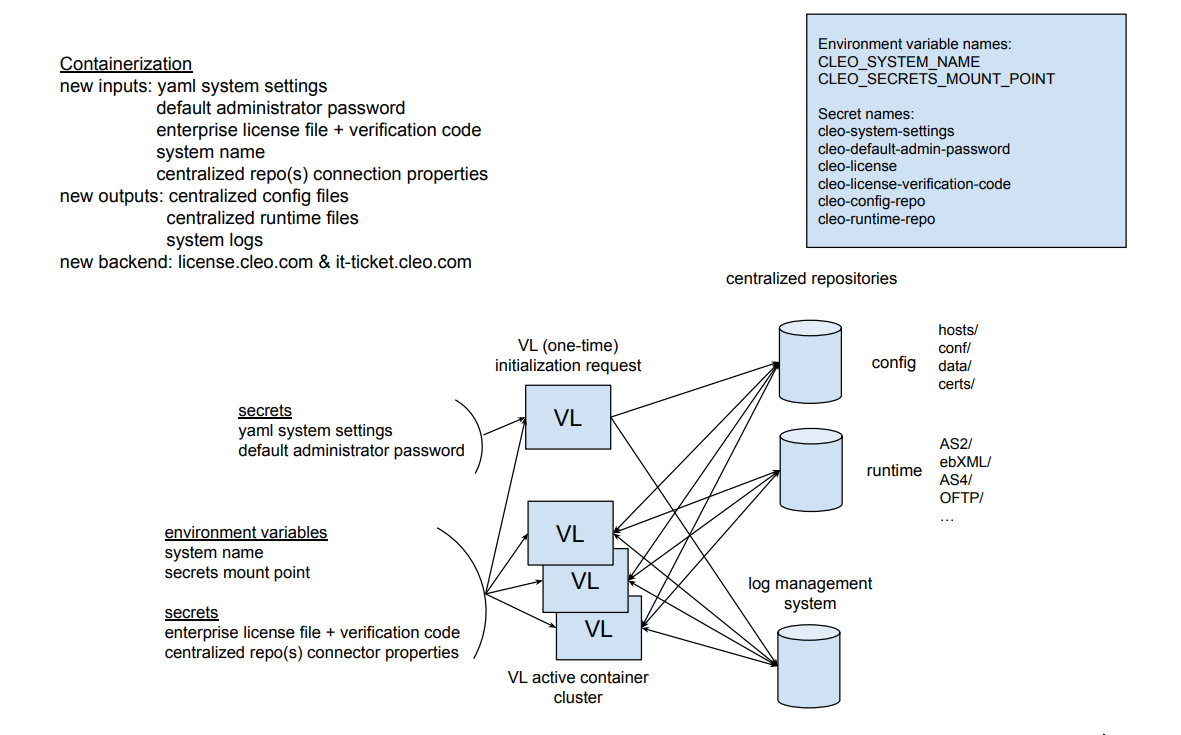
Two shared, persisted, centralized repositories are required -- one for configuration and one for runtime.
Harmony creates a subdirectory under the base path using the system name. This directory stores configuration files shared across all nodes in the cluster, including hosts, options, certificates, and more.
Supported repository types: smb, s3, azureblob, gcpbucket
Each Harmony node creates a parent subdirectory using the system name (if not already present), with a child subdirectory named after the host. This directory stores node-specific runtime files, primarily protocol message IDs and receipts.
Supported repository types: smb
Each Harmony node's system log events are stored in real-time into the customer-provided log observability platform and subsequently retrieved upon request by the Harmony REST API and Admin Web UI.
Supported log management systems: splunk, datadog
Each Harmony container verifies the enterprise license at startup. To do this, https://license.cleo.com must be accessible from the container.
If license.cleo.com is not accessible at startup, Harmony still starts and periodically retries license verification, initiating a four-day grace period. If the license is not verified within the grace period, the container exits. If the issue is determined to be on Cleo's side, Harmony automatically creates an internal Cleo IT ticket for the affected enterprise license by posting to https://it-ticket.cleo.com.
Harmony will email the system administrator if the grace period is initiated. Therefore, Cleo strongly recommends setting the system administrator email address and the necessary SMTP proxy.
Refer to the latest Harmony release system requirements: Cleo Harmony 5.8.1 System Requirements.
If you're using Cleo VLProxy within your network, note that VLProxy itself is not containerized and its setup remains the same. The only difference when configuring it for a Harmony container cluster is in the VLProxy Serial Numbers property. Instead of specifying a static serial number, use a regular expression.
For example, if your Enterprise license serial number is HC1234-ZZ5678, set the VLProxy Serial Numbers property to HC1234-ZZ5678-.* to match relevant container instances.
Setting up a Harmony container involves several key steps to ensure the environment is properly initialized, securely configured, and ready for operation. See the platform sections below for platform specfic instructions.
The following diagram illustrates the Harmony containerization environment:
| Platform | Status |
|---|---|
| Kubernetes | Supported |