Change auth flow one-time code display string to reflect inability to paste (and thus the need to 'copy') one-time code into auth webpage
Describe the feature or problem you’d like to solve
Upon issuing command gh auth login, and selecting auth flow options -->GitHub.com-->HTTPS-->Login with a web browser, the user is then presented with a helpful message:
! First copy your one-time code: B39F-XXXX
Press Enter to open github.com in your browser...
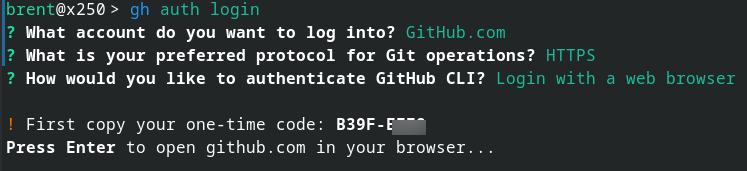
This message, however, is somewhat misleading: Upon hitting enter the user cannot paste the copied string - presumably B39F-XXXX - into the presented webpage at https://github.com/login/device. This page requires manual input of each character, thus negating the need to "copy" the one-time code from the terminal in the first place.
The user simply needs to refer to the code, not "copy" it.
Proposed solution
Proposing to simplify the text string from First copy your one-time code: to Your one-time code:
How will it benefit CLI and its users?
Presents esp. first time users with an accurate authentication flow, and no useless step of copying a string from CLI needlessly. Thus... an easier, smoother auth flow for all.

Change auth flow one-time code display string to reflect inability to paste (and thus the need to 'copy') one-time code into auth webpage
Describe the feature or problem you’d like to solve
Upon issuing command
gh auth login, and selecting auth flow options -->GitHub.com-->HTTPS-->Login with a web browser, the user is then presented with a helpful message:This message, however, is somewhat misleading: Upon hitting
enterthe user cannot paste the copied string - presumablyB39F-XXXX- into the presented webpage at https://github.com/login/device. This page requires manual input of each character, thus negating the need to "copy" the one-time code from the terminal in the first place.The user simply needs to refer to the code, not "copy" it.
Proposed solution
Proposing to simplify the text string from
First copy your one-time code:toYour one-time code:How will it benefit CLI and its users?
Presents esp. first time users with an accurate authentication flow, and no useless step of copying a string from CLI needlessly. Thus... an easier, smoother auth flow for all.