An air-conditioner controller using Raspberry Pi.
Features:
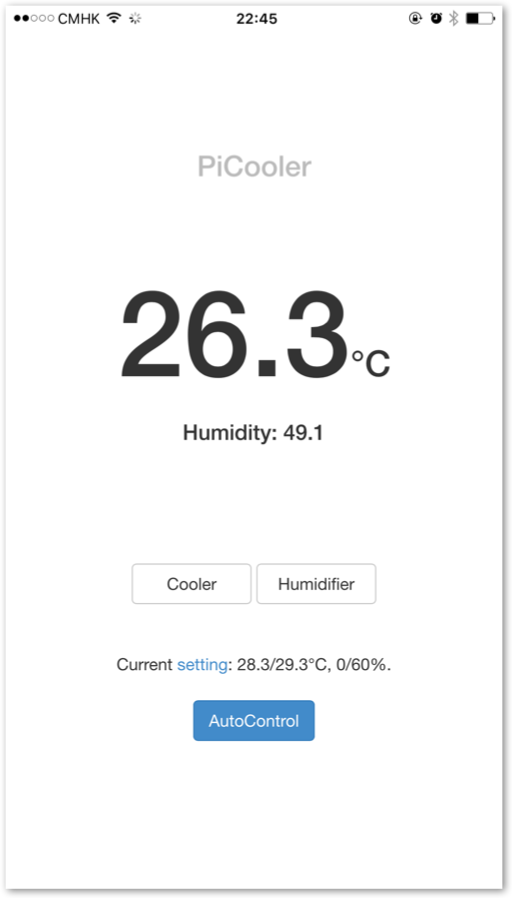
- Provide web interface for controlling and settings
- DHT22 provides values of both temperature and humidity
- Under auto mode, the system can automatically switch on/off air-conditioner and humidifier.
Screenshot on iOS:
This Python 2 project has the following dependencies:
- Flask
- Jinja2
- requests
- tornado
The Web interface uses jQuery and Bootstrap.
By default, the DHT 22 sensor is connected to GPIO 25,
while cooler and humidifier are connected to GPIO 24 and 23.
You can change the pin in cooler/__init__.py:
DHT_PORT = 25
HUMIDIFIER_PORT = 23
AIRCON_PORT = 24
Install all the dependencies:
sudo apt-get install python-requests python-flask python-tornado autosshCompile the DHT driver:
cd DHT && makeAssume the repository is cloned to /home/pi/PiCooler folder.
Add the following entries to root crontab (sudo crontab -e):
@reboot python /home/pi/PiCooler/runserver.py
* * * * * wget -O - -q -t 1 http://localhost:31415/cron
You may also expose the 31345 via local nginx or remote server.
For example, if you want to expose the server via a remote VPS server,
add the following entry to the users' crontab (crontab -e without sudo).
You should setup password-less login first.
@reboot autossh -f -M 52523 -nNTR 31415:localhost:31415 cllu@vps.cllu.me
MIT License