Repository navigation
Releases
TabForge 0.9.6

TabForge 0.9.6
Stable release. The Mix Table now shows every change at a beat, bars with changes get a red button on the timeline, Focus track stays on through jumps and Mix Table volume changes, and the code was tidied underneath.
🎸 New since 0.9.5
- Red button under the bar number: the timeline marks every bar where any track changes sound, effects or tempo. It lightens under the pointer, presses in when clicked, and opens the Mix Table on the bar's first changed beat.
- Composer close button: an X at the top right of the Composer panel does the same as turning the Composer off.
- Focus track shortcut: Ctrl+Alt+F turns Focus track on or off, also while the mixer or a plug-in window is in front. Change it in Settings > Shortcuts.
🔧 Changed
- Mix Table shows every change: F10 shows the tempo in force at the beat, including a gradual tempo change with its length in the Transition box, and changes made from any other track (a mix point set for all tracks). Setting a tempo writes it for every track.
- F10 in a marked bar: on a beat with no change, it opens the Mix Table on the bar's first changed beat instead of an empty table.
- Tempo slider: the tempo popup slider covers the song range, 20 to 400 BPM, instead of 30 to 300.
- Tidier code, same behaviour: dead code and stale test notes removed; tempo limits, setting ranges, command ids, MIDI numbers and the "all notes off" reset each have one shared definition; six duplicates merged; failures in background actions are logged or shown on the status line instead of lost; menus, scale pick, undo memory, selection, recording and clip-edit clean-up each have one clear owner; new tests pin the compiled MIDI, undo order, selection commands and the main window's commands.
🛠️ Fixes
- Focus track part-way through a song: after playback reached a volume point written in the Mix Table, the tracks it set went back to their normal level and Focus track stopped working. Volume points are now scaled like every other level.
- Focus track after a jump: clicking the timeline or ruler, jumping to a bar or section, a loop restarting after an edit, or an edit while playing could bring every track back to normal until Focus track was turned off and on again. A track added while playing was not lowered either. Focus track now applies to every level as it is sent.
- Gradual tempo in the Mix Table: a gradual tempo change (such as bar 101 of Ashen Meridian) was missing from the table.
- Paste after section: Paste after section and Paste section on a gap now paste into the track selected in the song, not the track from an earlier menu.
- Let-ring time: the 400 to 6000 ms setting now works across its whole range (below 600 ms it did nothing). Values of 600 ms and more sound as before; Guitar Pro files are unaffected.
Windows installers are not code-signed. Linux has not been validated on real hardware and remains experimental.
TabForge 0.9.5
TabForge 0.9.5
Stable release. It adds Focus track, an opt-in practice aid that plays the selected track louder, gives every slider and switch the app's accent colour, and fixes plug-in loading and GM sound problems.
🎸 New since 0.9.4
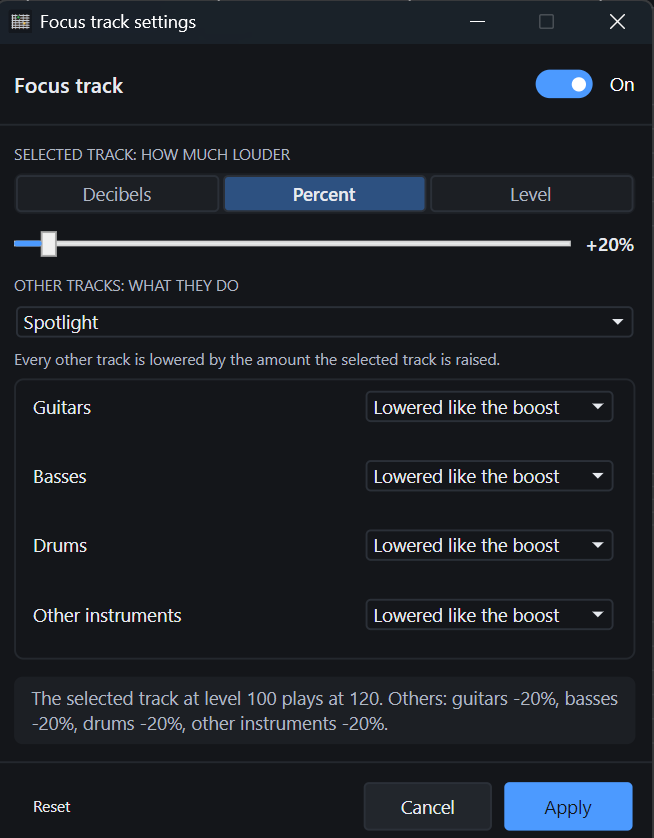
- Focus track: a left strip icon (and View > Focus track) that plays the selected track louder so it is easy to hear against the rest. Off until you turn it on; once on, it stays on until you turn it off. Left-click turns it on or off; right-click opens its settings.
- How much louder: 20% to begin with, or choose decibels, a percentage or a fixed level, with a slider.
- What the other tracks do: lowered by the same amount by default, group by group (guitars, basses, drums, other instruments): lowered like the boost, left exactly as they are, or lowered or raised by an amount of their own. Four templates fill the groups at once: Spotlight, Keep the rhythm section, Only boost the selected track and Rhythm section up.
- Safe by design: the selected track is never lowered, and Focus track changes only what you hear. Faders, the saved song, exports and renders are never touched.
- Accent sliders and switches: every slider fills with the accent colour up to its thumb, as the mixer faders do, and every On/Off switch uses the accent colour while on.
| 🎛️ Focus track settings |
|---|
 |
🛠️ Fixes and performance
- GM sound after reopen: the automatic GM sound tick and a manual GM untick are now saved in the song. Reopening a song with a playing VST instrument (such as Superior Drummer) switches the built-in GM sound off as it does when you add the instrument.
- Composer grooves on Linux: auditioning a groove always plays the built-in drum kit, never the sound of the track on the drum channel (channel 10).
- Plug-in loading: Windows no longer says a plug-in "could not be loaded under Wine"; it shows the plug-in's own reason. VST2 plug-ins whose support files are found through the system PATH now load, and older VST2 plug-ins that only use the original process call load instead of being refused.
- Plug-in editors and presets: small plug-in editors keep the size the plug-in asked for, and preset switching now works for 32-bit VST2 plug-ins.
Windows installers are not code-signed. Linux has not been validated on real hardware and remains experimental. Some JUCE 8 plug-in editors can render black under Wine; eight bridged plug-ins may need 1,024-frame buffers. A faulty native 64-bit VST2 plug-in can still crash the Windows audio engine.
TabForge 0.9.4
TabForge 0.9.4
This version adds a built-in Reverb, a 101-groove drums-only Composer catalogue with fixed pattern accents, browser-style Ctrl+Tab tab switching, larger score headers, a wider drag gutter in the FX windows, and Band/Compact/Keyboard toggles in the left strip; grooves no longer land in red (short) bars.
✨ New since 0.9.3
- Composer drum grooves (101): across Rock/Pop, Metal, Punk/Hardcore and Funk/Breakbeat — including double-bass, blast-beat, ballad, half-time, intro and fill grooves. Audition one at the song's tempo, drag it onto a track at the bar to start from, and choose the tab lane (notation written on the track) or the MIDI lane (a clip on a take lane). Grooves may use any General MIDI drum piece (kick, snare, hats, ride, crash, toms…). Timing stays exactly on the 16th grid; a fixed accent pattern voices the hits in dynamics (mp/mf/f/ff) — quarters strongest, 16th off-beats as ghosts, the snare backbeats and bar-opening kick on top, and the last bar of a multi-bar groove lifted into the repeat.
- Built-in Reverb: a convolution-based room generated by TabForge — no external IR file required. Size changes the room length; Predelay, Mix, High cut, Low cut, Width and Bypass shape the tail. Add it from the Add plug-in window like any other effect, with a full editor that saves and restores with presets and songs.
- Composer panel: drums-only. The instrument cards and the “coming soon” placeholders are gone, and the groove catalogue is visible as soon as the panel opens, with its search filtering grooves and genres.
- Left strip view toggles: Band view, Compact mode and Keyboard mode are now default synced toggle buttons in the left strip, and their top-right toolbar icons are gone. View > Band view and View > Compact mode remain, and Band view is bound to Ctrl+Shift+B by default.
- FX chain windows: the drag handle between the plug-in list and the editor lights on hover and shows the resize cursor; the whole gutter between them is draggable.
- Score headers: the authors and the tuning block are larger and easier to read.
- Ctrl+Tab tab switching: Ctrl+Tab shows the next tab and Ctrl+Shift+Tab the previous one, wrapping at both ends, as in a browser. Both are bindable commands (Next tab / Previous tab).
🛠️ Fixes
- Grooves in red bars: a groove dropped on the tab lane no longer leaves its bars short (drawn red). A hit now lasts until the next hit, so every bar adds up to its time signature.
Windows installers are not code-signed. Linux has not been validated on real hardware and remains experimental. Some JUCE 8 plug-in editors can render black under Wine; eight bridged plug-ins may need 1,024-frame buffers. A faulty native 64-bit VST2 plug-in can still crash the Windows audio engine.
TabForge 0.9.3
TabForge 0.9.3
Stable release. It adds the customizable left icon strip with a Composer panel (pattern browsing coming soon ✨), an in-app F1 Help window, full TuxGuitar (.tg) open/save so your TuxGuitar files come along, a lighter outlined light theme, and a batch of small fixes around tabs, playback and light mode.
✨ New since 0.9.2
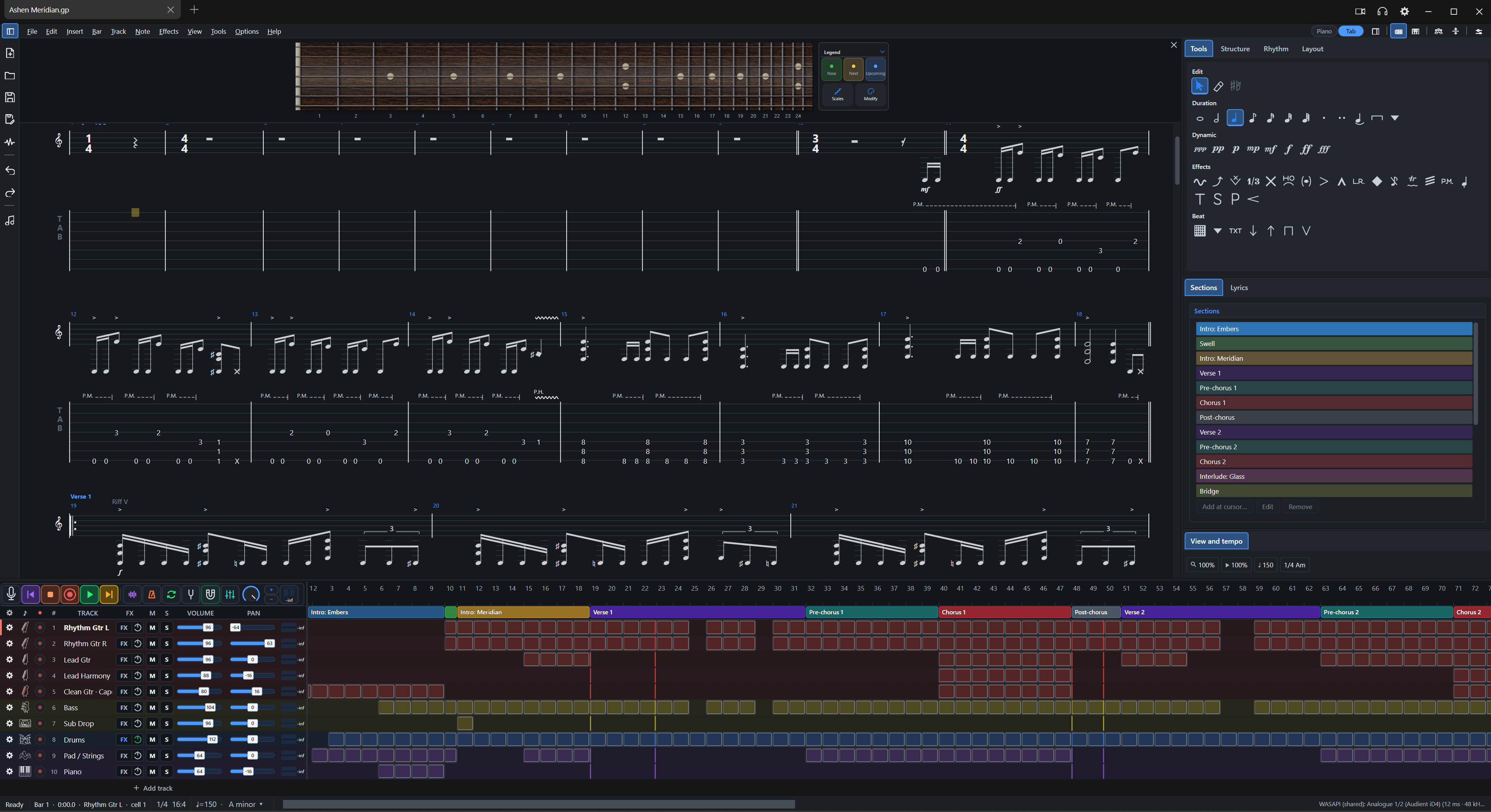
- Left strip and Composer: a slim icon strip beside the score (41 icons to choose from, large by default) with New, Open, Save, Save as, Render, Undo, Redo and Composer. Customize it with drag-and-drop, separators, position (left, beside menus, right), size, tooltips and labels. The Composer panel shows Drums, Bass, Guitar and Keyboard category cards, a search box and style rows — pattern browsing is coming soon, so anything you pick shows an empty state for now. Open it from View > Composer even with the strip hidden.
| Left strip with Composer panel: Drums, Bass, Guitar and Keyboard cards under the score |
|---|
 |
- F1 Help window: fourteen chapters from What's new and Getting started to Troubleshooting and FAQ, with a grouped chapter list, step badges, key-cap chips, Tip / Note / Warning boxes and Problem / Fix cards. Search is local and understands everyday words, forgives small typos, follows symptom phrases like "no sound" to the right chapter, and takes quoted phrases. Chapters load when opened and the window remembers its size.
- TuxGuitar (.tg) open and save: open and save
.tgfiles as a further file type (.tforgestays the default) — if you keep your songs in TuxGuitar, they now open here and come back intact. A file holds song details, tracks, tunings and capo, bars and signatures, repeats, tempo changes, notes and durations, ties, effects, drum parts, lyrics and section markers; anything it cannot hold is left out and named when you open the file. - Scale highlight: one shared On/Off across every control, an On/Off switch beside the SCALE title, a highlight opacity slider in the Scale panel and on the Fretboard settings Scale highlight page, larger outlined note names and degrees, and a Colour row with named colours and a custom colour picker shared with the Scales popup. Reset section and Reset all restore the default colour.
- Light theme: outlined with little fill. Selected chips, rows and tabs get a pale tint with accent text, check boxes are filled with the accent, slider fills are lighter, and OK is the only solid fill — every shade comes from your accent colour. In light mode the default fretboard (Maple) shows notes at 90% brightness unless you changed the look.
- Shortcuts and new tabs: Ctrl+N is now the single New command (File > New, the tab + button, the tab menu and the left strip New icon all run it). The Open and Save icons left the top-right of the menu row and live in the strip. The Shortcuts dialog is gone — Ctrl+Shift+A opens the Command palette listing every command with its keys, and Preferences > Shortcuts still rebinds them. F1 opens Help.
🛠️ Fixes
- Band mode: showing the side panels no longer removes the right panel.
- Speed controls: the keyboard and side panel speed controls are back in sync.
- Playback freeze: the playhead no longer freezes after clicking bar 1 or after a loop wrap.
- Hotkeys and tooltips: the duplicate Tab.New command and the F12 clash in the TuxGuitar preset are gone, and strip tooltips no longer hang.
- Light mode panels: panels, dialogs and the track list no longer stay dark (with dark-blue text on selected tabs and faint icons) while the fretboard and timeline turn light. A settings reset had marked every theme colour as your own pick, so switching to Light kept the dark ones — resets now hand colours back to the theme, and settings saved that way are repaired once at start.
Windows installers are not code-signed. Linux has not been validated on real hardware and remains experimental. Some JUCE 8 plug-in editors can render black under Wine; eight bridged plug-ins may need 1,024-frame buffers. A faulty native 64-bit VST2 plug-in can still crash the Windows audio engine.
TabForge 0.9.2
TabForge 0.9.2
Stable release. It reworks the fretboard legend into tappable colour tiles matched to the board height, makes the fretboard look-ahead count notes and preview live while paused or stopped, adds a section-stretch option that turns the added bars into a section of its own, and opens Preferences with Ctrl+, in place of F12.
🔎 Fretboard legend
- Now, Next and Upcoming tiles: the three small rows are now three side-by-side tiles, each tinted and edged in its own colour with its dot over its name. A click on a tile still opens the colour picker below it, and it shades under the pointer. The legend card is wider to fit them. Scales and Modify are two tiles of the same height and corners in one row under them, with the icon over the label, and their edges line up with the colour tiles.
- Exact height: the legend is always exactly as tall as the fretboard. On a short board the whole legend (tiles, text, Scales and Modify) shrinks with it, down to 45% of its normal size; on a tall board the colour tiles and the Scales and Modify tiles grow taller to fill the card, so there is no empty space above or below it. The card is roomier: more padding round its edge, a taller title row and wider gaps between the tiles. It matches the whole neck, binding included, and there is more room between the fretboard and the legend card.
- Minimise: a small chevron beside the title minimises the legend to one round button at its corner; the button brings it back. The button shades with an edge under the pointer, its clickable area reaches well beyond the drawn button, and the choice is saved with your settings. While minimised, Scales and Modify stay available from the Tools menu and the right-click menu.
⚡ Fretboard look-ahead
- Counted in notes: "Next notes shown ahead" now counts notes, not movements — the next movement is always shown whole and later notes fill up to that many in total. So at 10 you see ten notes ahead, chords included.
- Live preview: the look-ahead shows while paused and stopped too, at the playhead, so the slider auditions live without pressing play. Apply confirms and Cancel restores the previous settings.
⚙️ Fretboard settings
- More settings and Reset all: the footer link reads More settings, and a Reset all button beside it restores every fretboard setting to its default (the Look page to the shown theme's). Cancel still returns to how they were.
🧩 Section stretch
- Add a new section: dragging a section's start back past the previous section has a new option, Add a new section in those bars — now the second choice, under Add empty bars, with the rest keeping their order after it. The added bars become a section of their own with a name and colour you set inside the option, while the stretched section keeps its length.
⌨️ Shortcuts
- Preferences with Ctrl+,: Preferences now opens with Ctrl+, (the comma key). F12 keeps working as a second key, the TuxGuitar preset keeps F7, and custom bindings are untouched.
Windows installers are not code-signed. Linux has not been validated on real hardware and remains experimental. Some JUCE 8 plug-in editors can render black under Wine; eight bridged plug-ins may need 1,024-frame buffers. A faulty native 64-bit VST2 plug-in can still crash the Windows audio engine.
TabForge 0.9.1
TabForge 0.9.1
Stable release. It adds more rebindable shortcuts, fretboard note colours and a Fretboard settings page, a hand pointer on the fretboard capo, and scrolling while you drag a selection, and it fixes a loud first sound at start-up, a start-up crash and several plug-in editor and rewind problems. It supersedes 0.9.0.
🎸 New since 0.9.0
- More shortcuts: the piano roll's five tools, Quantize, Mute, Transpose, Zoom to fit, Legato, Duplicate and Invert can be rebound in Settings > Shortcuts, and so can Metronome, Count-in and Loop settings, Loop selected bars, Clear loop, Clear selection, Show / hide master track and Fretboard settings. One key can now serve commands that work in different places.
- Fretboard note colours: pick the Now, Next and Upcoming colours and a Fill or Ring dot style in Fretboard settings or in Settings > Fretboard & Keyboard, with the same colour picker as Appearance. Each legend row is clickable and opens the picker.
- Capo pointer: the fretboard's capo shows the Windows hand when you hover it and keeps it while you drag, so it is clear it can be moved.
- Drag selection scrolls the view: dragging a selection past the edge of the score, the timeline or the piano roll keeps scrolling, faster the further out you go.
- Settings search finds every Fretboard settings option by its own label.
- FX window meter: a track without an audio input shows the MIDI notes it receives in its Input bar.
- Theme-aware defaults: the dark theme starts on Rosewood at 75% board brightness and the light theme on Maple at 90%; a look you chose stays. Fretboard inlays show their own material colours, and the capo selector, focus rings, drop previews and active section band follow your accent colour.
🛠️ Fixes and performance
- Start-up loudness: the first sound no longer reaches the output without the Monitor FX plug-ins, such as the IR Loader's auto level.
- Start-up crash: the fretboard could fail to draw at start-up because the "Pearl cream" inlay's colour name had the wrong capitals. Every inlay material is now checked against the palette in both themes.
- Fretboard look and colours: a look or board brightness you chose is kept for good, even after you switch the theme away and back. Each follows the theme only until you change it, and Reset section on the Look page lets both follow again.
- Band view and layout: showing the side panels in the Band view, or in any layout without a side panel, put them in narrow nested columns at the window's right edge. They now come back as the normal view's one side column, at the default width share.
- Rewinding again while the song is still being prepared no longer restarts the preparation, so the playhead no longer holds still between presses.
- Dragging a selection during playback no longer jumps the view back to the playhead.
- FX window clipping: a plug-in editor docked in the FX window that is larger than its area now scrolls instead of losing its right and bottom parts, at any interface size.
- The Live input strip fits one row at the default window size with no clipped controls.
- Download names include the whole version, for example
TabForge-0.9.1-win-x64-portable.zip.
🧹 Code cleanup and maintenance
- Dead code deleted: unused classes (TrackIconPicture, NullChildProcessGuard), unused members and constants across the audio engine, dialogs and theme binding, and the unused FretMarkerColour setting. Settings files from earlier versions still load.
- Duplicates merged: one helper each for centring dialogs, margins and border padding (25 callers moved), one interface font name, one type scale for fifteen font-size constants, and one copy of the frame-queue steps the two video encoders repeated. Nothing looks or sounds different.
- Pointer shape: the last hand cursors are removed and a guard test enforces that only resize cursors change the pointer, apart from the hand over the fretboard's capo.
- Tests and checks: 26 test classes now share one helper instead of word-for-word copies, a text contrast check that five classes repeated runs once, outdated capo and settings tests match today's behaviour, and the architecture checks (dependency cycles, static state, portability) pass without raising any baseline.
- Docs: 14 screenshots no page named are removed and the README hero is the boxed third-party plug-in example again.
Windows installers are not code-signed. Linux has not been validated on real hardware and remains experimental. Some JUCE 8 plug-in editors can render black under Wine; eight bridged plug-ins may need 1,024-frame buffers. A faulty native 64-bit VST2 plug-in can still crash the Windows audio engine.
TabForge 0.9.0
TabForge 0.9.0
Stable release. It adds sharper wound strings, a more natural string ring and lighter playback, makes ASIO work again, fixes crash-recovery and shutdown problems, and removes a large amount of unused code and files.
🎸 New since 0.8.8
- More complete crash recovery: a recovered song now keeps its track inputs, Band layout and collapsed mixer groups, and its audio clips still point to the right files.
- Sharper wound strings: the fretboard's wound strings now have fine coils that stay sharp at any size, with a new Bronze finish.
- A more natural ring: a sounding string shows a soft blur that fades over the note's own length, quickly for a palm mute, with only a very slight movement.
- Tidier dialogs: many windows now share one set of text sizes and corner radii, and more dialog buttons use the same padding. The Fretboard settings window now matches main Settings, with grey cards, sliders, and Cancel, Apply and OK.
⚡ Performance
- Smoother score playback: a note change repaints only the playing line of the score, not the whole page.
- Lighter fretboard: a ringing string redraws only the strings, over a kept picture of the neck, with no change in how it looks.
- Songs open lighter: a song's auto-loaded plug-ins load when first needed (play, its FX chain, an armed track or an export), so a song you only read or edit stays light. Until then its tracks use the built-in sound.
- Less work while idle: the audio engine wakes about a third as often when nothing is happening.
- Less memory: memory left over from opening a song is handed back, and fretboards share one copy of their textures.
🛠️ Fixes
- Track properties: All -1 and All +1 have arrows, the string count box replaces the Add string button, and the capo From and To boxes show their whole outline on hover and focus.
- Settings: the video recording Save folder has a Browse button that opens a folder picker at the current folder.
- Video recording: the fretboard now shows in full. When the recording was smaller than the window, or the display was scaled, it came out as a bare block of wood with no strings, frets, numbers, legend or notes.
- Closing the rightmost tab no longer crashes the program when the window is activated during the close, which could happen while a song played in another tab. Closing a tab in the background no longer switches to it first, so the shown song and its playback carry on.
- A floating plug-in window now comes back exactly where you left it when you switch to another tab and back.
- Play, stop and other navigation keys now work while the FX chain, a plug-in window or another tool window has the focus, using your own key bindings. Text boxes, plug-in text fields that use a standard text box or a caret, dialogs, Settings and Fretboard settings keep their keys.
- ASIO drivers open again. Since 0.8.7 every ASIO driver failed with "Unable to instantiate ASIO" and playback fell back to WASAPI. A driver that really cannot be opened now says so in plain words.
- If the disk is too slow to finish writing a recording at shutdown, the lost audio is now reported instead of the take silently ending short.
- The audio engine no longer leaves a background timer running when it stops while connecting.
- Shutting down during a stuck render no longer disposes plug-ins that are still in use.
- A failed update check now says so instead of reporting that you are up to date, and a long release list can no longer stop the check working.
- People on 0.8.75 were not offered 0.8.8 because the check read 75 as higher than 8. This release is numbered 0.9.0 so that it reaches them.
- On a left-handed fretboard, string 1 now stays on top, matching the tab, and dragging a capo follows the pointer.
- The "Save changes" question stays on top of plug-in windows instead of opening behind them. While it is open it also stays above other programs.
- The Monitor FX headphones button only lights when a plug-in really plays on the current device.
- The "Plug-in loading slowly" prompt now closes with its window.
- A plug-in that connects after its timeout no longer leaks a connection.
- The IR Loader editor stops checking for updates while it is hidden, and its Choose button, which opened an empty menu, is gone; Browse picks the file.
- Removed unused code, settings and files. Settings files from earlier versions still load.
Windows installers are not code-signed. Linux has not been validated on real hardware and remains experimental. Some JUCE 8 plug-in editors can render black under Wine; eight bridged plug-ins may need 1,024-frame buffers. A faulty native 64-bit VST2 plug-in can still crash the Windows audio engine. See the complete changelog for all changes, and the compatibility notes.
TabForge 0.8.8
TabForge 0.8.8
Stable release. It contains everything in 0.8.75, plus the fixes below.
🎸 New since 0.8.6
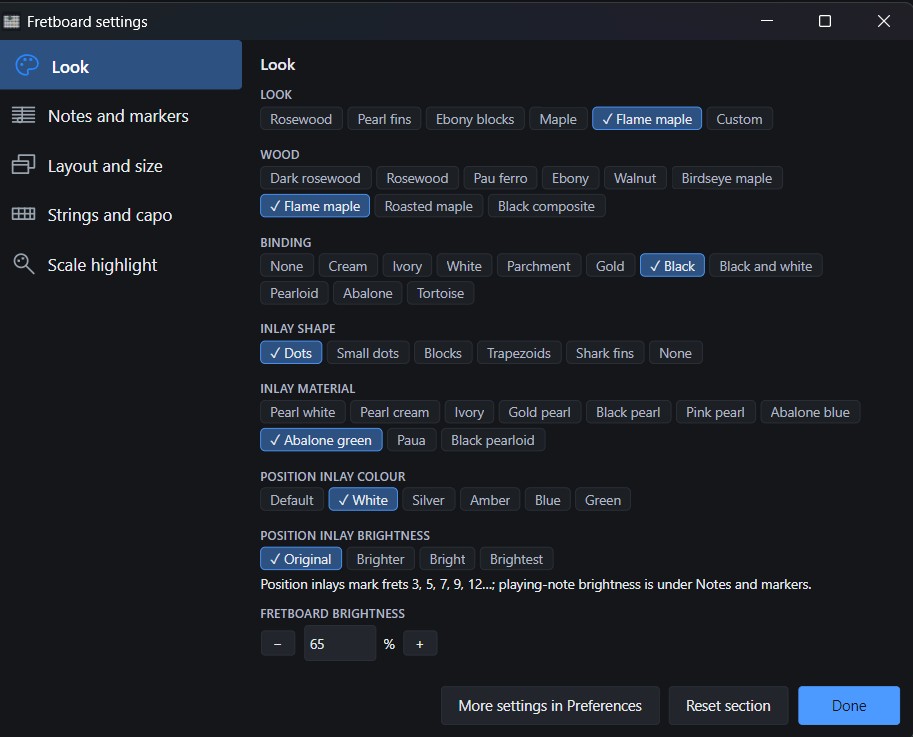
- A more lifelike fretboard: layered wood, true fret spacing, shaded binding, wound strings, material inlays and five looks, including Flame maple. Tune brightness and scale highlighting in the fretboard settings.
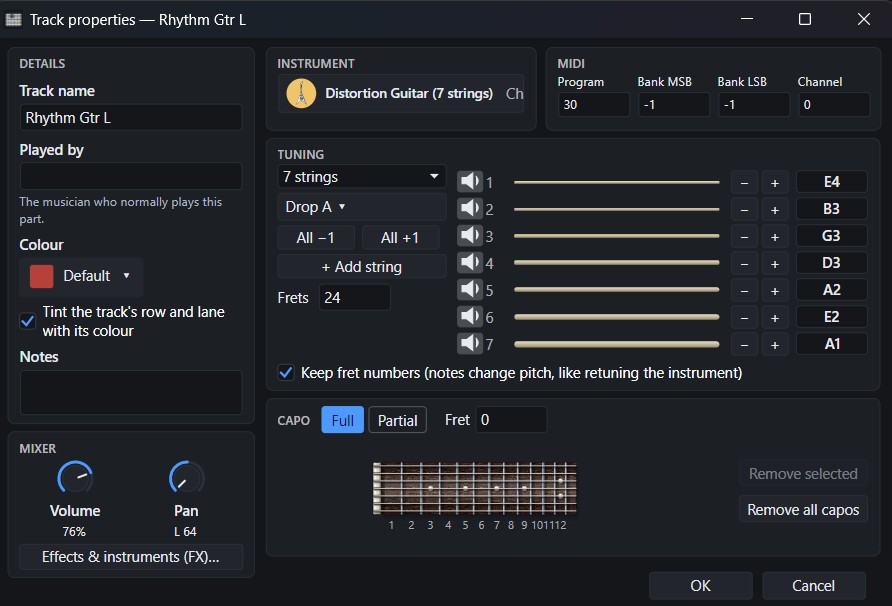
- Full and partial capos: add and drag capos on the fretboard or in Track properties. Up to four partial capos can cover different strings; notes, playback and score labels follow the effective capo.
- More flexible tuning and track setup: presets for 3–10 strings, saved custom tunings, per-string audition and compact Details, Mixer and MIDI cards. Track changes remain a draft until you choose OK.
- Plug-in workflow: 32-bit VST2 plug-ins use a helper process; bridged VST3 plug-ins can open their own editor. Approve all or selected plug-ins with visible progress and Stop.
- Linux packages (experimental): AppImage is primary; the
.tar.gzis a fallback. Both include pinned Wine and an LGPL FFmpeg build for video export.
| 📷 Fretboard settings | 🎼 Track properties and tuning |
|---|---|
 |
 |
| 🎸 Partial capo on the fretboard |
|---|
 |
🛠️ Fixes and performance
- The FX chain window now displays correctly with display scaling, and the Load FX Chain dialogue is fixed.
- File > Open no longer waits in a nested message loop; slow starting folders are checked off the UI thread with a timeout, and repeated Ctrl+O requests cannot overlap.
- Playback playheads follow display frames. Track-meter menus stay focused on meter controls, scale tooltips remain anchored, and reapplying the recommended UI size is a no-op.
- Plug-in search, piano-roll note queries, marker drawing, path retention, hidden-editor polling, icon preparation and General MIDI bank replacement avoid repeated or audio-thread work.
- Track-property edits stay transactional until OK; tuning changes warn before notes become unplayable. Container Active on rules apply consistently and survive preset loading.
- Projects with absolute plug-in paths from another operating system open with a readable missing-plug-in notice instead of refusing the project.
Automatic scale detection and best-match suggestions continue to work across the status bar, fretboard and piano roll; that capability first shipped in 0.8.6 and is not counted as new here.
Windows installers are not code-signed. Linux has not been validated on real hardware and remains experimental. Some JUCE 8 plug-in editors can render black under Wine; eight bridged plug-ins may need 1,024-frame buffers. A faulty native 64-bit VST2 plug-in can still crash the Windows audio engine. See the complete changelog for all changes since 0.8.6 and the compatibility notes.
TabForge 0.8.6

TabForge 0.8.6
Linux is still EXPERIMENTAL. Windows is the main platform. The Linux package is built and smoke-tested automatically, but it has only been tried in a Hyper-V Ubuntu VM, not on real hardware.
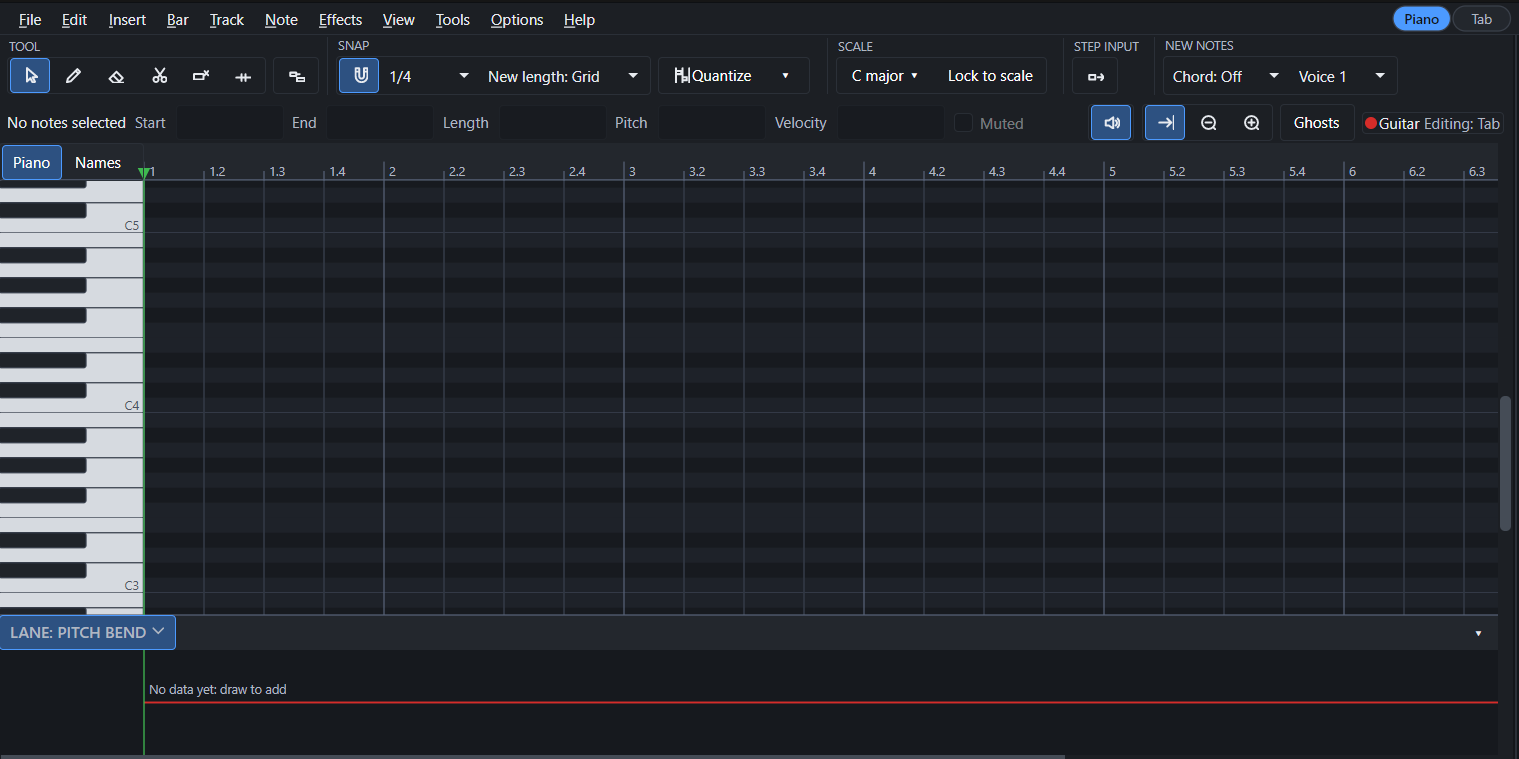
- 🎹 Piano roll redesigned: a new Select tool (the default) and a Write tool, a two-row toolbar, a redesigned keyboard, box and lasso selection, and Split, Glue, Mute and Erase tools that work on a whole drag.
- 🎼 Scale panel redesigned, with more scales and options: one shared scale panel (status bar, fretboard, piano roll) that detects the likely scales for the section you are in, with a match percentage and the notes of each. You choose what it reads from (this section, the whole song, or the song key only) and which tracks to analyse (this track or all pitched tracks; drums are never included), and you can pick any key and scale from the library with "Pick another...". Scale families can be switched on or off (Major, Minor, Pentatonic, Blues, Jazz, Harmonic minor, Melodic minor, Modes, World, Exotic and Favourites), with a "More scales..." search. "Lock to scale" snaps drawn and moved notes to the scale.
- 🎸 New Fretboard look: show the scale on the fretboard as Dots, Rings, Cell tint, Note names or Degrees; choose its colour and opacity; emphasise the root, dim notes outside the scale, or show it only on the frets in view.
- ⬆️ Move notes up or down by half steps or by steps of the scale (T in the piano roll).
- 🔊 Sound banks: pick GeneralUser GS, FluidR3 GM or MuseScore General in Settings, each with its licence; a new "None" sound engine for people who load their own instruments.
- 📤 Export MIDI dialog: choose tracks and a range, write articulation-map keyswitches, and optionally keep TabForge's own technique marks.
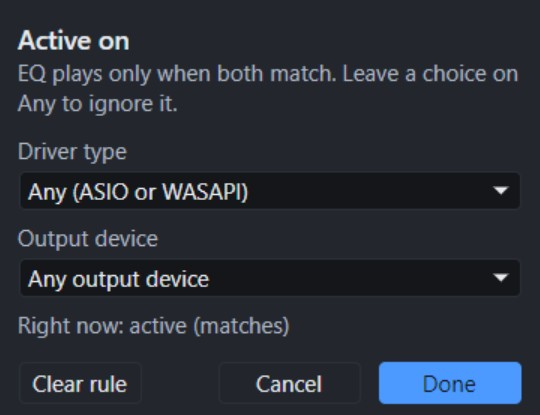
- 🎚️ Meters per track, and FX chains or single effects can be set to play only on chosen outputs ("Active on...").
- 🗂️ Presets remember what you applied (a trailing * when changed, "(missing)" when deleted); loading an FX preset into a used chain asks whether to replace or add.
- 📂 Opening a MIDI file asks whether to import it as tab tracks or as MIDI tracks. Opening song files from Explorer is on by default.
- 🧹 Settings > Advanced > Reset entire app... with a tick list and an optional backup.


Some of the new piano roll behaviour is marked "(untested in app)" in the changelog; it is built and covered by automated checks only.
Download
-
Windows:
TabForge-0.8.6-setup.exe(installer) orTabForge-0.8.6-win-x64-portable.zip(extract and runTabForge.exe). Windows 10/11, 64-bit. Not code-signed, so SmartScreen may warn the first time. -
Linux (experimental):
TabForge-0.8.6-linux-x64.tar.gz(extract, runTabForge/TabForge). Ubuntu 22.04 or newer, x86-64, X11. -
Checksums:
TabForge-0.8.6-SHA256.txt(Windows files) andTabForge-0.8.6-linux-x64.tar.gz.sha256(Linux).
For the full list, see the CHANGELOG, which includes 25 new features and 43 improvements and fixes.
Found something odd? Please report it on the Issues page.
TabForge 0.8.5
TabForge 0.8.5
Linux is new and EXPERIMENTAL in this release. Windows is the main platform. Linux appears fully functional in a Hyper-V Ubuntu VM, which is the only place it has been tried; it has not been tested on real hardware.
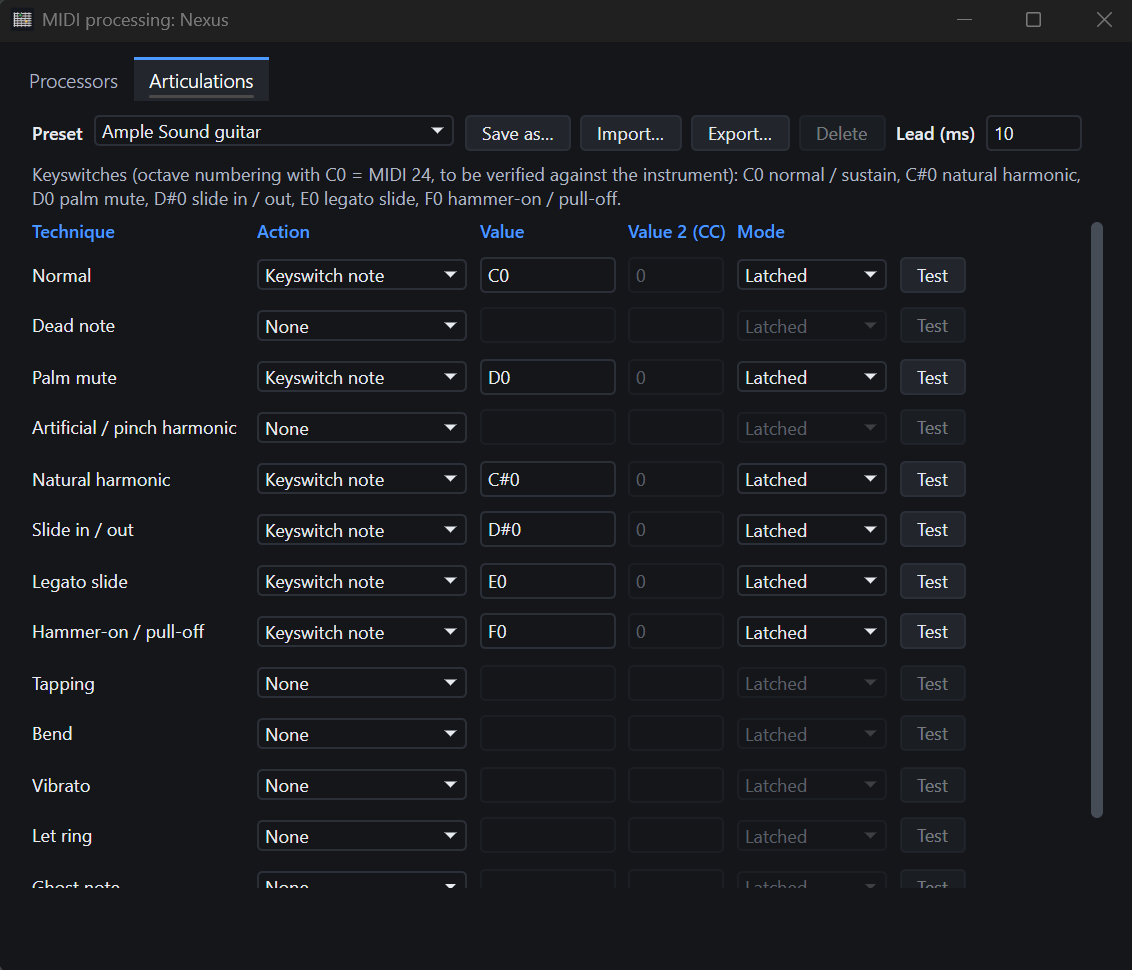
- 🎸 Articulations: palm mute, slides, harmonics and more become keyswitches or controllers for your instrument plug-in (new tab in the MIDI window).
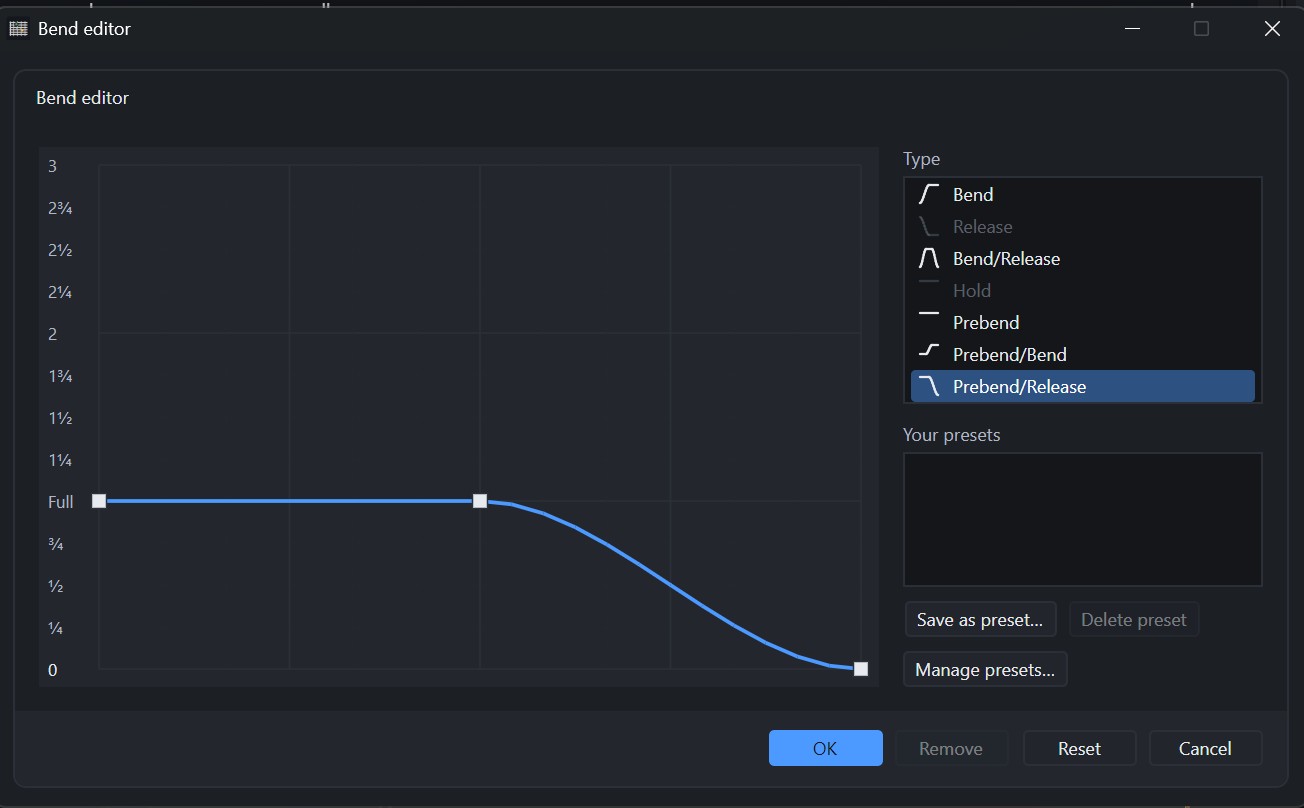
- 🎚️ Bend and tremolo bar editors redesigned: a type list with your own presets, a tone scale and eased curves.
- 💾 Save .gp5, .gp4 or .gp3 copies from File > Export, after a list of what the older format leaves out.
- 🔊 Notes you write sound through the track's instrument plug-in (Preferences > Audio > Preview notes with).
- 🥁 Drum map renamed "Superior Drummer 3"; built-in drum maps copy to "(edited)" on first edit. Vibrato window: Clean is now Remove. Middle-click on empty title bar opens a new tab at once. MIDI fixes: export through processors, output device kept by name, bank select, Humanizer default 0.
- 🎹 Piano roll: the active tool shows the same selected look as in the Tools tab.
- 🔀 Moving a track while a song plays no longer changes the sound; a new preset is shown as chosen in its box at once; an FX chain window hides when you switch to another song's tab.
- 🎬 Live video recording brings the window forward and names the reason if frames go black.
- 🎛️ Generic plug-in controls: any plug-in's parameters as searchable sliders, also when its own editor cannot open.
- 🗂️ Preset menu and manager: drag to reorder, undo a delete, import and export presets.
- 🛑 Panic command (Tools > Panic) releases every stuck note; Pause and Stop now send note-offs first.
- ⚡ Edits while a song plays are heard at once; a tremolo bar dive from a .gp file now plays and opens as written.
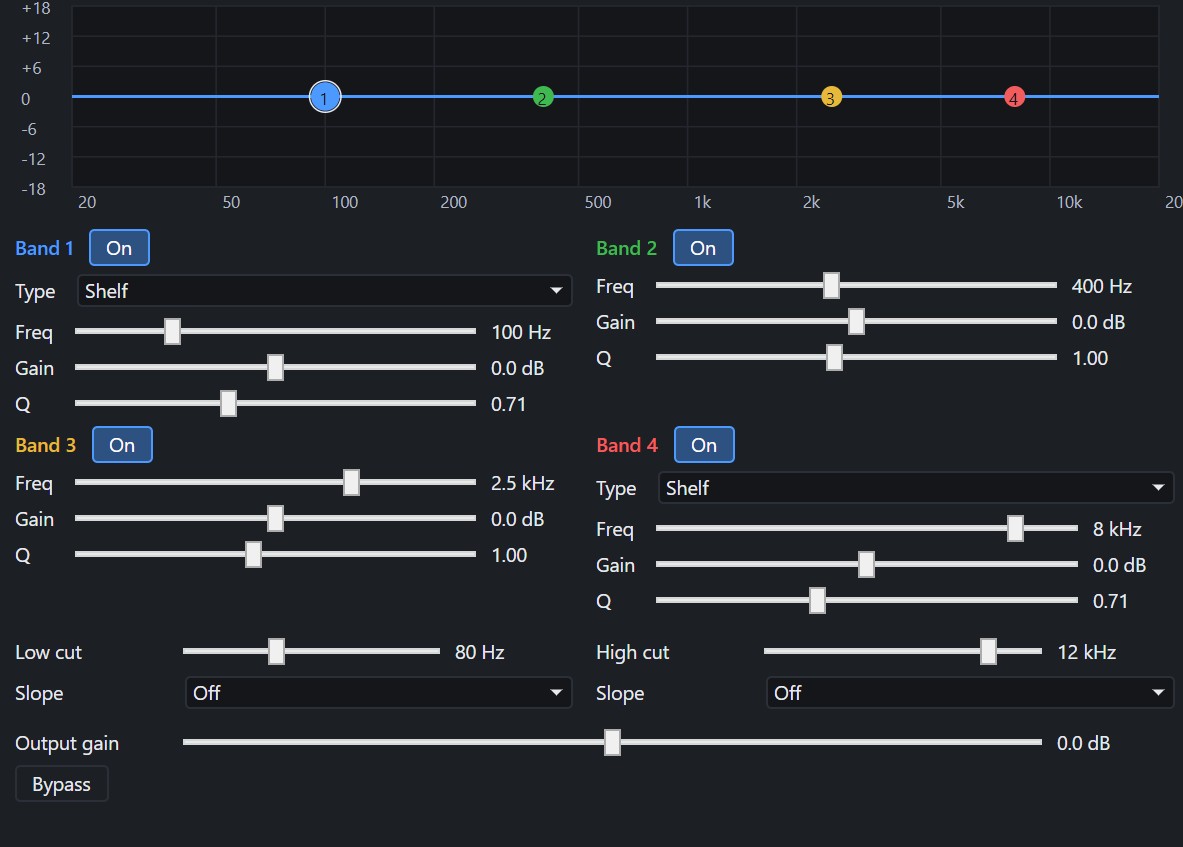
- 🎛️ Built-in effects: IR Loader (also as a monitoring-only speaker-correction slot on the master), EQ, Compressor, Limiter, Delay and Noise Gate, on Windows and Linux.
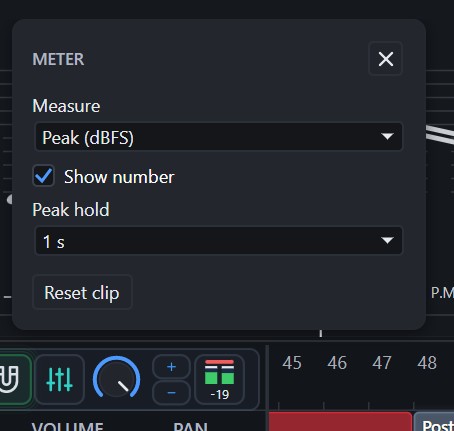
- 📊 Master level meter: peak, RMS and LUFS in the transport bar; reads before the output volume, so it matches the plug-in meters.
- 🐧 Linux (experimental): songs, sound, MIDI input, VST3 plug-ins, Video export and file drag and drop, in one tar.gz with the SoundFont and ffmpeg bundled. Ubuntu 22.04 or newer, X11. Render, microphone input and CLAP plug-ins are not yet confirmed on Linux.
Download
-
Windows:
TabForge-0.8.5-setup.exe(installer) orTabForge-0.8.5-win-x64-portable.zip(extract and runTabForge.exe). Windows 10/11, 64-bit. Not code-signed, so SmartScreen may warn the first time. -
Linux (experimental):
TabForge-0.8.5-linux-x64.tar.gz(extract, runTabForge/TabForge). Ubuntu 22.04 or newer, x86-64, X11. -
Checksums:
TabForge-0.8.5-SHA256.txt(Windows files) andTabForge-0.8.5-linux-x64.tar.gz.sha256(Linux).
0.8.4 was an unreleased test build; its changes are included. For the full list, see the CHANGELOG, which includes 29 new features and 34 fixes.
Found something odd? Please report it on the Issues page.