I Cannot install extensions, error 403 #3433

Description

First time I ran code-server, I couldn't install extensions and bumped into 403 error.
Then I realized that Microsoft prevents vscode forks from accessing their marketplace.
Then I found this in your docs and changed the configuration. But it didn't solved the problem.
OS/Web Information
- Web Browser: Microsoft Edge
- Local OS: Windows 10 build 21382.1
- Remote OS: Debian 10 as Host machine , ubuntu as container os
- Remote Architecture: x64
code-server --version: version-v3.10.1
Steps to Reproduce
-
Run code-server using this docker command :
sudo docker run -d --name=code-server -e PUID=1000 -e PGID=1000 -e TZ=Europe/London -e PASSWORD=mypassword -e SUDO_PASSWORD=mypassword -p 8083:8443 -v /path/to/appdata/config:/config --restart unless-stopped ghcr.io/linuxserver/code-server -
config marketplace :
sudo nano /config/.config/code-server/product.json -
this is product.json :
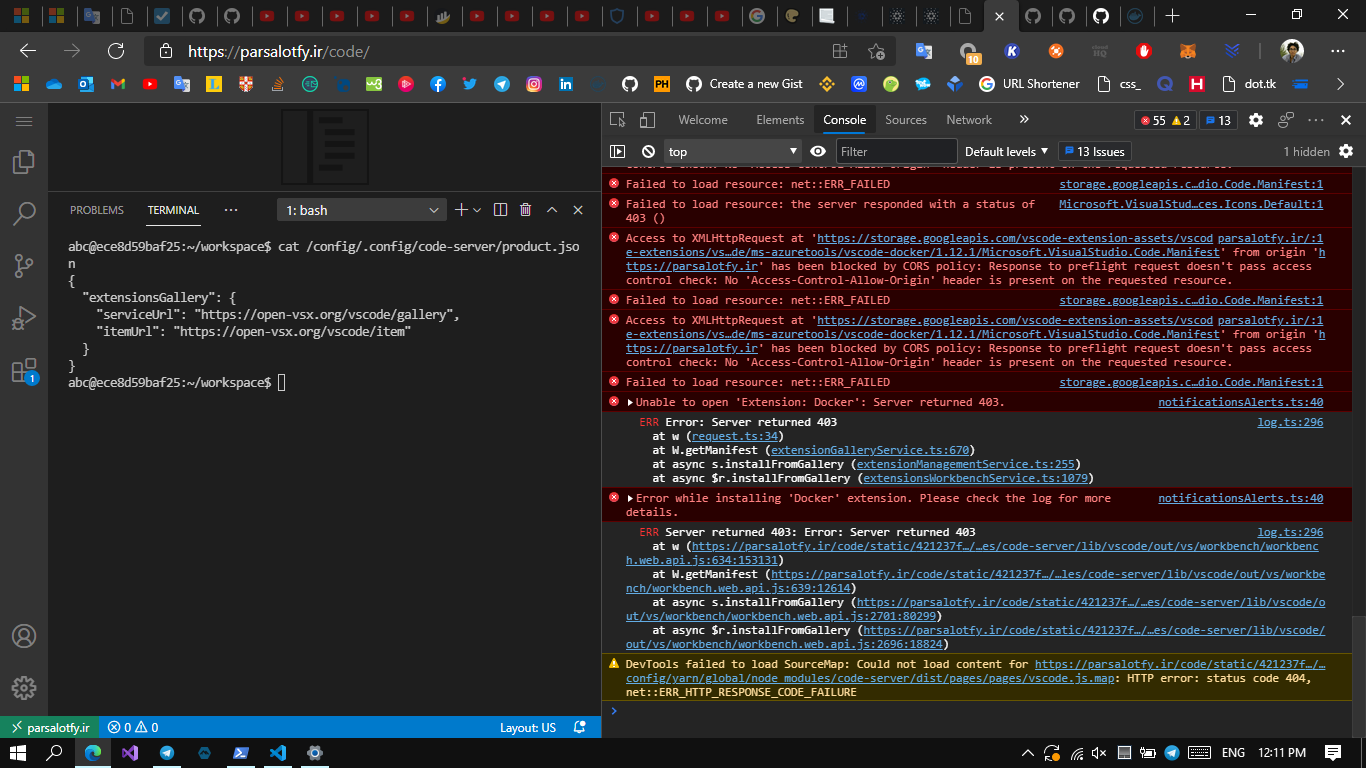
{ "extensionsGallery": { "serviceUrl": "https://open-vsx.org/vscode/gallery", "itemUrl": "https://open-vsx.org/vscode/item" } } -
save the file
-
go to extension panel in side bar
-
try to install some extensions
Expected
I expect that I could install extensions without any problem as long as I had changed the marketplace and I'm not using Microsoft marketplace anymore
Actual
It still gives me 403 error
Logs
Screenshot

Notes
This issue can be reproduced in VS Code: Yes/No