Repository navigation
v1.3.0

-
The tool remembers what you ticked and where your source is, and marks whatever
was not there last time. Every opening used to start from nothing: load, find your
assemblies in the list again, tick them again, untick the same two classes again, paste
the folder again. Now the first Load Assemblies of an environment puts all of that
back, and anything on either list that was not on it the last time you had that
environment open wears a small green mark - a colleague's new assembly, a class somebody
registered since - with the count on the status line and the reason in the row's tooltip.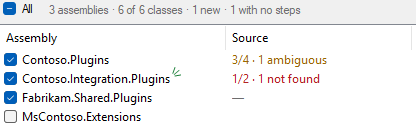
The memory is per environment, so two orgs do not trade ticks, and it is written as you go
rather than when the tab closes. Only the first load of an environment restores; pressing
Load Assemblies again in the same session still starts over, and Refresh still
keeps what you have. A class counts as new only against an assembly whose classes you had
looked at before: ticking one for the first time does not mark the whole group. -
Selecting a class in either list scrolls the preview to its block and tints it.
Picking a row under the source folder already found its class on the left; the preview
was still read from the top down to find what that class would be given. Now the block
comes up to the top of the pane on a pale yellow, and follows the preview when you tick
or untick others. A class that is not ticked is not in the preview, so it leaves the pane
where it is.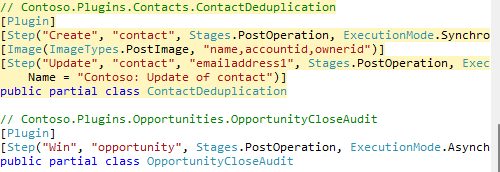
-
Write to Files no longer leaves a timestamped .bak copy beside every file it changes.
Your source control already holds the original, and the write is a diff you can review and
revert there; the copies were only clutter to sweep up or ignore afterwards. -
The tool's home is now comentality.com/tools:
the package page's project link goes there, and the README says so. The source and these
notes stay on GitHub. The store listing's description was reworded to say what the
tool leaves in your code, with both outputs named.
Install from the XrmToolBox Tool Library, or Comentality.PluginStepCodegen on NuGet. Requires XrmToolBox 1.2025.7 or later.