Releases: comentality/xrm-plugin-step-codegen
Release list
v1.2.0

-
A registered class with no steps is no longer filed as unregistered. A plugin type
somebody registered and has not written a step for yet is not listed — there is nothing
to document — so its.csfile fell through to In folder, not registered, whose
tooltip said in as many words that nothing registers it. That is the opposite of what
happened to that class, and it sent you off to register something that was already
registered. Those files now have a group of their own, and the middle column's status
line counts them apart from the classes nothing registers at all.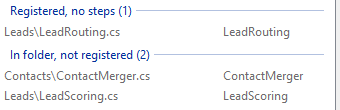
-
The assembly list drops its Isolation column and spends the width on saying what is wrong
with each assembly's source. That column read
Sandboxdown every row you were shown — Dataverse online forces it on everything that is
not Microsoft's, and the Microsoft's switch hides the rows where it does not — so a
quarter of the pane was spent saying the same word. It is gone, an assembly registered in
full trust says so in its tooltip, and the Source column got the width. What it spends it
on is the thing the roll-up would not say:3/4 ✗told you how bad it was without telling
you which, and no file and declared in two files are two different afternoons.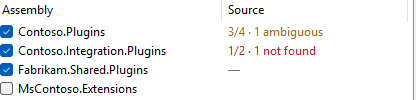
Its three empty states — not ticked yet, no source folder chosen, nothing registered in the
assembly — also answer when hovered, and the last of them reads—as soon as the row is
ticked rather than staying blank until a folder is chosen. -
Stale files have a group of their own, so "what have I got to rewrite" is one look rather
than a scan. They sat inside Matched, marked with a word
on the row, which is no way to answer "what have I got to rewrite" — the one question in
that pane you can act on with a single press.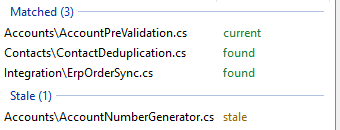
-
The tool behaves itself on a slow link: eight ways a fetch still in flight could mislead
you or lose your work are fixed. XrmToolBox draws a small panel in the middle of
a tool while it waits on the environment — not a sheet over the whole tab — so every button
stayed live for however long the fetch took. On a fast connection that window is
milliseconds wide. On a slow one it is where most of a session is spent, and eight things
went wrong in it:-
Closing the tab mid-fetch could take the tab down with it. The answer still arrived,
and was handed to a control that no longer existed. Every fetch now checks before it
draws, the way the folder scan always has. -
A late answer could overwrite a newer one — for good. Press Refresh while a fetch
is still out and two answers to two different questions are in the air; whichever landed
last was believed, and because the assembly was then in the cache it was never asked
about again. Fetches now carry the question they belong to and are dropped if it has
moved on. -
Ticking assemblies one at a time re-asked for the ones already on their way. Five
ticks put the first assembly on the wire five times. There is now one question out at a
time, and whatever is ticked meanwhile goes out together when it lands — one round trip
for the batch instead of one per tick. -
Load Assemblies and Write to Files are dead while their own work runs. Pressing Load
again cost a second full query whose answer cleared everything ticked since the first;
pressing Write twice put two writers over the same files, where the backup name is only
accurate to the second, so the two.bakcopies collided and the pristine original was
the copy that got lost. -
Write waits for the environment. It was offered while an assembly was still loading,
and would write a half-loaded list with a report that read like a complete one. -
The status lines stop claiming what has not arrived.
2 assemblies · 4 of 4 classes
is a complete-sounding sentence about a list with an assembly missing from it, and every
class of that assembly was filed, in words, under In folder, not registered — then
quietly un-filed when the network caught up. The count now says what it is waiting on,
the assembly's own row shows…, and nothing is called unregistered until every
registration is in.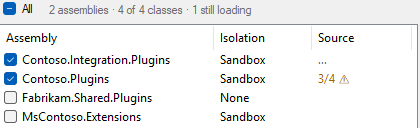

-
A fetch can be abandoned. The progress panel now offers Cancel. A query already on
the wire cannot be recalled, but the three round trips behind it can be called off, which
is most of the wait on the link where it matters. Nothing is recorded, so unticking and
ticking again asks afresh. -
A fetch that fails says so where you can still read it. The dialog is dismissed and
then there is only the list, and an environment that could not be reached looked exactly
like an environment with nothing in it. The status line keeps the reason.
tests\slow.ps1is what found all of it: ten scenarios driving the real control against
a Dataverse that takes seconds to answer, with a screenshot per gesture. -
-
The source folder can be slow too, and no longer freezes the window when it is. A plugin
repository is as likely to be on a UNC share, a mapped drive or a sync client that has
stopped syncing as it is to be on a disk, and against one of those simply asking whether a
folder exists blocks until the network gives up. That question was being asked from the
button-state pass, which runs on every keystroke in the folder box — so typing the path
to a share that was down froze the tool once per character. It is now asked once, on a
worker, after the same half-second pause the scan already waits out, and everything else
reads the answer it left. The box saysLooking for that folder...while the question is
out, rather than calling the path wrong before anybody has looked.Create Attribute Definitions File was the last thing still writing on the UI thread —
both looking for the file and writing it. It runs on a worker like every other write. -
The source folder is read once, not once per class, so a 250-file project scans in 17 ms
rather than four seconds. A project of 250 files with 33
registered classes took four seconds to scan and six to write. Reading all 250 files takes
twelve milliseconds, so none of that was ever the disk: every registered class was
re-scanning every file's text with a regex of its own, working out which local classes are
plugins built a freshRegexfor every name-against-class pair and did it again on every
pass, and one press of Write to Files walked and re-read the whole folder once per
class. The folder is now read and parsed once and answered out of a dictionary.On 250 files, 33 classes Was Now Scan 4051 ms 17 ms Write 6306 ms 48 ms A 4000 file repository — larger than most plugin repositories get — now scans in about
600 ms, of which 430 ms is reading the files. -
Write no longer freezes the window: it runs under the same progress overlay that loading
the assemblies does. It ran on the UI thread, so a slow write was a
tool that had stopped repainting. It runs under the same progress overlay as loading the
assemblies does, and says how many classes it is writing. -
Marks from another folder are cleared when you change folders, rather than sitting
there looking authoritative until the new scan lands. A rescan of the same folder — the
one that follows a write — keeps its marks up, because blanking the column on the way back
from a successful write reads as a fault. -
tests\perf.ps1times the scan and the write over generated repositories of 250 to 4000
files, against what reading the folder once costs on the same machine. It is what found
all of the above. -
The summary comment is grouped by table, so a plugin registered against a dozen tables
reads as a dozen short lists. A generic plugin — one class registered
against a dozen tables to stamp the same column on all of them — used to read as one
interleaved list, every table's steps scattered through it by stage. The comment now
takes a table at a time, tables alphabetically, keeping the order each table's own steps
run in; a step on a global message goes last./// Sync Post-Create of account (order 1): (all columns) /// Sync Post-Update of account (order 1): (all columns) /// Sync Pre-Update of annotation (order 1): (all columns) /// Sync Post-Create of annotation (order 1): (all columns)
The attributes are unchanged and stay in execution order: that is the order Xrm Tools
reads them back in. The one thing that did change there is a tiebreak — steps tying on
stage, rank and message name are now ordered by table rather than by whatever the query
returned, so the same registration writes the same file twice running. -
The docs, the store listing and the generated definitions file now name
Xrm Tools as whose attribute model this is. It is
...
v1.1.0
-
A near-complete column list can be said as its exceptions. Switched on, the comment
mode measures each list against its entity's current columns, and an image or filter
that covers nearly all of them reads(all columns except: creditlimit, ilac_legacyid, ...)instead of reciting seventy names — used only while the exceptions stay at most a
quarter of what is included. A list that turns out to be every column reads(all 75 columns, written out), distinct from(all columns), because a spelled-out list is
pinned to the day it was made while an empty one follows the table. A list carrying a
column the entity no longer has is left verbatim, so the stale name stays visible. -
The dagger. A † button in the write toolbar opens the experimental settings:
experiments that run as opt-ins until they earn being the default. The exceptions
phrasing above is the first of them, off by default, remembered across sessions.
-
A third column holds the source folder against the registrations. The folder picker
moved there from above the preview, and as soon as a folder and loaded classes exist the
tool scans in the background and keeps a ledger: which registered classes have a.cs
file (current, stale — the tool's output is present but no longer matches the
registration — or nothing written yet), which have no file, which are ambiguous,
and which plugin classes sit in the folder with no registration behind them. Every
class row carries the verdict as a glyph (✓ ✎ ✗ ⚠), every assembly row a roll-up
(4/5 ⚠), and selecting a row in either list highlights it in the other. What used to be
discovered by pressing Write to Files is now on screen before it. -
Write to both files when ambiguous. A checkbox that only appears when the scan has
found an ambiguity. Off, an ambiguous class is skipped as before; on, every file
declaring the class gets the same output — the splice replaces only the tool's own
block, so the partial-class case the ambiguity usually is ends up documented on both
halves. -
The preview is togglable. A Preview ▸ button in the write toolbar collapses the
code view and hands its width to the source column, for the sessions that are about
auditing the marks rather than reading what would be written; ◂ Preview brings it
back. The write controls sit above both panes and stay put either way. -
Refresh. Rereads the assemblies and their steps without resetting the session:
what is ticked, what is excluded, the filter and the folder all survive. For the loop
the tool lives in — register from the IDE, come back, refresh, write. -
The hint above the buttons now says what a write would do (
Will write 5 classes · 2 skipped (1 no file, 1 ambiguous)) instead of going quiet once the folder was valid. -
The registered namespace now settles a short-name tie. When several
.csfiles
declare a class of the same short name, the file whosenamespacedeclaration matches
the namespace the type was registered under is the one written, provided exactly one
file does. Two projects in one tree with a class name in common no longer come back as
Ambiguous. A tie the namespace cannot settle — a partial class spanning files, the
same namespace declared twice, a namespace declared in nested form — is still reported
as ambiguous and no file is touched.
Requires XrmToolBox 1.2025.7 or later. Install from the XrmToolBox Tool Library (package Comentality.PluginStepCodegen on NuGet.org), or drop the attached package's Plugins content into your XrmToolBox plugins folder.