Repository navigation
v1.4.0

-
A step you are profiling is documented exactly as registered, not as a disabled step
called "(Profiled)". Start Profiling in the Plugin Registration Tool renames the step,
switches it off, and moves its images onto a stand-in step on the profiler's own plugin
type. The tool read that at face value: the comment said disabled, the generated name
came out as a custom one, and the images were gone. Now a profiled step reads with its own
name, its images and its real on/off state, and the profiler's stand-ins are no longer
listed as steps of the profiler. Finding them costs no extra round trip. -
A class with a step being profiled wears a small amber bug, so a forgotten profiling
session is hard to miss. Profiling leaves the real step switched off until somebody presses
Stop Profiling. The bug shows after the class name and after its assembly; the row's
tooltip names the steps, and the status line counts them. Only the window shows it.
Nothing written to your files mentions profiling.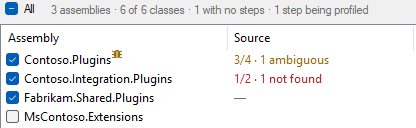
-
Panes and columns now fit what they hold, so long assembly names and deep source paths get the room.
Every column used to take a fixed share of its list and every pane a fixed width, so a
path three folders deep ended in an ellipsis beside a half-empty Steps column. Now the
short columns are exactly as wide as their widest entry, the assembly, class and path
columns take what is left, and the panes follow: the assembly and source panes get their
widest line first, and the preview gets the rest. It is always left its own longest line
or a third of the window, whichever is less, and scrolls sideways past that.
The fit is redone whenever the lists or the preview change. A column divider stops at the
widest line, and a splitter dragged past it settles back there when you let go. A pane you
drag keeps the width you gave it, so in a tight window you can choose which one gets the room.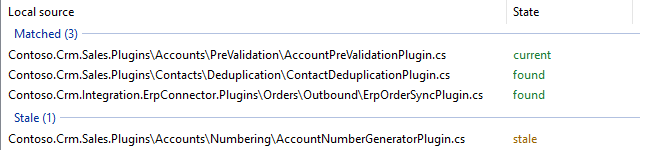
-
tests\profile.ps1profiles every step of the end to end fixture with the Plugin
Registration Tool's own profiler library, reads the fixture before, during and after, and
fails unless all three readings are identical down to every emitted line. -
The end to end fixtures and the harness sample are named and laid out like a real plugin
project: organisation.project assemblies, verbose class names ending inPlugin, several
namespaces per assembly, and source in nested folders that mirror them. Ids and keys did
not change, but an environment registered before this needstests\unregister.ps1and
thentests\register.ps1, because neither route renames a registered assembly in place.