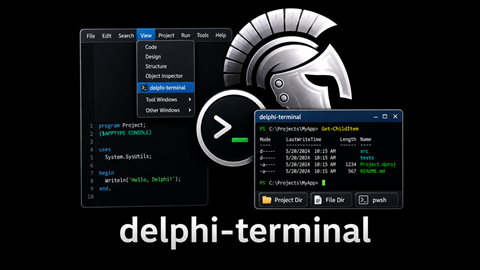




Dockable terminal panel for RAD Studio. Run CMD, PowerShell 7 (pwsh), and legacy PowerShell sessions directly inside the IDE.
- Three shell tabs -- CMD, pwsh, and PowerShell in a single panel
- ANSI color rendering -- SGR escape sequences rendered with the Windows Terminal Campbell palette via TRichEdit
- Command history -- Up/Down arrow keys recall previous commands
- Working directory shortcuts -- Project Dir and File Dir toolbar buttons resolve paths via ToolsAPI in the IDE (folder picker in the demo app.)
- Process exit detection -- shows a restart prompt when the shell
exits:
press Enter to restart - Keyboard shortcuts
- Ctrl+Tab / Ctrl+Shift+Tab -- cycle through shell tabs
- Ctrl+1, Ctrl+2, Ctrl+3 -- jump to CMD, pwsh, or PowerShell tab
- Up / Down -- navigate command history
- IDE integration -- dockable form with persistent dock state,
Viewmenu item, and config screen inTools>Options>Third Party>delphi-terminal - Auto change-directory option when the active Project changes
- Configurable Font Name + Font Size used in console window
All core functionality lives in TframeCmdShell, a self-contained TFrame
that embeds a terminal panel with ANSI-capable TRichEdit output, command
input, and shell process management. Both the IDE plugin and the demo app
host this same frame.
Minimal BPL package that registers a dockable form within RAD Studio and hosts the shared frame. Contains mostly just IDE plumbing: menu registration via INTAServices, ToolsAPI path resolution, and dockable form lifecycle.
Standalone VCL application that hosts the shared frame in a tabbed form. Useful for debugging the plugin.
DUnitX test project covering shell process management, ANSI parsing, and command history.
- A relatively recent version of RAD Studio
- You should remove {$LIBSUFFIX AUTO} for older versions.
- Plugin might otherwise be compatible back to XE3 (TStringHelper.contains) but old versions are untested.
Optional
- Defaults to
Cascadia Monofont (ships with Windows Terminal) - PowerShell 7+ (
pwsh.exe) for the pwsh tab
- Open
projects/ide-plugin/Delphi.Terminal.Plugin.dpkin RAD Studio - Right-click the project in Project Manager > Install
- Access via View > delphi-terminal
After installing, use the View menu and select delphi-terminal
Dock the form as desired and optionally save Desktop setting.


This tool is part of the Continuous-Delphi ecosystem, dedicated to the long-term success of Delphi applications.

Built with Delphi