How to get a submenu in a dropdown menu in CoreUI React? #297

Description

I am using CoreUI React Free version. Currently to implement a simple dropdown, this is what one needs to do
<CDropdown
      inNav
      className="c-header-nav-items mx-2"
      direction="down"
      >

      <CDropdownToggle className="c-header-nav-link" caret={false}>
        <div className="c-avatar">
          <CImg
            src={'avatars/user.jpg'}
            className="c-avatar-img"
            alt="admin@bootstrapmaster.com"
          />
        </div>
      </CDropdownToggle>

      <CDropdownMenu className="pt-0" placement="bottom-end">

        <CDropdownItem
          header
          tag="div"
          color="light"
          className="text-center"
        >
          <strong>Account</strong>
        </CDropdownItem>

         <CDropdownItem>
          <CIcon name="cil-user" className="mfe-2" />Profile
        </CDropdownItem>

        <CDropdownItem>
          <CIcon name="cil-settings" className="mfe-2" />
          Settings
        </CDropdownItem>

        <CDropdownItem>
          <CIcon name="cil-credit-card" className="mfe-2" />
          Payments
        </CDropdownItem>

        <CDropdownItem divider />
        <CDropdownItem>
          <CIcon name="cil-lock-locked" className="mfe-2" />
          Logout
        </CDropdownItem>
      </CDropdownMenu>
</CDropdown>
This is how it looks like

Now I want to add a submenu to Settings such that on clicking Settings, another menu opens up to its left and I can click on it to choose appropriate item. Something like below

I looked up online for documentation regarding integrating submenu to a dropdown menu in CoreUI but couldn't find anything.
The closest I could get was doing something like this to the Settings part
<CDropdownItem>
          <CIcon name="cil-settings" className="mfe-2" />
          Settings
          <CDropdownMenu>
            <CDropdownItem>
                Submenu Item 1
            </CDropdownItem>
            <CDropdownItem>
                Submenu Item 2
            </CDropdownItem>
          </CDropdownMenu>
 </CDropdownItem>
So now it looks like below
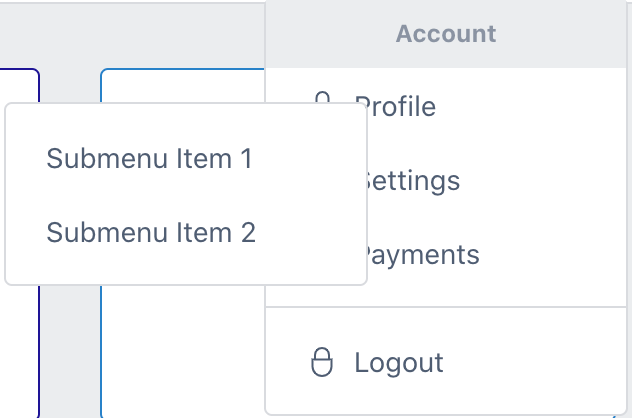
But as you can see, the submenu is not aligned and it is visible by default against the intended behaviour of clicking the Settings first and then the submenu should appear.
Is there any way CoreUI supports submenu in a dropdown menu? Or is there a workaround for this?
Note: I am using CoreUI React free version and my current version is 3.1.1