We are looking at Arrays today
TODO: Work on Press of a Button Achievement
- Take a section of code that outputs DOM content using console.log.
- Wrap the code into a named function.
- Attach this function to a
<button>element on the HTML page. - Click the button to invoke your function and output DOM content to the DOM.
Did not realize this was due today... So let's get cracking
Still am a bit iffy on the whole javascript side of things but getting better!
Found a tutorial on Youtube and I'll use it for some help! JavaScript Tutorial For Beginners #40 - The onClick Event by The Net Ninja
So I went thru so many tutorials. The one above is good but it does not use document.querySelector or Element.addEventListener
Ended up using this one for help with the achievement How to Change Button Color OnClick in Javascript by KodeBase
Extension
VScode - CodeRunner
TODO: Achievement 2 - Before and After
-
X Declare a variable with a name of your choice
-
X Assign this variable a value of your choice
- X String
- X Number -Used JavaScript the Basics - Increment and Decrement Operator by Rob Merrill for help
- X Boolean
- X Array
-
X Print the variable (Before) with
console.log. -
X Print the variable again (After), but changed in some way, such as
- X concatenate a String using template literals
- X increment a Number with the increment operator (++)
- X Reverse a Boolean value with the logical NOT (!) operator
- X Output the number of items in an array with Array.length
So far I've declared a few variables. Am playing around with the console to understand what it does a bit better. Watched a video to better understand variables. 7: How to Create Variables in JavaScript by Dani Krossing
This activity has actually really helped to visialize some of the things that one is able to do with JavaScript.
Been using plenty of Youtube videos to help. Will link underneath.
Attributions
7: How to Create Variables in JavaScript by Dani Krossing
JavaScript the Basics - Increment and Decrement Operator by Rob Merrill
JavaScript Template Literals by Programming with Mosh
27: JavaScript logical operators - Learn JavaScript front-end programming by Dani Krossing
JavaScript Tutorial For Beginners #11 - Booleans in JavaScript by The Net Ninja
TODO: Work on Plugin' Away - Achievement 1
- Install a 3rd-party JS library
- Demo the library with a simple demo
- Distinguish between the various methods JS can be loaded into an HTML file
- Document this activity
Was looking around for different libraries and I came across three.js and I love how it looks and what you can do with it.
Going to see if I'm successful in installing it!
Used Github to clone it down to my PC and I didn't realized it would take a bit to download.
So I don't really understand what is going on... maybe for a later time when I understand this better.
Going to try lodash.
I tried it. Saw this video on youtube What is Lodash and How it Works (for beginners) By iEatWebsites that helped to understand some of the functions of lodash but I'm not sure how to demo it. Like I can see it in the console but I'm not sure what to add to the HTML to actually make the javascript useful.
I think I'll do the reveal.js for now and ask more about it tomorrow. I thought I was understanding this better but I'm still pretty lost...
Looks like we are making a slide show tonight!!!!
Attribution
Photo of Pizza by Krisp Cut from Pexels
Photo of Pepperoni by Polina Tankilevitch from Pexels
Made a random slide show but I'm pretty proud of it. I feel a little bit better about using reaveal.js in the future but would still like to learn how to do that with other libraries.
TODO: Work on Home Page Assignment
- X Look for hero section image
- X One locally hosted image using HTML or CSS
- X a heading using h1 tag
- X a tagline using p tag
- X a call to action
- X add form page and link to it
- X add 3rd party api
- Add Fonts Sheet
Attributions
Photo of Medic Dogs by Sam Lion from Pexels
Was having a really hard time adding a background image that is locally hosted. I lookede around and couldn't figure it out.
Until... I realized I had forgotten to link my CSS sheet.
Okay, got some content on there. Gotta work on the button now. After that I'll link it to my form page and like that to the 3rd party api.
Got the form up and running.
Okay, linked the homepage with the form page. It's all working well.
Next, I want to add some font to make it look more attractive.
TODO: Working on Gallery
- X Add Nav. bar and Footer
- X Nav. must be responsive
- X Single column on mobile, 3+ columns on desktop
- X Semantic images using figure and figcaption
- X figcaption should include title or image description and photo credit
- X fig-caption should have a min-width to preserve line length
- X Images should use img tag and have proper alt text
- X note, if you use any functional images (such as links), then the alt text should describe the function and not the picture
- X Preserve image aspect ratio
Worked on my Gallery Page last night and got all of my images ready to start moving them around
Have completely change my images. I've been trying to make everything fit nicely but I'm having a really hard time getting it to do so
Got things lined up a bit. Used the Inspector tool and it really helped to figure out what was doing what.
Need to get better at using it
The Inspector tool helped to see what was doing what and I realized part of my CSS was messing with the layout I was trying to do. Deleted align-item: center;
and it helped with the smaller images to make them a bit bigger.
Went for a different approach on the gallery. It looks more like steps going up and down and I really liked the way it looked
Almost forgot Figcaptions
FINSISHED TIME TO SUBMIT
TODO: Work on User Input
Worked on User Input and I didn't document...
-
For this session I wanted to focus on understanding the pieces and components of a user input form.
-
Overall a relatively simple idea but with a lot of text!
-
Wrote out what the
<tags>and code are suppose to look at on my iPad and it may be hard to understand but it makes sense to me and really helped.
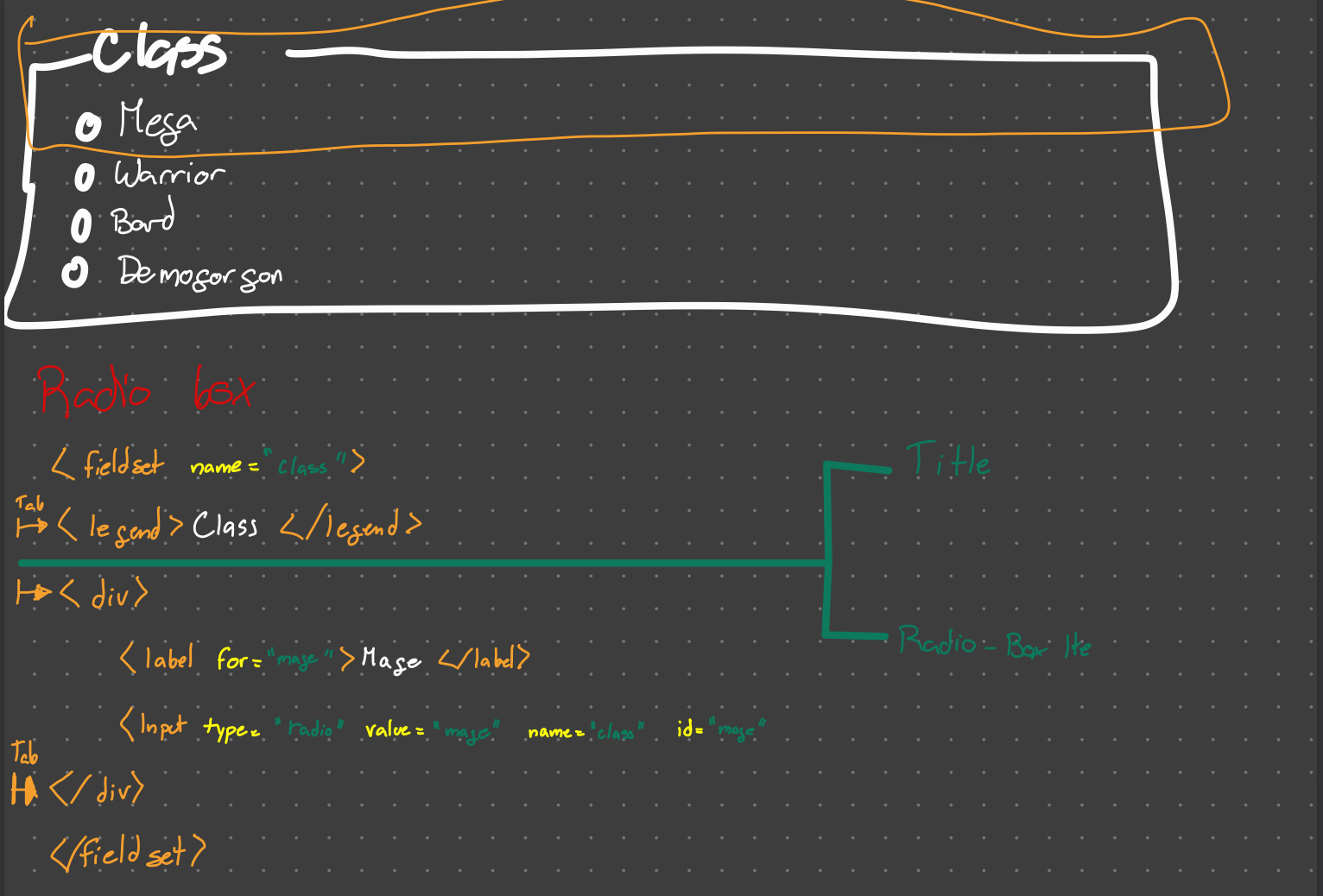
Will me uploading more images using iPad as I am finding it really useful
- All required content is on User Input. Will work on CSS tomorrow. Or I guess later today!
TODO: Work on User Input
- X Make sure it all sits in the middle
- X Add 2 separate sections for information
- X Get "Special Ability" dropdown menu to sit on top of backstory text box
- X Add Header and Footer
- X Center Button
Finding it tricky to stack some content on top of other content. Trying to use flexbox and grid.
... Realizing the reason why things weren't stacking properly is just because they were in a <div>. No CSS needed. Just the backspace key
Input is finished!
Have been working on this assignment for hours. But most of the item on my checklist have been done! Still trying to make everything wrap properly.
Found out what my spacing issue was... I didn't close off one of my links and it was missing everything up...
-
Would not have known what was wrong if it wasn't for Ashlyn pushing me to use the dev tools in Firefox.
-
Ended up changing card layout to a
gridlayout instead of aflexlayout. Easier for wrapping.
Finished at last :D Nothing fancy but it works, It looks nice. Best of all, its responsive.
- Finished CPNT-260-a2!!
Later in the day
Self brag: Got to repo file on my computer today with one command!
TODO: Work on User Input
TODO: Work on Prodoct/Services Page
- X Figure out website UI
- X Set up basic skeleton on HTML
- X Navigation Bar
- X Multiple sections
- X 3 card layout
- X an unordered list
- X Add content
- X Footer
- Make sure it all looks good
- Make sure it's funtional
- Attributions!!!
- https://www.pexels.com/photo/animal-dog-pet-cute-2007/ [dog-img-rudy]
Wish me luck!
- good luck!
Made a rough sketch of what I want my website to look like. Really helps to better visualize what needs to be in its own <div> or <section>
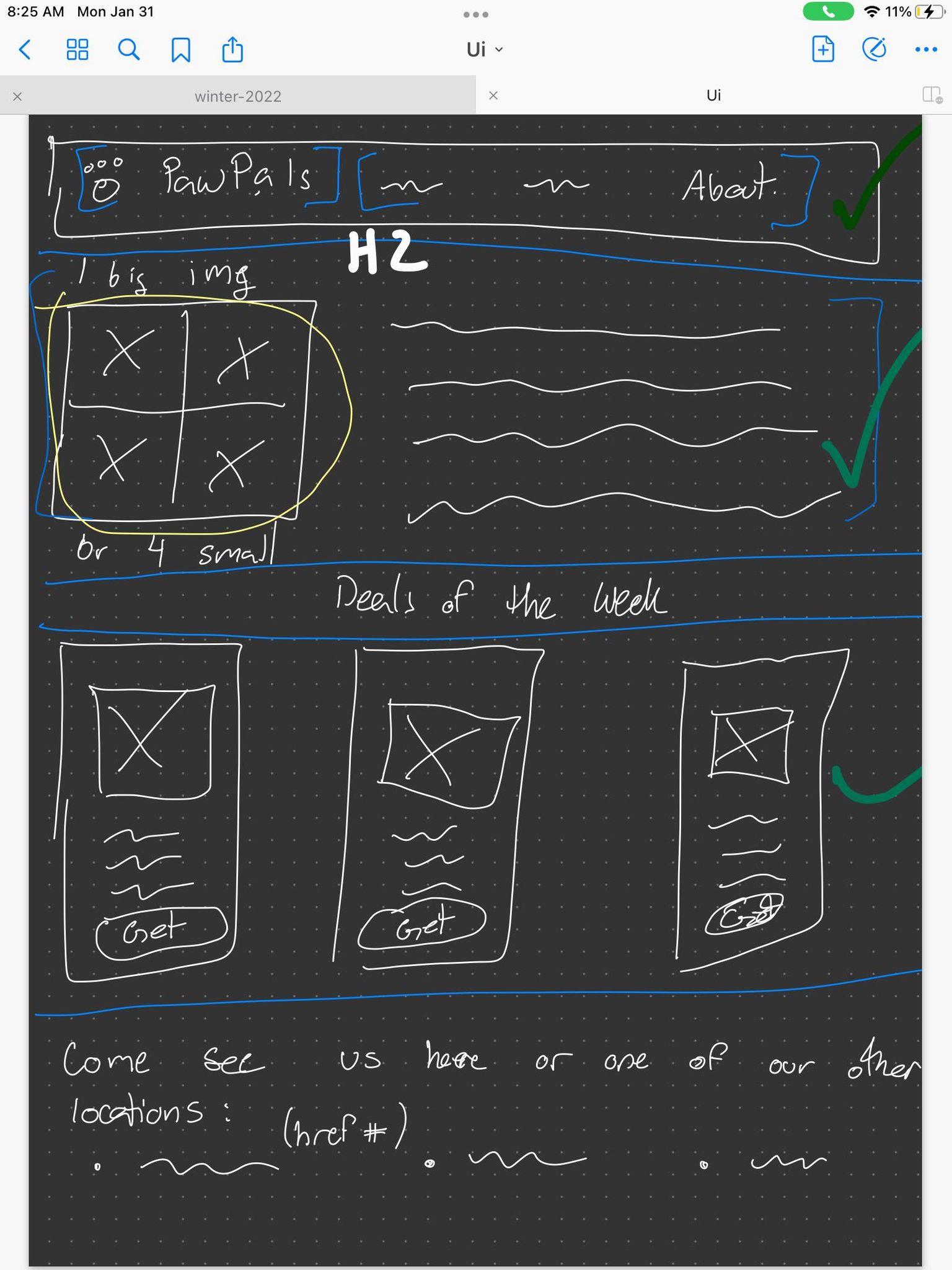
Have started setting up basic skeleton on website. So far so good. Have a nav. bar, multiple sections, 1 card so far!
Okay, I have everything but an unordered list. Will add that later. Going to add content and then move onto CSS.
Page content finished! Now to add the CSS!
TODO: Make sure it all looks good
- X Make sure everything lines up as my sketch.
- X Center H2
- X Place dog image side by side with dog fact
- X Adjust image and text size
- X Cards
- X Adjust all fonts
- X Max text width of 20ch
- X Make cards be side by side
- X paragraph text line lenght is 75ch
- no horizontal scroll
- change colour scheme and fonts
LATE
TODO: Work on 404 Page Activity
- X Find image for 404 page
- X Add 404 error text to page
- X make background image take up the full screen with
height:100vh - X How is it on mobile
Got most of the html typed out. Looking for funky image to add.
Found an image and added text to my page. Now to find out how to put the image in the background.
Having a really hard time getting the image to display!!
I don't know how to add this background image. I've been working on it for a while now :'(
Finally got an image in the background in there! YYAAY!!!
Fit for mobile!
Submit
TODO: Work on Cards Activity
- Figuring out what to write in the boxes that also makes sense for the website.
- X Adding text
- X Find logo or image to add to cards
- X add button
Finished adding the text and finding an image for the card.
TODO:
- X add boarders
- X play around with some colors Used to find a nice color mix for design
- X add button
- X Does it work on mobile?
Have done most the items on the list. Now I have to make sure that it is usable on a mobile device.
The website is functional and resposnsive. Navigation bar could use more work when it is in mobile mode but no sideways scroll!
TODO: Continue working on Navigation bar
-
X Make it so "Rob's Burger Shack" and rest of Navigation bar are on the same line.
-
X Add a background
-
X Add logo
-
X Add buttons
-
So far so good, managed to get all of the text onto one line and add a background. Now I'm just having trouble separating my list items. Trying to use
justify-content: space-evenly or space-aroundbut it't not doing much. -
Was successful in adding a little burger icon!
-
Finally spaced out the content that was in the middle with a "nav-wrapper." I sucks that you could spend so long trying to figure out something simple :'(. But that's the learning process.
-
Okay so haven't worked on the button previously mentioned but navigation bar is looking really good. It's taken a bit but we are getting there!
-
I'm finding that going along with the recording of Ashlyn coding the navigation bar is really helpful.
Repetition
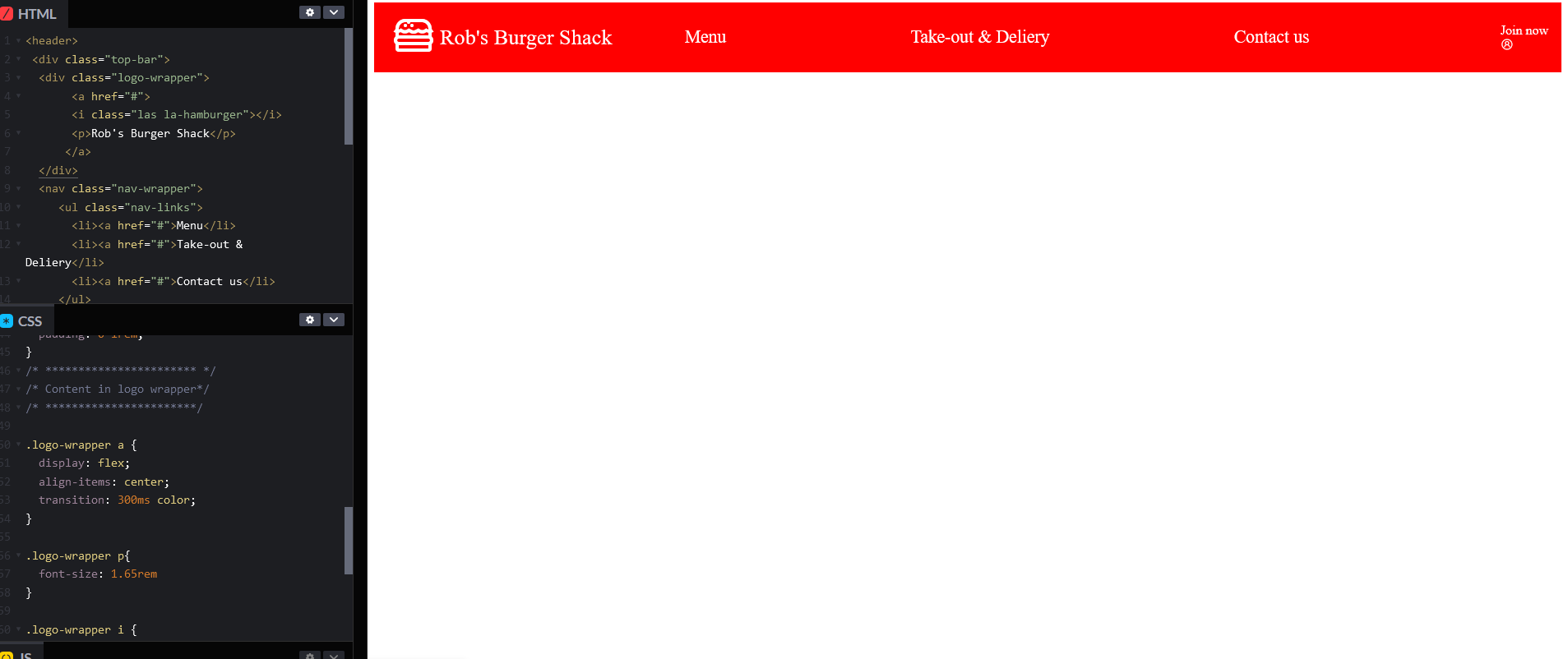
- I think the CSS is starting to make a lot more sense. Some of the things I'm still confused as to how they work but I'll figure it out.
- Finally made the button for a sing-up area but I had a bit of an issue that I think looks pretty cool so I think I'll keep it?
TODO: Work on Navigation bar
-
For some reason I am having a hard with all the code that goes into a navigation bar. Trying to add an icon or image to navigaton bar.
-
Finished some very easy HTML so I can start playing around with some CSS
-
Was able to use flexbox to display my navigation bar links in a row. It took a while becaue I was typing `class=app'to the different < div > and it wasn't doing much. But I got it eventually!
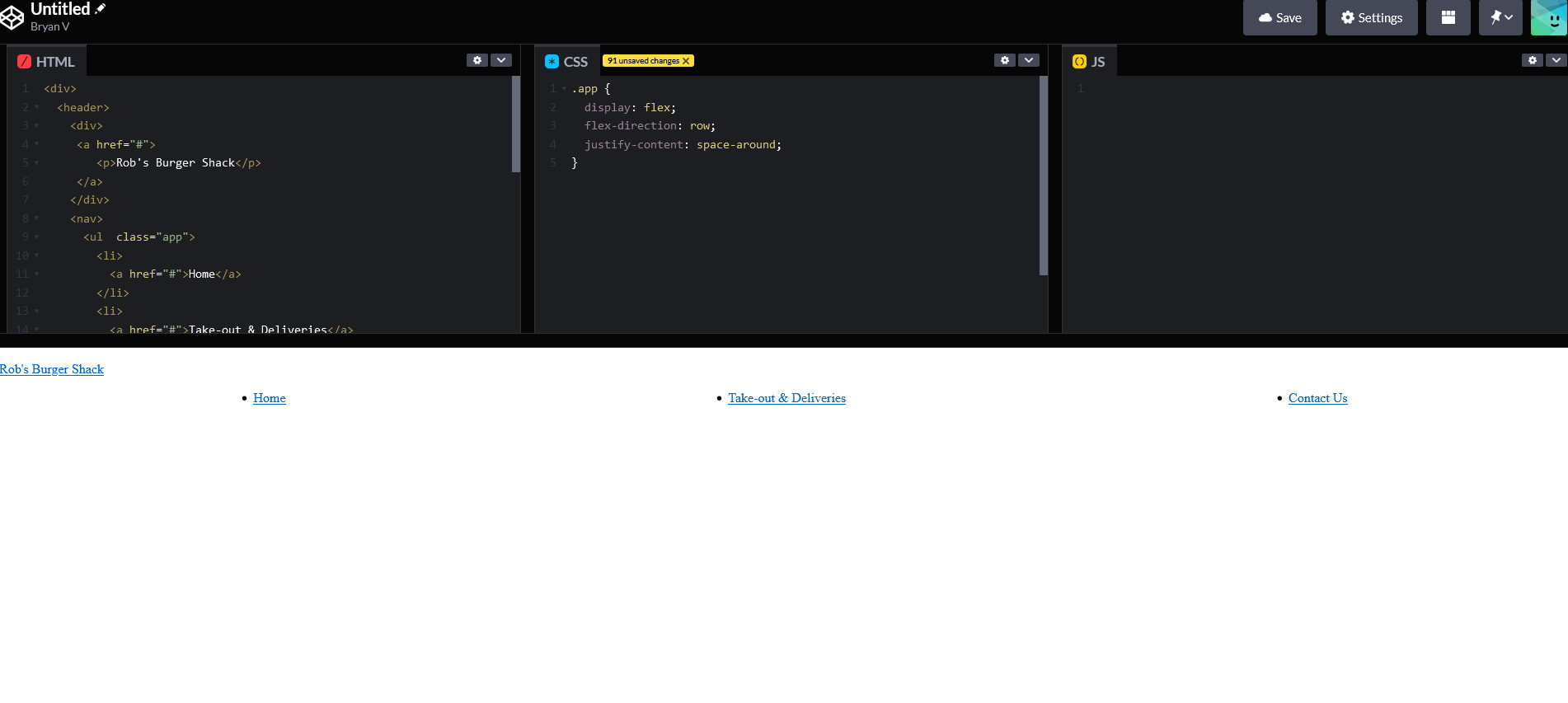
- Using the CSS-tricks website lots to help figure out what I am supposed to do. CSS Tricks
TODO:
- Make it so "Rob's Burger Shack" and rest of Navigation bar are on the same line.
- Add a background
- Add logo
- Add buttons
TODO: Watch yesterday's lesson
- Been working on codepen along side what Ashlyn is doing. Really like that it updates the website in real time. Enjoying it a little more than VS code, can't lie.
After Class
- Today I worked on a lot of html and css using codepen.
- Completely forgot that we needed a journal entry so I'll document the things that gave me the most issues.
- It was really exciting finally having that light bulb moment today as it actually made sense how html and css work together.
- After class today I began my "Wiki Article" activity
- I've already submitted it but I spent a solid 3 hours or so working on it
- It's nice to see what you are coding in real time, with codepen.
- I was a bit all over the place when it came to my coding, but I more or less tried to follow these steps:
- Set-up the skeleton of the website
- Then make sure everything goes in the right place. Whatever is a header is in the header section and so on with the body and footer
- After that I decided to play with some CSS to make the website look nice
- Once I got some CSS code in there, I noticed that the website was doing weird things
- Went back to my html and realized it was a MESS
- Tried to tidy it up as best as I knew how and took out things that didn't need to be there. Mostly because it was just extra code that served no purpose
- After that the website was pretty well centered
- Next I played with the background color of the website
- Added some fonts
- Once I was pretty happy with how the website looks, I tried to fix the "Contents" box so that all the numbers would line up nicely for the list. Unfortunatly I was unsuccessful in doing so
- The other issue I was unsuccessful with solving was the footer box. I was unable to get it to stretch from one side of the page to the other.
Attributions - Image of Bowser Jr. (https://upload.wikimedia.org/wikipedia/en/d/d2/Bowser_Jr.png) sourced from Super Mario Wiki (https://www.mariowiki.com/File:Bowserjr_NSMBU.png)


- I think I will continue to work on code in the future, but there is other assignments due for today!
User Flow User Story: As a gamer, I want to sign up for the "Xbox Game Pass." So that I can have access to the vast library of content Microsoft has available.
THESE STEPS ARE ASSUMING THAT USER HAS AN ACCOUNT AND IS SIGNED IN
- Using the browser, the User navigates to the Microsoft website
- Once at the home page, the User clicks on the hamburger menu and selects "Xbox"
- User clicks on "Game Pass" button
- User clicks on "Join Now" button
- User clicks on "Join for $1" button
- User clicks on "Join" button
- User clicks on "NEXT"
- User picks payment option
- User fills out credit card and address informantion and hits "Save"
- User clicks "Subscribe"
- User is re-directed to home page with a success message
TODO: Continue and finished Agile UX Assignment
- Looking for mobile website in progress...
- Website found! "https://www.microsoft.com/en-ca"
Summary
- Microsoft is the online hub for all microsoft products such as Surface computers, Xbox gaming console and other accessories for their products.
User Stories
- Sample: As a [type of user], I want [an action] so that [a benefit/a value].
User Story 1
- Who?
- As a high school graduate
- What?
- I want to buy a computer
- Why?
- so that I can have my own to take to college
User Story 2
- As a gamer, I want to sign up for "Games Pass." So that I can have access to the vast library of content Microsoft has available.
User Story 3
- As a business owner, I want Microsoft 365 for business. So that my team and I can stay connected and on the same page for all the projects we work on.
TODO: Finish User Flow & Wireframe
cd TODO: DON'T FORGET TO SUBMIT JOURNAL ENTRIES FOR JAN 19-20TH DUE AT 11:59PM
- I do find the visual hierarchy very interesting because with the way you design your website, you can control where people's eyes go. That mixed with the earlier classes in UX, with User Stories and User Flow. I can see how all of these could be very useful tools for a web developer. I also underestimated how much work goes into building a website such as "Apple.ca"
- I've been trying to think about the final project. There is still plenty to learn but I think that I would like to code a website for a friend of mine. She has a photography business on Instagram but would like something more professional like a website.
TODO: Work on assignments.
- Looking for mobile website in progress...
- Website found! "https://www.microsoft.com/en-ca"
Summary
- Microsoft is the online hub for all microsoft products such as Surface computers, Xbox gaming console and other accessories for their products.
- Today we learned about HTML template, which is exciting because I like being able to play around with different themes. See what each has to offer. After this I could help family and friends set up websites for further practice.
- We learned what pair coding is. Then we got our assingment. With a partner, we need to practice some pair coding. I was thinking to think about what to do for it. I thought it could be interesting to have a webpage for our favourite cartoon or something silly.
So far so good, I've been having plenty of fun learning to use VS code, github and git bash. Can't say I haven't had my fair share of anger moments when it feels like everything is good until something doesn't work and I either start all over or spend far too long trying to figure things out.
- On my free time I am trying to get better acquainted with:
- HTML
- CSS
- The Command line