Getting Started
The Show Build Notes plugin for Jenkins displays the contents of a file on the build summary page.
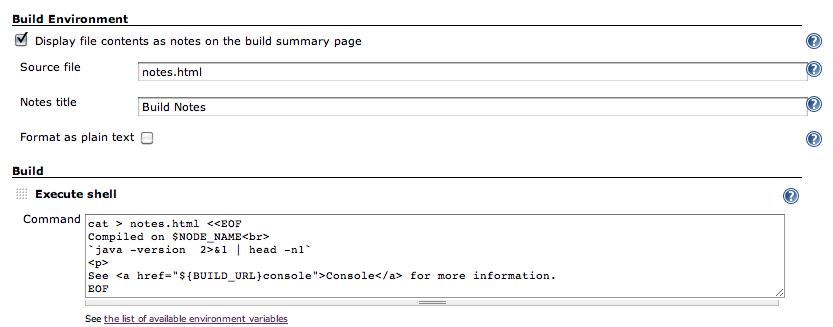
The configuration options include,
- Source file : The name of the file relative to the workspace root. The contents of the file will be used to as the notes on the build summary page. The file can contain plain text or HTML.
- Notes title : An optional title to use for the notes on the build summary page.
- Format as plain text : Check this if you want to display the notes without rendering HTML markup.
In this example shown, the notes.html is created as part of the Build.
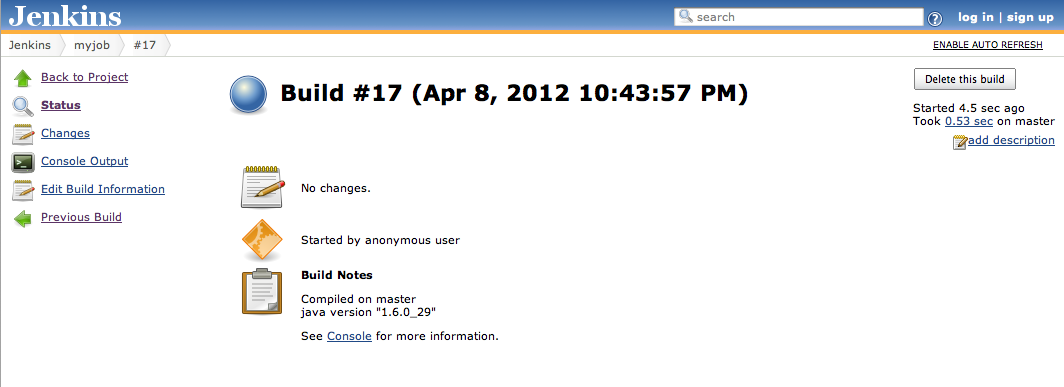
After running a build, the notes should appear on the build summary page.
Version 1.0 (7 April 2012)
Initial release