TradingView Premium Desktop Workspace is organized around the desktop trading workflow: reusable layouts, synchronized charts, alert management, screeners, Pine strategy analysis, chart export, and Premium historical/backtesting capabilities.
Nothing in this repository bypasses TradingView licensing or subscription controls. Use the official TradingView application and an official Premium subscription for Premium functionality.


Current limits below were checked against TradingView's official Premium pricing/help pages in August 2026. TradingView can change plan limits and features at any time.
| Premium capability | Current official Premium limit / availability |
|---|---|
| Charts per tab | 8 |
| Indicators per chart | 25 |
| Historical bars | 20K |
| Parallel chart connections | 50 |
| Price alerts | 400 |
| Technical alerts | 400 |
| Watchlist alerts | 2 |
| Ads | No ads |
| Chart data export | Included |
| Second-based intervals | Included |
| Tick-based intervals | Included |
| Bar Replay | Included |
| Multi-condition alerts | Included |
| Open-ended alerts | Premium / Ultimate |
| Deep Backtesting | Premium and professional plans |
Premium therefore supports a dense workstation-style layout without needing one browser tab for every market or timeframe.
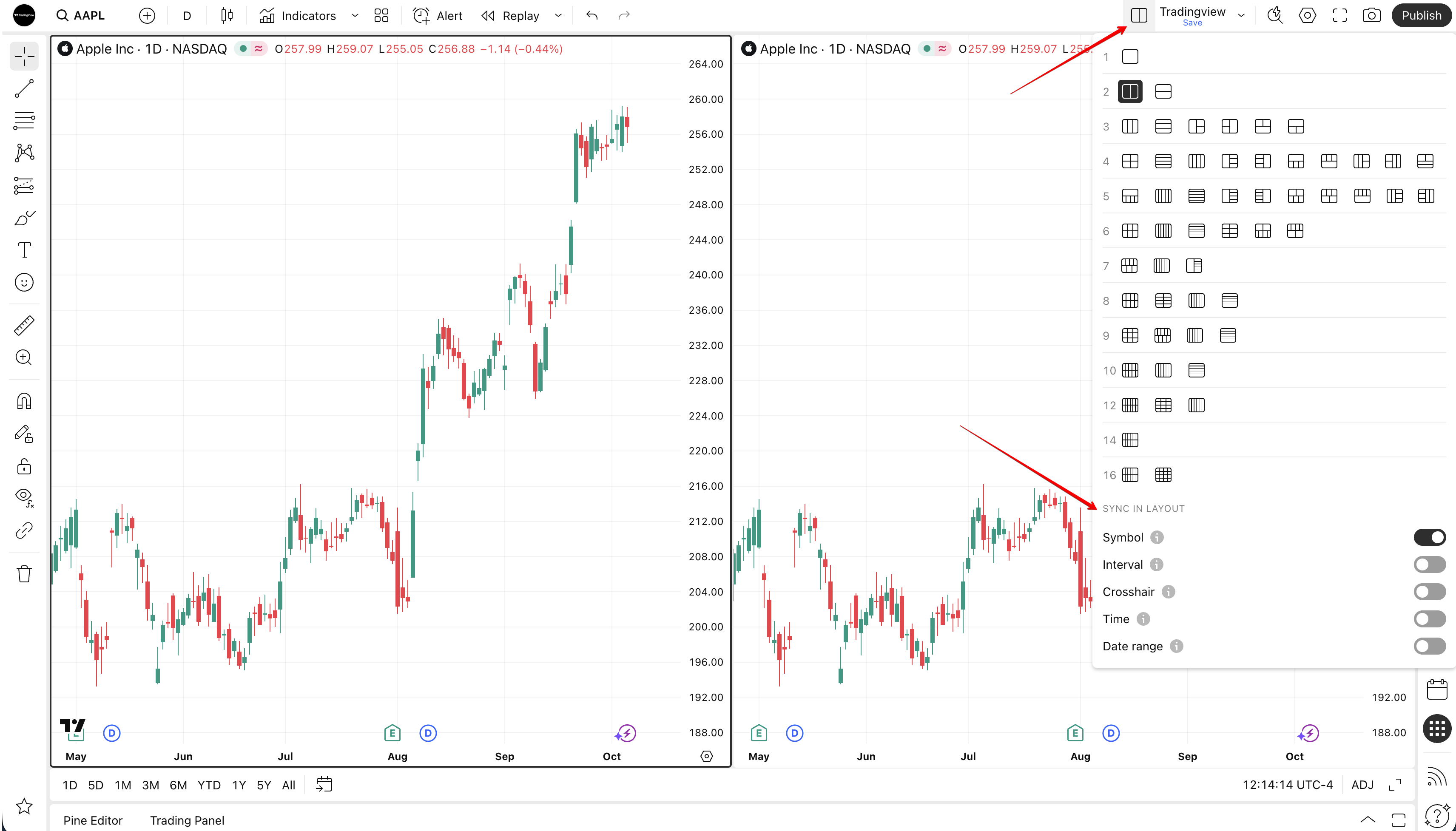
TradingView Premium currently supports up to 8 charts per tab. Multi-chart layouts can be used to monitor different symbols, intervals, or analytical views inside one workspace.
TradingView also provides synchronization controls for symbol, interval, crosshair, time, date range, and drawings where supported.

Chart 1  BTCUSD     1H     Trend / structure
Chart 2  BTCUSD     15m    Entry timing
Chart 3  ETHUSD     1H     Relative strength
Chart 4  SPX        1D     Risk context
Chart 5  DXY        4H     Dollar context
Chart 6  EURUSD     1H     FX correlation
Chart 7  GOLD       4H     Macro confirmation
Chart 8  TOTAL3     1D     Alt-market breadth
TradingView's current Premium plan provides 400 active price alerts + 400 active technical alerts. Premium also supports open-ended alerts, which can remain active without a normal expiration date subject to TradingView's inactivity rules.

Alerts can be based on:
- price movement;
- indicators;
- strategies;
- drawings;
- chart patterns;
- custom Pine conditions;
- multiple conditions in one alert;
- watchlists where supported.
Breakout Alerts
Trend Confirmation
RSI / Momentum
Moving Average Crosses
Volatility Events
Strategy Orders
Macro Watchlist
Crypto Watchlist
Premium currently includes 2 watchlist alerts. A watchlist alert applies one selected condition across symbols in a list and tracks each symbol independently.

This is useful for setups such as:
S&P 500 — daily breakout
Crypto majors — volatility expansion
FX majors — moving-average cross
Earnings watchlist — price threshold
Custom momentum basket
Premium currently allows 25 indicators per chart. This gives enough room for complex analysis without combining unrelated tools into one script purely to stay under a low indicator limit.
A clean setup might separate indicators by function:
Trend      EMA / SMA / Supertrend
Momentum   RSI / Stochastic / MACD
Volume     Volume Profile / Volume
Volatility ATR / Bollinger Bands
Structure  Pivots / custom Pine tools
Breadth    Market-specific breadth indicators
The repository recommends keeping layouts readable rather than using all 25 slots simply because they are available.
TradingView provides screeners for multiple asset classes. A Premium-centered workflow can use screeners for discovery and Supercharts for confirmation.
Suggested saved screens:
High Relative Volume
52-Week Breakouts
Oversold Large Caps
Momentum Continuation
High Beta Movers
Dividend Quality
Crypto Trend Leaders
Forex Volatility
The current TradingView Screener also includes newer tools such as candlestick-pattern scanning, and TradingView introduced an AI Screener in public beta for paid plans in August 2026.
TradingView's Deep Backtesting is available to Premium users and professional plans. TradingView states that it can test Pine strategies across deeper historical data than regular chart testing, with up to 2 million bars available for deep backtests.

Typical workflow:
1. Open a strategy in Pine / Supercharts
2. Verify normal Strategy Tester behavior
3. Choose Deep Backtesting
4. Select the historical period
5. Generate the report
6. Review profitability, drawdown and trade statistics
7. Validate on an out-of-sample period
Historical strategy performance does not guarantee future results.
Chart data export is included in the Premium feature set. A research workflow can export data for additional offline analysis in Python, Excel, R, or a private research notebook.
Example organization:
exports/
├── BTCUSD-1H.csv
├── ETHUSD-1H.csv
├── SPX-1D.csv
└── EURUSD-4H.csv
TradingView provides official web, desktop, and mobile applications. The Free Premium for TradingView

Suggested desktop organization:
Workspace 1 — Intraday
Workspace 2 — Swing
Workspace 3 — Crypto
Workspace 4 — Forex
Workspace 5 — Equities
Workspace 6 — Strategy Research
- Name layouts by market and purpose
- Use multi-chart layouts instead of unnecessary tabs
- Synchronize symbols/timeframes only where useful
- Keep indicator stacks readable
- Group alerts by strategy or market
- Use watchlist alerts for broad scans
- Keep a separate strategy-testing layout
- Export important research data
- Maintain a Paper Trading/testing workspace
- Review alert schedules and expiration rules
- Install or open the official TradingView web/desktop application.
- Sign in to your own TradingView account.
- Activate an official Premium subscription if you need Premium-only functionality.
- Download this project package for the companion documentation/workspace reference: Project Download
- Build layouts for your preferred markets.
- Configure alerts, screeners, indicators, and strategy tools.
- Save layouts and workspace conventions.
No.
No. Premium features are provided by TradingView and require the appropriate official subscription.
The documentation and workflow are specifically organized around TradingView's official Premium capabilities and limits.
No. The TradingView interface images embedded in this README come from official TradingView / TradingView Help Center image sources.
No. They are plain README images and are not wrapped in hyperlinks.
Desktop workspace / screeners / strategy research.
Plan:                 TradingView Premium
Charts per tab:       8
Indicators/chart:     25
Historical bars:      20K
Parallel connections: 50
Price alerts:         400
Technical alerts:     400
Watchlist alerts:     2
Ads:                  No
Open-ended alerts:    Yes
Deep Backtesting:     Yes
This is an independent, unofficial community project and is not affiliated with, endorsed by, or sponsored by TradingView, Inc. TradingView and associated product names are trademarks of their respective owner.
This repository does not include a subscription, activation method, account, license key, patch, crack, or mechanism for bypassing TradingView plan restrictions.
Trading and investing involve financial risk. Nothing in this repository is financial advice.
🔎 Related Topics
TradingView Premium • TradingView Advanced Charts • TradingView Desktop • TradingView Alerts • TradingView Screener • TradingView Strategy Tester • Deep Backtesting • TradingView Pine Script • TradingView Multi Chart • TradingView Watchlist • Technical Analysis • Market Analysis