Application Navigation
The main navigation sidebar provides quick access to all Crodox features and workflows.
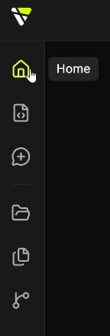
The left sidebar contains the following main sections:
Icon: House
Access the main dashboard and overview of your Crodox workspace.
- View workspace status (repositories, templates, workbenches)
- Quick-start workflow: Open repositories → Create workbench
- Monitor your recent sessions
- Access quick links to settings and main features
See also: Home Screen - Detailed dashboard documentation
Icon: Code brackets <>
Create, edit, and manage your grammar templates.
- Write new templates using Crodox grammar syntax
- Import/export
.crodoxtemplate files - Validate grammar for correctness
- Test templates against sample code
See also: App-Template - Full template documentation · Template-Editor - Editor interface guide · Creating Your First Template - Step-by-step guide
Icon: Plus +
Quickly create a new workbench to analyze a repository.
- Click this button to start a new workbench
- Select a template to use
- Choose a repository to parse
- Begin analyzing your code
See also: App-Workbench - Workbench documentation
Icon: Folder
Browse and manage your GitHub Enterprise repositories.
- View all accessible repositories
- Filter by All, Local, or GitHub
- Select a repository to use in a workbench
See also: App-GitHub - Repository management
Icon: Document
View and manage all your saved grammar templates.
- Browse existing templates
- Edit or delete templates
- See which repositories each template is used for
- Quick access to template details
See also: App-Template - Template documentation
Icon: Connected nodes
View and manage all your active and archived workbenches.
- See all workbenches linked to repositories
- View parsing results and analyzed structures
- Browse parsed dependencies
- Create pull requests from selections
See also: App-Workbench - Workbench documentation
See also: Getting Started - Complete setup walkthrough