Getting Started
This guide walks you through setting up Crodox and creating your first grammar template.
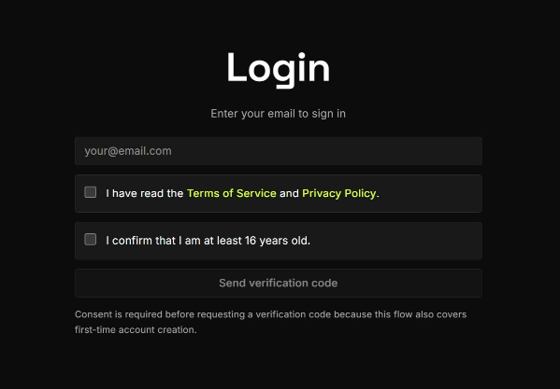
- Open the Crodox app at your organization's URL
- Enter your email address and click Send verification code
- Verify with your GitHub Enterprise account (see Sign-Up for details)
After signing in, you land on the Github tab.
- Enter a user name and click save
- Click Re-link GitHub to connect your GitHub account
- Sign in to GitHub Enterprise and Authorize the Crodox-DEV app
Once authorized, the page shows "GitHub account linked" with your GitHub username.
Switch to the Template tab. This is where you define your Crodox grammar.
You have three options:
| Method | How |
|---|---|
| Paste from wiki | Copy an example definition (e.g., Angular, Python, T-SQL) into the text editor |
| Import | Click import to load a .crodox file |
| Write from scratch | Write your grammar directly in the editor using the Syntax Overview |
Click save when done. The parser validates your template:
- Valid → The template is saved and ready to use
- Error → The parser shows an error message. Refer to the Syntax Overview and the grammar documentation to fix it
Tip: Use the Template Generator to generate a starter template for your language.
Switch to the Workbench tab.
- Enter a name for your workbench (e.g.,
Angular) - Click create
The workbench opens with your template linked. You can now select a repository to test against. After saving, Crodox begins parsing the repository using your grammar definition.
Note: Creation and parsing may take a few seconds. Performance will improve in the release version.
After parsing completes (shown as a green "Finished at ..." message), the results view opens:
- Select a repository from the dropdown at the top
- Browse parsed files - each file from the repository is listed with a checkbox
- Inspect file details - click on a file to see its parsed structure in the detail panel on the right
- Use the toggle in the top right to switch between views
At the bottom of the results view, you can search and query the parsed dependency tree using the Query Language.
This lets you filter and find specific objects, dependencies, and relationships across your codebase.
Switch to the Workbench tab to work with the parsed structure:
- Select files and objects to group into logical units
- Slice the repository into separate pull requests based on the dependency structure
- Each PR represents a self-contained change set informed by the dependency graph
graph TD
    LOGIN["Sign In<br/><i>Email + Code</i>"] --> PROFILE["Set Up Profile<br/><i>Username + GitHub</i>"]
    PROFILE --> TEMPLATE["Create Template<br/><i>Write / Import / Paste</i>"]
    TEMPLATE --> PARSE["Save & Parse<br/><i>Validates grammar</i>"]
    PARSE -->|"Error"| FIX["Fix Syntax<br/><i>See Troubleshooting</i>"]
    FIX --> TEMPLATE
    PARSE -->|"Valid"| WORKBENCH["Create Workbench<br/><i>Link repository</i>"]
    WORKBENCH --> BROWSE["Browse Results<br/><i>File list + details</i>"]
    BROWSE --> QUERY["Query Structure<br/><i>Search dependency tree</i>"]
    BROWSE --> SLICE["Slice into PRs<br/><i>Group changes</i>"]

    style LOGIN fill:#4a90d9,color:#fff
    style TEMPLATE fill:#7b68ee,color:#fff
    style PARSE fill:#e67e22,color:#fff
    style WORKBENCH fill:#27ae60,color:#fff
    style BROWSE fill:#27ae60,color:#fff
    style QUERY fill:#27ae60,color:#fff
    style SLICE fill:#27ae60,color:#fff
- Learn the grammar syntax: Syntax Overview
- Understand the building blocks: Objects, Sub-bodies, Variables
- See complete examples: Basics, Angular, Python, T-SQL
- Analyse your own repository: Analysing a Repository
- See a worked analysis: Repo Analysis
- Generate starter templates: Template Generator
If the parser rejects your template, check for these common mistakes:
| Error | Cause | Fix |
|---|---|---|
| Unclosed element | Missing closing tag (<:>, <*>, <~>, ` |
>, ?>`) |
| Empty jump target |
-->> followed by an or-statement with an empty branch (`< |
|
| Invalid jump target |
-->> not followed by any token |
Add a stop token: -->> \n
|
| Missing variable delimiters |
<< >> not properly closed |
Check that every << has a matching >>
|
| Empty reference |
<-{}-> with no object names |
List at least one object: <-{name}->
|
| Unclosed or-statement | `< | without matching |
| Unclosed repeat |
<? without matching ?>
|
Add the closing ?>
|
If the template is valid but parsing fails on your repository:
| Symptom | Cause | Fix |
|---|---|---|
| Parsing hangs | Grammar is too broad or has infinite loops | Review Repeat Statements - ensure repeats have proper terminators |
| Objects not found | Grammar doesn't match the actual source code | Compare your definition against the real file syntax |
| Wrong dependencies | Variable scoping is incorrect | Review Variables - check :following, :up, :down scopes |
| Files not linked | Path variable name doesn't match file grammar name | Ensure <~"FROM".ts~> and <<"FROM".ts>> share the same name - see Path Variables
|