This GitHub action acquires access tokens (JWTs) for federated Azure AD workload identities that have configured GitHub as Open ID Connect (OIDC) credential provider.
The access tokens can be used for any kind of API access or usage, like Microsoft Graph. The retrieved access token is stored as environment variable ACCESS_TOKEN within the GitHub Action workflow and can also be consumed from PowerShell.
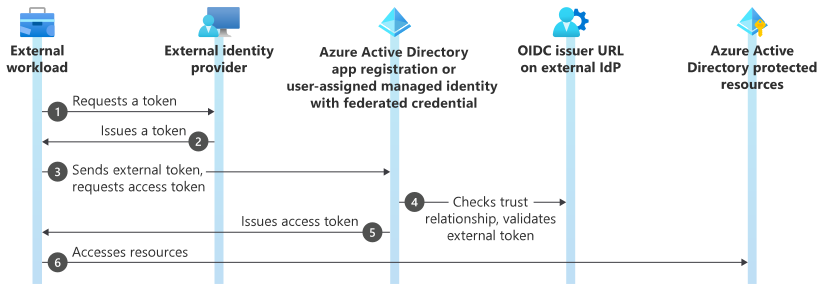
This action requires two mandatory inputs:
- Azure AD Tenant ID
- Azure AD App Registration Client ID
You can also pass the inputs via GitHub repository secrets to the GitHub action.
Make sure to add the id-token permissions to your GitHub action.
Example workflow:
on: [push]

permissions:
  id-token: write
  contents: read

jobs:
  hello_world_job:
    runs-on: ubuntu-latest
    name: WIF Example
    steps:
      - name: Azure AD Workload Identity Federation
        uses: nicolonsky/WIF@v0.0.1
        with:
          tenant_id: '30204efd-acb7-41a7-9fe9-233cec0556c1'
          client_id: '504fd139-6825-4e25-ad7a-627f100ab466'
      - name: Do some Stuff
        run: |
          Install-Module -Name Microsoft.Graph.Authentication
          Connect-MgGraph -AccessToken $env:ACCESS_TOKEN
          Invoke-MgGraphRequest -Uri '/beta/organization' | Select-Object -ExpandProperty value
shell: pwsh-
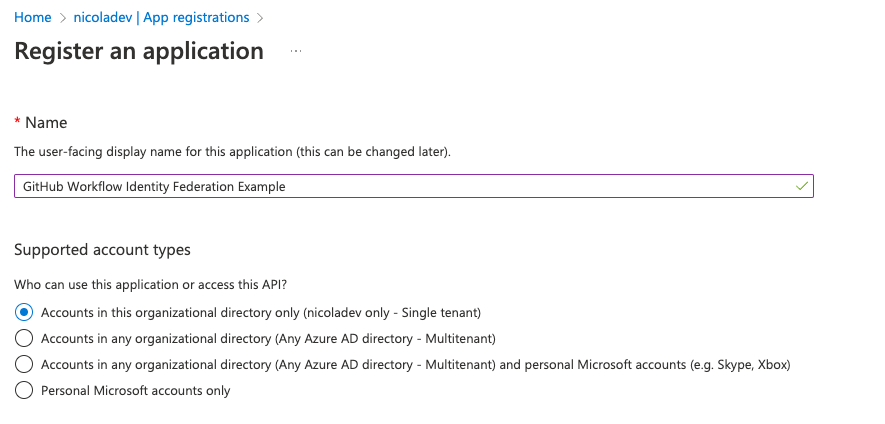
In Azure AD you need to create an app registration:
-
Add the desired permissions and do not forget to grant admin consent:
-
Add federated credentials:
-
Specifiy your GitHub repository information
-
Copy your tenant and client id


Building the action:
ncc build index.js -o dist