[ADR]: determine system design documentation format #328


Description

Problem Statement
Communicating what problem our platform solves and the scale at which we operate has long been a very painful endeavor.
We've repeatedly learned that verbal communication quickly and hilariously falls short for the types of discussions we have. Things such as UI/UX, data flow, performance bottlenecks, etc. should not left up to interpretation, but rather communicated in an exact manner with zero ambiguity. Any misunderstandings can have pretty disastrous consequences if everyone isn't aligned on exactly what's going on.
Having such discussions within ourselves is difficult enough, even with the best diagramming & modelling tools available to us and an entire docs site.
Having such discussions with people that lack the entire context yet are still technical has proven to be frustratingly time-consuming, as they need a solid brief of the problem statement first.
Having such discussions with people that lack the entire context, and are non-technical has proven to be nigh-impossible altogether.
What we've tried
Creating an entire docs site to find out the hard way that:
- People don't read docs, no matter how nicely and elaborately you write them and/or style them
- Even plaintext docs have limits
- Some docs go out of date almost as quickly as they're written
- It's extremely high-maintenance initially, but dividends have been well worth it
- The maintenance has partially been addressed by docgen and CMS integration
Diagramming tools have been tried, such as:
| Mermaid.js | Supabase Schema Visualizer | Nx Project Graph |
|---|---|---|
 Credits for above to Jeremy Friesen Credits for above to Jeremy Friesen  |
 |
 |
Figjam:
 |
 |
 |
 |
Such attempts have made progress, but overall have simply have not been successful. All of the above are riddled with many deal-breaking challenges such as:
- Mermaid's syntax is slightly different from industry standard, and requires additional tooling to render
- Collaborating in real-time requires paid plans 💀
- The Supabase Schema Explorer requires team members to be added to the project, which is beyond the free tier 💀
- The Nx Project Graph is fantastic for low-level technical discussions with current contributors, debugging task pipelines and code dependencies, and is simply not meant to be anything further than that.
- It's fantastic at what it does.
- FigJam is just horrible. Period. 💀
- We ended up spending a lot time fighting Figma
- By the time the diagrams were done, no one had the energy left to actually have useful discussions over them
- Access control was a nightmare and mixups were common if people created copies (which is way too easy to do)
These are all the options provided by Mermaid and PlantUML.
| Mermaid | PlantUML |
|---|---|
 |
 |
I was exhausted going through all of the options, learning different paradigms and approaches to diagramming, etc. I also wanted to avoid fragmenting our diagrams between different diagram systems with language, tooling, and syntax of their own.
I eventually realized that it's not tooling we lack, but the right documentation standard fit for the abstraction layers at which we want to communicate our problems, and stumbled upon the C4 Model created by Simon Brown who is passionate about addressing this very challenge.
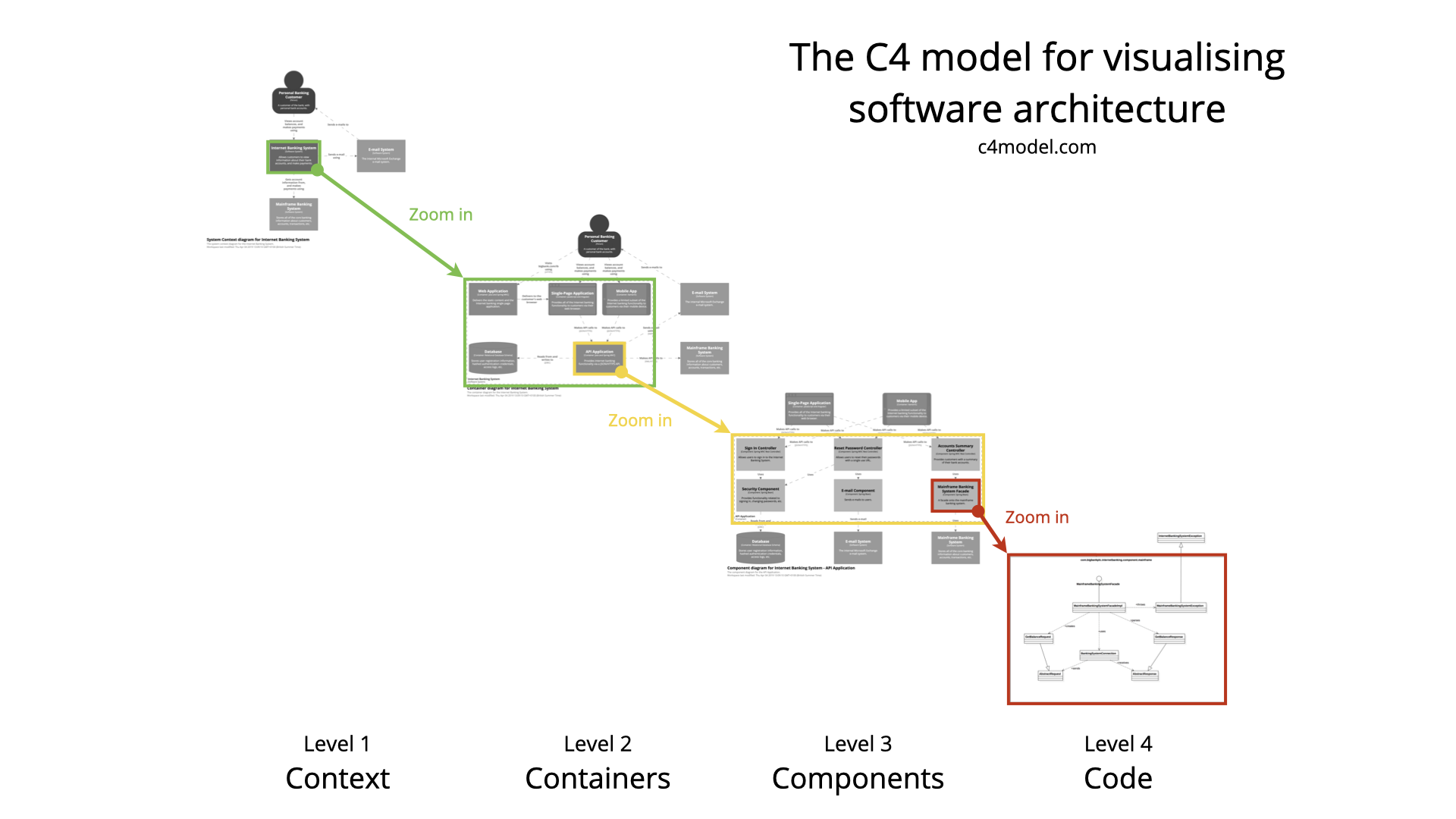 |
 |
I went on to finish reading the book. The next challenge was actually putting the knowledge to use and producing value, which I came to learn was far easier said than done.
I began by trying to use our existing tooling. I was aware of Mermaid's experimental support for C4 diagrams.
 |
 |
While reading the book and trying to follow along, I also quickly became aware that Mermaid's C4 Diagram support is much more experimental than I'm comfortable with for a project the size and scale as this one is, so I tried PlantUML-C4 inside Org Mode.
 |
 |
This was still not ideal.
- PlantUML-C4 requires the tooling to be present on people's machines, and has an insane, somewhat unintuitive learning curve.
- They also just look hysterically bad 🤮
- The notations also aren't entirely standardized.
- Rendering them into our docs site is a whole another ballgame I had no desire of playing.
- Org mode is fantastic, except:
- I'm the only one in the org (pun intended) that uses it.
- I'm probably the only person on campus that uses it.
- Rendering the diagram creates a new local image file every time.
I wanted something interactive like the Supabase Schema Visualizer, which can be explored in a standalone manner on this neat little tool called database.build.
 |
 |
I needed something with the modern looks, convenience, shareability of the above, tailored to the grand system design problem and discovered LikeC4 quite early on; back in August.
 |
 |
I also found that the C4 Model site had this super neat app embedded into the page that allowed you to find the right platform to do your diagramming in.
 |
 |
I gave Structurizr a solid try and was very satisfied with it. Unfortunately, I had too much on my plate to look into this any further, so I temporarily abandoned the initiative altogether :/
Solution
Recently while scaffolding the back-end for the project and working on modeling data, the need for diagrams came up again. Having conversations about table implementations and flows became impossible, so I set up the following:
Drizzle Studio
 |
 |
 |
Drizzle Labs Schema Visualizer
 |
 |
This was great, but modeling state management was still a huge issue. Learning the diagrams was curve and a half, and difficult to keep in sync with code. I was aware that XState has a pretty sophisticated solution:
 |
 |
 |
I had no desire to get into a vendor lock-in battle with Stately, so began exploring options. Structurizr was a clear winner. The problem was that it just looked...bad 😬
I re-visited LikeC4 again out of curiosity for how much it evolved, and was blown away by this demo.
 |
 |
It has:
- Dynamic views
- Metadata support
- Sets the foundation for you to follow C4 conventions with the option to modify and extend it to your needs
- Exports to images, dot, and even React Components
- Can be iframed into websites, and deployed separately as a site of its own
I scaffolded it into our repo, and deployed it to arch.cuhacking.ca. It also withstood the needs of modeling our own organization impressively well.
 |
 |
 |
 |
 |
 |
 |
 |
Metadata
Metadata
Assignees
Labels
Type
Projects
Status