A production-ready, feature-rich tar replacement with tree view, full color support (hex + named), emoji file icons, and a smart cross-platform config system.
Binary name:
tar2— drop-in compatible with standard tar CLI flags.
Author: Hadi Cahyadi cumulus13@gmail.com
Homepage: https://github.com/cumulus13/tar2
| Feature | Description |
|---|---|
| Full tar compatibility | -c, -x, -t, -r, -u, -f, -z, -j, -J, --zstd, -v, -C, -p, -W, etc. |
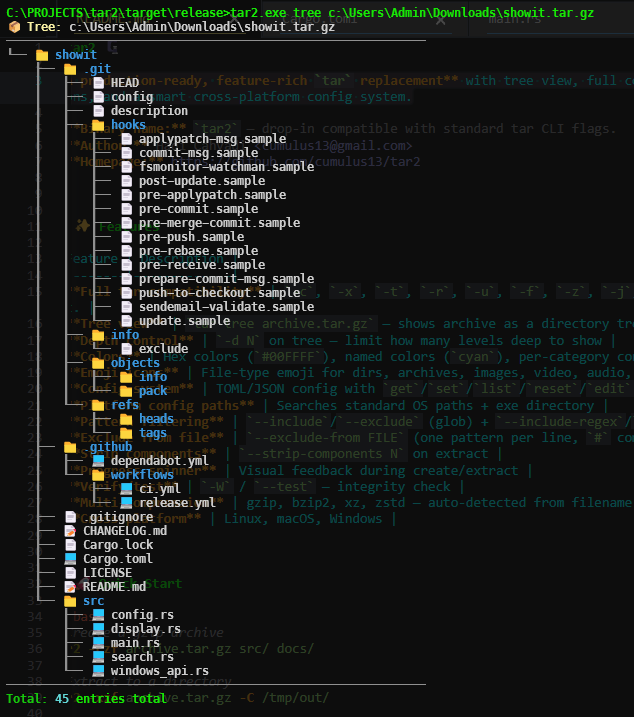
| Tree view | tar tree archive.tar.gz — shows archive as a directory tree |
| Depth control | -d N on tree — limit how many levels deep to show |
| Colors | Hex colors (#00FFFF), named colors (cyan), per-category config |
| Emoji icons | File-type emoji for dirs, archives, images, video, audio, code, docs |
| Config system | TOML/JSON config with get/set/list/reset/edit |
| Platform config paths | Searches standard OS paths + exe directory |
| Pattern filtering | --include/--exclude (glob) + --include-regex/--exclude-regex |
| Exclude from file | --exclude-from FILE (one pattern per line, # comments) |
| Strip components | --strip-components N on extract |
| Progress spinner | Visual feedback during create/extract |
| Verify/test | -W / --test — integrity check |
| Multi-compression | gzip, bzip2, xz, zstd — auto-detected from filename |
| Cross-platform | Linux, macOS, Windows |
# Create a gzip archive
tar2 -czf archive.tar.gz src/ docs/

# Extract to a directory
tar2 -xzf archive.tar.gz -C /tmp/out/

# List contents (with verbose metadata)
tar2 -tvf archive.tar.gz

# Show as a tree (unlimited depth)
tar2 tree archive.tar.gz

# Show tree, 2 levels deep, with sizes and dates
tar2 tree archive.tar.gz -d 2 --size --time

# Include only .rs files
tar2 -tf archive.tar.gz --include '*.rs'

# Exclude build artifacts
tar2 -czf project.tar.gz . --exclude 'target/**' --exclude '*.o'

# Verify integrity
tar2 -Wf archive.tar.gztar2 tree myproject.tar.gz -d 3 --size --time --perm
📦 Tree: myproject.tar.gz
────────────────────────────────────────────────────────────
├── 💻 Cargo.toml  -rw-r--r--  1.2 KiB  2024-11-01 14:30
├── 📁 src  drwxr-xr-x  2024-11-01 14:30
│   ├── 💻 main.rs  -rw-r--r--  8.4 KiB  2024-11-01 14:30
│   └── 📁 modules  drwxr-xr-x  2024-11-01 14:30
│       ├── 💻 archive.rs  -rw-r--r--  12.1 KiB  2024-11-01 14:29
│       └── 💻 config.rs  -rw-r--r--  6.8 KiB  2024-11-01 14:28
└── 📁 docs  drwxr-xr-x  2024-11-01 14:30
    └── 📝 README.md  -rw-r--r--  4.2 KiB  2024-11-01 14:27
────────────────────────────────────────────────────────────
Total: 8 entries total
Use --ascii for ASCII art connectors (|-- / `--) instead of Unicode box-drawing.
tar searches for config in this order (first found wins):
Linux:
$XDG_CONFIG_HOME/tar/tar.toml~/.config/tar/tar.toml~/tar.toml/~/.tar.toml/etc/tar/tar.toml- Current working directory
- Same directory as the executable
macOS:
~/Library/Application Support/tar/tar.toml~/.config/tar/tar.toml~/tar.toml/~/.tar.toml- Current working directory / exe directory
Windows:
%APPDATA%\tar\tar.toml%USERPROFILE%\tar.toml- Current working directory / exe directory
Both .toml and .json formats are supported, with and without a leading dot.
tar2 config list              # Show all keys and current values
tar2 config get colors.dir    # Get a single value
tar2 config set colors.dir '#FF6600'   # Set a value (saves immediately)
tar2 config set display.emoji false    # Disable emoji
tar2 config paths             # Show all searched paths
tar2 config which             # Show active config file
tar2 config reset             # Reset to defaults
tar2 config edit # Open config in $EDITOR[colors]
dir = "#00BFFF" # Directory entries
file = "white" # Regular files
link = "#FF69B4" # Symlinks
exec = "#00FF7F" # Executables
header = "#FFD700" # Archive name / headers
size = "#00FFFF" # File sizes
date = "#DDA0DD" # Modification times
perm = "#FFA500" # Permission strings
tree = "#808080" # Tree branch characters
warn = "#FFFF00" # Warnings
error = "#FF4444" # Errors
ok = "#44FF44" # Success messages
[emojis]
dir = "📁"
file = "📄"
link = "🔗"
archive = "📦"
image = "🖼️"
video = "🎬"
audio = "🎵"
doc = "📝"
code = "💻"
ok = "✅"
warn = "⚠️"
error = "❌"
[display]
emoji = true # Show emoji icons
colors = true # Enable colored output
tree_depth = 0 # Default tree depth (0 = unlimited)
human_readable = true # Human-readable sizes (KiB, MiB...)
verbose = false # Verbose by default
progress_style = "bar" # "bar" | "spinner" | "none"
date_format = "%Y-%m-%d %H:%M"
tree_style = "unicode" # "unicode" | "ascii"Colors accept:
- Hex:
#RRGGBB(e.g.#00FFFF,#FF6600) - Named:
black,red,green,yellow,blue,magenta,cyan,white, andbright_*variants
| Flag | Description |
|---|---|
-c |
Create archive |
-x |
Extract archive |
-t |
List contents |
-r |
Append files |
-u |
Update (newer files only) |
-W, --test |
Verify/test integrity |
| Flag | Format |
|---|---|
-z |
gzip (.tar.gz, .tgz) |
-j |
bzip2 (.tar.bz2, .tbz2) |
-J |
xz (.tar.xz, .txz) |
--zstd |
zstd (.tar.zst) |
--compression-level N |
Override level (1–9 / 1–22 for zstd) |
Compression is auto-detected from the archive filename if no flag is given.
| Flag | Description |
|---|---|
--include PATTERN |
Include only matching files (glob, repeatable) |
--exclude PATTERN |
Exclude matching files (glob, repeatable) |
--include-regex RE |
Include by regex |
--exclude-regex RE |
Exclude by regex |
--exclude-from FILE |
Read exclude patterns from file |
| Flag | Description |
|---|---|
-v |
Verbose (repeat for more: -vv) |
-C DIR |
Change to DIR before operating |
-p |
Preserve permissions |
-L |
Dereference symlinks |
--numeric-owner |
Use numeric UID/GID |
--strip-components N |
Strip N path components on extract |
--transform EXPR |
Filename transform (e.g. s/old/new/) |
--no-color |
Disable colors |
--no-emoji |
Disable emoji |
--config FILE |
Use a specific config file |
--progress |
Show progress (default: on) |
git clone https://github.com/cumulus13/tar2
cd tar2
cargo build --release
# Binary at: target/release/tar
Requirements: Rust 1.75+
Install globally:
cargo install --path .
# or
cp target/release/tar ~/.local/bin/tar| Variable | Effect |
|---|---|
NO_COLOR |
Disable all colors (standard) |
EDITOR / VISUAL |
Editor for tar2 config edit |
MIT — see LICENSE


