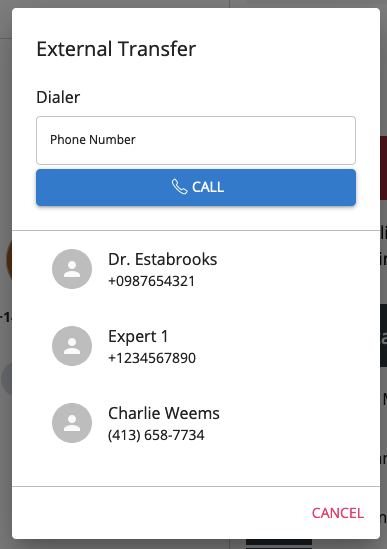
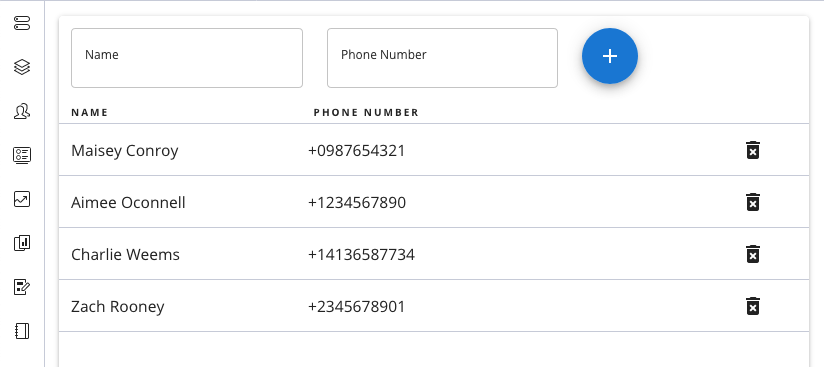
This plugin allows agents to transfer calls to external numbers from a pre-configured directory. It is still in active development, use at your own risk.
Warning: These Twilio Functions do not currently check to see if a user is authenticated. This means that any contacts you add to your contact list are publicly exposed to anyone with your functions URL. Use only for publicly available phone numbers.
Todo:
- Authenticate requests to the contacts DB
- Make Directory Admin interface only viewable to Supervisors
- Add search and pagination to transfer interface
- Add search to the transfer interface
Make sure you have Node.js as well as npm installed.
Afterwards, install the dependencies by running npm install:
cd

# If you use npm
npm installIn order to develop locally, you can use the Webpack Dev Server by running:
npm startThis will automatically start up the Webpack Dev Server and open the browser for you. Your app will run on http://localhost:8080. If you want to change that you can do this by setting the PORT environment variable:
PORT=3000 npm startWhen you make changes to your code, the browser window will be automatically refreshed.
Create a new Twilio function in the console (API functions deploy currently not supported. Name each function after its file name, leaving out the .js extension.
The Twilio functions have two dependencies: js-base64 and node-fetch. Add both in your functions configuration tab in the console.
-
Create a Sync Service twilio api:sync:v1:services:create --friendly-name=contacts
-
Create a Sync Map twilio api:sync:v1:services:maps:create --service-sid=ISXXXXXXXXXXXXXXXXXXXXXXXX
-
Add
CONTACT_SYNC_SERVICEandCONTACT_SYNC_MAPas environment variables in your Twilio Function configuration. -
Update the functions URL with your URL in
DirectoryAdmin.jsandConferenceDialog.js.
Once you are happy with your plugin, you have to bundle it in order to deploy it to Twilio Flex.
Run the following command to start the bundling:
npm run buildAfterwards, you'll find in your project a build/ folder that contains a file with the name of your plugin project. For example, plugin-example.js. Take this file and upload it into the Assets part of your Twilio Runtime.
Note: Common packages like React, ReactDOM, Redux and ReactRedux are not bundled with the build because they are treated as external dependencies so the plugin will depend on Flex to provide them globally.