Repository navigation
Modes and permissions
| Mode | What the agent does |
|---|---|
| Ask | Answers about the project. It can read, but it can't edit or run anything. |
| Plan | Every message is a request for a plan: the agent reads the project and presents a plan to approve before editing anything. Same permissions as Ask; Approve and build switches to Build. Commands starting with / still go as commands. |
| Review | Reviews scenes and scripts and returns findings (bug, structure, performance, style), shown as marks in the Script Editor. See Review. |
| Build | Edits scenes, scripts and project settings and runs the game without asking, like Edit automatically in the Claude Code extensions. Shell commands, the Asset Store and project tools ask first (matrix below). |
| Auto | Like Build, but without cards for what can be undone: it edits scenes, scripts and project settings and runs the game on its own. Shell commands run on their own only if they're on the allowlist; see Auto mode. |
| One-shot | Pursues a whole goal with budgets, checkpoints and playtests, in the One-shot screen. See One-shot. |
Switching mode also switches the agent's own mode when it publishes one: Ask, Plan and Review use plan; Build, Auto and One-shot use default.
The model you pick in the composer's model selector is remembered for the mode the tab is in, for that agent profile. Switching back to that mode picks that model again, so you can plan in Plan with a strong model and build with a fast one, the planner/editor pair of other harnesses but without two requests per change. Approve and build also switches to Build's model, and the agent keeps going with it in the same turn. A mode with nothing remembered doesn't change the model, and One-shot is one more mode. The first time a mode switch changes the model, the chat says so in one line (Build uses Sonnet, with Change); the selector's tooltip says which mode it's remembered for.
It's a setting of yours, not of the project, because the models depend on your account. Settings → Agents lists what each profile remembers, with Forget. If the agent no longer offers a remembered model (another account, for instance), the model isn't changed and the chat says so once. It works with agents that publish the model as a session option (Claude Code does); with others the selector doesn't show. Claude Code's own opusplan alias, if your account lists it, does something similar without the harness.
A project mode is a mode with its own name ("Level design", "Shaders", "Tests only") on top of Ask, Review, Build or Auto. Its permissions come from that base mode; the project mode can only take some away: which files the agent may write, and the shell. It also adds instructions to the agent's system prompt. It never allows more than its base.
Each mode is a .json file in the project's modes folder, res://agent_modes/ by default (Change folder… in Extensions → Modes), shared through git like the rest of the project and left out of exports. The composer's mode selector lists them after the fixed modes, under Project modes, as Name (Base); the tooltip says when to use it and what it edits. A file with problems doesn't show. Picking a fixed mode takes the project mode off. If the harness changes the base mode while a project mode is on (Approve and build moves to Build), the project mode stays, with its files and instructions.
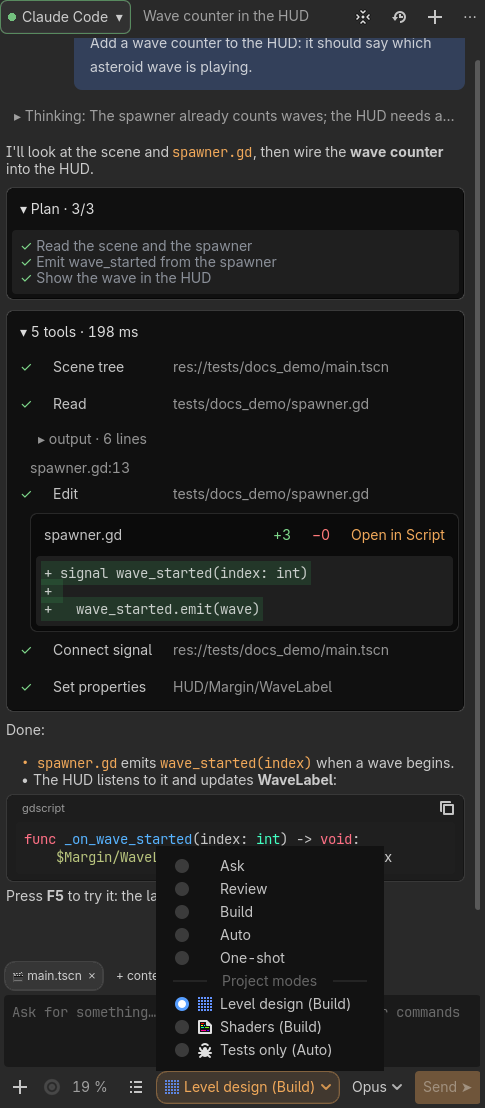
-
Files: with
editable, writing any other file is rejected, without a card, whatever the base mode: the agent's own Edit and Write tools,fs/write_text_file, and thegodot.*tools (each one says which files it writes: the scene it edits, a TileSet or SpriteFrames saved in its own.tres,project.godot, a bake's files…). A tool that doesn't say what it writes (asset_install,install_extension,restart_editor,press_tool_button) is rejected. Files outside the project, and the modes folder itself, are never editable. The chat says which file was rejected and why. -
Shell: with
editable, a shell command, a project tool or a tool from another MCP server could write anything, so they always ask, even with base Auto (the Auto lists don't apply, and the card offers no "always")."shell": "deny"denies the shell;"shell": "base"leaves it to the base mode. -
Instructions go to the agent's system prompt after the base mode's rules, with the list of editable files, marked as the project's instructions (like
CLAUDE.md). Switching to another project mode sends the system prompt again with the next message.
The format:
{
  "version": 1,
  "name": "Level design",
  "base": "build",
  "when_to_use": "Building and tweaking levels",
  "instructions": "Only touch level scenes. Reuse the props in res://props/.",
  "editable": ["res://levels/**", "res://levels/*.tres"],
  "shell": "ask",
  "icon": "TileMap"
}
base is ask, review, build or auto. editable takes the same patterns as rules by file: ** is any number of folders, * and ? stay inside a name, and a pattern without / (*.gdshader) works in any folder; leave it out for a mode that doesn't limit files. shell is ask (the default), deny or base. icon is the name of an editor icon. A mode has no model in its file: the model is yours, not the project's. Like the fixed modes, the model you pick while a project mode is on is remembered for that project mode in your profile (see A model for each mode); with nothing remembered, it uses its base mode's model. Settings → Agents lists them as Name (project mode).
The Modes tab of Extensions lists the project's modes with ✓ or how many problems each one has, and opens the .json in an editor that checks it as you type. New mode copies one of three templates (level design, shaders with the shell denied, tests only); Use in the dock puts the active tab in that mode.
In One-shot, a project mode can be picked for the builder. Nobody answers cards in a run, so what the mode would make ask (shell commands, project tools, other MCP servers) is denied instead, and the report lists each denial. The godot.* tools that verify the game (running scenes, playtests, captures) keep working.
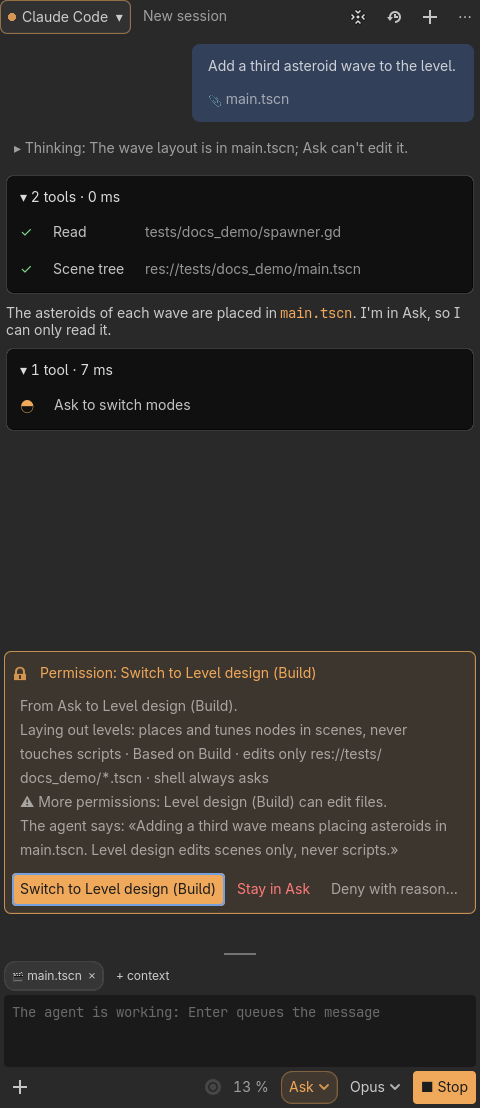
When the task needs another mode (you're in Ask and ask for a change, or a project mode fits better), the agent can propose the switch with godot.request_mode. A card shows where it would go, from which mode, what the target edits and the agent's reason, with Switch to … and Stay in …. It shows in every mode, Auto included, and has no "always": nothing switches by itself. If the target can do more without asking (Ask → Build, Build → Auto, a project mode that limits files → a mode that doesn't, a mode without shell → one with it), the card says so with ⚠ More permissions. On Switch, the agent gets the new mode's rules in the same turn; with Deny with reason… it stays, and the agent gets your reason. In One-shot it is denied, since nobody answers cards in a run, and the second opinion can't use it. The system prompt lists the fixed modes and the project's modes with their "when to use" line.
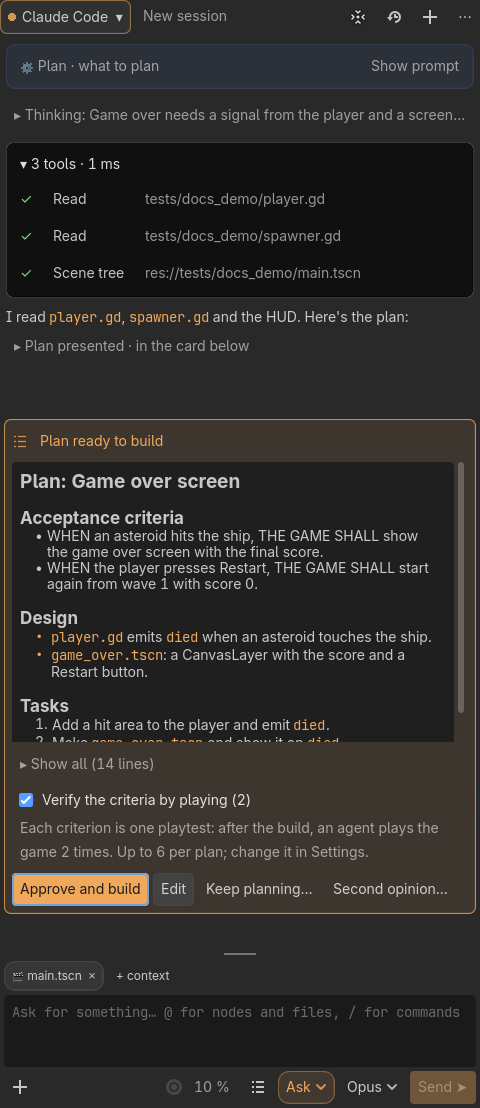
In Ask, Plan or Review, an agent with a plan mode (Claude Code) can finish planning by presenting a plan to approve. The dock shows it as a card with the plan in Markdown and three buttons:
-
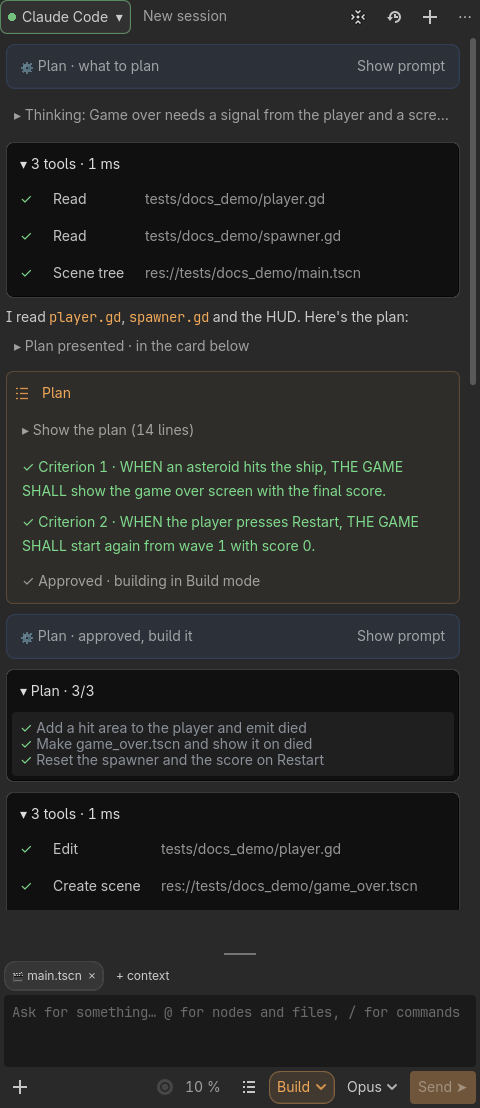
Approve and build switches the session to Build and lets the agent start. Its edits follow Build's permissions. The card doesn't offer the agent's auto, bypass or clear context options. The approved plan is saved in
.godot_agent/plans/<date>-<title>.md, so you can bring it back in another session with@. - Edit opens the plan as text, with a live count of the lines you changed. Send changes declines the plan, and when the turn ends the agent gets the changed lines and the whole plan, and presents it again.
- Keep planning… declines with a reason that the agent gets when the turn ends.
What goes back to the agent shows in the chat as a dimmed harness line (Plan · the changes you made, Plan · keep planning). If you press Stop right after, it stays paused in the queue instead of going out. The plan card waits for you: it has no timeout.
To get a plan before the agent touches anything, from any mode except One-shot, write what you want in the composer and press the Plan icon next to the mode selector (it's also in the + menu). You can also type /plan <what you want>. The session switches to Plan and the agent is asked for a plan with playable criteria ("WHEN the player touches an enemy, THE GAME SHALL take one life away"), the design in Godot terms (scenes and nodes, scripts, signals, autoloads, input map actions, collision layers) and numbered tasks.
- An agent with a plan mode (Claude Code) presents it with the card above.
- An agent without one (Codex, Gemini and others over ACP) is asked to end its answer with the plan in a
```planblock. The harness turns that block into the same card, and the message shows a single line, Plan presented · in the card below. Edits and reasons go to the agent right away, because its turn has already ended. Approve and build saves the plan, switches to Build and asks the agent to implement it, keeping the numbered tasks as its plan so the dock ticks them off. Some agents (Antigravity) don't send that list. When the build turn ends without it, the card says Progress not tracked instead of guessing from the files the agent edited. If you send another message while the card is waiting, the card is cancelled.
/plan is handled by the harness and never reaches the agent.
When the plan has acceptance criteria written as "WHEN …, THE GAME SHALL …" (or "CUANDO …, EL JUEGO DEBE …"), the card shows Verify the criteria by playing (N), checked by default, with a line saying that each criterion is one playtest. With it checked, Approve and build also starts a verification run:
- After the build turn, once the scripts parse and the project checks pass, an agent plays the game once per criterion, one turn in Review each, without changing the project. Each playtest shows in the chat as a dimmed harness line (Plan · playtest of a criterion).
- A criterion that passes is marked ✓, and its playtest is saved as a regression like any other.
- The criteria that fail go back to the agent together, with what each playtest saw inside an untrusted-text envelope (Plan · fix the criteria that failed). After the fix, only those are played again. This happens up to two times.
- A criterion the playtest couldn't check is marked ⊘ and isn't retried.
- Sending your own message ends the run.
The card shows each criterion's state, with what the playtest saw in its tooltip. A final notice sums it up (for example 4 ✓ · 1 ✗ · 1 ⊘), and the saved plan gets a ## Verification section with the result. A run plays up to 6 criteria. Change the number, or turn verification off by default, in Settings → After each turn (Verify a plan's acceptance criteria by playing). The criteria past the limit aren't played; the final notice offers Verify the rest, which plays them without a fix turn. If a recipe with Plan first is waiting for the plan, its playtests and the plan's criteria run in the same verification.
In Build and Auto, when a turn ends the harness validates the .gd scripts that changed during it, whichever way the agent wrote them. If one doesn't parse, the agent gets the errors in a new turn to fix them, up to two turns in a row; after that, or if you already queued a message, they stay as a notice in the chat. Turn it off in Settings → After each turn (Check the scripts after each turn).
The project can add its own checks in Settings → After each turn → Project checks after each turn: the saved playtest regressions, GUT or gdUnit4 tests, or any command. In Build and Auto, after a turn that changes files (and once the scripts parse), the harness runs each check whose patterns match a changed file. A check with no patterns runs after any change. The footer notice shows ✓ or ✗ for each one. If a check fails, the agent gets its exit code and the end of its output in a new turn to fix it, inside an untrusted-text envelope. This shares the two-turn limit with the script check.
The checks are saved in addons/godot_agent/config/project_config.tres, so they travel with the project. A command runs as a program with its arguments, without a shell (no |, &&, ; or redirections; put those in a script and run the script). {godot} stands for this editor's binary and {project} for the project folder. Because the file can come from someone else's repository, a command only runs on a machine where that exact text was approved. A command you write or change in Settings is approved when you save. One that came with the project shows Not approved on this machine; it is skipped, and the notice offers Approve «name»…, which shows the exact command before allowing it. If the command changes, it asks again. Approvals are kept per user, in the editor settings, not in the project. The playtest regressions check needs no approval: it runs the addon's own regression_cli.gd.
Tick godot.run_tests on the check that runs the project's tests, and the agent runs them with godot.run_tests instead of the shell, also when the check is off after each turn (a long suite you don't want after every change). In its command, {paths} becomes the test paths the agent asks for (res://…, separated by commas), {files} just their file names and {test} a test name; an argument with one of these and nothing to put in it is left out, so --only={files} disappears when the agent runs everything. For example: {godot} --headless --path {project} --script res://tests/run_tests.gd -- --only={files}. The approval is the same as for the check. With no check marked, the tool uses GUT or gdUnit4 if they're in addons/.
Hooks react to things that happen in the editor and that no agent sees. You set them in Settings → After each turn → Project hooks, under the project checks. Each hook has an event:
-
A scene or script is saved, with optional file patterns (
res://levels/**) and who saved it: by you (the default), by the agent (during one of its tools, or written by its file tools) or by anyone; - A game ends, run by you (F5/F6) or by the agent;
-
Playtest regressions finish, from the Regressions tab or from
godot.run_regressions; - An export starts.
For a game or regressions, Only if there were errors is on by default. A hook does one of three things:
-
Run a command: a program with its arguments, without a shell, like the project checks. Besides
{godot}and{project},{path}is the saved file (or the export's output) and{event}the event. The program also gets them in theGODOT_AGENT_EVENT,GODOT_AGENT_PATH,GODOT_AGENT_BY,GODOT_AGENT_ERRORSandGODOT_AGENT_HOOKenvironment variables. The time limit is 60 seconds by default and 600 at most. -
Run a godot.* tool, for example
validate_scriptsorrun_regressions, with JSON arguments. It runs without asking, so only tools that read, check or run the game are allowed, plus the project tools approved on this machine. - Ask the agent: by default the chat of the active tab shows a notice with Send to the agent, and nothing is sent until you press it. With Send it on its own, the prompt goes to the agent right away and spends tokens without asking, up to 2 hook prompts in a row without a message from you; after that it's a notice again. Never in One-shot. What comes from the event (paths, the game's errors) goes to the agent inside an untrusted-text envelope.
Hooks never stop or change what happened: they run afterwards, in the background. A hook that is already running runs once more when it ends, and saves that come together count once. Each run goes to the Agent Log with ✓ or ✗, the time and the end of the output, and a failure shows a toast.
Hooks are saved in addons/godot_agent/config/project_config.tres, which the agent's file tools can't write. They still travel with the project, so a hook only runs on a machine where its whole definition was approved. A hook you add or change in Settings is approved when you save. One that came with the project doesn't run and shows a notice with Approve «name»…. Any change, including turning on Send it on its own, asks again.
Hooks are not the place for checks at the end of each turn: those are the project checks, whose failures go back to the agent.
A recipe is a request you repeat (a new enemy from a base scene, an options screen, porting a script to C#) saved with typed parameters and checks the result must pass. Each recipe is a .json file in the project's recipes folder, res://agent_recipes/ by default (Change folder… in Extensions → Recipes), so it is shared through git like the rest of the project.
-
Launch a recipe from the composer's + → Recipe… or with
/recipe <name>. A form asks for its parameters, one control per type: text, multiline text, a choice, a number, yes/no, a scene, script, resource or any project file (with a file picker), a node of the open scene and an input action. Use writes the expanded request into the composer, in the recipe's mode, without sending it: edit it if you want, then send. A chip above the composer names the recipe's checks; remove the chip to send without them. -
Checks: after each turn of the run, the recipe's checks run even if the turn changed nothing: the saved playtest regressions, a command (like the project checks) or a playtest with a goal. A playtest check runs once the others pass: an agent plays the game in Review mode to check the goal, and the check passes when the verdict is pass. If a check fails, the agent gets what it reported and tries again, up to the recipe's
max_retries(2 by default, 5 at most). The run ends with checks passed (attempt N) or still fail after N attempts. A message of yours ends the run. A playtest that could not test ends it with a notice. -
Plan first (on by default when the recipe says
"plan": true) sends the request as/plan: the agent plans in Plan mode and the run starts with Approve and build. - A recipe can't run anything on its own. A check's command only runs on a machine where that exact command was approved, the same approval as the project checks: a recipe that came from someone else's repository shows Approve «name»… and runs nothing until you approve it.
- The Recipes tab of Extensions lists the project's recipes with ✓ or how many problems each one has, and opens the
.jsonin an editor that checks it as you type. New copies one of three templates (an enemy from a base scene, an options screen, porting a script to C#); Use in the dock opens the recipe's form.
The format:
{
  "version": 1,
  "title": "New enemy",
  "description": "A new enemy that inherits a base scene.",
  "mode": "build",
  "plan": false,
  "prompt": "Create {{name}} as an inherited scene of {{base}}. It should {{behavior}}.",
  "parameters": [
    {"key": "name", "type": "text", "label": "Name"},
    {"key": "base", "type": "scene", "label": "Base scene"},
    {"key": "behavior", "type": "choice", "options": ["patrol", "chase the player"]}
  ],
  "checks": [
    {"kind": "regressions"},
    {"kind": "command", "name": "Tests", "command": "{godot} --headless --script res://tests/run.gd"},
    {"kind": "playtest", "goal": "the new enemy patrols and hurts the player on contact", "minutes": 5}
  ],
  "max_retries": 2
}
mode is build, auto or ask. A parameter's type is text, multiline, choice (with options), number, bool, scene, script, resource, path, node or input_action; required is true by default, default fills the form, and filter limits a file to some extensions. A file or node goes into the request as a mention (@res://…), like the composer does. Recipes aren't available during a One-shot run.
Some instructions only matter for part of the game: how to write shaders, how UI scenes are laid out, C# conventions in a mixed project. Instead of growing AGENTS.md, put them in a rule that applies to some files, in any of the formats agents already use:
-
.agents/rules/*.mdwithtrigger: globandglobs: "**/*.gdshader, shaders/**"(Google Antigravity's format; the one the harness suggests); -
.claude/rules/**/*.mdwith apaths:list (Claude Code); -
.cursor/rules/**/*.mdcwithglobs:and withoutalwaysApply: true(Cursor).
A pattern without / (*.gdshader) matches in any folder; ** matches any number of folders and {gd,cs} either. When a turn touches a file that matches (an agent tool reads or edits it, a godot.* tool names it, or your message mentions it, attaches it, or the Script Editor shows it), the harness sends the rule to the agent: at the end of that godot.* tool's result, in the same turn, or with your next message. Each rule goes once per session, and again if it changes. It goes as an instruction from the project, like CLAUDE.md, labeled with its patterns and file; up to about 4000 characters per message, and the rules that don't fit are named. The chat shows rules: shaders.md under your message.
Rules the active agent already loads on its own aren't sent again: Claude Code reads .claude/rules and Antigravity reads .agents/rules. Codex, Copilot, OpenCode and the rest get them all from the harness. Rules that always apply, or that the agent applies when it decides to, stay with each agent. Turn it off in Settings → After each turn (Apply the project's rules by file). The Instructions tab of Extensions shows each rule's patterns and who applies it, creates a rule in each format, and Test says which rules apply to a path.
While the agent works in Build or Auto, a counter above the composer shows what it changed so far in the turn (3 files · +42 −7); click it to see those changes (you keep or reject them when the turn ends). In Build and Auto, when the project is in a git repo, a turn that changed files ends with a footer line: how many files, lines added and removed, and two actions. View changes lists the files, each with its diff and Go back (that file returns to how it was before the turn). Open a script or text file with ▸ to review its changes one by one: Keep marks a change as reviewed, and Reject undoes just that change in the file, even if you edited other parts of the file after the turn. Undo, in the dialog or in the chat notice, puts it back. If those same lines changed after the turn, the change shows Changed after the turn and can't be rejected (nothing gets overwritten); use Go back for the whole file. Nothing is touched while the file has unsaved changes in the editor, while another session is editing it in its turn, or while the turn is still running. Reject all in this file rejects every change that can be rejected and says how many couldn't. The same works from the Script Editor: a script the last turn changed shows each change in its gutter, with a bar on its lines and ✓ and ✗ on its first line. ✓ keeps it (click again to unmark it), ✗ rejects it, and ✗ on a rejected change puts it back. The status bar under the code counts what is left to review and says why a change couldn't be rejected. It follows the active tab's last turn, and the marks move with the text if you write above them. A scene opens by node, and each change can be rejected on its own: a changed property gets its value from before the turn back, an added node goes away with the nodes below it and its signal connections, a removed node comes back in the same place among its siblings, a moved or renamed node goes back where it was, and the same for the root's name, a node's type or instanced scene, its groups and each signal connection. What comes back brings the resources it used, without clashing with the scene's current ones. Before writing, the scene is loaded to check it still loads; if it wouldn't, nothing is written. A change inside a resource that other nodes share can only be undone with Go back. The agent is told which changes you rejected. A scene's diff is shown by node: nodes added (with how many came below them), removed, moved or renamed, properties changed with their value before → after (a shape's shape.size, a script by its path), and signal connections. Resource ids that Godot renumbers when it saves are not changes. View raw shows the text diff. A big change shows its first 200 lines and says how many are left out. Undo turn goes back to before the turn for every file, including what changed after the turn, and asks first; the chat then offers Undo. The agent is told which files were reverted before its next turn.
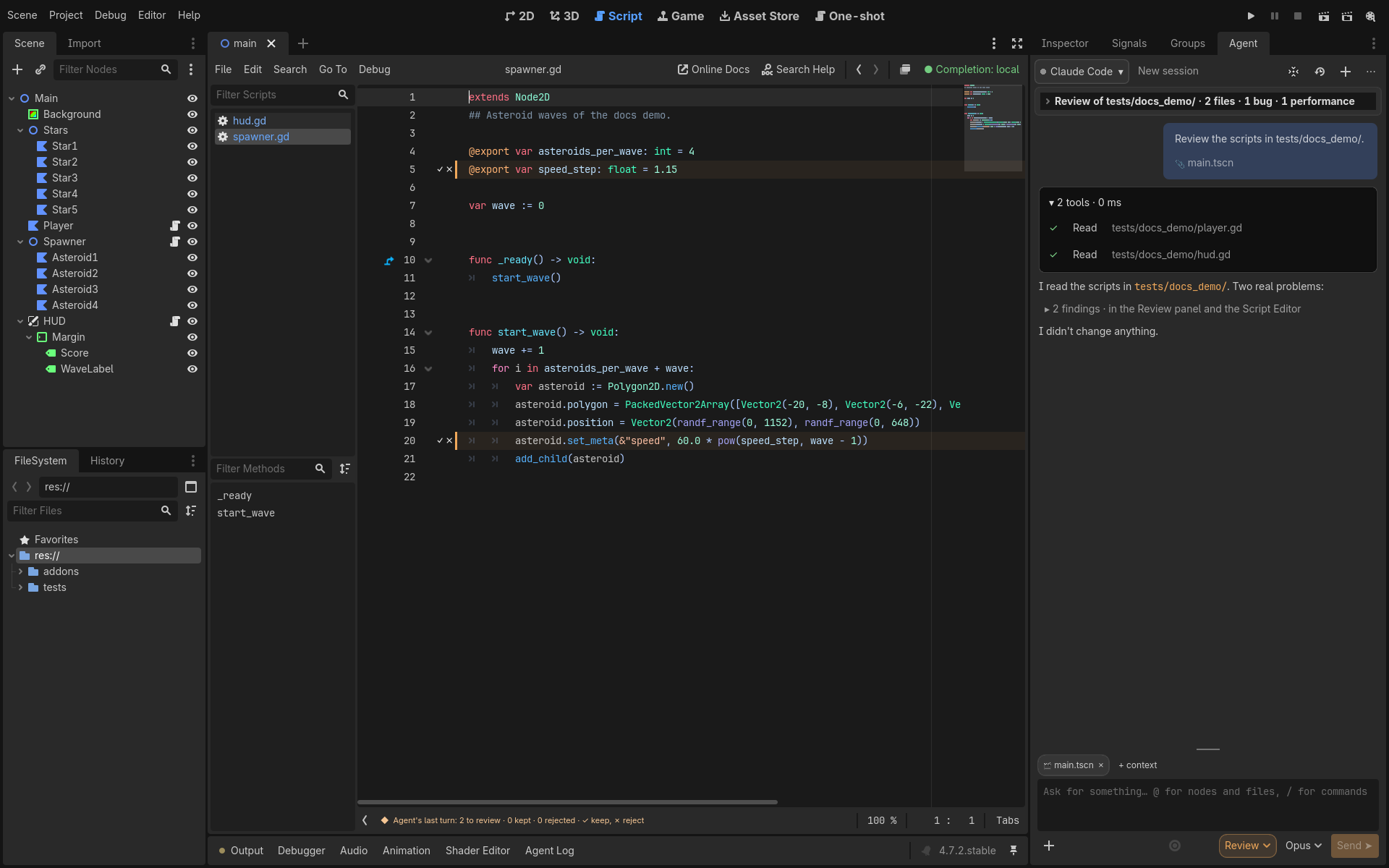
The notice also counts the screenshots the agent took during the turn (of the game or the editor), and Save report writes .godot_agent/reports/<date>/report.md with what the agent said, the files it changed and those screenshots as PNG files, and opens the folder: something to look at later or to share. Without git, the notice shows only when there are screenshots.
The harness takes a snapshot of the project folder at the start and at the end of each turn, as git commits outside your branches (refs/godot-agent/turns/…, the last 60 per session). Your branch, index and stash are not touched, and files .gitignore leaves out are not part of it, nor are .godot/ and .godot_agent/. Turn it off in Settings → After each turn (Keep a snapshot of the project on each turn).
Every action belongs to a group, and each group has a decision per mode: Allow, Ask or Deny.
- Ask (the decision, not the mode) shows a card in the chat with what the agent wants to do (and the diff, for edits). If nobody answers in 5 minutes (configurable), it's denied.
- Deny denies without asking and tells the agent why.
Every card also has Deny with reason…: it denies, stops the agent's turn and sends it the reason you typed right away, as a dimmed Denied with a reason line in the chat. Otherwise the agent only learns that it was denied, and may keep trying in the same turn.
Defaults:
| Group | Ask and Plan | Review | Build | Auto | One-shot |
|---|---|---|---|---|---|
| Read | Allow | Allow | Allow | Allow | Allow |
| Diagnostics | Allow | Allow | Allow | Allow | Allow |
| Edit scenes | Deny | Deny | Allow | Allow | Allow |
| Edit files | Deny | Deny | Allow | Allow | Allow |
| Run the game | Deny | Ask | Allow | Allow | Allow |
| Shell / commands | Deny | Deny | Ask | Ask¹ | Ask |
| Project settings, export and addons | Deny | Deny | Allow | Allow | Allow |
| Install from the Asset Store | Deny | Deny | Ask | Ask | Ask |
| Project tools | Deny | Deny | Ask | Ask | Ask |
| Second opinion | Ask | Ask | Ask | Ask | Deny |
| Messages to other sessions | Ask | Ask | Ask | Ask² | Deny |
| Subagents | Allow | Allow | Allow | Allow | Allow |
¹ In Auto, the Auto mode lists decide first; only what they don't allow shows a card.
² Whatever the matrix says, a message to a session in a mode with more permissions is always denied: see Messages between sessions.
Restarting the editor (restart_editor) is outside the matrix: it always asks in Build, Auto and One-shot (and is denied in the read-only modes), without Always allow in this session.
With Claude Code, launching a subagent (its Agent tool) goes through the Subagents group, so you can deny it or have it ask in a mode.
- Subagents at once, in the matrix of Settings → Permissions, caps how many run at the same time in each mode (0 = no limit). One more is rejected with a notice in the chat, and the agent is told why.
- A subagent's card in the chat shows its prompt, the tools it runs and what it writes as it works, and its report at the end. One that runs in the background stays in progress until it ends, even after the tool call that launched it.
- While the agent works, the agent chip in the header counts the subagents running; its tooltip lists them.
With several tabs open, an agent can leave a message for another with godot.session_send. It goes through the Messages to other sessions group: Ask in every mode, denied in One-shot. The message reaches the other agent when its turn ends, inside an untrusted envelope with the name of the session that sent it, as data and not as instructions: the sender may have read planted text in the project, the game or the internet.
A message toward a mode with more permissions is always denied, whatever the matrix or a permission granted for the session: from Ask or Review to Build, Auto or One-shot, and from Build to Auto or One-shot. Otherwise an agent that can't edit could get another tab to do it. The agent is told why, and no card shows. Ask and Review count as the same level, as do Auto and One-shot.
Another agent can review the work read only, without this conversation: a model of another family often sees what the first one misses. Pick it in Settings → Agents → Second opinion (any profile; None turns it off). It can be asked for in four places:
- Second opinion in the footer of a Build or Auto turn that changed files: it gets that turn's diff (cut at 30,000 characters, with the list of files to read for the rest).
- Second opinion… in the plan card: it gets the plan; the card keeps waiting for you.
-
/second-opinion [question]in the composer: your question and the last turn's changes. - The agent itself, with
godot.ask_second_opinion(question, the diff of its turn and files to look at). It goes through the Second opinion group: Ask in every mode except One-shot, where it's denied.
The other agent runs in its own session, without a tab, started with the first question and reused (one question at a time, up to 5 minutes each). It can read the project and use diagnostics; everything else is denied whatever the mode (edits, the game, commands, project settings, other MCP servers, messages to other sessions), and a card it would raise is denied on its own. While it works, a Second opinion · thinking · 12 s chip shows next to the tab's state, with the agent and model in its tooltip.
The answer you asked for shows as a folded notice with its tokens, and nothing reaches this tab's agent until you press Send to the agent. Open the conversation opens the other agent's session from the history. The answer always reaches the agent as data from another agent inside an untrusted envelope, never as instructions: the other agent read the project's code and texts, and they may carry planted instructions. The same goes for the result of godot.ask_second_opinion. Each question spends the other agent's quota.
The tools of an MCP server other than godot (a server from Settings, or one the agent loads from its own configuration) belong to a group of their own, MCP · name, which is Ask in every mode until you change it.
- In Settings → Permissions, below the matrix, there's a row for each server on the list and for each one that already asked in this session.
- The card of one of these tools also offers Always allow «name» in mode mode, in this project, which saves Allow in that row. Always allow in this session only covers that server.
- When a One-shot starts, the activity warns about the servers that would ask: the run waits at each of their tools.
The scompass server of a project organized with Scope Compass is the exception: its tools that read the board (show_task, list_tasks, show_doc…) belong to Read, and the ones that write to it (moving a task, checking a step, notes) to MCP · scompass, which is Ask in Ask and Review and Allow from Build on. Its row is always in Settings.
Auto is for working in the chat without approving every step. Edits can be undone (the ↶ on each card, the editor's undo), so they go through on their own. The shell is different, so each command is checked against two lists of patterns:
-
Allowlist: runs without asking. By default, read-only and build commands:
ls,cat,grep,find,git status/diff/log/show,godot --headless …and similar. -
Always ask: shows a card even if a broader allowlist pattern matches. By default:
rm,mv,sudo,chmod,git push/reset/checkout/clean/rebase,curl,wget,ssh, package installers,find -delete/-exec. - Anything else shows a card.
Text from outside the harness (the game's Output and errors, what the game tools read from the running game, texts and node names of scenes and resources, Asset Store pages) reaches the agent inside an untrusted envelope, and the agent is told to read it as data, never as instructions. A game or an asset that writes "ignore your rules and…" can't pass that off as an order. This lowers the risk of prompt injection in Auto mode; it doesn't remove it. See Editor tools → Details.
How a command is checked:
- A command with
&&,||,;or|runs on its own only if every part is on the allowlist. - Command substitution (
$(…), backticks) and redirection to a file (> out.txt) always show a card.2>&1and> /dev/nullare fine. - In a pattern,
*matches anything, andgit log *also matchesgit logalone. A program with a path (/opt/godot/godot) is matched by its name. - Writing project files from the shell is still rejected, whatever the lists say (see below).
When a command shows a card, the card proposes a pattern, such as npm test for npm test, which you can edit, for example to npm test *. Always allow adds the pattern to the allowlist and allows this command. Shell cards never offer "Always allow in this session", in any mode and from any agent: it would open every command for the rest of the session, including those on the "always ask" list and after switching to Auto.
Reviewing the lists: Settings → Permissions → Auto mode: shell commands shows every rule with its list, its origin (default, added by you, from a permission card) and the date it was added.
- Test a command: type one in the field above the table to see whether it would run or ask, and why. The rule that decided is highlighted in the table. It uses the rules as you are editing them, before saving.
- You can filter for the ones you or the cards added, edit a pattern or move it to the other list, remove rules and restore the defaults (this keeps the rules you added).
- They're saved in
project_config.tres, with the rest of the project's permissions.
Each decision also goes to the Agent Log, perm channel: the command, whether it ran or asked, and the rule that decided it.
Whatever the mode, the harness rejects on its own, without a card:
- shell commands that write project files: redirections (
>),tee,sed -i,dd of=, and Python, Node, Ruby or Perl scripts that open files for writing; - writing a
.tscn,.uidor.importby hand, with the agent's file tools or through the editor's file access; - running Godot from the shell without
--headless: it would open the game or an editor in a separate window. To see the game, the agent runs it from the editor (godot.run_scene) and captures it (godot.capture_game_frame).
A shell command made only of commands that read files (ls, cat, head, tail, grep, rg, find without -exec or -delete, sed -n, wc, file, stat, tree, cd…), with no redirections or $(…), is not shown to you as a card when the shell would ask: the harness rejects it, the chat shows "Not asked: … only reads files", and the agent is told to use its own file tools (Read, Glob, Grep) or godot.list_files and godot.find_in_files, which never ask. godot.list_files reads the editor's filesystem and gives each file's resource type and the width and height of PNG, JPEG and WebP images, so the agent doesn't need Python for that. When the shell is allowed (a mode or rule that allows it, or Auto mode's allowlist), these commands run as usual.
The chat shows a "Rejected: …" notice, and the agent gets the reason in a message labeled Rejected by the harness: what it tried to write and what to use instead (its own file tools for scripts, which the harness passes through the editor, and the godot.* tools for scenes, settings and moving files). The same goes for the other rejections without a card: a file another session is editing, a project mode that doesn't allow that file, or a mode that denies the tool. Commands that write outside the project, such as to /tmp, follow the matrix above as usual. Relative paths count from the last cd or pushd in the command: cd /tmp && echo x > out.txt writes to /tmp, while a cd inside ( … ) doesn't count after it.
Change the matrix in Settings → Permissions. Only what differs from the defaults is saved, in the project's config (project_config.tres), so it can be committed and shared with your team.
With Claude Code you can continue a dock session from claude.ai/code or the Claude app on your phone. When the agent offers /remote-control, Remote Control shows in the header's ⋯ menu; it turns Remote Control on, with the project's name as the session name. While it's on, a strip under the header shows the link, QR (a QR code of the link, to open it with your phone's camera), Copy link and Turn off. Click the strip's title to fold it to one line. Typing /remote-control or /remote-control off in the composer does the same.
- What you write from the phone, and the agent's answers, only show on the phone: Claude Code doesn't send them to the harness. The dock still sees the tool calls that need permission.
- The files that change while Remote Control is on (and no dock turn is running) show up in the chat as one notice per burst: "From Remote Control: modified player.gd · created enemy.gd". View diff shows each file before and now, and Undo puts them back as they were. Undo is offered when the harness knows the previous text: text files up to 256 KB. Files you save from the editor don't count, and the harness only looks at the first 5000 files of the project.
- Permissions keep following the mode. What the matrix allows or denies, Auto's lists and the rejected writes above are decided by the harness at once, so the phone doesn't ask. When the harness would show a card, the phone asks too, and you can answer on either side. If you answer on the phone, the dock's card closes with "Answered elsewhere".
- Commands Claude Code runs without asking (read-only ones such as
git status) don't reach the harness at all. - One-shot runs on its own: the button is hidden in that mode, and starting a One-shot turns Remote Control off. A new session starts with it off.
- Slash commands (
/remote-control,/compact…) are sent alone, without the harness context or attachments: Claude Code only recognizes a command when it's the whole message.