Repository navigation
Review
In Review mode, the agent reviews scenes and scripts and returns findings instead of editing.
- Pick Review in the dock and ask: "Review the scripts in
player/" or "Review the open scene". - The agent reads with the editor tools and answers with its findings. Each finding has:
- a category: bug, structure, performance or style;
- a file and a line;
- an explanation and, when it can, a fix.
- The findings show up:
- as marks in the Script Editor, on the right lines, with a card: Apply fix, Ask (continues the conversation about it) and Dismiss;
- in the findings list in the dock, to jump to each one.
Apply fix switches to Build and asks the agent for that fix. The edit goes through the permission matrix like any other. If the turn ends well, the finding leaves the review. The dock's findings list can also send several fixes at once.
The review can be exported to the project's CLAUDE.md as conventions, for example "use static types everywhere" or "don't use get_parent() for behaviour". You see a preview first. From then on the agent follows them in every mode.
Playtest… in the findings panel asks what to check by playing ("the player can jump onto the second platform"). The agent runs the game, sends input by physics frame so the run is reproducible, reads the live state and captures frames, and answers with a verdict that shows in the chat: passed, failed with the steps that reproduce it, or could not test with the reason, plus what it observed. It does not change the project. With Record a video of the run, run_scene saves an AVI under res://.godot_agent/playtests/: the game runs at a fixed 30 fps while it records and closes by itself at the end.
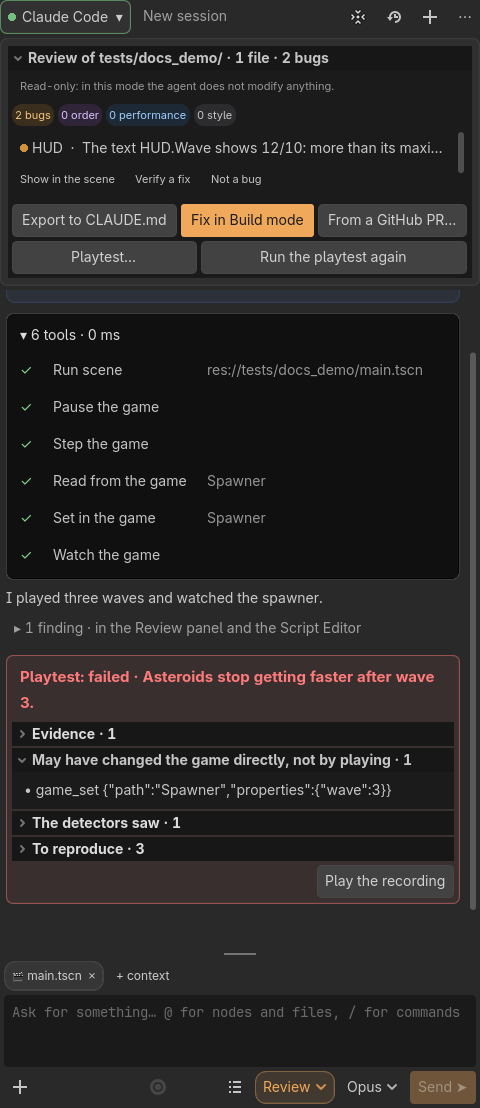
The verdict is a card in the chat. Its title is the result and the reason (Playtest: passed, Playtest: failed, Playtest: could not test or Playtest: explored, then the agent's summary); the body keeps what to read before trusting it (Before you trust this:) and the video, if there is one. The rest goes in collapsible sections with their counts: Evidence, May have changed the game directly, not by playing (open from the start, because it's a warning), The detectors saw and To reproduce. It fits a narrow dock.
The harness checks the verdict against what the agent did. A passed or failed verdict counts as could not test if the agent never played the game, or if the verdict depends on how something looks and it captured no frame. The verdict also lists what may have changed in the running game without playing (game_set, game_call, game_script), what the detectors saw, and why there is no video if you asked for one. Detector and recording lines that the game printed itself are ignored, so a game can't fake the video or what the detectors saw.
You can ask for three things in the same box: to verify something, to reach a goal, or to explore ("go through this level and tell me what looks wrong", which answers explored). A script error doesn't end the playtest: the game goes on and the error is listed.
A playtest stops when the agent is stuck in a loop: the same game calls (the same keys, the same capture, the same error) several times in a row, with the game answering the same every time. On the third time the tool result tells the agent; on the fourth the harness ends the turn with could not test, saying what the agent was repeating, with those calls and what the game answered as evidence. A game that changes between calls (it moved on, an animation played) counts as progress.
Detectors run inside the game and report what the agent wasn't looking at, with a picture of the moment: NaN transforms, bodies out of the world, a player falling for 8 s, a frame over 0.75 s, and a text like 12/10 on the HUD.
Findings of a playtest and of the detectors go to the findings panel, where each one has Show in the scene, Verify a fix and Not a bug. A finding marked as not a bug doesn't come back. Run the playtest again repeats the last one as it was, and Play the recording in the verdict plays the run's frames in the editor. The dialog also sets a time limit, remembered per project: the agent is told how much is left, but the turn isn't cut off.
Regressions: a playtest that passes leaves a script that repeats the check. Its verdict says it was saved as a regression and offers Run regressions (N) and CI workflow… right there; the first time, a notice explains what regressions are, where they live and that the CI workflow runs them on every push. Run regressions in the findings panel runs them all without the agent and without using tokens, and says which ones fail. They are kept in res://.godot_agent/playtests/regressions/.
A regression that depends on the frame rate or on chance can pass one run and fail the next. To find those, set the × box next to the button to 2 or more: each regression runs that many times and only passes if every run does. One that passes some runs and fails others is flaky: the chat says how many runs passed («passed 2 of 3»), the count is saved with the regression, and the button shows how many are flaky (the tooltip names them). A later repeat in which it passes every run clears the mark. The agent can do the same with godot.run_regressions (repeat, and goal to run only some). To run them in CI, commit that folder and run:
godot --headless --path . --script res://addons/godot_agent/playtest/regression_cli.gdCI workflow… next to it writes .github/workflows/godot-agent-regressions.yml: a GitHub Actions workflow that installs this editor's Godot version, imports the project and runs that command on every push and pull request, uploading the report and the captures as artifacts when a regression fails. The file goes to the root of the git repository even when the project lives in a subfolder (GitHub reads no other .github/), and the workflow warns if the project isn't in git or if .godot_agent/ or addons/godot_agent/ are ignored, because then the CI would have no regressions or no addon to run them. It never replaces an existing file without asking, and it writes nothing while there are no saved regressions. From a .NET editor the workflow installs the .NET build of Godot and runs dotnet build first; if the editor is not an official release, it warns that the download URL needs adjusting. The agent has the same as godot.write_regressions_workflow (with render: true for regressions that need the game drawn, under Xvfb, and repeat and fail_on_flaky for the options below), except that the tool never replaces an existing workflow: only you can, from this button.
It exits with 0 if they all pass, 1 if one fails and 2 if there are none; after -- it takes other .json files or folders. -- --repeat=3 runs each one 3 times and prints FLAKY with the count for those that pass only some runs. A flaky regression doesn't fail the run unless you add --fail-on-flaky. Without --repeat, a regression marked flaky in the editor that fails is tried again, up to 3 runs: if one passes it's reported as flaky, and if all 3 fail it fails, so the mark can't hide a regression that really broke. One that fails every run always fails it. Run regressions and godot.run_regressions retry the same way. The game runs without the editor, so a game error doesn't stop it. A regression can carry a sabotage, a script that breaks in the game what it checks: then it runs a second time with it and has to fail, otherwise it doesn't detect the bug and counts as failed.
Invariants and budgets: a regression's script can check the game on every physics frame and measure its performance while it runs. game.invariant(name, check) fails the regression at the first frame where check stops being true, with the frame and the value. game.budget(metric, limit) measures frame_ms_p95, physics_ms_p95, draw_calls_max, nodes_max or orphans_end from that point on; going over limit fails it. A budget without a limit is compared with a baseline that the first passing run records: the counts (draw calls, nodes, orphans) share one baseline, saved in the regression, and fail above it; the times are compared with this machine's own baseline, kept in the project's user folder outside the repository, and only warn ("frame_ms_p95 2.1× this machine's baseline"). On the command line, --no-baselines runs them without recording new baselines.
Measure regressions in the findings panel tells you whether your saved regressions would catch a bug. In a separate headless Godot, and only in its memory, it makes small changes to the game's scripts (a flipped comparison, a deleted line, a changed number), one at a time, and runs the regressions against each one. It also sabotages the regressions' scenes, picking the nodes each regression names: an exported property set to 0, false or null, a signal connection cut, a node hidden or a collision shape disabled. Each sabotage goes on the scene before it starts, so a value the game only reads in _ready (a starting health) breaks too; connections made in code aren't sabotaged. The result gives a score (how many changes some regression noticed), the changes nobody noticed, with Open at the line, what each regression caught and how many the invariants and budgets caught. The regressions have to pass first without changes. It takes a minute or a few, and the project's files are never written. From the command line, -- --mutate (20 changes by default, or --mutate=N) does the same, and --min-score=P makes it exit with 1 when the score is under P %.
Memory: playtests keep what they verified about your game (controls, mechanics, pitfalls) and the scripts that worked in res://.godot_agent/playtests/, and the next one is told which files changed since, so it rechecks what may be out of date. Delete that folder to start over.
From a GitHub PR… in the findings panel brings the review comments of a pull request as findings, with the GitHub CLI (gh, signed in with gh auth login). Write its number, or leave it empty for the pull request of the current branch. Each comment on a line of a file of this project becomes a finding with its text and author, marked in the Script Editor like the agent's; replies within a thread are left out. From there, Fix in Build mode asks the agent to address them. It only reads: nothing is posted to GitHub.
The other direction is optional: with Offer to push and open a GitHub pull request when closing a separate copy (Settings → After each turn, off by default), closing a session in a separate copy offers Push and open a PR, which pushes its branch to origin and opens a pull request against the branch you were on.