Repository navigation
Camera Controls
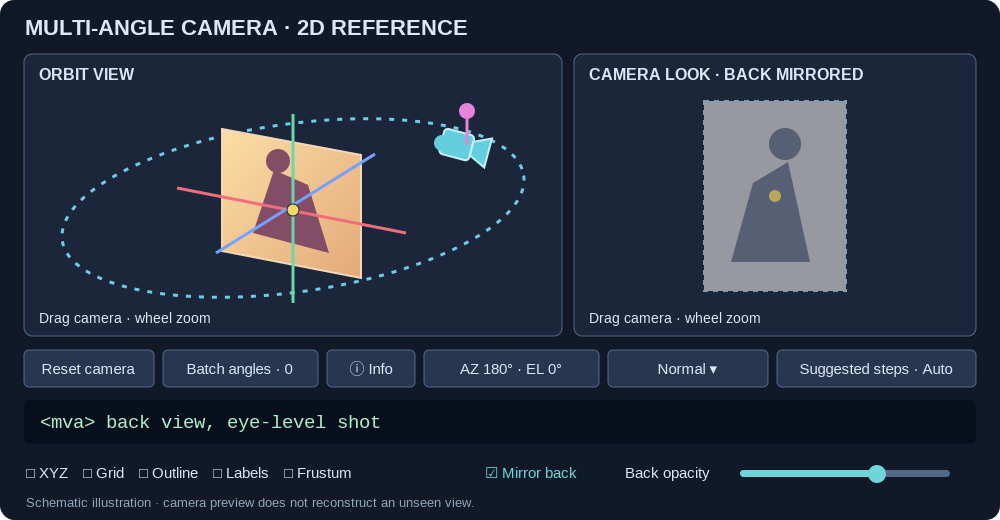
- Single camera: drag either viewer to change azimuth (AZ) and elevation (EL); prompt and both viewers update. The cyan and magenta orbit handles restrict movement to AZ and EL respectively. By default the angles snap to the nearest available profile pose on release. Alt+drag or middle drag inspects the orbit without changing the prompt.
- Wheel: zooms the hovered preview independently. Framing changes only the prompt; resizing the node horizontally or vertically scales both viewports to the available space while preserving the reference aspect ratio; it does not change either wheel zoom or the prompt.
- Node size: new nodes start at 960 × 680; manually resized dimensions survive workflow reload. Right-click and choose Reset camera node size to restore the compact default without changing camera settings.
- Reference plane: X red and Y green lie in the plane; Z blue is perpendicular. Optional XYZ, grid, outline, labels and frustum explain orientation, including a thin edge-on view at 90°. The rear is mirrored with ghost opacity and dashed edge. Only Mirror back is enabled by default; opacity starts at 65%, shown as a 0–100% slider.
- Reset camera: resets pose, framing and target, leaving wheel zoom and batch selection.
- Suggested steps: profile default in Auto mode, optionally overridden by an integer; reset returns to Auto. This does not change the prompt.
- Info: node help, license, credits and optional requests. Copy: copy the live prompt.
In batch mode the viewers inspect the reference rather than changing the active output pose; see Batch angles. The preview is always schematic and cannot reveal unseen sides of a real subject.