Repository navigation
Camera Workflow Examples
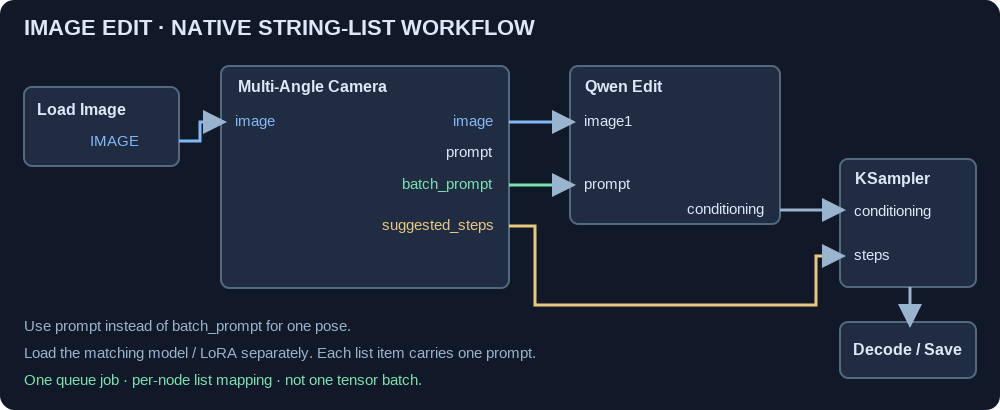
| Port | Type | Connect to |
|---|---|---|
| image | IMAGE | Image-edit image1 (reference image) |
| prompt | STRING | Image-edit prompt, single selected pose |
| batch_prompt | STRING list | Image-edit prompt, multiple selected poses |
| suggested_steps | INT | KSampler steps (convert to input if necessary) |
Use either prompt or batch_prompt, not both. The unmodified IMAGE tensor passes through; only the first batch image appears in the UI. Install and load matching model and LoRA weights separately.
For Qwen 2.1 Akhaliq MVA at AZ 60°, EL 30°, normal framing, the prompt is <mva> front-right quarter view, elevated shot.
Connect the camera's batch_prompt to the native edit node's prompt input. The ComfyUI list execution engine maps the encoder, downstream sampler, decode and save operations over the selected strings when those nodes support native list processing. Upstream single-item inputs are repeated; independent work may be cached. This is one queued workflow, not a separate queue job per view or one GPU tensor batch. Start with a small selection and check memory usage. Custom nodes that consume or combine lists may behave differently.