Talka is a local-first voice input system for macOS and iOS. An iPhone acts as a remote microphone, streams audio to a paired Mac over the local network, and the Mac transcribes, optionally cleans up, and inserts the final text into the active app.
The project is built for personal dictation, short-form writing, chat replies, notes, and coding-adjacent text entry where local control matters. Audio stays on the local network, ASR runs on the Mac, and text cleanup can use a local Ollama server or another OpenAI-compatible endpoint.
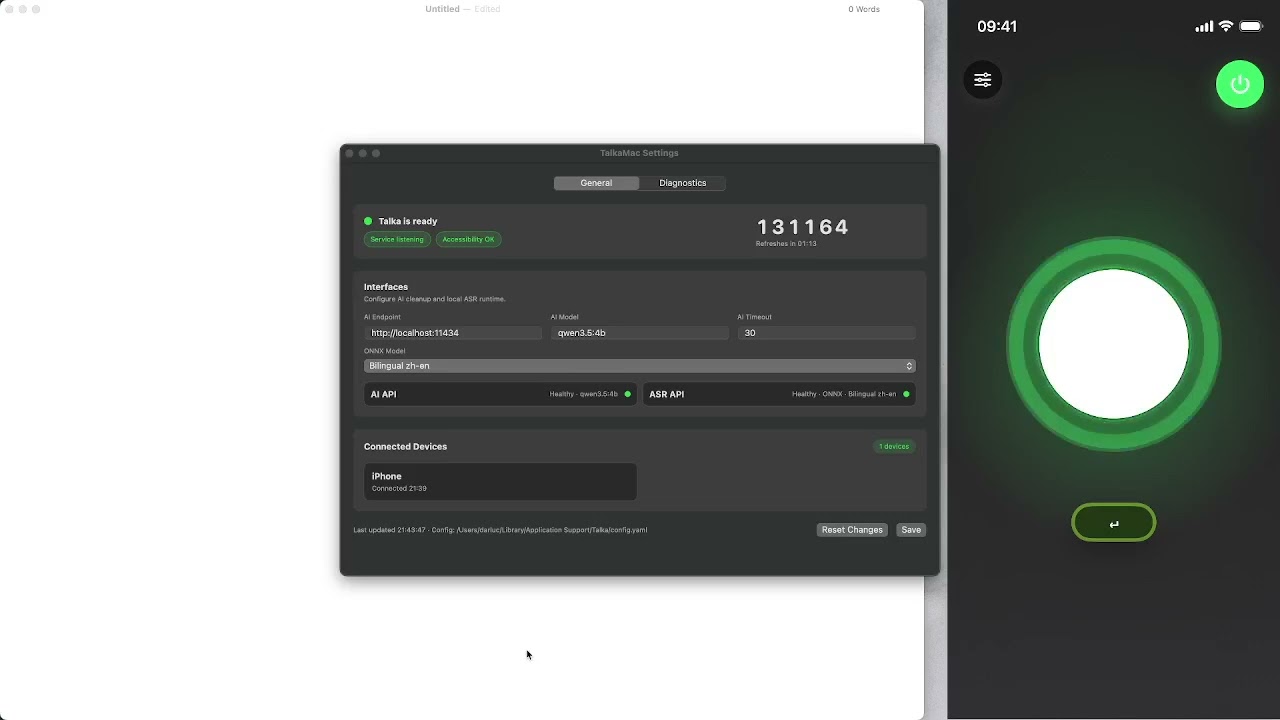
- iOS remote microphone with pairing, reconnect handling, and a compact recording UI.
- macOS menu bar app with service status, pairing PIN, connected-device visibility, diagnostics, and runtime settings.
- Local streaming ASR through bundled
sherpa-onnxruntime assets and zh/en Paraformer model profiles. - Optional LLM cleanup through a configurable Ollama/OpenAI-compatible API endpoint.
- Secure paired sessions using PIN-confirmed key exchange and encrypted audio/control messages.
- Text insertion through a native macOS paste broker that checks Accessibility permission before touching the clipboard.
- Direct Return-key shortcut from iOS, with optional Cmd, Alt, and Shift modifiers, bypassing the ASR/LLM pipeline.
Talka is early-stage software. The macOS and iOS apps are usable for local development and internal testing, but release packaging is still intentionally simple:
- GitHub Actions currently builds unsigned/ad-hoc macOS artifacts only.
- iOS builds are expected to be produced locally through Xcode or the helper scripts.
- Apple Developer ID signing, notarization, and iOS IPA distribution are not enabled in the default workflow.
Talka has three main pieces:
apps/macos/TalkaMac: SwiftUI menu bar app, settings UI, diagnostics, process supervision, and native paste broker.apps/ios/TalkaIOS: SwiftUI iOS app for discovery, pairing, microphone capture, recording controls, and shortcut buttons.cmd/talka-serverplusinternal/*: Go control service, pairing/session protocol, audio pipeline, ASR/LLM providers, mDNS advertisement, and text injection orchestration.
At runtime:
- The Mac advertises a
_talka._tcpservice on the local network. - The iPhone discovers the Mac, pairs with a short PIN, and establishes an encrypted session.
- The iPhone streams PCM audio frames to the Go service.
- The Mac feeds audio into the local
sherpa-onnxrecognizer. - The final transcript is optionally cleaned by the configured LLM endpoint.
- The Go service asks the Swift paste broker to insert text through the active macOS app.
More detail is available in:
- macOS with Xcode installed.
- Go 1.24 or newer.
xcodebuild,xcrun,swift,python3, andshasum.- Optional: Ollama running locally if you want local LLM cleanup.
- For real ASR builds:
sherpa-onnxruntime assets and model files prepared by the project scripts.
Clone the repository:
git clone https://github.com/darluc/talka.git
cd talka
Prepare local runtime assets:
./scripts/build-sherpa-onnx-runtime.sh
SHERPA_ONNX_MODEL_PROFILE=bilingual ./scripts/download-sherpa-onnx-model.sh
mkdir -p .sisyphus/evidence
Verify the development environment:
./scripts/setup-dev.sh --verify-onlyRun the full local test suite:
./scripts/test-all.shBuild and package the macOS app:
./scripts/package-macos-app.sh --arch arm64
./scripts/package-macos-app.sh --arch x86_64
The packages are written to dist/:
dist/TalkaMac-macOS-arm64.zipdist/TalkaMac-macOS-x86_64.zip
Build iOS locally through Xcode:
open apps/Talka.xcworkspaceFor a connected development device, the helper script can build and install the iOS app when your local Apple signing setup is valid:
./scripts/deploy-ios.shPushing a tag that starts with v or alpha. triggers the GitHub release workflow:
git tag v0.1.0
git push origin v0.1.0
The workflow builds only the macOS app and publishes:
TalkaMac-macOS-arm64.zipTalkaMac-macOS-x86_64.zip
The workflow does not use Apple signing secrets. The generated macOS bundles are ad-hoc signed, which is useful for internal testing but not equivalent to a notarized Developer ID release.
Talka needs macOS Accessibility permission to insert text into other apps. If System Settings shows Accessibility enabled but Talka still reports Accessibility Required, remove the old TalkaMac entry from:
System Settings > Privacy & Security > Accessibility
Then add or enable the currently installed app again. Ad-hoc signed builds can change code-signing identity between packages, and macOS TCC can treat them as different authorization subjects.
apps/
  macos/TalkaMac/      macOS SwiftUI app
  ios/TalkaIOS/        iOS SwiftUI app
cmd/
  talka-server/        Go control service
  talka-fake-asr/      local fake ASR helper for tests
  talka-sherpa-transcribe/
internal/
  app/                 control API and pipeline wiring
  asr/                 fake and sherpa-onnx ASR providers
  config/              runtime config loading and validation
  crypto/              pairing/session crypto helpers
  inject/              text insertion abstraction
  llm/                 Ollama/OpenAI-compatible cleanup provider
  mdns/                Bonjour/mDNS service metadata
  pairing/             pairing state and trusted devices
  protocol/            wire protocol types
  session/             encrypted session state
scripts/               setup, packaging, smoke, and QA helpers
docs/                  product and architecture notes
Issues and pull requests are welcome. Before opening a PR:
./scripts/test-all.sh
git diff --check
Keep generated models, downloaded runtime binaries, local build products, and personal signing material out of commits.
Talka builds on a number of open source projects and platform technologies:
- sherpa-onnx, used for local streaming ASR integration and macOS runtime artifacts.
- ONNX Runtime, used underneath the packaged ONNX recognizer runtime.
- Ollama, supported as the default local LLM cleanup endpoint.
- FunASR, referenced by earlier runtime scaffolding and model-conversion notes.
- ModelScope and Hugging Face, used by scripts or notes for ASR model sources and mirrors.
- Go and the Go modules used in this project, including
golang.org/x/crypto,golang.org/x/sys, andgopkg.in/yaml.v3. - Apple's SwiftUI, AVFoundation, Network/Bonjour, CryptoKit, CoreGraphics, and Accessibility APIs, which provide the native macOS/iOS app surfaces and system integration.
Please review each upstream project's license before redistributing bundled runtime or model artifacts.
Talka is released under the MIT License. Third-party runtime libraries, models, and tools keep their own upstream licenses.