A cool lab exercise to practice Backend and Frontend development
You are tasked with creating a REST API using Node.js and Express.js for a games catalogue application. The API should have various endpoints to perform CRUD operations on games list. Additionally, you need to create a frontend interface using HTML, CSS, JavaScript, and Bootstrap to consume these APIs.

1.1 - Create api-docs using Swagger for the following REST endpoints and Implement these REST endpoints in Node.js and Express.js.
Note: You will first create your swagger file and then you will start implementing those endpoints. Swagger helps you document your API requirements so everyone in your team is on the same page. This also helps you test your endpoints.
-
GET /api/games: This endpoint should return a list of all games in the game-store. -
GET /api/games/:id: This endpoint should retrieve a specific game by its ID. -
GET /api/games?publisher=:publisher: This endpoint should retrieve games by a specific publisher. -
GET /api/games?genre=:genre: This endpoint should retrieve games of a specific genre. -
GET /api/games?title=:title: This endpoint should retrieve games matching the title(s) using the keyword search. -
POST /api/games: This endpoint should add a new game to the games list. -
PUT /api/games/:id: This endpoint should update the details of a specific games. -
DELETE /api/games/:id: This endpoint should delete a specific game.
-
Set up a new Node.js project for your backend API application and install the necessary dependencies, including Express.js.
-
npm i express -
npm i swagger-ui-express -
npm i cors -
npm i -D nodemon -
Create a server.js file to define the Express server, and register the relevant middlewares.
-
Setup your swagger.json file with all the required endpoints/specifications and access it in your browser using
http://localhost:3000/api-docsto see all the endpoints before you start implementing any endpoints. -
Implement the REST API endpoints mentioned above (Use the MVC pattern), including the necessary routes, controller(s), model(s), and data storage (e.g. Use an array for data storage for now).
- Hint: You can create a GamesRepository class that has a games array as a data member and allows to get and add elements to this games array.
2.1 - Create a frontend interface using HTML, CSS, JavaScript and Bootstrap to consume the APIs. The frontend should have the following functionality:
- Fetch all the games from /api/games endpoint (use fetch or axios) and display the list of all games (in tiles) on an html page. Preferably, create a template for the game tile, and reuse that in your code.
- Ensure the frontend communicates with the backend APIs using asynchronous requests.
- Implement search functionality (a search box) to search games by title.
- Implement filtering functionality to filter games by publisher and genre using the appropriate endpoints.
- Provide a form to add a new game using the POST /api/games endpoint.
- Create a
publicdirectory in the same project (if not already there) and add the following html & css files in the public directory. - Create an
index.htmlfile to build the frontend interface. - Use CSS, Bootstrap to style the page and make it visually appealing.
- Write a separate stylesheet e.g.
games-catalogue.cssif you are writing any custom css for your games catalogue.
- Write JavaScript code in a separate files e.g.
games-ui-script.jsto manipulate DOM to display the retrieved data and interact with the usergames-client.jsto handle API requests. Create a javascript class (e.g. GamesService) and write seperate methods in that class to make API calls as per the frontend data requirements.
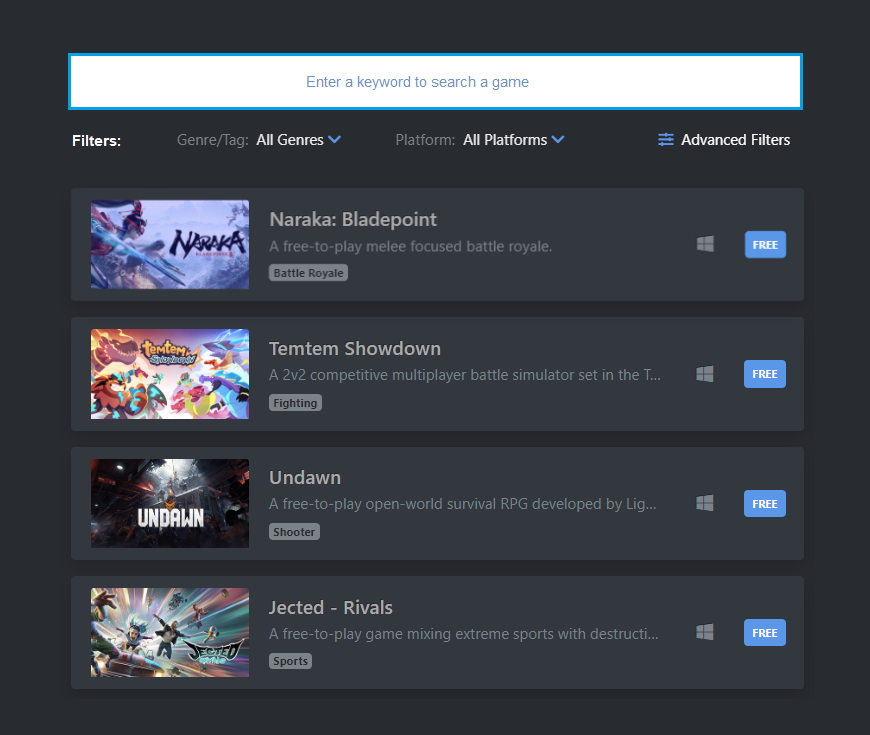
Test the application by running the backend server and accessing the frontend interface through a web browser. Verify that the API endpoints work correctly and the frontend interface can consume the data and perform the desired actions.
Note: You can use any additional libraries or frameworks to assist with the development process if needed.
Remember to structure your code neatly (give some good names to your functions & variables), add comments where necessary, and try your best to implement the error handling in your backend and frontend. Good luck!