

This tool is intended to make construction of LED dot wall art, inspired by ewoolsey's Reddit post here, easier by determining drill bit sizes needed for each dot.
Save a black and white image named input.png in your current directory. Then run the Dottizer.py script, and it will bring up the following GUI:
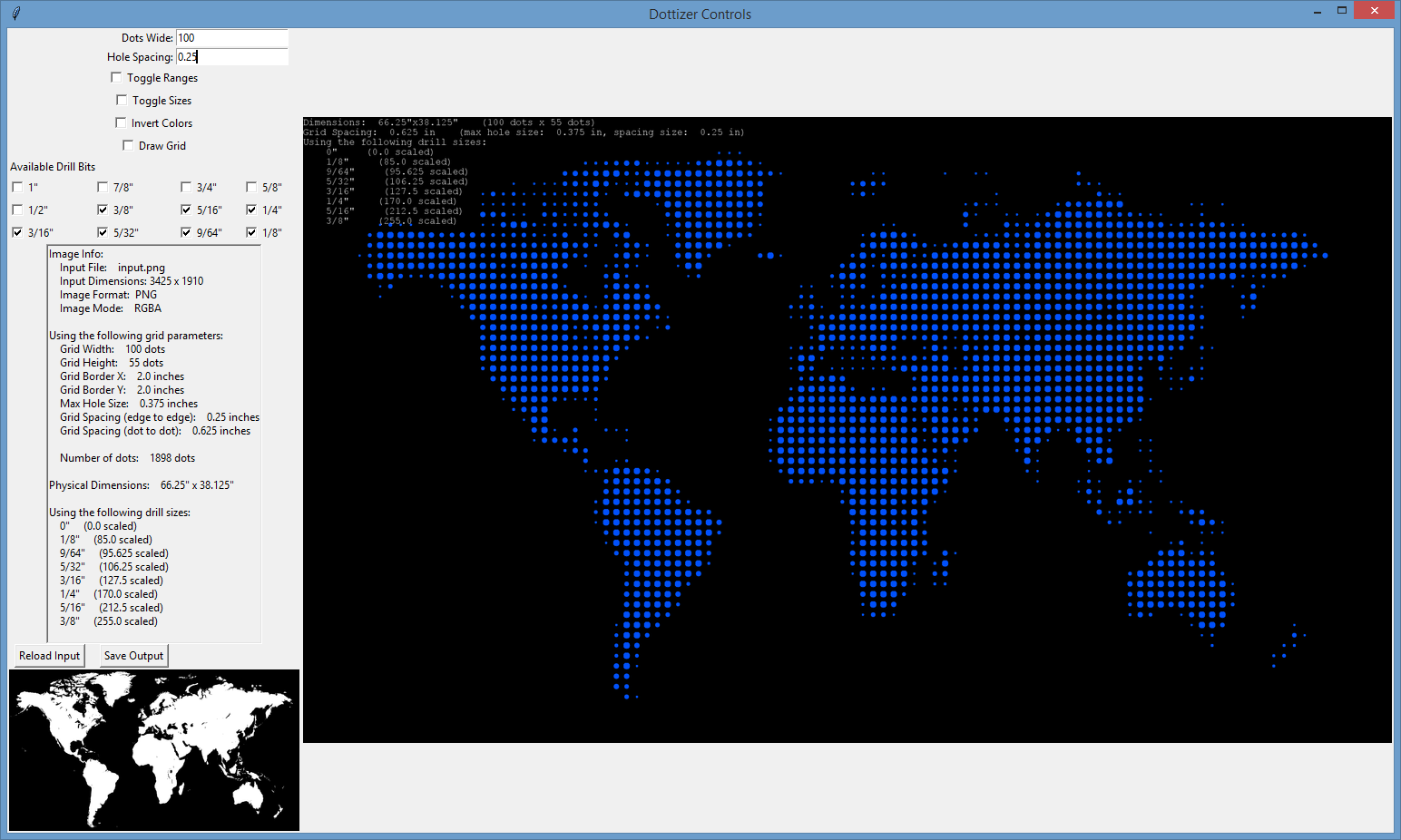
The main view at the right side of the application shows the result dot image. The left side shows the main controls, various image information, and a thumbnail of input.png.
Dots Wide - The number of dots wide the image should be. (dots tall is calculated from this value and the image dimensions)
Hole Spacing - The spacing (edge-to-edge) between each dot vertically and horizontally.
Toggle Ranges - Draws outline of maximum drill size over each dot.
Toggle Sizes - Draws drill bit size on top of each dot.
Invert Colors - Inverts input image before processing.
Draw Grid - Draws grid marks under dots.
Available Drill Bits - Allows selection of particular drill bit sizes.
Reload Input - Force dottizer to reload input.png for processing.
Save Output - Saves larger version of generated image to out.png in the current working directory.
Python Image Library (available here for Windows: http://www.lfd.uci.edu/~gohlke/pythonlibs/)
Tkinter
Note: The tool has been tested on Windows with Python 3.4.1 and the Python Image Library available at the link above.