
Quick-search launcher for Total Commander button bars. Hit a hotkey, type a regex, press Enter — the matched command runs instantly.
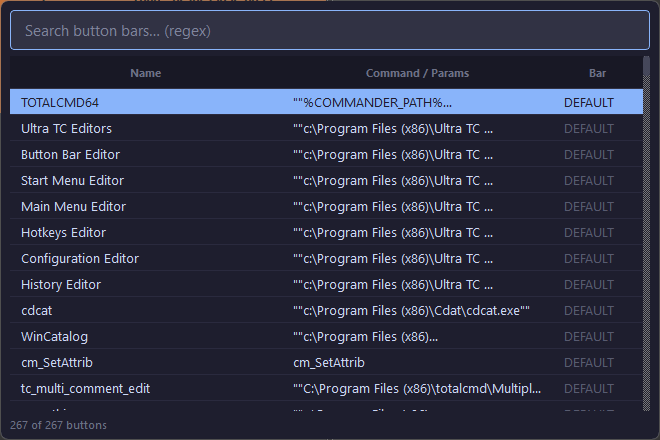
- Parses all
.barfiles from your TC directory automatically - Real-time regex (or plain substring) search across button name, command, and tooltip
- Executes external programs and TC internal commands (
cm_/em_) via the/C=API - Frameless overlay centered over the TC window, closes on Escape or focus loss
- System tray with Reload / Settings / Exit
- Global hotkey (default
Ctrl+Space, TC window only)
- Windows 10/11
- Python 3.11+ with pip
(not needed if you use the compiled.exe) - Total Commander installed
pip install -r requirements.txt
python main.py- Put your icon at
app.iconext tomain.py(optional but recommended) - Run:
build.batOutput: dist\TCMSearch.exe
Copy it anywhere; config.ini is created next to it on first run.
Download UPX and set UPX_DIR in build.bat. The build script picks it up automatically.
| Action | Result |
|---|---|
Ctrl+Space (in TC) |
Toggle search overlay |
| Type | Filter by regex or substring |
↑ / ↓ |
Navigate results |
Enter or double-click |
Execute and return focus to TC |
Escape or click away |
Close overlay |
| Tray → Reload Bars | Re-parse all .bar files |
| Tray → Settings | Open config.ini in default editor |
config.ini is created next to the executable on first launch.
[App]
tc_path    = C:\totalcmd          ; TC installation directory (auto-detected if not set)
tc_only    = true                 ; only trigger hotkey when TC is foreground
hotkey_mod = 2                    ; modifier bitmask (2 = Ctrl, 1 = Alt, 4 = Shift)
hotkey_vk  = 32                   ; virtual key code (32 = Space)
window_width  = 660
window_height = 440
window_x = 1057
window_y = 722| Hotkey | hotkey_mod |
hotkey_vk |
|---|---|---|
Ctrl+Space |
2 |
32 |
Alt+Space |
1 |
32 |
Ctrl+Alt+F |
3 |
70 |
TCMSearch reads standard TC .bar files (INI format):
[Buttonbar]
Buttoncount=3

menu1=Notepad
cmd1=C:\Windows\notepad.exe
param1=
path1=
tooltip1=Open Notepad

menu2=New Folder
cmd2=cm_MkDir
param2=
path2=
tooltip2=TC internal command

menu3=Edit Here
cmd3=C:\tools\editor.exe
param3=%COMMANDER_NAME%
path3=%COMMANDER_PATH%
tooltip3=Open selected file in editor
Buttons pointing to other .bar files (sub-toolbars) are excluded from results.
| Command type | Detection | Method |
|---|---|---|
| External program | anything not starting with cm_/em_ |
subprocess.Popen |
| TC internal | starts with cm_ or em_ |
totalcmd.exe /O /S /C=<cmd>, falls back to WM_COPYDATA |
MIT