Skip to content

Add more helpful error on misconfigured conda env. Closes #1897#1989

Merged
brollb merged 1 commit intomasterfrom
1897-helpful-error-on-conda-failure
Jan 20, 2021
Merged

Add more helpful error on misconfigured conda env. Closes #1897#1989
brollb merged 1 commit intomasterfrom
1897-helpful-error-on-conda-failure

Conversation

@brollb
Copy link
Copy Markdown
Contributor

@brollb brollb commented Jan 20, 2021

Perhaps this is too much help info? I think it should be all useful but would be open to thoughts/comments...

@umesh-timalsina
Copy link
Copy Markdown
Contributor

The issue might also arise when using source activate conda-env from a custom conda environment. It might be helpful to include it in the message. But, Probably the root of the issue is mentioned here:
https://github.com/deepforge-dev/deepforge/pull/1989/files#diff-5414311e553828ce21bcebd3ff16794abb26a2360ebae744f194ae2da308550dR284

@brollb
Copy link
Copy Markdown
Contributor Author

brollb commented Jan 20, 2021

It actually seems to be working for me from within a custom conda environment (after I update my PATH). Are you able to reproduce the failure when within a custom conda environment? Just to make sure I am not missing anything, I am running:

source activate deepforge
source activate deepforge-server

@umesh-timalsina
Copy link
Copy Markdown
Contributor

No, bin directory of conda is in the PATH(Which has the activate command) when you are in your base environment:
image
image
But when you are in a custom environment, the environment's bin directory gets added and the old bin is removed. So, I think it might be a bit confusing for just to add bin to your PATH because it might override the conda configuration and bin directories.
image

@umesh-timalsina
Copy link
Copy Markdown
Contributor

An alternative could be to find the location of the conda bin directory when starting the server.

@brollb
Copy link
Copy Markdown
Contributor Author

brollb commented Jan 20, 2021

I am a little puzzled. In my earlier example, I was running the second command (source activate deepforge-server) within the deepforge conda environment without error. Is there a way that I can reproduce the error from a custom conda environment?

@brollb
Copy link
Copy Markdown
Contributor Author

brollb commented Jan 20, 2021

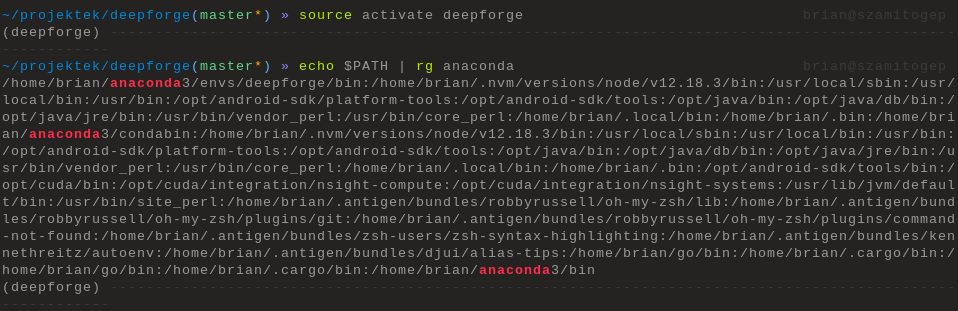
The old one actually isn't removed for me:
DeepinScreenshot_select-area_20210120143320

Any idea which is the standard behavior?

@umesh-timalsina
Copy link
Copy Markdown
Contributor

Its not an error. I am bit weary about adding a directory to the PATH that would be managed/changed by conda.

@brollb
Copy link
Copy Markdown
Contributor Author

brollb commented Jan 20, 2021

I would like to avoid trying to automatically fix the issue. It would probably get a bit hairy (across different OS'es and conda implmentations/versions) and I would rather spend our development time on more important things.

@brollb brollb merged commit cc96c7f into master Jan 20, 2021
@brollb brollb deleted the 1897-helpful-error-on-conda-failure branch January 21, 2021 14:11
Sign up for free to join this conversation on GitHub. Already have an account? Sign in to comment

Projects

None yet

Development

Successfully merging this pull request may close these issues.

2 participants