DeepDeck: Yet Another DeepSeek Harness Desktop / 又一个 DSH 桌面客户端 #3328

Replies: 2 comments

Update — DeepDeck Apps: from installable plugins to locally modifiable software这周 DeepDeck 最大的变化,不是又增加了几个桌面 UI,而是开始把 Cordis Plugin 组织成一种用户可以直接使用、现场修改并参与共建的 App。 一个 DeepDeck App 仍然是普通的 Cordis Host/Client Plugin,没有发明新的包格式;但它现在可以拥有:
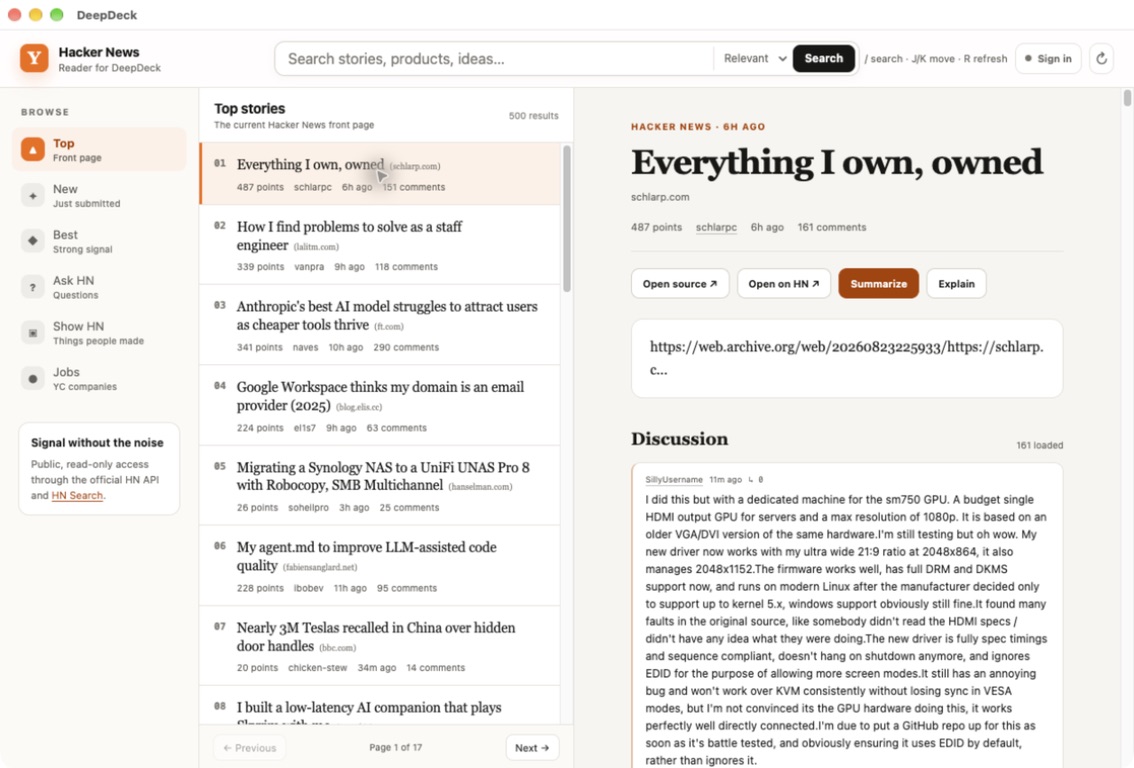
第一个参考实现:Hacker News Reader我做了一个独立维护的 Hacker News Reader 来验证完整链路: https://github.com/jo32/dsh-hackernews-reader 它支持 Top、New、Best、Ask HN、Show HN、Jobs、搜索、完整评论树和用户资料。选中故事、评论或文字后,可以直接调用 Explain / Summarize,结果进入 Reader 自己的标准 Harness Workspace,而不是 App 私有的另一套对话系统。
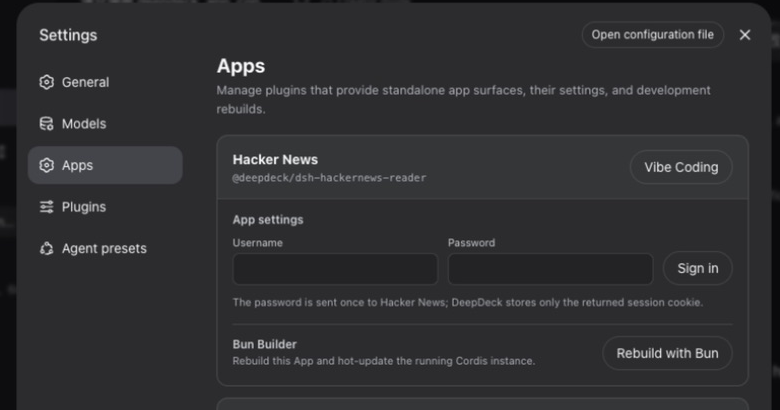
更重要的是,如果用户觉得 Reader 缺少筛选、信息密度不合适,或者想换一种交互,可以从 App 设置进入 Vibe Coding。DeepDeck 会打开一个绑定该 App 源码的 Creator Workspace,让 Agent 修改本地源码。
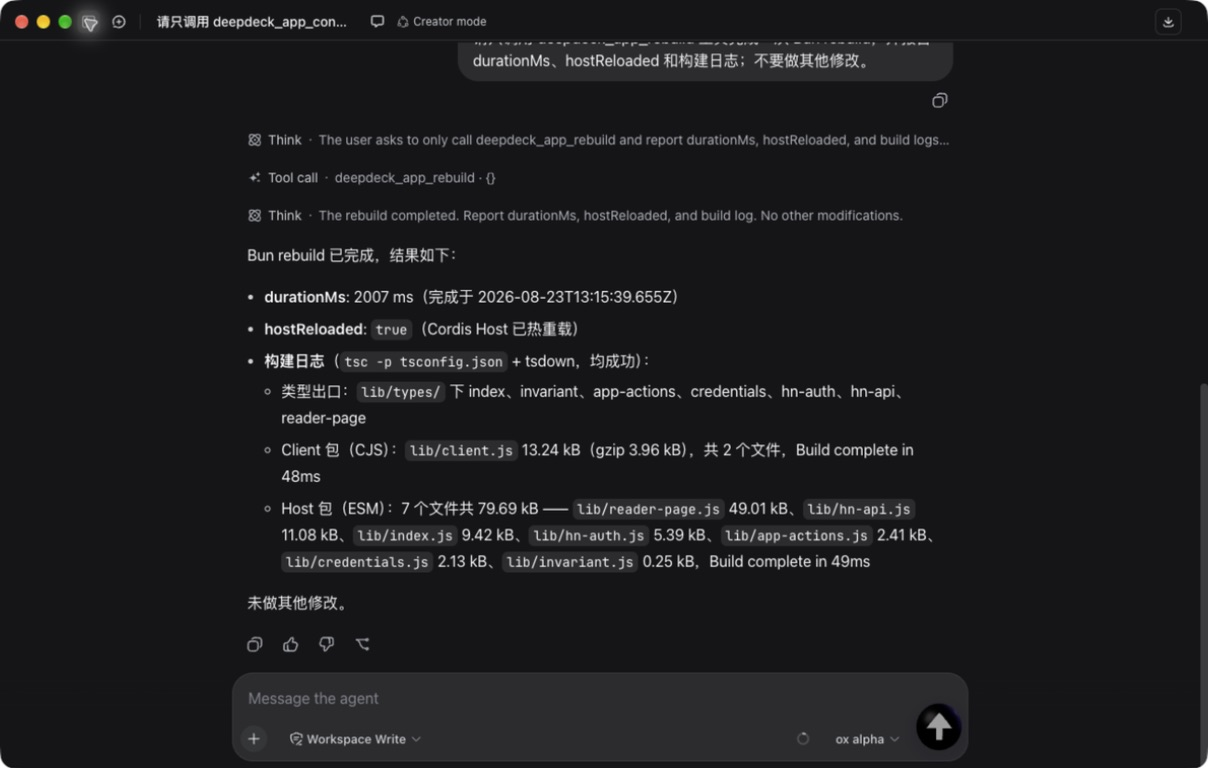
修改后可以调用受控的 Bun rebuild。只有注册过的源码根目录、package name 和 build plan 能进入这条链路;如果它正是当前 Cordis profile 加载的 package,构建完成后 Host 和 Client 会原地热更新,不需要重启整个桌面端。
这里的目标不是让 Agent 生成的代码自动进入官方仓库。每个人首先修改、构建和使用自己的本地副本;有普遍价值的改动,再通过正常的 fork、branch、commit、PR 和 review 回到社区。 我现在更想讨论的几个问题
我很想听 Harness 和 Cordis Plugin 作者的反对意见:这套边界最先会在哪里失效? Apps 协议草案: https://github.com/jo32/DeepDeck/blob/main/docs/apps-protocol.md English summaryThe biggest change in DeepDeck this week is an App runtime built entirely on ordinary Cordis Host/Client plugins. An App can now have its own launcher, standalone window, settings, canonical Harness Workspace and Sessions, fixed AI actions, a source-bound Creator Workspace, and a reviewed Bun rebuild plan. When the registered source is the package currently loaded by Cordis, DeepDeck can rebuild and hot-reload both Host and Client without restarting the desktop application. The Hacker News Reader is the first reference implementation: https://github.com/jo32/dsh-hackernews-reader The intended loop is: use an App → find something awkward → modify the local source with an agent → build and test locally → keep personal changes local or send generally useful work upstream through a normal PR. The open questions matter more to me than the showcase:
I would especially appreciate criticism from Harness and Cordis plugin authors. Which boundary is most likely to fail first? |

|
大佬您好,冒昧打扰一下。 有兴趣的可以直接回复或加群1079434587 |


Uh oh!
There was an error while loading. Please reload this page.
DeepDeck
Yet Another DeepSeek Harness Desktop.
中文介绍
大家好,我最近在开发 DeepDeck,一个非官方、由社区维护的 DeepSeek Harness 桌面客户端。
说实话,这个项目多少有点**“为了 icon 这碟醋包了一盘饺子”**:一开始只是想把这个 icon 和一些自己对交互的想法做出来,回过神时,桌面客户端、内置插件、安装包和自动更新都已经齐了。
更简洁、更贴近个人习惯的交互
做 DeepDeck 的一个重要原因其实很个人:我希望 Harness 在桌面上的界面更简洁,也更贴近我自己的使用习惯。
这并不是想定义一套“正确”的交互方式,只是把我每天最常用的操作放得更直接,把不常用的界面元素尽量收起来。例如真正可以完全收起的侧栏、更直接的新会话入口,以及集中展示上下文占用和会话指标的紧凑弹层。
同时,DeepDeck 也内置了一些我希望下载后就能直接使用的能力,包括首次启动配置、模型供应商选择、dsh-market、Codex Connect、会话指标和自动更新。少做一些环境准备,打开应用就可以开始工作。
界面截图与交互演示 / Screenshots & interaction demo
上下文与会话指标 / Context and session metrics
交互演示 / Interaction demo
20260819152215_rec_.mp4
自动更新
DeepDeck 也补齐了一套完整的桌面自动更新流程。
打包版本会在启动后检查新版本。发现更新时,只在侧栏安静地提示,不打断当前会话;由用户主动开始下载并查看进度。下载完成后,DeepDeck 会先干净地停止 Harness 进程,再安装更新并自动重启应用。
目标很简单:升级 DeepDeck 应该像升级普通桌面应用,而不是维护一份本地开发环境。
内置 Marketplace
DeepDeck 内置了 dsh-market,开箱即可浏览、安装、更新和管理 Harness 插件。插件变更需要重启 Harness 时,会由桌面宿主管理 Harness 的重启流程,不需要用户手动处理后台进程。
为什么还要再做一个桌面客户端?
在 DeepDeck 之前,社区已经有了目前用户最多、采用最广的桌面客户端之一:anywhere-labs/deepseek-harness-desktop。它已经为大量用户提供了成熟的开箱即用体验:自动管理本地 Harness 服务,集成系统托盘与桌面窗口,不需要用户安装 Node.js 或使用命令行,并且同时支持 macOS 和 Windows。
DeepDeck 并不是为了否定或替代它。它更像是我对另一组产品取舍的实验:我想把自己对简洁交互的思考做得更彻底,用第一方 Cordis 插件承载桌面产品能力,并围绕官方 Web profile 构建一套贴近上游、可以持续更新的桌面体验。社区里有多个实现、各自验证不同方向,我觉得本身就是一件好事。
尽量贴近上游
DeepDeck 有意选择了不重写 Harness,也不直接修改上游 Harness 源码。
它复用官方
webprofile,在操作系统分配的本地回环端口启动固定版本的 Harness 进程,等待运行时就绪后显示界面,并在应用退出时干净地关闭进程。它继续使用标准的$DSH_HOME,所以已有的 profile、凭据、设置、patch 和已安装插件都能保持兼容。此外,社区里也有很有意思的
file://+ IPC 桌面传输实验。相较之下,DeepDeck 选择了一条相对保守的路线:让官方 Web 运行时继续作为权威实现,再围绕它构建一个可以直接安装和更新的桌面产品。如何体验
当前版本支持 Apple Silicon 和 Intel 芯片的 macOS:
https://github.com/jo32/DeepDeck/releases/latest
也可以从源码运行:
DeepDeck 使用 MIT License 开源。
我尤其想听听大家对这些交互取舍的看法:接下来最值得增加哪项原生桌面能力,以及桌面客户端还应该向插件生态开放哪些 Cordis 扩展点。
欢迎试用,也欢迎提交问题、贡献代码或一起讨论架构方向。
English
Hi everyone — I’ve been building DeepDeck, an unofficial, community-maintained desktop client for DeepSeek Harness.
To be completely honest, this project is partly a case of making a whole plate of dumplings for one tiny dish of vinegar: I wanted an excuse to ship this icon and a few interaction ideas, and somehow ended up building a desktop client, a small plugin suite, packaging, and automatic updates around them.
A simpler interface, shaped by personal habits
One important reason I made DeepDeck is quite personal: I wanted the Harness desktop interface to feel simpler and closer to the way I naturally work.
This is not an attempt to define the “correct” interaction model. It simply makes the things I use every day more direct and moves less-used interface elements out of the way—for example, a sidebar that can disappear completely, a clearer new-session entry point, and one compact popover for context usage and session metrics.
DeepDeck also bundles several things I wanted to work out of the box, including first-run setup, model-provider selection, dsh-market, Codex Connect, session metrics, and automatic updates. The idea is to spend less time preparing the environment and start working as soon as the app opens.
Automatic updates
DeepDeck also has a complete desktop update flow.
The packaged app checks for new releases after launch. When an update is available, the sidebar shows it without interrupting the current session. The user explicitly starts the download, can see its progress, and after it finishes DeepDeck cleanly stops the Harness process, installs the update, and restarts the app.
The goal is simple: upgrading should feel like using a desktop app, not like maintaining a local development checkout.
Built-in Marketplace
DeepDeck includes dsh-market out of the box, so users can browse, install, update, and manage Harness plugins directly. When a plugin change requires Harness to restart, the desktop host manages that lifecycle without asking the user to handle background processes manually.
Why build another desktop client?
Before DeepDeck, the community already had what is currently the most widely adopted desktop client: anywhere-labs/deepseek-harness-desktop. It gives a large user base a mature, out-of-the-box experience: local Harness service management, a system tray and desktop window, no Node.js or command line required, and support for both macOS and Windows.
DeepDeck is not an attempt to dismiss or replace it. It is an experiment with a different set of product choices: pushing my own ideas about simpler interaction further, implementing desktop product behavior through first-party Cordis plugins, and building an updateable desktop experience around the official web profile while staying close to upstream. I think having multiple community implementations exploring different directions is healthy for the ecosystem.
Staying close to upstream
DeepDeck is deliberately not a rewrite of Harness and does not modify the upstream Harness source.
It reuses the official
webprofile, starts a pinned Harness process on an OS-assigned loopback port, waits until it is ready, and shuts it down cleanly with the application. It continues to use the standard$DSH_HOME, so existing profiles, credentials, settings, patches, and installed plugins remain compatible.There is also interesting community work exploring a deeper
file://+ IPC desktop transport. Compared with that approach, DeepDeck takes an intentionally conservative route: keep the official web runtime authoritative and build a distributable desktop product around it.Try it
The current release supports macOS on both Apple Silicon and Intel:
https://github.com/jo32/DeepDeck/releases/latest
Or run it from source:
DeepDeck is open source under the MIT License.
I’d especially appreciate feedback on the interaction choices, which native desktop capability would be most useful next, and which Cordis extension points a desktop client should expose to the wider plugin ecosystem.
Contributions, bug reports, and architectural feedback are very welcome.
All reactions