
Replies: 2 comments

|
I ran into the same missing control and implemented a focused patch in my unofficial fork:
The pi-ai model row's advanced settings now offers three choices:
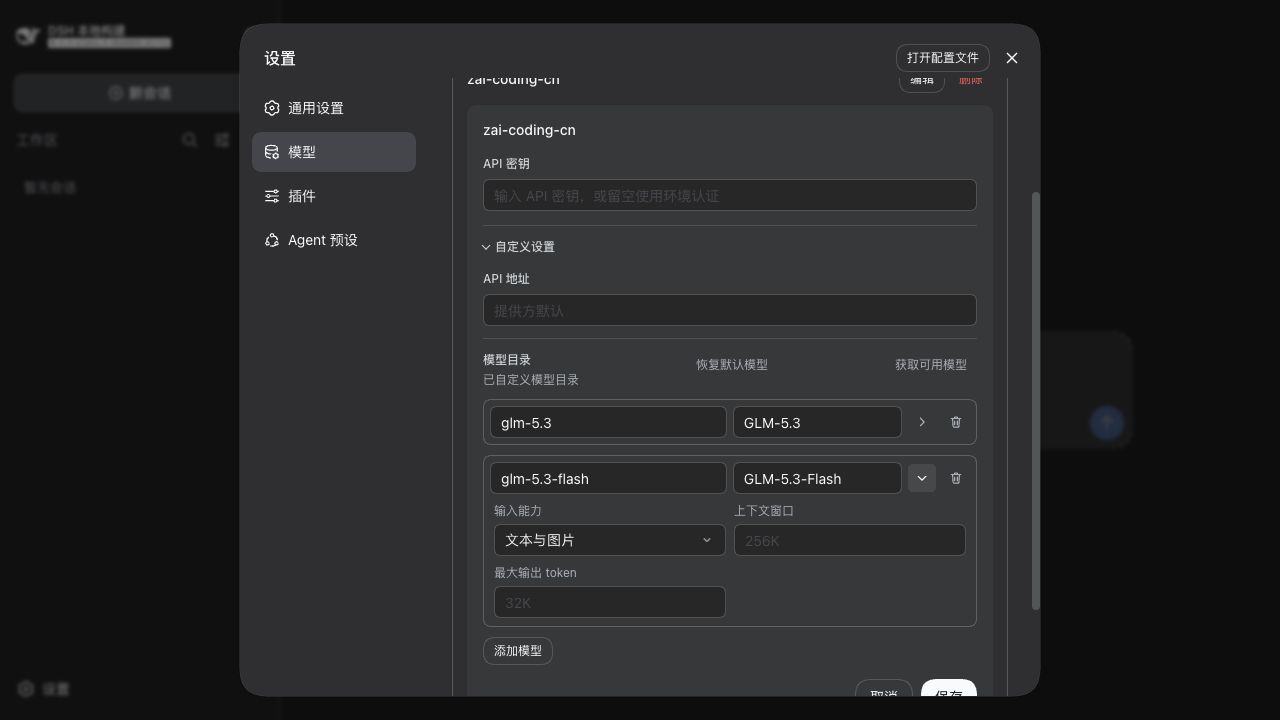
Inheritance needs its own choice: clearing an override should restore the installed model's modalities or the provider fallback, rather than explicitly disabling images. Existing empty arrays, reversed modality order, and image-only declarations are displayed without rewriting them during unrelated edits. Image-only entries have a disabled display option to preserve the existing declaration. The shared editor covers both adding a provider and editing an existing one, including read-only mode and English/Chinese copy. One clarification from current master: known catalog models can already inherit image support, and the editor already preserves existing Screenshot from the isolated local Web configuration test, after saving and reopening the model. The selected option is Text and images (文本与图片).
Local validation on macOS passed:
The Web tests exercise configuration without making model API calls; they do not establish whether any particular endpoint accepts images. I understand that external PRs are not currently accepted, so I am sharing the implementation here for evaluation. Would this narrowly scoped change be useful upstream? I would be happy to adjust it to maintainer feedback and open a PR if invited, or have the patch adopted directly. |

|
I can reproduce the same issue with the following model:
This model supports image input and works successfully with the same endpoint in OpenWebUI. However, in DSH the model is treated as text-only, and attaching an image fails immediately with:
The model is provided through an OpenAI-compatible route. Since its exact model ID is not present in the built-in catalog and the Models UI has no way to declare Environment: DSH This suggests the issue also affects newly introduced or gateway-specific vision model IDs, not only the built-in catalog models. |


Uh oh!
There was an error while loading. Please reload this page.
Problem
When using a model that is actually vision-capable (e.g.
deepseek-v4-flash-vision-exp, or third-party models like Claude/GPT throughllm-pi-ai), sending an image fails with:The model picker gives no hint about which models accept images, and the Models settings page cannot express it.
Root cause
dsh gates image input on each model's declared modalities (
inputModalities). The web Models editor (dsh-client-ui-settings-models) only lets you edit per model:idnamecontextWindow/maxTokens(behind the row's disclosure)It never exposes the modality list. For
llm-pi-aithe field isinput(it falls back to["text"]when absent, so a model row created from the UI is automatically text-only); forllm-deepseekit isinputModalities(plusimagePixelBudget/imageMaxBytes/imageDetail). So even a known vision model gets treated as text-only and images are rejected — with no way to enable them from the UI.Current workaround
Hand-edit
$DSH_HOME/settings.yaml:This works but is non-obvious (the field name differs per provider, and a row re-saved through the UI can drop the field). See also discussion #112.
Proposed change
input: [text, image]forllm-pi-aiandinputModalities: [text, image]forllm-deepseek. Optionally expose the image limits (imagePixelBudget,imageMaxBytes,imageDetail).inputis not lost.This removes the need to hand-edit settings and makes image capability clearly configurable per model from the web UI.
All reactions