The problem
When you type # in the summary box for a commit, it used to be possible to use the up and down arrow keys to navigate to the issue of interest and then press Enter to select it.
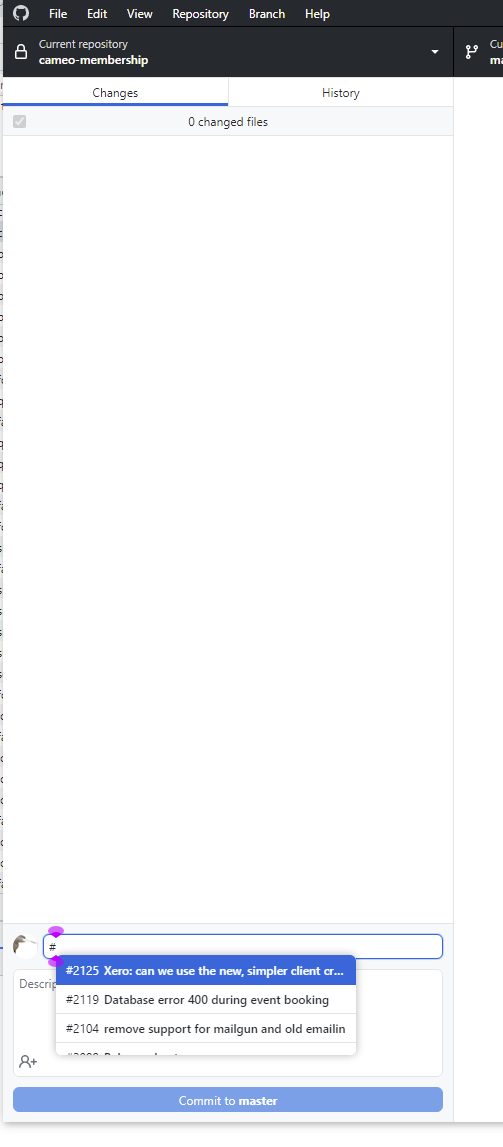
Now, you can select the first issue shown with Enter, but if you use down arrow, it now dismisses the menu and furthermore loses focus from the summary box. There no longer seems to be a keyboard way of selecting the issue number. (As well as convenience, this is an accessibility problem).
(It would also be helpful if the list were a bit wider so you can see more of the description, and also if there were a way to refresh the list - currently it seems you have to change repo or quit and restart the app for it to pick up newly added issues)
Release version
3.1.7
Operating system
Windows 10
Steps to reproduce the behavior
- Type # in the summary box, so a list of issues pops up
- Press down arrow - expected behaviour is to move to the next entry, but now the menu just disappears
Log files
2023-02-24.desktop.production.log
Screenshots
Additional context
No response

The problem
When you type # in the summary box for a commit, it used to be possible to use the up and down arrow keys to navigate to the issue of interest and then press Enter to select it.
Now, you can select the first issue shown with Enter, but if you use down arrow, it now dismisses the menu and furthermore loses focus from the summary box. There no longer seems to be a keyboard way of selecting the issue number. (As well as convenience, this is an accessibility problem).
(It would also be helpful if the list were a bit wider so you can see more of the description, and also if there were a way to refresh the list - currently it seems you have to change repo or quit and restart the app for it to pick up newly added issues)
Release version
3.1.7
Operating system
Windows 10
Steps to reproduce the behavior
Log files
2023-02-24.desktop.production.log
Screenshots
Additional context
No response