
Important: Please read this before proceeding.
When connecting the display, ensure that has a voltage regulator (shown in the image below) before connecting it directly to the 5v logic level of the Arduino. This is because the display could be destroyed if the version of the display you have does not have the regulator.
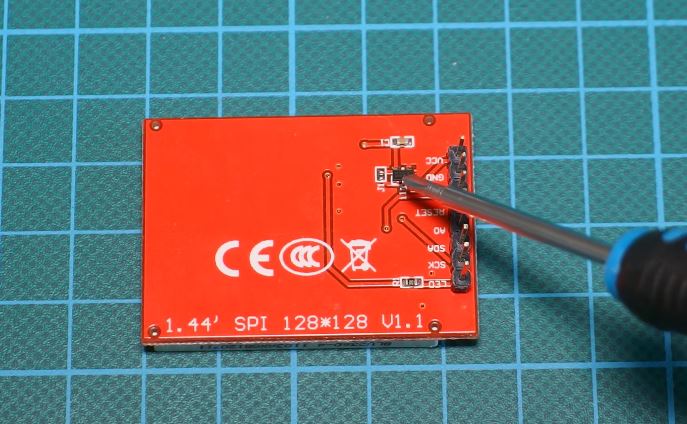
Remember to exercise caution and proceed at your own risk.If you have any doubts or concerns, consult the manufacturer's documentation or seek assistance from experienced individuals.
Proceed with caution and enjoy the project responsibly!
In this task, i made a simpe game using Arduino. The TFT screen and joystick are connected to the Arduino board using the following pin configuration:
- LED: 3.3V
- SCK: D13
- SDA (MOSI): D11
- A0: D8
- RST: D9
- CS: D10
- VCC: 5V
|
game 
|
game over 
|
- GND pin connects to the circuit’s ground.
- Vcc pin is used to supply the 5-volt power to the module.
- VRx pin is the analog output pin for X-axis (left and right).
- VRy pin is the analog output pin for Y-axis (up and down).
- SW pin is connected to the pull-up button. Once the button is pressed, SW pin outputs 0


To get started, we need to include the Adafruit_ILI9163C library in our Arduino code. Follow these steps to install the library:
- Open the Arduino IDE.
- Go to "Sketch" -> "Include Library" -> "Manage Libraries".
- In the Library Manager, search for "Adafruit_GFX".
- Click on the "Adafruit_GFX" library and click the "Install" button.
- Wait for the installation to finish.
To use the code, follow these steps:
-
Connect the TFT screen and the joystick to the Arduino board according to the provided pin configuration.
-
Open the Arduino IDE and create a new sketch.
-
Include the library at the beginning of your code:
#include <Adafruit_GFX.h> #include <Adafruit_ST7735.h> -
make the pin connections and adjust accordingly
const int SW = 2; // SW const int X = 0; // VRx const int Y = 1; // VRy #define TFT_CS 10 #define TFT_RST 9 #define TFT_DC 8 -
then the rest of the code
arduin_game.inovoid setup(){ //code } void loop{ // more code }