


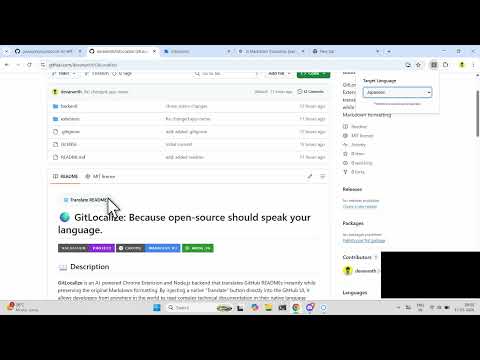
GitLocalize is an AI-powered Chrome Extension and Node.js backend that translates GitHub READMEs instantly while preserving the original Markdown formatting. By injecting a native "Translate" button directly into the GitHub UI, it allows developers from anywhere in the world to read complex technical documentation in their native language without leaving the repository.
Open-source software powers the world, but it has a massive barrier to entry: Language.
- The "Google Translate" Problem: If a non-English speaker right-clicks and translates a GitHub page using standard browser tools, the HTML manipulation destroys technical context. Bash commands get translated into literal verbs, JSON keys get altered, and Markdown tables break.
- Friction in Collaboration: Developers waste time copying and pasting text chunk-by-chunk into external translators just to understand how to install a library or contribute to a project.
- Our Solution: GitLocalize fetches the raw
.mdfile, translates it using the context-aware Lingo.dev AI engine, and safely renders it back to the screen—ensuring that code snippets, terminal commands, and technical jargon remain perfectly intact.
Technical Blog: GitLocalize blog post
- Frontend (Extension): JavaScript (Manifest V3), HTML/CSS, Chrome Storage API,
marked.js(for Markdown-to-HTML rendering). - Backend (API): Node.js, Express.js, CORS.
- Translation Engine: Lingo.dev SDK.
- Optimization:
p-limit(for managing highly concurrent API requests and avoiding rate limits). - Hosting: Render (Backend).
gitlocalize/
│
├── backend/                  # Express server for API handling
│   ├── .env                  # Environment variables (Lingo.dev API Key)
│   ├── package.json          # Backend dependencies
│   └── server.js             # Express app, chunking logic, and Lingo.dev integration
│
└── extension/                # Chrome Extension files
    ├── manifest.json         # Manifest V3 configuration
    ├── background.js         # Service worker for API calls
    ├── content.js            # GitHub DOM manipulation & UI injection
    ├── marked.min.js         # Local copy of marked.js parser
    ├── popup.html            # Extension dropdown UI
    └── popup.js              # Language selection & storage logic
We built GitLocalize to be plug-and-play. The backend is already live-hosted on Render, so you can test the extension instantly without running the local server.
-
Download or clone this repository:
git clone https://github.com/your-username/gitlocalize.git -
Open Google Chrome and navigate to
chrome://extensions. -
Toggle on Developer Mode (top right corner).
-
Click Load Unpacked and select the
/extensionfolder from this repo. -
Pin the extension, select your language from the popup, and visit any GitHub repo (e.g., facebook/react) to see it in action!
⚠️ IMPORTANT NOTE: Our backend is hosted on Render's free tier. If the server has been inactive, the very first translation request may take up to 60 seconds while the container spins up from a cold start. Please be patient! All subsequent translation requests will process rapidly in just a few seconds.
If you want to run the translation engine locally on your machine:
1. Start the Backend:
- Navigate to the backend directory:
cd backend - Install dependencies:
npm install - Create a
.envfile and add your Lingo.dev key:LINGODOTDEV_API_KEY=your_api_key_here PORT=3000
- Start the server:
node server.js
2. Point the Extension to Localhost:
- Open
extension/content.js(orbackground.js, depending on your architecture). - Change the fetch URL from our live Render link to your local server:
// Change from: const API_URL = "[https://your-app.onrender.com/api/translate](https://your-app.onrender.com/api/translate)";
const API_URL = "http://localhost:3000/api/translate";
- Go back to
chrome://extensionsand click the Refresh icon on the GitLocalize extension card.
- 💾 Offline Persistence & Export: Allow users to persist generated translations and download the localized
.mdfiles directly to their machine for offline viewing or direct repository commits. - 💬 PR & Issue Translation: Extend the DOM injection script to detect and translate real-time discussions, code review comments, and descriptions within GitHub Pull Requests and Issues.
- 🌐 Auto-Language Detection: Leverage the browser's
Accept-Languageheader to automatically detect the user's native language and trigger the appropriate translation without requiring manual popup selection.