Progress bar not updated when downloading maps #12


-
|
The progress bar is not updated when downloading maps |
Beta Was this translation helpful? Give feedback.
Replies: 10 comments 16 replies

-
|
Thanks for the report. Can you write more details? Do you mean the progress bar inside the app or in the notifications at the top? The downloads are handled by Android and sometimes it take a while to start. What map from which provider? |
Beta Was this translation helpful? Give feedback.

-
|
progress bar inside the app... The bar in the notifications is updating correctly.... Mapsforge, no matter which map, all, in this case germany... if you look at it or if you close the screen and look later, it doesn't update the bar. At the end when the download is completed than the bar is updated fully in a second. |
Beta Was this translation helpful? Give feedback.

-
|
The only time I can get this to happen is if exit the app, by double tapping the Android back button. When the app is in the foreground or background and the download screen is open or hidden (and reopen) What do you see? |
Beta Was this translation helpful? Give feedback.

-
|
Correct progress bar on A9 phone. (Small map) |
Beta Was this translation helpful? Give feedback.
-
The downloads are handled by Android and should not exit from the app. |
Beta Was this translation helpful? Give feedback.

-
|
On my A10 phone sometimes the progress bar is updated, and sometimes it is not. But that's not important for me - I get an acoustic signal if it's ready and the Android download shows the progress either. |
Beta Was this translation helpful? Give feedback.
-
just tested on a Samsung A52S (other was a Samsung S9 plus): a bar that keeps going back and forth is shown for 2-3 seconds, then a blank bar is seen until the download is completed, then again for some seconds a bar that is going back and forth. It seems to be an issue with large maps only. A small map like luxemburg shows the progress bar, but it is downloaded within seconds. You cannot simulate it with such little maps. It is not a big issue. You can leave it alone until the map has gone and is visible under local and then it is ok |
Beta Was this translation helpful? Give feedback.
-
|
Thanks for the extra details. |
Beta Was this translation helpful? Give feedback.
-
|
I see this as follows.
|
Beta Was this translation helpful? Give feedback.
-
Downloads are handled by Android (as in browsers). As downloads progress and you have not exited Cruiser Anything different should be something I need to check. 🙂 |
Beta Was this translation helpful? Give feedback.
-
|
Works like this |
Beta Was this translation helpful? Give feedback.
-
|
Next Cruiser version will include in the downloader the Voluntary themes: https://voluntary.nichesite.org (working on this I improved the downloader, let's see if this report happens again)
|

Beta Was this translation helpful? Give feedback.
-
|
Cruiser 3.0.8 is available with improvements in download manager. Please see if everything is working properly now. |
Beta Was this translation helpful? Give feedback.

-
|
In the last days I did some downloads (Spain and Portugal) with 3.0.7 and saw a correct progress bar ... |
Beta Was this translation helpful? Give feedback.

-
|
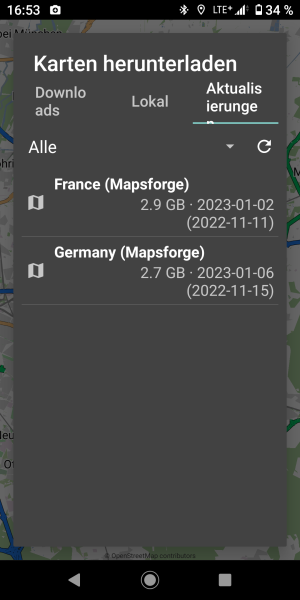
Just updated the France map (2.9G). The Cruiser progressbar did no show any value until over halfway on the NotificationBar progress, which displayed correctly. I wonder if this is a "2GB Barrier" thing as smaller downloads are fine. |
Beta Was this translation helpful? Give feedback.
-
|
I just tried to update the France map - process bar stays totally empty. The process bar of the Android download was correct. It was a very, very, very slow download, with 25 mb bandwidth. Cruiser was set into navigation and therefore permanently in foreground while updating France. After let say 20 minutes the process was interrupted - no longer an Android download at all. |
Beta Was this translation helpful? Give feedback.
-
|
@WolfgangZ42 thanks for the test.
Do you mean, you stopped it or it stopped by other reason? |
Beta Was this translation helpful? Give feedback.
-
|
It was not stop by myself - I was patient enough. I always checked the Android process at intervals of a few minutes, and at some point this process no longer existed. |
Beta Was this translation helpful? Give feedback.

-
Yes, updating the existing version. |
Beta Was this translation helpful? Give feedback.
-
|
Thanks everyone for your reports. 👍 I will check the progress bar with large downloads / updates. |
Beta Was this translation helpful? Give feedback.

-
|
I also experienced this today, the progress bar stopped moving while downloading a 1.6 GB map. Most likely it was due to a temporary drop in network performance, because after a few minutes everything returned to normal. But at the time it occurred to me that maybe a simple numeric data transfer counter located on the download card would be a useful clue here. Edit: I mean instantaneous download speed counter, without the need for a reset or any other interaction. |
Beta Was this translation helpful? Give feedback.
-
|
Next Cruiser will display the download percentage instead of the progress bar, let's see how it goes: 
|
Beta Was this translation helpful? Give feedback.
-
Available in Cruiser 3.0.23. |
Beta Was this translation helpful? Give feedback.


Cruiser 3.0.8 is available with improvements in download manager.
Please see if everything is working properly now.