
Next-generation documentation site generator for dbt™ Core projects.
Live Demo · Docs · Website · PyPI · Changelog




Thousands of teams use dbt Core without access to dbt Cloud's documentation features. The built-in dbt docs generate && dbt docs serve generates a useful, but somewhat dated static site, with limited functionality that doesn't scale well.
Docglow replaces it with a modern, interactive single-page application — and it works with any dbt Core project out of the box.
- No dbt Cloud required — generate and serve docs locally or deploy anywhere
- Unlimited models, unlimited viewers — no seat caps, no model limits
- Zero configuration — just point it at a dbt project with compiled artifacts and go
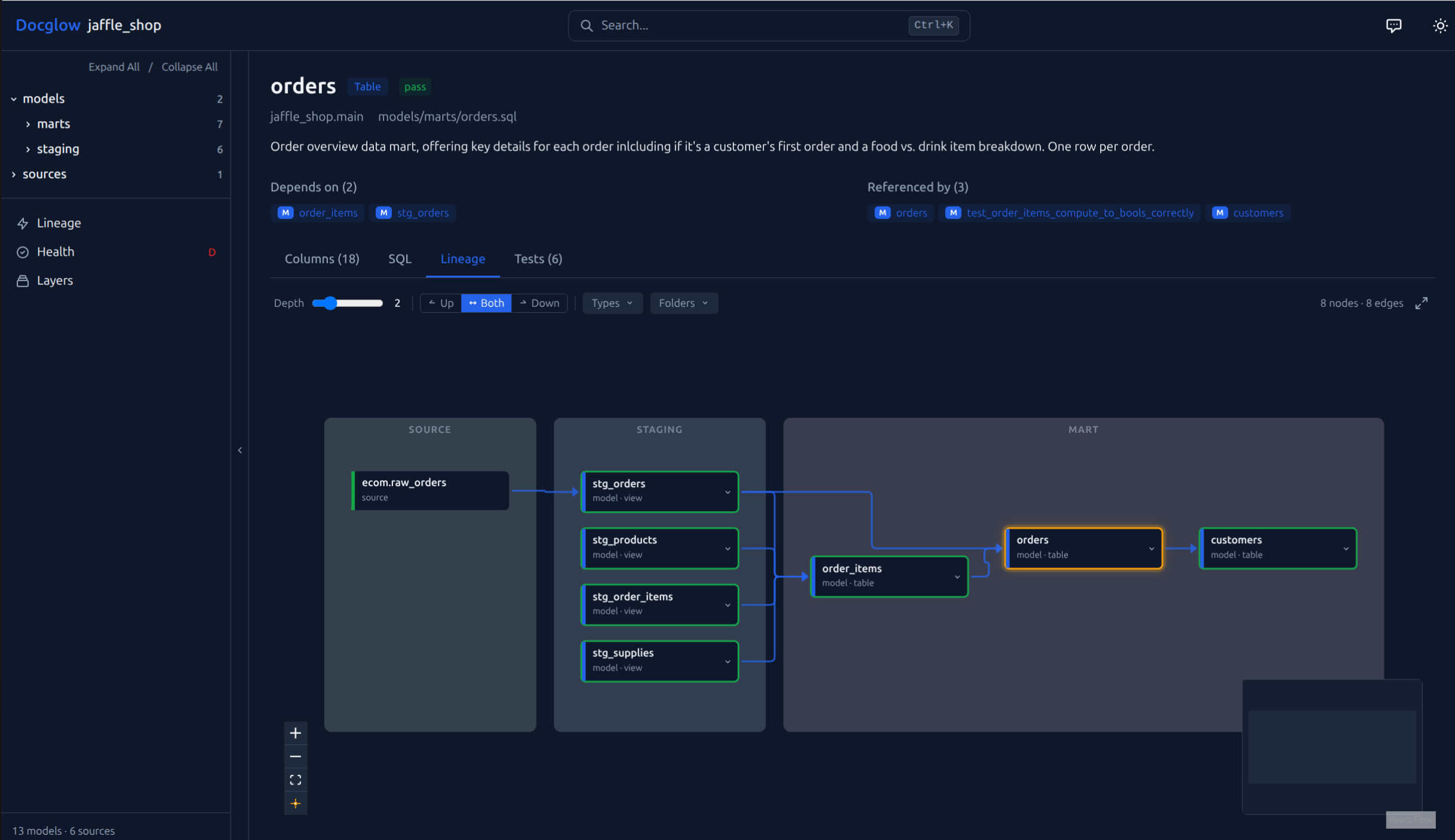
- Interactive lineage explorer — drag, filter, and trace upstream/downstream dependencies visually
- Project health scoring — get a coverage report for descriptions, tests, and documentation completeness
Switching from dbt docs serve? See the migration guide for a side-by-side comparison and step-by-step instructions.
Interactive lineage explorer — layer-grouped DAG with upstream/downstream filtering, depth control, and folder grouping
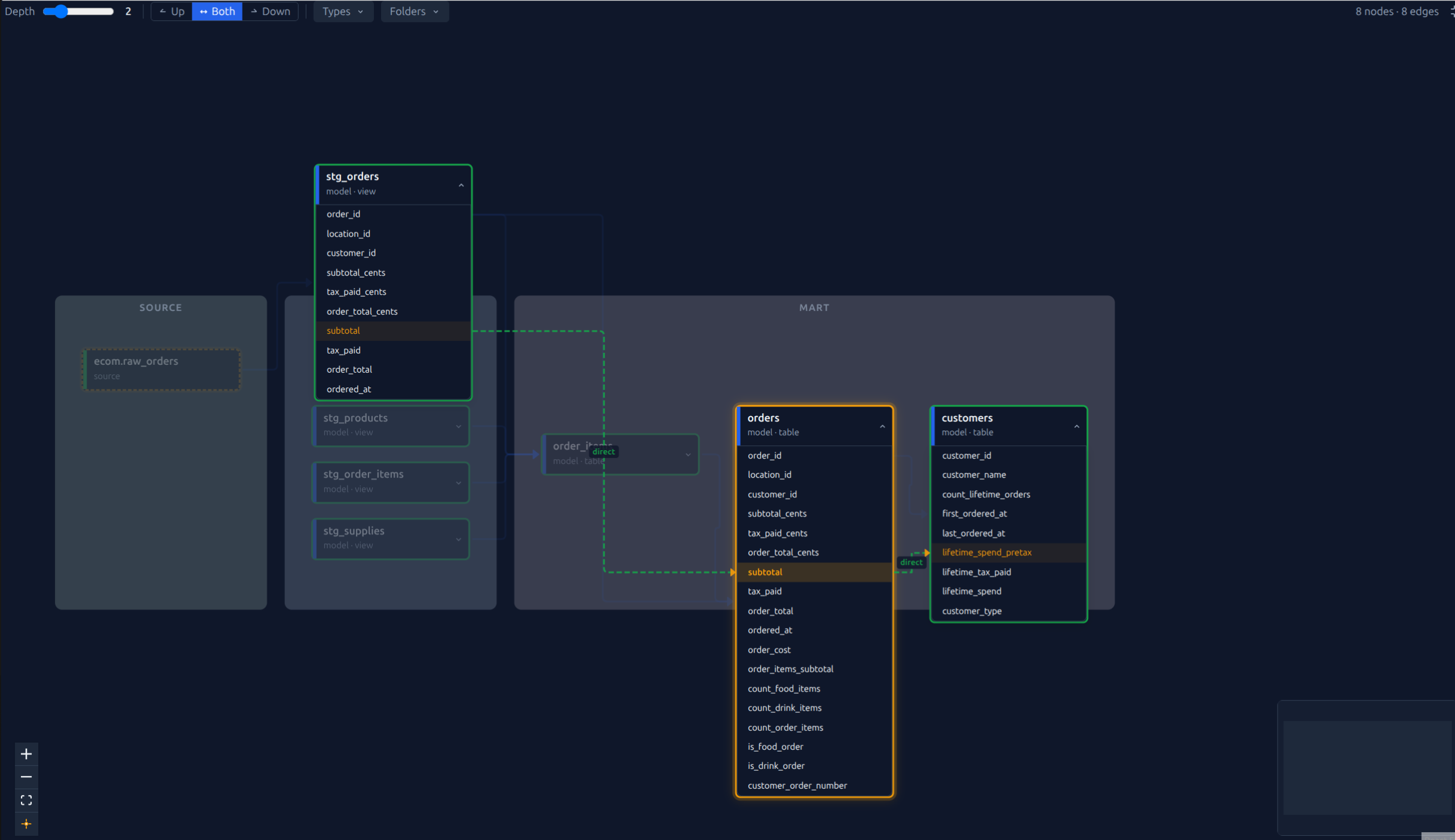
Column-level lineage — expand nodes to trace individual columns across models with transformation labels (direct, derived, aggregated) (guide)
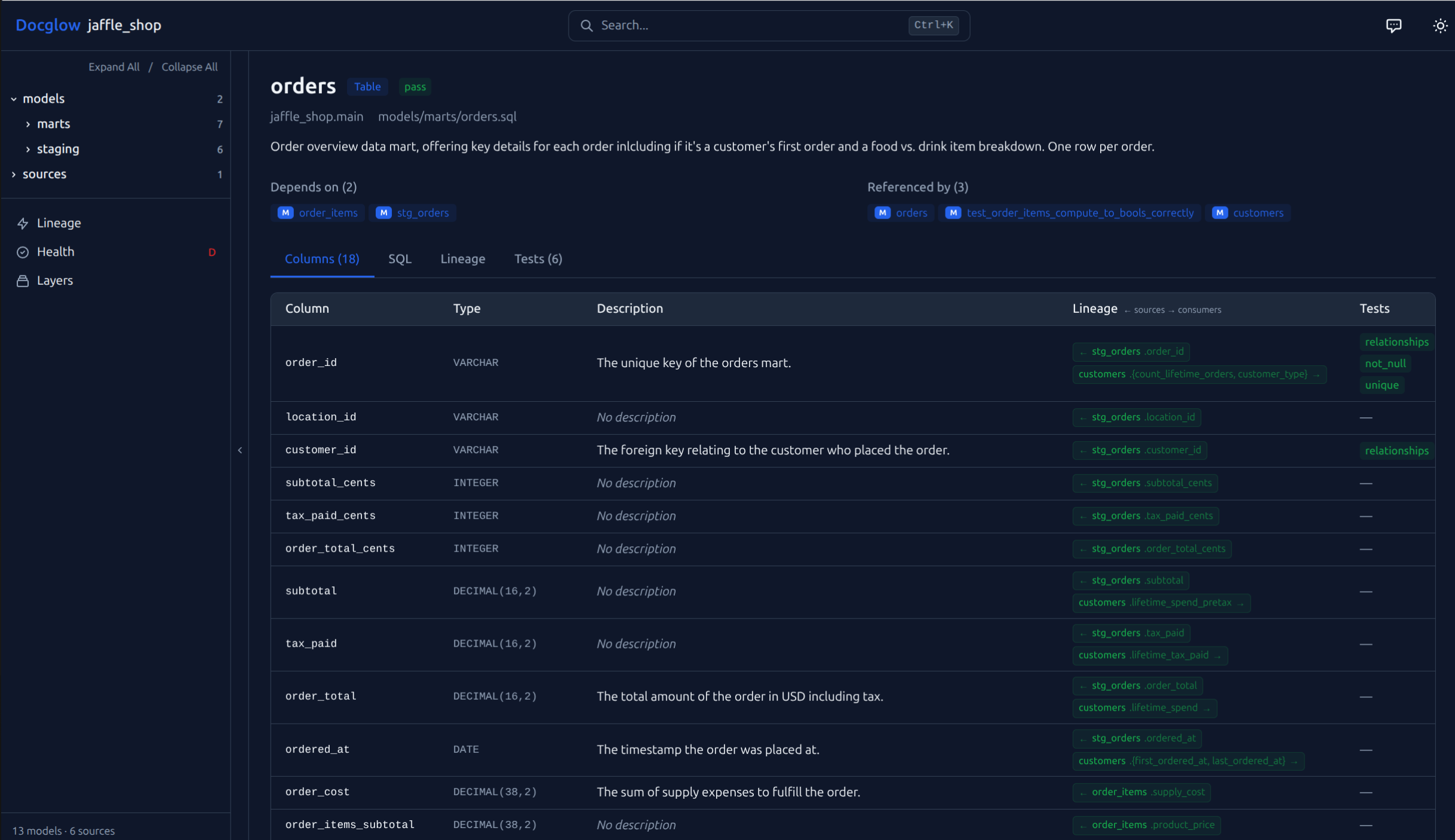
Column table with lineage — view types, descriptions, tests, and upstream/downstream dependencies for every column. Click a lineage badge to jump directly to that column in the linked model.
pip install docglowpip install docglow
git clone https://github.com/docglow/docglow.git
cd docglow
docglow generate --project-dir examples/jaffle-shop --output-dir ./demo-site
docglow serve --dir ./demo-siteThis uses the bundled jaffle_shop example project with pre-built dbt artifacts.
# Generate the site from your dbt project
docglow generate --project-dir /path/to/dbt/project --output-dir ./site

# Serve locally
docglow serve --dir ./site- Interactive lineage explorer — drag, filter, and explore upstream/downstream dependencies with configurable depth and layer visualization
- Column-level documentation — searchable column tables with descriptions, types, and test status
- Project health score — coverage metrics for descriptions, tests, and documentation completeness (details)
- Full-text search — instant search across all models, sources, and columns
- Single static site — no backend required, deploy anywhere (S3, GitHub Pages, Netlify, etc.)
- AI chat (BYOK) — ask natural language questions about your project using your own Anthropic API key
- Dark mode — auto, light, and dark themes (follows system preference by default)
| Command | Description |
|---|---|
docglow generate |
Generate the documentation site from dbt artifacts |
docglow serve |
Serve the generated site locally |
docglow health |
Show project health score and coverage metrics |
docglow mcp-server |
Start MCP server for AI editor integration |
docglow init |
Generate a starter docglow.yml configuration file |
docglow profile |
Run column-level profiling (requires docglow[profiling]) |
Generate a completely self-contained HTML file — no server needed:
docglow generate --project-dir /path/to/dbt --static
# Open target/docglow/index.html directly in your browser
The entire site (data, styles, JavaScript) is embedded in one file. Perfect for sharing via email, Slack, or committing to a repository.
Add a docglow.yml to your dbt project root for optional customization (layer definitions, display settings, etc.). Docglow works out of the box without any configuration — just point it at a dbt project with compiled artifacts in target/.
Generate a starter config with all options documented:
docglow initDocglow supports three themes: auto (follows system preference), light, and dark.
docglow generate --theme darkOr in docglow.yml:
theme: dark # auto | light | darkDocglow includes a built-in AI chat panel powered by Claude. Ask natural language questions about your dbt project and get answers grounded in your actual metadata — models, columns, lineage, tests, and health scores.
Enable it:
# Option 1: Pass your key as a flag (for local use only)
docglow generate --ai --ai-key sk-ant-...

# Option 2: Set the environment variable
export ANTHROPIC_API_KEY=sk-ant-...
docglow generate --ai

# Option 3: Enable in docglow.yml
# ai:
#   enabled: true
Open the chat panel with Ctrl+J (or click the chat icon in the header), enter your Anthropic API key, and start asking questions.
Example questions:
| Question | What it does |
|---|---|
| What models depend on the orders source? | Traces the lineage graph to find all downstream consumers |
| Which columns might contain PII? | Scans column names and descriptions for personally identifiable information |
| What would break if I changed stg_customers? | Lists all downstream models that depend on stg_customers |
| Show me all models related to revenue | Searches model names, descriptions, and tags for revenue-related content |
| Which models have the most failing tests? | Cross-references test results with model metadata |
| What's the overall health of this project? | Summarizes the health score breakdown across all six dimensions |
| Explain what dim_employee does | Describes the model using its SQL, columns, upstream dependencies, and description |
| What's the difference between stg_orders and fct_orders? | Compares two models side-by-side using their metadata |
How it works: When you generate with --ai, Docglow builds a compact project context (model names, descriptions, columns, lineage, test status, health scores) and embeds it in the site. The chat panel sends this context as a system prompt to the Anthropic API along with your question. Responses stream back in real-time with clickable model references.
Security: Your API key is never embedded in the generated site. It's stored in your browser's localStorage when you enter it in the chat panel, and sent directly to the Anthropic API from your browser. You can safely deploy AI-enabled sites — they contain the project context but not your key.
Limits: 20 requests per session (clear chat to reset). Uses Claude Sonnet 4 with streaming.
Docglow includes a Model Context Protocol server that exposes your dbt project to AI editors like Claude Code, Cursor, and Copilot.
Add to your editor's MCP config (e.g. ~/.claude.json):
{
  "mcpServers": {
    "docglow": {
      "command": "docglow",
      "args": ["mcp-server", "--project-dir", "/path/to/dbt/project"]
    }
  }
}
The server provides 9 tools: model/source lookup, lineage traversal, health scores, undocumented/untested discovery, cross-model column search, and full-text search. No API keys or network access required — it runs locally over stdio.
Use Docglow as a CI quality gate with the --fail-under flag:
# .github/workflows/docs.yml
- name: Check documentation health
  run: docglow health --project-dir . --fail-under 75

- name: Generate and deploy docs
  run: docglow generate --project-dir . --output-dir ./site
Column-level lineage runs by default. For large projects, use --skip-column-lineage to speed up generation, or --slim to strip SQL source from the output and reduce payload size by 40–60%.
See the CI/CD Deployment Guide for complete walkthroughs covering GitHub Pages, S3, GitLab CI, health score thresholds, and enterprise private Pages.
Ready-to-copy workflow files: GitHub Pages (recommended), S3, and PR health check.
Add Docglow's health check to your existing pre-commit workflow:
# .pre-commit-config.yaml
repos:
  - repo: https://github.com/docglow/docglow
    rev: v0.5.5
    hooks:
      - id: docglow-health
args: ['--fail-under', '75']- Python 3.10+
- A dbt project with
target/manifest.json(rundbt compileordbt runfirst) - See Compatibility for supported dbt versions and adapters
MIT
dbt is a trademark of dbt Labs, Inc. Docglow is not affiliated with or endorsed by dbt Labs.