
Multi-node agent orchestrator — tasks, agents, missions, git, files, and worktrees, with any model, local or cloud.
runfusion.ai → · Docs · GitHub · npm · Discord





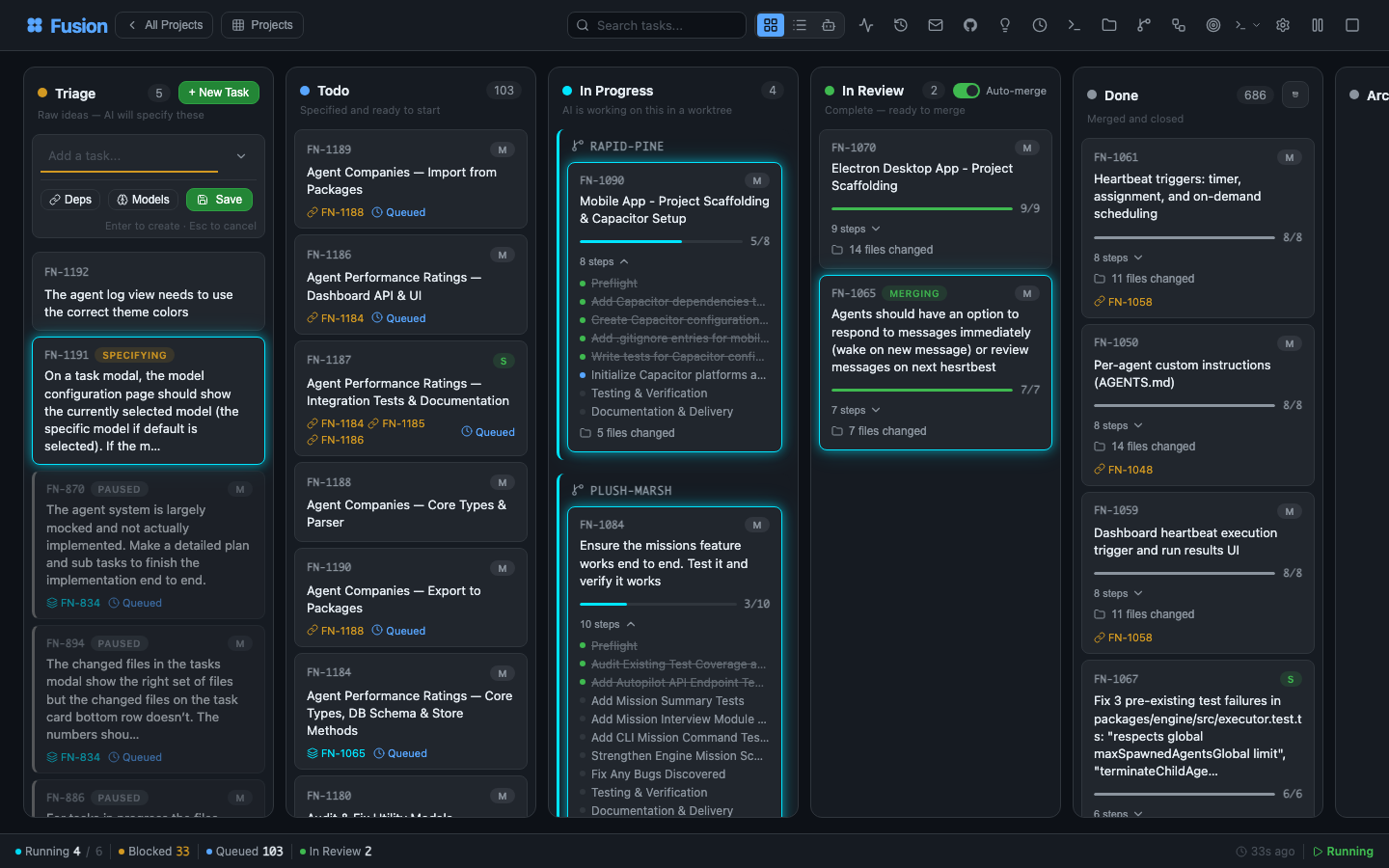
Describe a task in plain language. A planning agent reads your project, understands context, and writes a full PROMPT.md plan — steps, file scope, acceptance criteria. Then Fusion plans, reviews, executes, and reviews again, in an isolated git worktree, with a human approval gate wherever you want one.
One board. Controlled from anywhere. Laptop, Mac mini, Linux server, cloud VM, phone — all connected.
Like Trello, but your tasks get specified, executed, and delivered by AI — powered by pi. Built on the great work of dustinbyrne/kb.
  ①  Describe          ②  Planning             ③  The board           ④  Isolated worktree
  ─────────────        ─────────────         ─────────────          ─────────────────────
  "Add dark mode   →   Agent writes    →   Plan → Review →    →   fusion/FN-123 branch
   toggle to           PROMPT.md           Execute → Review        concurrent, zero
   settings panel"     (steps, scope,      (per step, until        file conflicts
                       acceptance)         done)
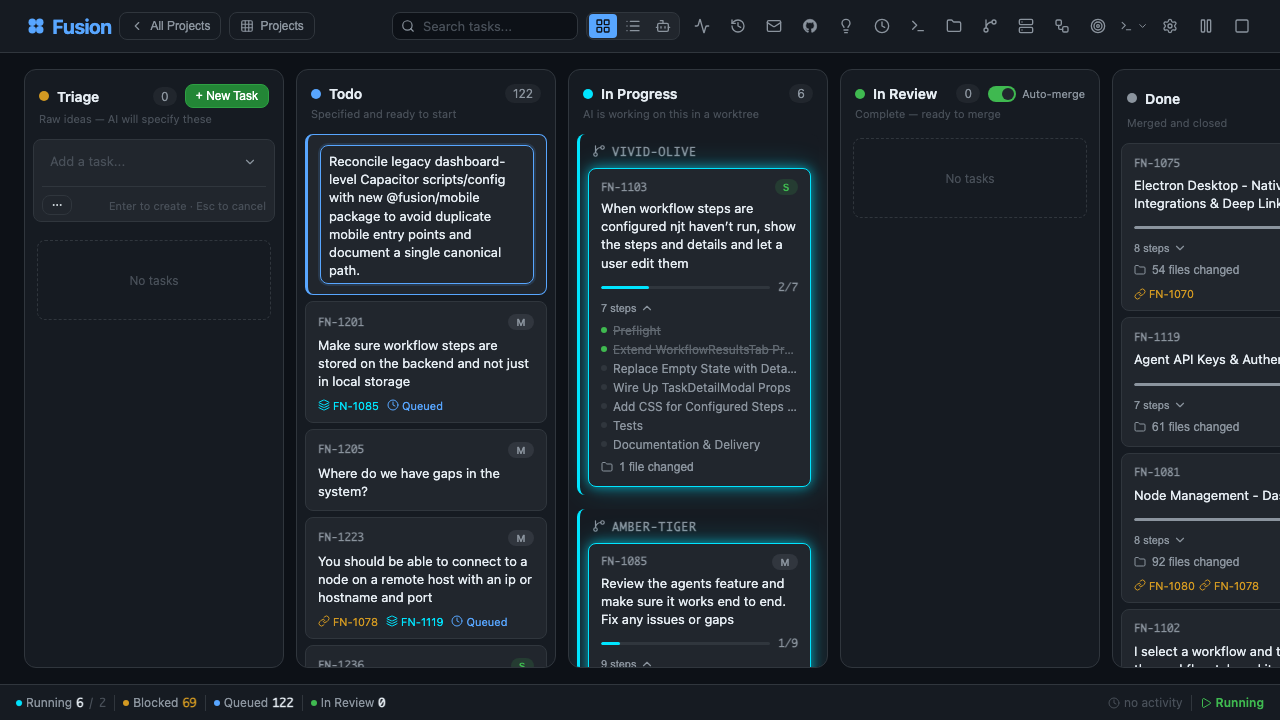
Every task shows its plan, its reviews, its diffs, and its file changes in real time. Jump into an active task and nudge direction, tighten constraints, pause, or re-prompt.
| 🧠 AI planning | Describe a task in plain language. Planning agents turn it into a PROMPT.md plan with steps, file scope, and acceptance criteria. |
| 🔁 Workflow gates | Plan → Review → Execute → Review on every step. Pre-merge gates block bad code; post-merge gates run informational checks. |
| 🌳 Worktree isolation | Each task runs in its own branch and worktree (fusion/{task-id}). Parallel tasks. Zero conflicts. |
| ⚡ Smart merge | Passing every gate? Fusion squash-merges and moves on. Opt into manual approval anywhere. |
| 🛰️ Multi-node mesh | Laptop, Mac mini, Linux server, cloud VM, phone — all synced. Desktop, mobile, web. |
| 🧩 Any model | Anthropic, OpenAI, Ollama — or anything pi-compatible. Local and cloud coexist. |
| 🏢 Agent companies | Import pre-built teams — 440+ agents across 16 companies — and run them autonomously for weeks. |
| 📬 Inter-agent messaging | Built-in mailbox between agents. Delegate, clarify, coordinate. |
| 🗺️ Missions | Hierarchical planning (Mission → Milestone → Slice → Feature → Task) with autopilot and validation contracts. |
| 🧪 Self-improvement | Agents reflect on their own output and update their prompts as they learn your codebase. |
| 🔓 Open source. MIT. | No vendor lock-in. Run it on your own hardware. Shipping weekly. |
graph TD
    H((You)) -->|rough idea| T["Planning<br/><i>auto-planning</i>"]
    T --> TD["Todo<br/><i>scheduled for execution</i>"]
    TD --> IP["In Progress<br/><i>for each step:<br/>plan, review, execute, review</i>"]

    subgraph IP["In Progress"]
        direction TD
        NS([Begin step]) --> P[Plan]
        P --> R1{Review}
        R1 -->|revise| P
        R1 -->|approve| E[Execute]
        E --> R2{Review}
        R2 -->|revise| E
        R2 -->|next step| NS
        R2 -->|rethink| P
    end

    R2 -->|done| IR["In Review<br/><i>ready to merge,<br/>or auto-complete</i>"]
    IR -->|direct squash merge<br/>or merged PR| D["Done"]

    style H fill:#161b22,stroke:#8b949e,color:#e6edf3
    style T fill:#2d2006,stroke:#d29922,color:#d29922
    style TD fill:#0d2044,stroke:#58a6ff,color:#58a6ff
    style IP fill:#1a0d2e,stroke:#bc8cff,color:#bc8cff
    style P fill:#1a0d2e,stroke:#bc8cff,color:#e6edf3
    style R1 fill:#1a0d2e,stroke:#bc8cff,color:#e6edf3
    style E fill:#1a0d2e,stroke:#bc8cff,color:#e6edf3
    style R2 fill:#1a0d2e,stroke:#bc8cff,color:#e6edf3
    style NS fill:#1a0d2e,stroke:#bc8cff,color:#bc8cff
    style IR fill:#0d2d16,stroke:#3fb950,color:#3fb950
    style D fill:#1a1a1a,stroke:#8b949e,color:#8b949e
Tasks with dependencies are processed sequentially. Independent tasks run in parallel. Optionally require manual approval before tasks move from Planning to Todo (requirePlanApproval setting).



Laptop, Mac mini, Linux server, cloud VM, phone — every node is a peer. Your task state, agents, logs, and diffs stay synchronized across the mesh. The same Fusion ships as:
- 🖥️ Desktop app — Electron for macOS (Intel + Apple Silicon), Windows 10/11, and Linux
- 📱 Mobile app — Capacitor for iOS/iPadOS and Android (MOBILE.md)
- 🌐 Web dashboard — any modern browser, served from the
fn dashboarddaemon - 🔌 CLI —
fnbinary + pi extension for terminal-first workflows
Start the daemon on any node, connect your other devices, and the board follows you everywhere.

Import a team. Run it autonomously for weeks. 440+ agents across 16 companies, wired for missions, mailboxes, and inter-agent delegation.
npx companies.sh add paperclipai/companies/gstackFusion stands on open tools we love. Every Pi extension works out of the box. Hermes, Paperclip, and OpenClaw all ship as first-class plugins — route any workspace to whichever runtime fits the task. And any Paperclip agent-company imports with a single command.

Pi — the runtime
pi.dev
Fusion is built on top of Pi — the minimal, extensible coding-agent CLI. Every Pi extension works inside of Fusion. Install Fusion as a Pi extension to get native tools (fn_task_create, fn_task_list, fn_task_show, …) and a /fn command to manage Fusion from any Pi session.
pi install npm:@runfusion/fusionThis installs the Pi extension — it provides Fusion tools and
/fninside pi sessions only. To get thefnCLI in your terminal, install globally:npm install -g @runfusion/fusion.

Hermes experimental
Nous Research
The open-source autonomous agent from Nous Research. Install the Hermes plugin and run agents through Hermes for long-running, context-growing work — route any Fusion workspace to it.
OpenClaw runtime support is available as an experimental plugin (fusion-plugin-openclaw-runtime) for runtime discovery/configuration parity. Configure agents with runtimeConfig.runtimeHint: "openclaw" after installing the plugin.

Paperclip experimental
paperclip.ing
The human control plane for AI labor. Install the Paperclip plugin to run agents through Paperclip inside Fusion.
Fusion also natively supports the companies.sh agent-company standard: import a prebuilt team — 440+ agents across 16 companies — and let them coordinate over Fusion's mailbox, missions, and workflow gates for weeks of autonomous work. Same company format, same agents, same skills as Paperclip.
npx companies.sh add paperclipai/companies/gstackHermes, Paperclip, and OpenClaw are experimental runtime plugins — APIs and wire formats may shift between minor releases. Pi is Fusion's stable runtime dependency.
Zero install, straight from npm:
npx runfusion.aiThat launches the dashboard. Subcommands forward through: npx runfusion.ai task create "fix X", npx runfusion.ai --help, etc. (Or verbosely: npx @runfusion/fusion dashboard.)
One-line installer (macOS & Linux — auto-picks Homebrew, falls back to npm):
curl -fsSL https://runfusion.ai/install.sh | sh
fusion dashboard
Homebrew (macOS & Linux):
brew tap runfusion/fusion
brew install fusion
fusion dashboard            # or: fn dashboard
Or as a one-liner (auto-taps): brew install runfusion/fusion/fusion.
npm global:
npm install -g @runfusion/fusion
fn dashboard                # or: fusion dashboard
Pi extension (optional): To use Fusion tools inside Pi chat sessions, also run
pi install npm:@runfusion/fusion. This adds a/fncommand and Fusion tools within pi — but does not install thefnCLI globally.
From a clone (for development):
pnpm dev dashboardThen click the Open: URL printed in the terminal. It embeds a bearer token
(http://localhost:4040/?token=fn_...) that the browser captures to
localStorage on first visit and reuses automatically thereafter. On the
server side, Fusion now persists the dashboard/daemon token in
~/.fusion/settings.json on first authenticated run and reuses it on later
starts unless you override it (--token, FUSION_DASHBOARD_TOKEN,
FUSION_DAEMON_TOKEN) or disable auth with --no-auth. See
CLI reference → fn dashboard → Authentication
for full precedence and reset/revocation options.
On first launch, Fusion opens the onboarding wizard with three guided steps:
- AI Setup — Use a simplified quick-start provider list (recommended providers plus any already-connected providers), then expand Advanced provider settings only if you need additional providers or setup details. You only need one provider to get started.
- GitHub (Optional) — Connect GitHub for issue import and PR management
- First Task — Create your first task or import from GitHub (if no project is active, onboarding first prompts you to register/select a project directory)
The wizard is dismissible and non-blocking — click Skip for now to use the dashboard immediately. Re-trigger it later from Settings → Authentication → Reopen onboarding guide.
For Capacitor + PWA workflow, see MOBILE.md.
| Guide | What it covers |
|---|---|
| Getting Started | Installation and onboarding |
| Dashboard Guide | Board/list views, terminal, git manager |
| Task Management | Task lifecycle and CLI commands |
| Settings Reference | Configuration options |
| Architecture | System internals |
| Agents | Agent management, spawning, heartbeat |
| Workflow Steps | Quality gates, templates, phases |
| Missions | Mission hierarchy, planning, autopilot |
| Multi-Project | Central registry, isolation modes |
| Docker | Container deployment |
- AI Planning — Planning agent generates detailed
PROMPT.mdwith steps, file scope, and acceptance criteria - Step-by-step Execution — Plan → Review → Execute → Review cycle for each task step
- Git Worktree Isolation — Each task runs in its own worktree (
fusion/{task-id}branch) - Workflow Steps — Configurable quality gates (pre-merge: blocks merge; post-merge: informational)
- GitHub Integration — Import issues, create PRs, real-time PR/issue badges
- Dashboard — Real-time kanban board, agent management, terminal, git manager, mission planner
- Missions — Hierarchical planning (Mission → Milestone → Slice → Feature → Task) with autopilot, validation contracts, fix-feature retries, and blocked-handoff semantics
- Multi-Project — Manage multiple projects from a single installation with project isolation
- Inter-Agent Messaging — Built-in messaging for coordination between agents and users
Fusion supports OAuth-based authentication for AI providers configured via Settings → Authentication. When the dashboard is accessed via a non-localhost host (remote node, LAN host/IP, or reverse proxy), provider login URLs are automatically rewritten to route OAuth callbacks through a bridge endpoint (/api/auth/openai-codex/callback), ensuring the redirect reaches the active browser session.
- OpenAI Codex — Authenticates via Settings OAuth flow with secure state validation
- Other providers — Authenticate via API key entry in Settings
- pi authentication — Handled separately via the
piCLI (/login) orANTHROPIC_API_KEYenvironment variable
Fusion uses a dual-scope model hierarchy with five independent lanes. Global settings define baseline defaults; project settings provide per-project overrides.
| Lane | Purpose | Global Baseline Keys | Project Override Keys |
|---|---|---|---|
| Executor | Task execution agent | executionGlobalProvider + executionGlobalModelId |
executionProvider + executionModelId |
| Planning | Task planning agent | planningGlobalProvider + planningGlobalModelId |
planningProvider + planningModelId |
| Validator | Plan/code reviewer | validatorGlobalProvider + validatorGlobalModelId |
validatorProvider + validatorModelId |
| Title Summarization | Auto-title generation | titleSummarizerGlobalProvider + titleSummarizerGlobalModelId |
titleSummarizerProvider + titleSummarizerModelId |
| Workflow Step Refinement | AI prompt refinement | (uses defaultProvider/defaultModelId) |
(uses modelProvider/modelId on WorkflowStep) |
Per-Task Overrides: Tasks can override the executor, validator, and planning lanes with per-task model fields (modelProvider/modelId, validatorModelProvider/validatorModelId, planningModelProvider/planningModelId).
Precedence: Per-task → Project override → Global lane → defaultProvider/defaultModelId → Automatic resolution.
For full settings documentation, see Settings Reference.
Fusion supports scheduled task automation via the /api/automations endpoints. Automations can run shell commands or multi-step workflows on a configurable schedule.
Automations and routines can run in two scopes:
- Global — Runs across all projects. Use this for cross-project maintenance, backups, or unified reporting.
- Project — Runs only within a specific project. Use this for project-specific CI, testing, or deployment tasks.
When you create a schedule without choosing a scope, Fusion defaults to project scope with the default project ID for backward compatibility.
To explicitly target a scope:
- In the dashboard Scheduled Tasks modal, use the Global / Project toggle.
- Via the API, pass
?scope=globalor?scope=project&projectId=<id>on automation/routine endpoints.
Scope resolution rules:
scope=globalalways resolves to the global automation/routine lane, independent of the active project.scope=projectrequires aprojectId. If omitted, it falls back to"default".- CRUD, run, toggle, and webhook operations are strictly scope-isolated: a global schedule cannot be mutated from a project-scoped request, and vice versa.
Operational guidance for multi-project setups:
- Prefer global schedules for shared infrastructure (e.g., nightly backups, memory insight extraction).
- Prefer project schedules for per-repository automation (e.g., per-project test runners, deployment hooks).
- Global and project lanes are polled independently by the engine, so due runs in one lane do not block the other.
| Endpoint | Method | Description |
|---|---|---|
/api/automations |
GET | List all automations (filtered by scope if specified) |
/api/automations |
POST | Create automation (scope defaults to project) |
/api/automations/:id |
GET | Get automation by ID |
/api/automations/:id |
PATCH | Update automation |
/api/automations/:id |
DELETE | Delete automation |
/api/automations/:id/run |
POST | Trigger manual run |
/api/automations/:id/toggle |
POST | Toggle enabled/disabled |
/api/automations/:id/steps/reorder |
POST | Reorder automation steps |
Routines are AI agent tasks triggered by cron schedules, webhooks, or manual execution. Routines share the same global/project scope model as automations.
| Endpoint | Method | Description |
|---|---|---|
/api/routines |
GET | List all routines (filtered by scope if specified) |
/api/routines |
POST | Create routine (scope defaults to project) |
/api/routines/:id |
GET | Get routine by ID |
/api/routines/:id |
PATCH | Update routine |
/api/routines/:id |
DELETE | Delete routine |
/api/routines/:id/run |
POST | Manual trigger |
/api/routines/:id/trigger |
POST | Canonical manual trigger |
/api/routines/:id/runs |
GET | Get execution history |
/api/routines/:id/webhook |
POST | Webhook trigger (signature verification supported) |
fn task create "Fix the login bug"                    # Quick entry → planning
fn task plan "Build auth system"                      # AI-guided planning
fn task import owner/repo --labels bug                # Import GitHub issues
fn task show FN-001                                   # View task details
fn task logs FN-001 --follow                          # Stream execution logs
fn task steer FN-001 "Use TypeScript"                 # Guide the agent mid-execution

fn project add my-app /path/to/app                    # Register a project
fn project list                                       # List all projects

fn settings set maxConcurrent 4                       # Configure settings
fn settings export                                    # Export configuration

fn mission create "Auth System" "Build auth"          # Create mission
fn mission activate-slice <slice-id>                  # Activate a slice

fn skills search react                                # Search skills.sh
fn skills install firebase/agent-skills # Install agent skills| Package | Description |
|---|---|
@fusion/core |
Domain model — tasks, board columns, SQLite store |
@fusion/dashboard |
Web UI — Express server + kanban board with SSE |
@fusion/engine |
AI engine — planning, execution, scheduling, workflow steps |
@runfusion/fusion |
CLI + pi extension — published to npm |
pnpm install                  # Install dependencies
pnpm build                    # Build all packages
pnpm dev dashboard            # Run dashboard + AI engine
pnpm dev:ui                   # Dashboard only (no AI engine)
pnpm lint                     # Lint all packages
pnpm typecheck                # Type-check all packages
pnpm test                     # Run all tests
Build a single self-contained fn binary using Bun:
pnpm build:exe                # Build for current platform
pnpm build:exe:all # Cross-compile for all platformsMIT — open source, no vendor lock-in. See LICENSE.