asp-fallback CSS tag helper affected by Application Insights JavaScript #8889

Description

Describe the bug
If you have the Application Insights js code in your <head> tag ahead of <link> tags (such as bootstrap CSS) with the asp-fallback-* tag helpers, the first stylesheet with the tag helper will always fall back. The reason for this is that the AI js code is calling setTimeout and injecting a <script> tag in the head, effectively creating a race condition with the fallback code, such that when the fallback code tries to find its own script tag, it gets the AI-injected tag instead, and calling previousElementSibling returns the fallback script tag instead of the <meta> tag, which does not have the desired styles, causing the fallback to occur unnecessarily. Subsequent <link> tags are not affected, just the first one.
To Reproduce
Steps to reproduce the behavior:
- In an ASP.NET Core web app with Bootstrap CDN CSS in the
<head>tag and theasp-fallback-*tag helpers in place, add the Application Insights JavaScript tracking code before the<link>tag. - Run the app with the Network inspector open in Firefox/Chrome
- Notice that the CDN version loads successfully, and then the fallback CSS loads. Alternatively, inspect the DOM and notice that this is true.
Expected behavior
The CDN version, assuming it returns 200 OK and the tag helper test attributes are correct, should not fall back.
Screenshots
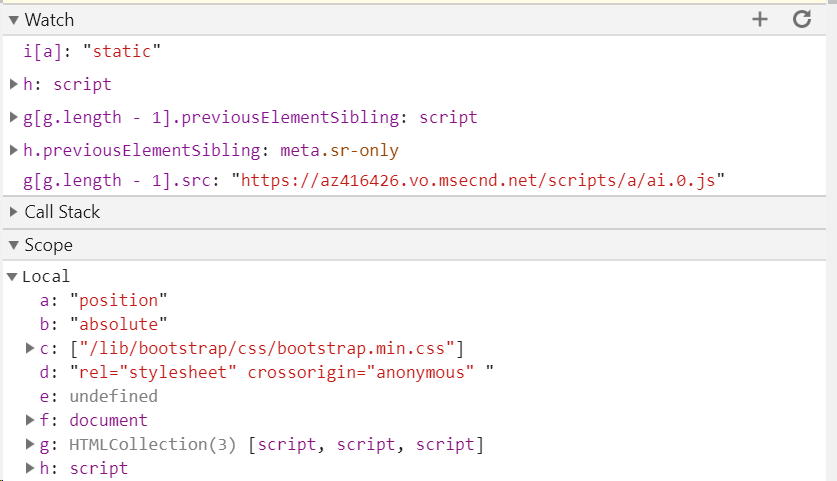
Additional context
A workaround for this issue is to move the AI code after the stylesheet. However, it's worth noting that it may not be just AI that is an issue; any JavaScript that injects script tags in the head could potentially cause this problem. I would suggest investigating if a unique id could be applied to the meta tag (or script tag, but that would still be somewhat fragile if using previousElementSibling) to find it with document.getElementById instead of using the current approach of getElementsByTagName. If it is necessary to continue with the previousElementSibling approach, at least add validation to ensure that it is the meta tag that is expected, and warn and not fall back if it is an unexpected element.