So …
I downloaded a bunch of cabs and in all of the ones I looked at FSharp memory usage was really low. The way I determined memory usage was to look for variables with FSharp in the type name. For sure if F# code was running there would be plenty of them. The amount of memory consumed by FSharp in the cabs I looked at were really quite low.
So I presumed that the F# dll’s were being loaded as a side effect of some other work. So I did some fairly straightforward tests.
• Attach a debugger to a vs instance and create a C# dotnet sdk project …
a. Open tools options … this loads FSharp.Editor.dll --- it doesn’t really do anything with it, but it faults it in.
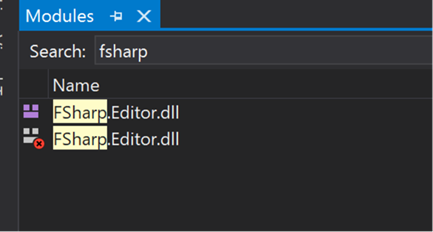
b. Selecting the Tools/F# Options tab – loads a few more F# dll’s including VFSI, FSharp.Compiler.Private, FSharp.UIResources.

c. Select Add new item causes FSharp.ProjectSystem.FSharp.ni.dll to be loaded
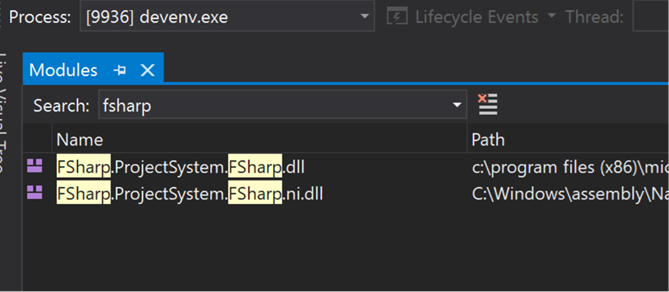
Please be aware at no time was any actual F# projects or code loaded or edited.
I believe the settings and the fact that adding a file to any project including C# causes Some FSharp dll’s to be faulted in is is one of the main reasons F# is over-represented in the OOMS.
We should probably look around to see what else causes F# to be faulted in. I expect we can do some work to avoid loading FSharp dlls in the add new item case and the settings scenarios. Which would probably eliminate us from a bunch of the cabs.
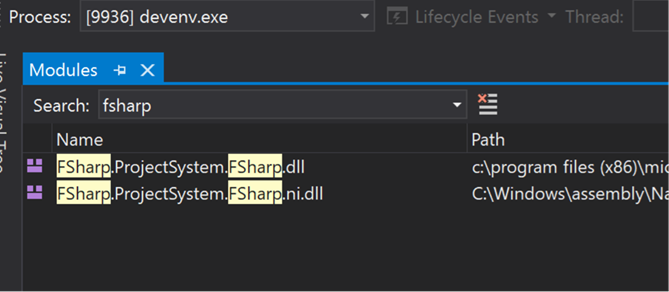
I also note that we can load several dll’s twice, FSharp.Core.ni.dll and FSharp.Core.dll. I imagine we can avoid that by being clever. Also, the module list window shows a couple of files duplicated, the only difference is that the path has upper and lower case in one instance and lower only in the other. That may be nothing, but is probably worth a look.
Anyway, I expect we can figure out some action items from this. I am off until next week, so let’s hook up next Tuesday and see what we want to do moving forward.
TBH, I doubt if we are contributing significantly to the working set in projects where F# is not loaded and edited. But it would be nice to get off the radar from these inadvertent, and I expect unnecessary loads.
Kevin


So …
I downloaded a bunch of cabs and in all of the ones I looked at FSharp memory usage was really low. The way I determined memory usage was to look for variables with FSharp in the type name. For sure if F# code was running there would be plenty of them. The amount of memory consumed by FSharp in the cabs I looked at were really quite low.
So I presumed that the F# dll’s were being loaded as a side effect of some other work. So I did some fairly straightforward tests.
• Attach a debugger to a vs instance and create a C# dotnet sdk project …
a. Open tools options … this loads FSharp.Editor.dll --- it doesn’t really do anything with it, but it faults it in.

b. Selecting the Tools/F# Options tab – loads a few more F# dll’s including VFSI, FSharp.Compiler.Private, FSharp.UIResources.

c. Select Add new item causes FSharp.ProjectSystem.FSharp.ni.dll to be loaded

Please be aware at no time was any actual F# projects or code loaded or edited.
I believe the settings and the fact that adding a file to any project including C# causes Some FSharp dll’s to be faulted in is is one of the main reasons F# is over-represented in the OOMS.
We should probably look around to see what else causes F# to be faulted in. I expect we can do some work to avoid loading FSharp dlls in the add new item case and the settings scenarios. Which would probably eliminate us from a bunch of the cabs.
I also note that we can load several dll’s twice, FSharp.Core.ni.dll and FSharp.Core.dll. I imagine we can avoid that by being clever. Also, the module list window shows a couple of files duplicated, the only difference is that the path has upper and lower case in one instance and lower only in the other. That may be nothing, but is probably worth a look.
Anyway, I expect we can figure out some action items from this. I am off until next week, so let’s hook up next Tuesday and see what we want to do moving forward.
TBH, I doubt if we are contributing significantly to the working set in projects where F# is not loaded and edited. But it would be nice to get off the radar from these inadvertent, and I expect unnecessary loads.
Kevin